Vue lecture

Il y a de nouveaux articles disponibles, cliquez pour rafraîchir la page.
✇Latest Blogs from the Microsoft Tech Community

What is causing the Always On AG issue? Is it cluster, AD, DNS, or SQL?

Do any of these issues sound familiar?


- My AG fails to failover

- Why did my AG failover? 

- Why did my AG fail?

- My AG is missing!

- Why am I seeing stale data on secondary? 

- What is with the sudden log growth alerts?


You are either hearing from end users that they are seeing stale data, or they are losing connections to availability database or listener, or you have monitoring solutions in place to catch these proactively and mitigate but are looking for a root cause. In either scenario, it helps to understand the high-level architecture of Availability Groups and the troubleshooting resources available for these components.


1.0 Overview of Availability Group


AG Overview.png


A picture is worth a thousand words. The above picture depicts the different high-level components that are at play with Always On Availability Groups.  This article attempts to give a high-level conceptual overview of the different components, a map to common failure troubleshooting articles, and specific support topics/component to use when calling Microsoft support for further assistance. This article is not an all-encompassing map of all the issues that one could run into with AG, as there could be various issues based on specific environment and workloads. However, this is an attempt to include the common areas of failures and the logs to look at for narrowing the issue and component down.


2.0 Why WSFC with AG? 


As you can see from the picture, in a Windows environment, when AG is deployed for HA, a Windows Server Failover Cluster (WSFC) is required. WSFC monitors the health of the AG cluster role and also controls operations such as offline/online of the AG cluster role.


  • AG is a cluster role on Windows Server failover Cluster (WSFC).
  • Cluster service has a Resource Control Manager (RCM) component that is responsible for bringing the cluster resource group to a persistent state. RCM also negotiates with all the RCM instances on all the cluster nodes to ensure that the AG cluster role is online on at most one cluster node at a time. RCM is responsible for bringing the resources in the cluster resource group online in the order of dependencies.
  • In order to keep the cluster process stable and not load the custom resource DLLs into the cluster process, a child process RHS (Resource Host Subsystem), also called a Resource Monitor, hosts the DLLs for cluster resources.  SQL Server Always On Availability group has a resource DLL (hadrres.dll) that is loaded into the RHS process. 
  • If you are interested in reading more about failover cluster software components, here is a good article - Creating a Cluster Resource DLL (Part 1).


WSFC component performs mainly the following functions:


  • Heartbeat communication between cluster nodes

Heartbeat messages are sent between cluster nodes to ensure that the cluster is in a healthy and consistent state. IPv6 is the default protocol that Failover Clustering will use for its heartbeats. The heartbeat itself is a UDP unicast network packet that communicates over Port 3343. 


- Delay defines the frequency in seconds at which cluster heartbeats are sent between nodes (default = 1 second in same subnet and cross subnet)

- Threshold defines the number of heartbeats which are missed before the cluster takes recover action. (default = 10 heartbeats in same subnet, 20 in cross subnet)

- Reference: Detailed heartbeat thresholds are documented here Tuning Failover Cluster Network Thresholds - Microsoft Community Hub


So, with default delay of 1 second and default threshold of 10 heartbeats on a single subnet WSFC environment, what do you expect to see when a certain cluster node does not respond to heartbeats for 10 seconds? This node is removed from active failover cluster membership. You will see a 1135 event on your system log with a message that goes like" Cluster node 'N1' was removed from the active failover cluster membership... " For more details on how to troubleshoot this issue, refer to A problem with deleting a node | Microsoft Learn


  • Cluster Quorum

Quorum mechanism is used to prevent split brain and also ensure a consistent and healthy state of WSFC. Cluster goes offline in the event of quorum loss. When cluster service shuts down due to quorum loss, Event ID 1177 is logged in event viewer under Microsoft-Windows-FailoverClustering with a message that goes like "The Cluster service is shutting down because quorum was lost. ... " For more information on troubleshooting this, please refer to : Event ID 1177 — Quorum and Connectivity Needed for Quorum | Microsoft Learn


  • Lease (Looks-Alive) 

This is a continuous handshake between SQL Server instance and SQL Server resource DLL to ensure that the AG resource looks alive.  A lease timeout may result in the following errors:


2016-02-16 11:37:03.05 Server      Error: 19419, Severity: 16, State: 1.
2016-02-16 11:37:03.05 Server      Windows Server Failover Cluster did not receive a process event signal from SQL Server hosting availability group 'ag' within the lease timeout period.
2016-02-16 11:37:03.07 Server      Error: 19407, Severity: 16, State: 1.
2016-02-16 11:37:03.07 Server      The lease between availability group 'ag' and the Windows Server Failover Cluster has expired. A connectivity issue occurred between the instance of SQL Server and the Windows Server Failover Cluster. To determine whether the availability group is failing over correctly, check the corresponding availability group resource in the Windows Server Failover Cluster.


Other errors with lease timeout: Improved Always On Availability Group Lease Timeout Diagnostics - Microsoft Community Hub


  • Health Check (IsAlive) - 

Two values control the Always On health check: FailureConditionLevel and HealthCheckTimeout. The FailureConditionLevel indicates the tolerance level to specific failure conditions reported by sp_server_diagnosticsand the HealthCheckTimeout configures the time the resource DLL can go without receiving an update fromsp_server_diagnostics. The update interval forsp_server_diagnosticsis always HealthCheckTimeout / 3. If SQL Server does not respond with the results from executing sp_server_diagnostic within the HEALTH_CHECK_TIMEOUT (default is 30 sec), then the availability group will transition to RESOLVING state and failover if configured to do so. (Reference/CreditDiagnose Unexpected Failover or Availability Group in RESOLVING State - Microsoft Community Hub)


3.0 How is AD/DNS involved?


When a cluster is created, a CNO (Cluster Name Object) is created in Active Directory. CNO has IP address(es) as dependencies and the CNO and IP are used for management and cluster operations. The listener also referred to as a Virtual Network Name (VNN) has a network name and IP address(es) and listener is also created in Active Directory. If the account that is used to create the cluster or listener on AD, does not have full permissions to perform the operation, CNO and listener can be pre-staged on AD.


Both the CNO network name and listener VNN network name are also present on DNS for mapping between the network name and IP address(es). Reference on DNS: DNS Registration with the Network Name Resource - Microsoft Community Hub


Some common issues on AD/DNS is permissions related - 


  • Listener creation failure with error 19471 or 19476

Msg 19471, Level 16, State 0, Line 2
The WSFC cluster could not bring the Network Name resource with DNS name '<DNS name>' online. The DNS name may have been taken or have a conflict with existing name services, or the WSFC cluster service may not be running or may be inaccessible. Use a different DNS name to resolve name conflicts, or check the WSFC cluster log for more information.


Msg 19476, Level 16, State 4, Line 2
The attempt to create the network name and IP address for the listener failed. The WSFC service may not be running or may be inaccessible in its current state, or the values provided for the network name and IP address may be incorrect. Check the state of the WSFC cluster and validate the network name and IP address with the network administrator.


Troubleshoot article: Create Listener Fails with Message 'The WSFC cluster could not bring the Network Name resource online' - Microsoft Community Hub


  • Connection timeouts in multi-subnet availability group

Connection Timeouts in Multi-subnet Availability Group - Microsoft Community Hub

Connect to an availability group listener - SQL Server Always On | Microsoft Learn


  • Driver and Client support 

Driver and client connectivity support for availability groups - SQL Server Always On | Microsoft Learn (This table shows the driver versions that have support for Always On parameters like Application Intent, multi-subnet failover, read-only routing etc.)


4.0 How is SQL Server involved?


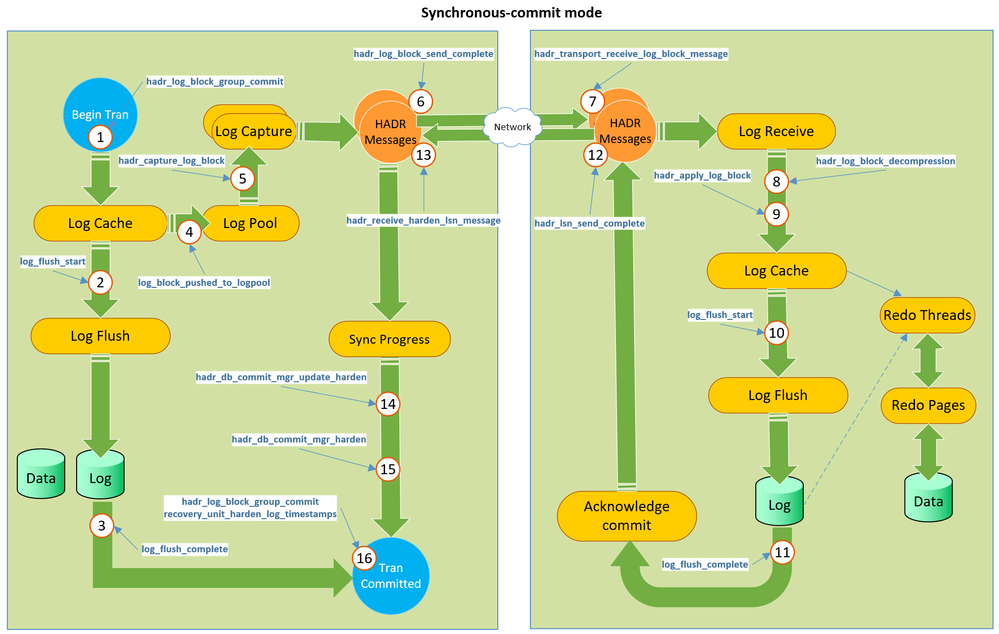
Data movement from the primary replica to the secondary replica(s) is done through log block transmission and redo process.


AG Data Flow.png

Reference for the above image: Troubleshooting data movement latency between synchronous-commit Always On Availability Groups - Microsoft Community Hub (This article is also an excellent resource to read further)


5.0 My AG has an issue. Where do I look? 


Issue Result Logs to look at Common Error numbers Causing Component  Articles
Windows Cluster Issues (CNO, CNO IP, Listener, Listener IP, cluster service crash) AG resource offline-online, failover cluster.log, system log, Microsoft-Windows-FailoverClustering log, SQL Server errorlog

1069

1207

1135

WSFC

Troubleshooting resource for WSFC resource such as IP, disk  failed/offline issues:

Can't bring a clustered resource online troubleshooting guidance - Windows Server | Microsoft Learn


Troubleshooting resource for 1135

Troubleshooting cluster issue with Event ID 1135 | Microsoft Learn


Cluster System Log Event IDs and explanation

Failover Clustering system log events | Microsoft Learn


Listener Creation Issues Listener unavailable cluster.log, system log, SQL Server errorlog

Msg 19471, Level 16, State 0, Line 2


Msg 19476, Level 16, State 4, Line 2

WSFC and AD/DNS

CNO of WSFC cluster must have Crate Compter Objects Permissions.

Configure availability group listener - SQL Server Always On | Microsoft Learn


Troubleshooting listener creation failures and common issues

KB2829783 - Troubleshooting Always On availability group listener creation in SQL Server 2012 - Microsoft Support

Listener Connectivity Issues  Client connection failures, timeouts and errors Client connection logs, network traces, SQL Server errorlog, cluster.log, system log

0x80131904


0x80004005


"Login timeout expired."


Driver multisubnet parameter support, RegisterAllProviders cluster setting, DNS 

Listener connection times out - SQL Server | Microsoft Learn


Troubleshoot SQL Server connectivity issues

Troubleshoot connectivity issues in SQL Server - SQL Server | Microsoft Learn


Connectivity Issues caused due to SQL Server

Connectivity Problems Caused by Issues in SQL Server - Microsoft Community Hub


Connection timeouts in multi-subnet AG

Connection Timeouts in Multi-subnet Availability Group - Microsoft Community Hub


Driver and client connectivity issues with AG  Client connection failures, timeouts and errors Client side connection logs, driver logs, network traces, SQL Server errorlogs   Driver, SQL Server configuration, Networking Driver and client connectivity support for availability groups - SQL Server Always On | Microsoft Learn
Lease Timeout AG resource offline-online, failover Cluster log, System Log, System Health events, Always On Health events, SQL Server errorlog, any dumps on SQL log folder

19407

19419

19420

19421

19422

19423

19424


OS not responding, low virtual memory, working set paging, SQL generating dump, pegged CPU, WSFC down (loss of quorum)

How It Works: SQL Server Always On Lease Timeout - Microsoft Community Hub


Lease timeout common errors and corrective actions

Improved Always On Availability Group Lease Timeout Diagnostics - Microsoft Community Hub

Cluster Health Check TImeout AG resource Offline-online or Failover, FCI restart/failover

Cluster log, System Log, System Health events, Always On Health events, SQL Server errorlog, any dumps on SQL log folder

On cluster.log

[RES] SQL Server Availability Group <ag>: [hadrag] Resource Alive result 0

Failure conditions met, OS not responding, low virtual memory, working set trim, SQL generating dump, WSFC (loss of quorum), scheduler issues (dead locked schedulers) Diagnose Unexpected Failover or Availability Group in RESOLVING State - Microsoft Community Hub
Cluster Quorum Loss AG in resolving state Cluster log, System Log, Network traces

1177

The Cluster service is shutting down because quorum was lost. 

Network connectivity issues, Node instability issues, OS not responding 

WSFC Quorum Modes and Voting Configuration (SQL Server)

WSFC quorum modes & voting configuration - SQL Server Always On | Microsoft Learn


Troubleshooting Event ID: 1177 

Event ID 1177 — Quorum and Connectivity Needed for Quorum | Microsoft Learn

Session timeout Secondary-disconnected Cluster log, System Log, System Health events, Always On Health events, SQL Server errorlog, any dumps on SQL log folder

35206

35201

35267


Network communication,
Issues on secondary - down, OS not responding, resource contention

Reasons for connectivity failures between availability replicas - SQL Server Always On | Microsoft Learn


Troubleshooting resource:

Troubleshooting intermittent connection time-outs between availability group replicas - SQL Server | Microsoft Learn


MSSQLSERVER_35267 - SQL Server | Microsoft Learn


Cluster service permissions on SQL Server AG creation failure SQL Server error log

41131

SQL Server Permissions

Error 41131 when creating availability group - SQL Server | Microsoft Learn

Data synchronization latency due to log send queuing Log file growth, low disk space alerts, Stale data in secondary replicas Perfmon, sys.dm_hadr_database_replica_state, Always On dashboard

9002


Troubleshooting long send queueing in an Always On availability group - SQL Server | Microsoft Learn


Error 9002 when transaction log is large - SQL Server | Microsoft Learn

Data synchronization latency due to recovery queuing Stale data Perfmon, sys.dm_hadr_database_replica_state, Always On dashboard


Troubleshooting recovery queueing in an Always On availability group - SQL Server | Microsoft Learn

Availability group removed or AG replica removed    


Issue: Replica Unexpectedly Dropped in Availability Group | Microsoft Learn

Create Availability Group Fails With Error 35250 'Failed to join the database'

Endpoint not created or started, Endpoint connection issues, Name resolution issues, Endpoint permissions


DMVs, Telnet, Test-NetConnection

35250


MSSQLSERVER_35250 - SQL Server | Microsoft Learn


This is not an all-encompassing list of issues, but includes some common issues observed with Always On. Hope this helps!


Thanks to @Joseph Pilov  and Kathleen Carter for reviewing this article. 


Till next time,

Dharshana

✇Latest Blogs from the Microsoft Tech Community

Export to Logic Apps Standard – Latest Improvements

The Logic Apps Standard extension in VS Code provides a feature that allow customers to export workflows from Integration Services Environment (ISE) or Consumption SKUs to a Logic Apps Standard VS Code project.


This experience allows customers to group workflows that should be deployed together as Logic Apps Standard application, validates the workflows against the export logic – guaranteeing that workflows, once export, work successfully in the new platform, and generates a local VS Code project, allowing users to test the code locally before packaging them for deployment.

This tool is a core part of the strategy to migrate workflows off ISE, which is retiring on August 31, 2024, providing a way to export ISE workflows into Logic Apps Standard projects, allowing customers to plan their migration on their own terms.


For more details this export features, including a walkthrough and known issues, access the Microsoft Learn documentation for ISE or consumption.


What’s new in the Export Tool


Updated Converter List


The latest version of the Export Tool implemented a series of converters that will automatically replace actions based on Azure Connections to their Service Provider counterparts. The following is the list of converters implemented today:


  • Azure API Management
  • Azure Automation
  • Azure Blob Storage
  • Azure File Storage
  • Azure Functions
  • Azure Queue Storage
  • Azure Table Storage
  • Batch Operations
  • DB2
  • Event Grid Publisher
  • Event Hubs
  • File System
  • Flat File
  • FTP
  • Integration Account
  • Key Vault
  • Liquid Operations
  • MQ
  • RosettaNet
  • SAP
  • Service Bus
  • SFTP
  • SMTP
  • SQL Server
  • Workflow Operations
  • XML Operations


Custom Connector Export


Logic apps containing Custom Connector actions are now able to be exported. The exported workflow action will be converted to an HTTP action, with the endpoint parameterized. This allows the workflows to be exported and adds flexibility for the user to decide how that action will be configured.


Workflow Operations Export


One of the differences between consumption in standard is related how the workflow operations action works. While in consumption you could refer to any workflow in a subscription, with standard you are restricted to workflows in the same application. This would restrict how workflows with a “call child workflow” action could be exported. The export tool now handles this situation automatically, with the following rules:


  • If a child workflow is part of the logic apps workflows selected to export, the tool will export that action as is.
  • If a child workflow is not part of the logic apps workflows selected to export, the tool will export that action as an HTTP action, with the endpoint parameterized, so you can point to a different application.
✇Latest Blogs from the Microsoft Tech Community

HLS Teams Productivity Summit- Empowering Frontline Workers on shared mobile devices

Thank you for being a part of the HLS Teams Productivity Summit. We are pleased to provide you with a copy of today's presentation and recording, which you can find below.

Session Title: Empowering frontline workers on shared mobile devices

Session Details: Most frontline workers today use shared devices while at work. This means they need to sign-in and -out of their devices once or multiple times a shift. This can be time consuming, and if not done correctly, a security risk. To simplify authentication for shared device, Microsoft created Shared Device Mode.


With Shared Device Mode, a user only needs to sign-in once to be automatically authenticated into all their MSAL enabled applications and sign-out once to make the device safe to give to the next user. During this session, we will discuss timelines for Shared Device Mode and how to roll it out to your frontline workers.


Target Audience: IT Professionals who manage a fleet of shared corporate devices.

✇Office 365 for IT Pros

Find Out Who’s Using Teams Shared Channels in Another Tenant

Use Inbound and Outbound Shared User Profiles to Reveal the Ins and Outs of Membership in Teams Shared Channels

In August 2022, I discussed how to use the Get-AssociatedTeam cmdlet to report the membership of channels in teams for users within a tenant. It’s a useful cmdlet that includes the ability to report membership of shared channels in other tenants. In most cases, the reports that can be generated from the data returned by the Get-AssociatedTeam cmdlet meet the needs of administrators to know what channels users access.

Microsoft 365 often offers multiple ways to report data. In this instance, Azure AD supports shared user profile resources created for use with Azure AD B2B Direct Connect, the underlying cross-tenant access mechanism for shared channels.

  • An inbound shared user profile represents an Azure AD user from an external Azure AD tenant whose profile data is shared with your tenant. The profile data is used by applications like Teams to display information about the inbound user in shared channels.
  • Conversely, an outbound shared user profile represents Azure AD users from your tenant who share their profile information when they access resources in other Azure AD tenants.

Essentially, when a shared channel owner invites an external user to become a member of the channel and that user confirms their acceptance, Azure AD creates an inbound shared user profile to note this fact. Azure AD creates an outbound shared user profile when a user from your tenant becomes a member of a shared channel hosted by another tenant. For example, Figure 1 shows the membership of a Teams shared channel. The users marked with (External) have inbound shared user profiles.

Membership information for Teams shared channels
Figure 1: Membership information for Teams shared channels

Using PowerShell to Report Shared User Profiles

The Microsoft Graph PowerShell SDK contains cmdlets to fetch information about unbound and outbound user profiles. With consent for the CrossTenantUserProfileSharing.Read.All permission, you can connect to the Graph and run these commands:

Connect-MgGraph CrossTenantUserProfileSharing.Read.All
Select-MgProfile beta
Get-MgDirectoryOutboundSharedUserProfile

UserId
------
08dda855-5dc3-4fdc-8458-cbc494a5a774
5b52fba5-349e-4624-88cd-d790883fe4c4
a221d10f-e0cf-4a1d-b6a2-4e844670f118
cad05ccf-a359-4ac7-89e0-1e33bf37579e
eff4cd58-1bb8-4899-94de-795f656b4a18

The output is a list of identifiers for Azure AD user accounts, so it’s not very exciting. IApart from not listing account names, the output doesn’t tell us what outbound tenants are accessed. To get that information, we must run the Get-MgDirectoryOutboundSharedUserProfileTenant cmdlet for each account. The output of that cmdlet is a list of tenant identifiers, which we can resolve to discover the tenant name. Here’s the code:

[array]$Users =  Get-MgDirectoryOutboundSharedUserProfile | Select-Object -ExpandProperty UserId
ForEach ($User in $Users) {
   $UserData = Get-MgUser -UserId $User
   [array]$TenantNames = $Null; $TenantDisplayNames = $Null
   [array]$TenantIds = Get-MgDirectoryOutboundSharedUserProfileTenant -OutboundSharedUserProfileUserId $User | Select-Object -ExpandProperty TenantId
   If ($TenantIds) {
       ForEach ($TenantId in $TenantIds) {
         $Uri = ("https://graph.microsoft.com/beta/tenantRelationships/findTenantInformationByTenantId(tenantId='{0}')" -f $TenantId.ToString())
         $ExternalTenantData = Invoke-MgGraphRequest -Uri $Uri -Method Get  
         $TenantNames += $ExternalTenantData.DisplayName
       }
       $TenantDisplayNames = $TenantNames -join ", "    
   }
   Write-Host ("User {0} has outbound shared profiles in these tenants {1}" -f $UserData.DisplayName, $TenantDisplayNames)
}

User Sean Landy has outbound shared profiles in these tenants o365maestro
User Ken Bowers has outbound shared profiles in these tenants o365maestro
User Tony Redmond has outbound shared profiles in these tenants o365maestro, Microsoft Community & Event Tenant

Getting Inbound Shared User Profiles

The Get-MgDirectoryinboundSharedUserProfile cmdlet lists information stored about inbound shared user profiles. We can’t read Azure AD to find information about these users because they come from other tenants. This is what the cmdlet returns:

Get-MgDirectoryinboundSharedUserProfile | Format-List

DisplayName          : Alex Wilber
HomeTenantId         : 22e90715-3da6-4a78-9ec6-b3282389492b
UserId               : a6453657-2058-4c15-a38a-b0a94f0ed737
UserPrincipalName    : AlexW@o365maestro.onmicrosoft.com
AdditionalProperties : {}

Once again, we can resolve the tenant identifier to make the information more understandable:

[array]$Guests = Get-MgDirectoryinboundSharedUserProfile
ForEach ($Guest in $Guests) {
    $Uri = ("https://graph.microsoft.com/beta/tenantRelationships/findTenantInformationByTenantId(tenantId='{0}')" -f $Guest.HomeTenantId.ToString())
    $ExternalTenantData = Invoke-MgGraphRequest -Uri $Uri -Method Get  
    Write-Host ("User {0} comes from tenant {1}" -f $Guest.DisplayName,  $ExternalTenantData.DisplayName)
}

User Christina Smith comes from tenant CM Portal Solutions
User Nicolas Blood comes from tenant NBConsult
User Alex Wilber comes from tenant o365maestro
User Tom Jones comes from tenant o365maestro
User Vlad Bitton comes from tenant vNext Solutions

The interesting thing here is that I didn’t recognize some of the user names and tenants that Azure AD stored inbound shared user profiles for. However, given that the names were all MVPs and my tenant supported many beta versions of Teams shared channels in the past, it’s entirely possible that the profiles originated in a test. Azure AD doesn’t register a date to tell you when it created a profile, so there’s no clue from that source.

Tracking External Access to Teams Shared Channels

My previous article describes how to create a report about the users accessing shared channels in your tenant. The added piece of information covered here is finding the set of Azure AD accounts from your tenant who use Azure AD B2B Connect to access resources in other tenants. That’s a valuable nugget if you want to track who’s interacting with Teams shared channels externally.

✇Latest Blogs from the Microsoft Tech Community

Extracting Table data from documents into an Excel Spreadsheet

Documents can contain table data. For example, earning reports, purchase order forms, technical and operational manuals, etc., contain critical data in tables. You may need to extract this table data into Excel for various scenarios.

  • Extract each table into a specific worksheet in Excel.
  • Extract the data from all the similar tables and aggregate that data into a single table.

Here, we present two ways to generate Excel from a document's table data:

  1. Azure Function (HTTP Trigger based): This function takes a document and generates an Excel file with the table data in the document.
  2. Apache Spark in Azure Synapse Analytics (in case you need to process large volumes of documents).

The Azure function extracts table data from the document using Form Recognizer's "General Document" model and generates an Excel file with all the extracted tables. The following is the expected behavior:

  • Each table on a page gets extracted and stored to a sheet in the Excel document. The sheet name corresponds to the page number in the document.
  • Sometimes, there are key-value pairs on the page that need to be captured in the table. If you need that feature, leverage the add_key_value_pairs flag in the function.
  • Form Recognizer extracts column and row spans, and we take advantage of this to present the data as it is represented in the actual table.


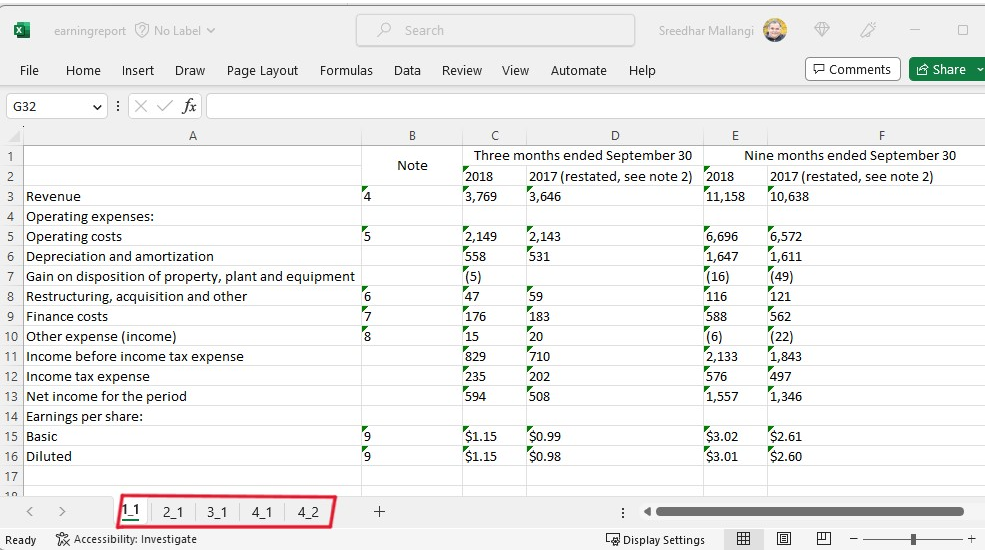
Following are two sample extractions.

Pic3.png Pic4.png

Top excel is with key value pairs added to the table. Bottom one is without the key value pairs.


Pic1.png Pic2.png

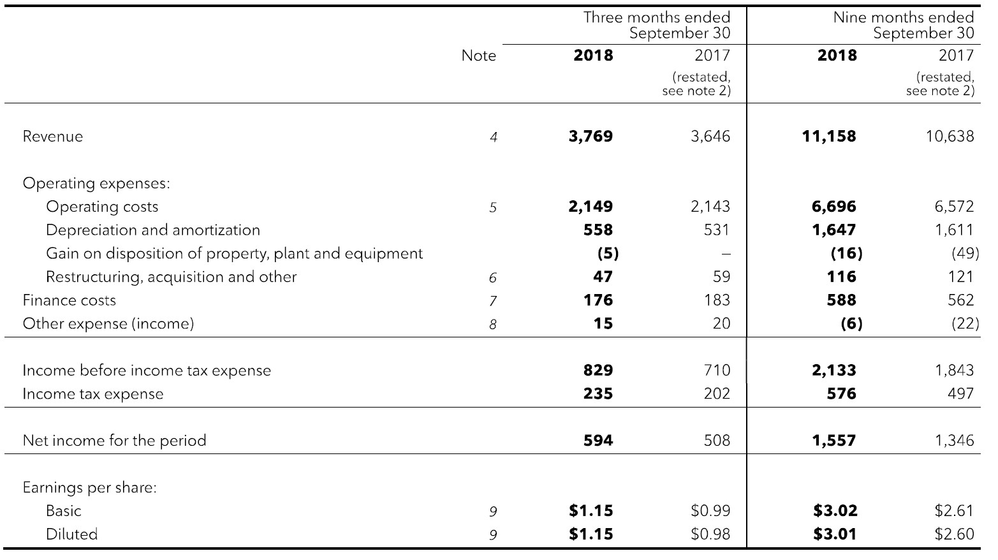
The Excel shown above is the extraction of table data from an earnings report. The earnings report file had multiple pages with tables, and the fourth page had two tables. 


Solution

Azure Function and Synapse Spark Notebook is available here in this GIT Repository 

  • Deployment Steps 
  • Sample Data: The repository has two sample documents to work with:
  • Note on the Excel output: 
    • If there is a page in the main document with no tables, no sheet will be created for that page.
    • The code has been updated to remove the extracted text from check boxes (":selected:", ":unselected:") in the table.
    • If a cell does not have any alphanumeric text, it will be skipped. Please update the code to reflect different behavior.


How to leverage this Solution

  • Use this solution to generate an Excel file as mentioned above.
  • Integrate this with Power Automate so that end-users can use this seamlessly from O365 (email, SharePoint, or Teams).
  • Customize this to generate an aggregated table.


Contributors: Ben Ufuk Tezcan, Vinod Kurpad, Matt Nelson, Nicolas Uthurriague , Sreedhar Mallangi

✇Latest Blogs from the Microsoft Tech Community

Microsoft Purview in the Real World (April 21, 2023) - Sensitivity Labels and SharePoint Sites

James_Havens_1-1682100919511.png


Disclaimer

This document is not meant to replace any official documentation, including those found at docs.microsoft.com.  Those documents are continually updated and maintained by Microsoft Corporation.  If there is a discrepancy between this document and what you find in the Compliance User Interface (UI) or inside of a reference in docs.microsoft.com, you should always defer to that official documentation and contact your Microsoft Account team as needed.  Links to the docs.microsoft.com data will be referenced both in the document steps as well as in the appendix.


All the following steps should be done with test data, and where possible, testing should be performed in a test environment.  Testing should never be performed against production data.


Target Audience

Microsoft customers who want to better understand Microsoft Purview.


Document Scope

The purpose of this document (and series) is to provide insights into various user cases, announcements, customer driven questions, etc.


Topics for this blog entry

Here are the topics covered in this issue of the blog:

  • Sensitivity Labels relating to SharePoint Lists
  • Sensitivity Label Encryption versus other types of Microsoft tenant encryption
  • How Sensitivity Labels conflicts are resolved
  • How to apply Sensitivity Labels to existing SharePoint Sites
  • Where can I find information on how Sensitivity Labels are applied to data within a SharePoint site (i.e. File label inheritance from the Site label)


Out-of-Scope

This blog series and entry is only meant to provide information, but for your specific use cases or needs, it is recommended that you contact your Microsoft Account Team to find other possible solutions to your needs.


Sensitivity labels and SharePoint Sites – Assorted topics


Encryption Sensitivity Label Encryption versus other types of Microsoft tenant encryption


Question #1

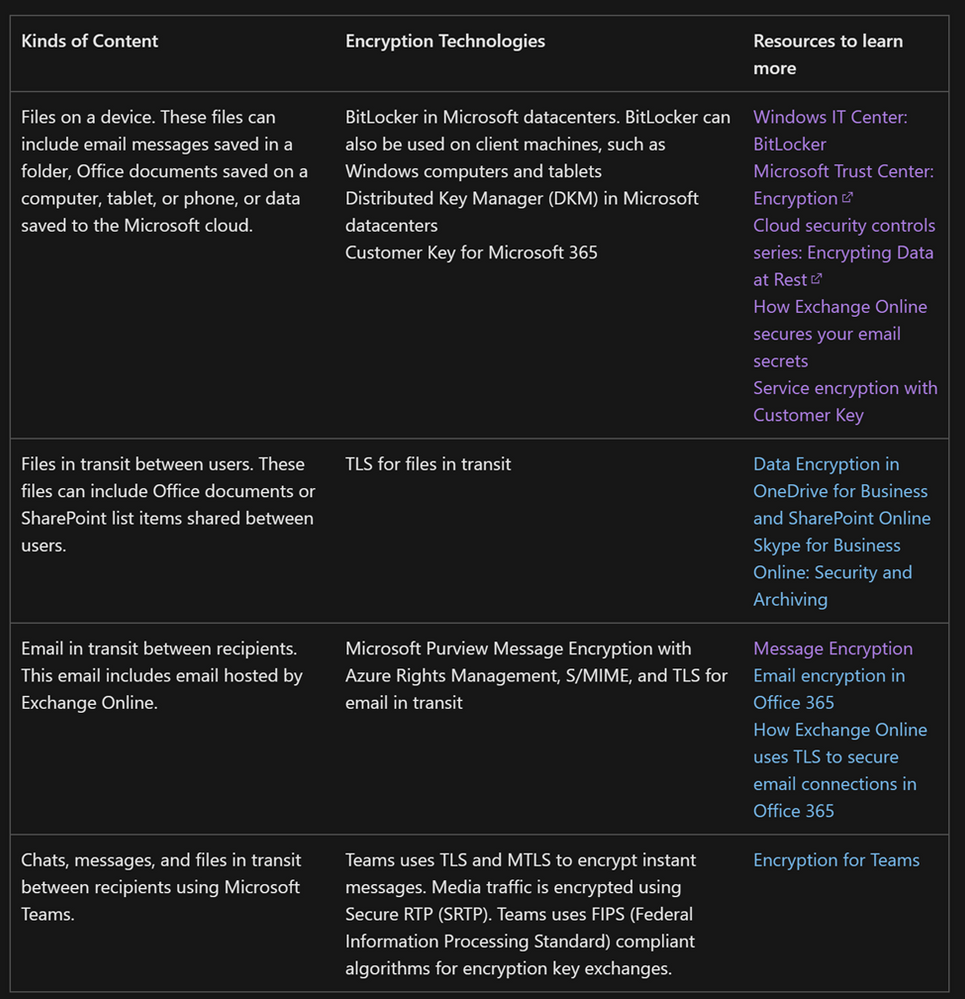
How does the encryption of Sensitivity Labels compare to encryption in leveraged in BitLocker?


Answer #1

The following table breaks this down in detail and is taken from the following Microsoft Link.

Encryption in Microsoft 365 - Microsoft Purview (compliance) | Microsoft Learn


James_Havens_0-1682101199234.png


Sensitivity Labels relating to SharePoint Lists


Question #2

Can you apply Sensitivity Labels to SharePoint Lists?


Answer #2

The simple answer is NO while in the list, but YES once the list is exported to a file format.


Data in the SharePoint List is stored within a SQL table in SharePoint.  At the time of the writing of this blog, you cannot apply a Sensitivity Label to a SharePoint Online tables, including SharePoint Lists.


SharePoint Lists allow for exports of the data in the list to a file format.  An automatic sensitivity label policy can apply a label to those file formats. Here is an (example below of those export options.


James_Havens_1-1682101270872.png


How to apply Sensitivity Labels to existing SharePoint Sites


Question #3

Can you apply Sensitivity Labels to existing SHPT sites?  If so, is this, can this be automated (ex. PowerShell)


Answer #3

You can leverage PowerShell to apply SharePoint labels to multiple sites.  Here is the link that explains how to accomplish this.

Look for these two sections in the link below for details:

  • Use PowerShell to apply a sensitivity label to multiple sites
  • View and manage sensitivity labels in the SharePoint admin center


Use sensitivity labels with Microsoft Teams, Microsoft 365 Groups, and SharePoint sites - Microsoft Purview (compliance) | Microsoft Learn


How Sensitivity Labels conflicts are resolved


Question #4

If you have an existing file with an existing Sensitivity Label that is stricter than the Sensitivity Label being inherited from SharePoint Site label, which Sensitivity Label is applied to the file? 


Answer #4

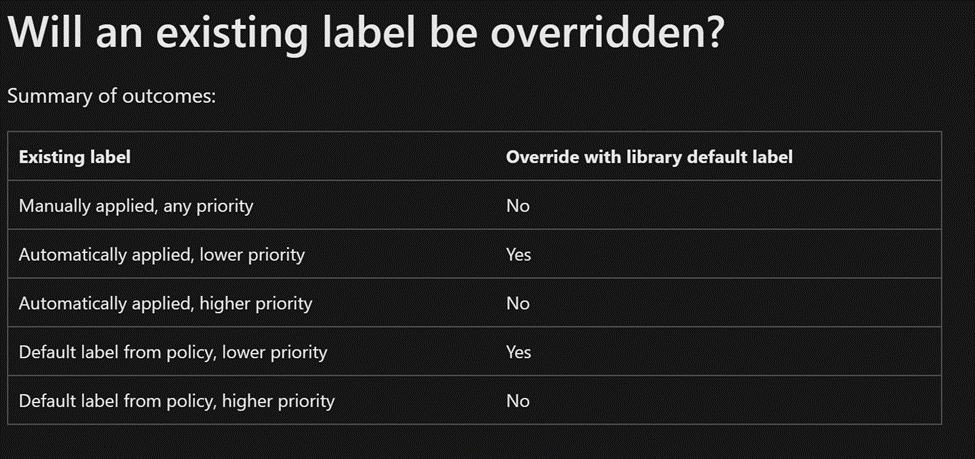
Please refer to the link and table below for how Sensitivity Label conflicts are handled.  Notice that any Higher priority label or user applied label, would not be overridden by a site label or an automatic labeling policy.


Configure a default sensitivity label for a SharePoint document library - Microsoft Purview (compliance) | Microsoft Learn


James_Havens_2-1682101300207.png


File label inheritance from the Site label


Question #5

Where can you find the documentation on SharePoint Site labels and how label inheritance applies to files in that SharePoint site?


Answer #5


Here are 2 links that can help you with Sensitivity Labels and how they relate to SharePoint sites:


When it comes to default Sensitivity Labels for SharePoint sites/libraries (what I have called “label inheritance” above, this link is of use.


"When SharePoint is enabled for sensitivity labels, you can configure a default label for document libraries. Then, any new files uploaded to that library, or existing files edited in the library will have that label applied if they don't already have a sensitivity label, or they have a sensitivity label but with lower priority.


For example, you configure the Confidential label as the default sensitivity label for a document library. A user who has General as their policy default label saves a new file in that library. SharePoint will label this file as Confidential because of that label's higher priority."


Appendix and Links


✇Latest Blogs from the Microsoft Tech Community

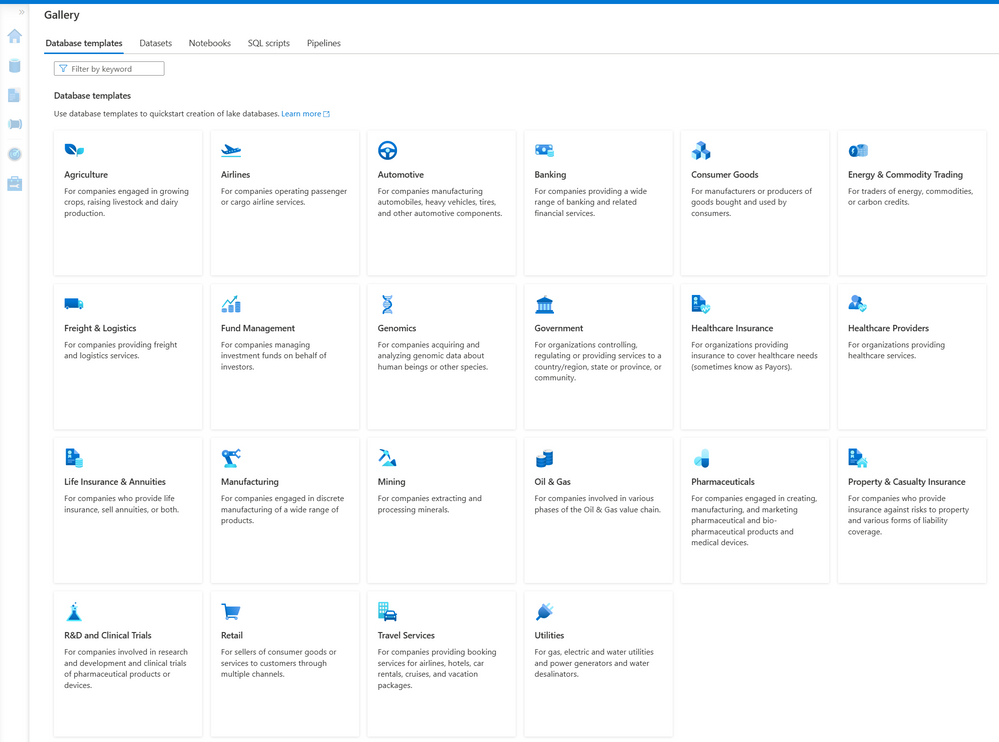
Synapse Database Templates for airlines & travel services plus seven industries are now GA


In response to continued enthusiastic adoption of the twenty previously published Synapse Database Templates (SDTs), we’re pleased to announce today that we are releasing two Industry Data Models (IDMs), for Airlines and for Travel Services, that have not previously been published as SDTs, along with enhanced versions of seven previously published SDTs.


The IDM for Airlines is a comprehensive data model that addresses the typical data requirements of organizations operating one or more airlines for passengers and/or cargo. The IDM for Travel Services is a comprehensive data model that addresses the typical data requirements of organizations providing booking services and/or hospitality services for airlines, hotels, car rentals, cruises, and vacation packages.


We have released two new SDTs for Travel Services and Airlines, in addition to updated versions of the previously released SDTs for Automotive Industries, Consumer Packaged Goods, Healthcare Insurance, Healthcare Service Providers, Manufacturing, Retail, and Utilities. All twenty-two SDTs can now be accessed in Azure Synapse, either through the Gallery or by creating a new lake database from the Data tab and selecting '+ Table', and then 'From template'.


We have also continued to expand the scope and content of the previously published seven SDTs by releasing new versions. Additionally, we are working to ensure that our customers and partners who use selected Microsoft solution offerings can fully integrate their application data into relevant subsets of a data lake created using the new versions of SDTs.


The new versions for Healthcare Insurance and Healthcare Providers have been fully mapped from Microsoft’s Industry Cloud for Healthcare to ensure customers can land all their data from our Healthcare Cloud into the relevant subset of a data lake published using the applicable SDT to make it easier for our customers to land data from Microsoft’s Healthcare Cloud, along with data from their organization’s many other applications and data sources, into a comprehensive integrated and harmonized lake database deployed using the SDTs. We have also expanded the IDMs for healthcare to enable customers to provision the specific clinical data content required to support OMOP consumption in the gold layer of their Azure data lake if that is of interest.  


We’ve expanded the IDM for Retail to accommodate smart store and shopper journey data generated by solutions from key Microsoft smart store partners such as AiFI in support of current and anticipated future smart store analytics use cases. Similarly, the expanded IDM for Utilities provides full data support for data sourced from Microsoft’s 24x7 Sustainability offering. We’ve also expanded the IDMs for Automotive, Consumer Packaged Goods, and Manufacturing to provide full alignment with the recently announced Microsoft Supply Chain Center solution offering. Each of the SDTs that is part of this latest release also benefits from enhanced and expanded support for readings and data streams acquired from leading edge IoT devices and sensors used in each of those industries.


SDTs contain coverage of many different “business areas”, some very industry-specific and others cross-industry, that together comprise each of these very large IDMs. For example, in addition to comprehensive industry-specific business areas (such as Reservations, Ticketing, and Cargo and Departure Control Services for the Airline industry), most SDTs also include cross-industry business areas such as Accounting & Financial Reporting, Human Resources, Inventory, and an Emissions business area which provides support for data used to report greenhouse gas emissions (including scope 1, scope 2, and scope 3 emissions), combining to provide unparalleled coverage of the data typically found in the integrated data estates of large organizations in specific industries, thereby providing comprehensive best practices based accelerators as our customers continue to move their enterprise data estates to the cloud.


DataModels_0-1682028606569.png


To learn more, check out the following:


Tags: Database templates     Industry    Lake databases

✇Latest Blogs from the Microsoft Tech Community

Securely Migrate and Optimize with Azure

Join us for this year’s digital event, Securely Migrate and Optimize with Azure, where you’ll learn how to achieve more efficiency and maximize the value of your IT investments. Get tips to migrate and modernize your infrastructure, apps, and data—with a spotlight from experts on optimizing migration for Windows Server and SQL Server workloads.


Here’s 5 good reasons to Register Now


  1. Get expert guidance to securely migrate and optimize your Windows Server and SQL Server workloads.
  2. Find tools, programs, and resources from Azure to migrate and optimize your cloud investments.
  3. Hear real-life success stories of customers who moved to Azure.
  4. See demos with step-by-step guidance on how to stay secure and manage complex hybrid IT environments.
  5. Get a walkthrough of tools for self-guided migration—including how to discover, assess, and migrate with Azure Migrate.

You’ll also get expert answers to your migration questions during the live chat Q&A.


Securely Migrate and Optimize with Azure

Wednesday, April 26, 2023

9:00 AM–11:00 AM Pacific Time (UTC-8)

✇Office Videos

Krones uses Windows 11 Enterprise as its platform for secure, sustainable innovation

Krones uses Windows 11 Enterprise as its platform for secure, sustainable innovation

💾

Krones is a global manufacturer of process and packaging technology for the food and beverage industry, with distributed operations across more than 100 sites worldwide and a product portfolio that includes digital systems solutions, factory planning, and intralogistics services. Krones’s culture of innovation and engineering expertise has produced more than 6,400 patents and utility models. In response to the shift to hybrid work and a shared desk environment, Krones upgraded from Windows 10 to Windows 11 Enterprise using existing tools such as Microsoft Intune and Windows Autopilot. Upgrading to Windows 11 Enterprise enabled Krones to experience additional security, IT, and productivity benefits and allowed employees to access company resources securely, from anywhere. Read the case study: https://aka.ms/Krones_W11_cs Learn more about Windows 11 Enterprise: http://windows.com/enterprise #Microsoft #Microsoft365

✇MTC Microsoft Teams Blog

Celebrate success using Together Emojis in Microsoft Teams

We're celebrating #NationalHighFiveDay today by introducing an exciting and unique way to interact with your team members using new Together Emojis in Microsoft Teams. The new Together Emoji for high fives is currently rolling out and will be available to users soon!


What are Together Emojis?

“Together Emojis” are a unique concept conceived by myself and my colleague Nico Nuzzaci in 2016 to bridge the gap across the communication stream. For a long time, when you send an emoji in chat, it stays on the left or right and has always felt disconnected to us.

We wanted a way for people to come together when they are apart using digital communication to foster a greater sense of connection and community. Ranging from a slap of hands with high fives, clinking glasses to cheers, grabbing a coffee, or getting pizza for lunch, Together Emojis are there to bring everyone’s sentiments together and belong!


How to do it:

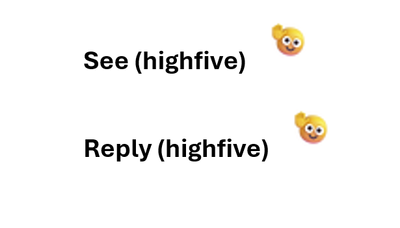
Open Microsoft Teams for work or life, desktop or mobile app, and jump in to chat with friends, colleagues, and family, and by each of you sending high five after each other, you’ll get a fun animation:

highfive.png

And watch the two smileys come together.

Together Emoji high five mobile.gif


You can find the “highfive” emoji in 3 ways:

  1. On desktop type (highfive) in the compose bar and hit enter; or
  2. On mobile or desktop, open the fun picker, and type “highfive” in the search bar and hit enter; or
  3. On mobile or desktop, open the fun picker and scroll down the smileys category to the custom emojis and tap the highfive emoji and hit enter.

“Highfive” is one Together Emoji of many other sentiments you can bring together, more coming soon!


More about National High Five Day:

National High Five Day is celebrated in the United States on the third Thursday of April and is a holiday about giving high fives and spreading good vibes. This year, it benefits CoachArt by sending virtual high fives to kids with chronic illnesses. Learn more about this holiday, the charity, and how to get involved at http://nationalhighfiveday.com.

✇Latest Blogs from the Microsoft Tech Community

Unable to delete Azure EventHub Cluster/Namespace/Entity/ConsumerGroup from Portal/ PowerShell/ CLI

Issue:

Unable to delete Azure EventHub Cluster/Namespace/ Entity from Portal/ PowerShell/ CLI.


Case 1:

When EventHub tier is Premium and you are unable to delete Azure EventHub namespace and getting conflict operation error 409.

anuja_nirula_0-1682046002240.png

Sample error message : "statusMessage":"{\"error\":{\"code\":\"Conflict\",\"message\":\"Namespace provisioning in transition. For more information visit https://aka.ms/eventhubsarmexceptions.


Reason:

The reason for stuck state of EventHub namespace or its provisioning failure is due to a known race condition which initiates between two or more internal microservices from premium EventHub  architecture from different namespaces. If we trigger a Premium namespace provisioning and an event hub creation right after that then this race condition initiates and both provisioning may fail and the runtime creation will fail with internal server error 500.


Recommendation:

It is recommended to not perform back to back create operation on EventHub until the first EventHub namespace is not created successfully and if you want to delete the namespace just after its creation then it is recommended that the operation should be performed after 1 hour of its created time.


Action to be taken:

In such situation where your EventHub is stuck in activating/ Deleting state, raise support request with Microsoft to fix the state of namespace and to bring it in active state.


Case 2:

While deleting EventHub you have received a conflict error 409  but it's not a Premium EventHub.


Reason:

The reason for this conflict error could be due to any pending operations executing in the backend associated with the EventHub components and you might be trying to delete the EventHub while its execution is not completed.


Recommendation and Action to be taken:

In such situation, wait for some time to finish the pending operations on EventHub or its component and then retry after sometime.


Case 3:

Getting successful message on deletion of EventHub entity within a namespace but after sometime it is recreating and reappearing on portal.


Reason:

The recreation of entities in namespace could be due to any diagnostics settings enabled against the namespace entity or the Application insights might be using the EventHub entity and so Azure Monitor resource provider could be recreating the EventHub.


Action to be taken:

In such case, Please follow the below steps:

  1. Check if the entity is operational using PowerShell/ CLI. You may test using any Get command, example - Get-AzEventhub
  2. If the EventHub is recreated, check the content of EventHub. You can check the content either by Processing Data option on EventHub control pane on portal or by using Service Bus explorer tool.
  3. Once you see any content or record in EventHub entity, then identify the resource ID which is sending the events to that EventHub by looking at content data.
  4. Go to that resource from Azure portal and disable the diagnostic settings or application Insight settings which is using the EH entity.

Recommendation:

If you want to delete the EventHub entity or namespace, you should check whether none of the resource from this document are streaming logs to EventHub.


Case 4:

When you have deleted the EventHub and all operations on the deleted EventHub entity are failing but it is still showing on Portal


Reason:

The reason why we are still seeing a non-operational and deleted EventHub could be due to its stale entry in ARM cache


Action to be taken:

In such case, Please follow the below steps:

  1. Check if the entity is operational using PowerShell/ CLI. You may test using any Get command, example - Get-AzEventhub
  2. If the operation is failing with error code 404 i.e. entity not found, but it is still showing on portal then raise a support ticket with Microsoft to perform the synchronize operation on ARM cache of resource.

Case 5:

When you are unable to delete Kafka enabled EventHub topic.


Reason:

One of the reason why you are still seeing the Kafka enabled EventHub topic after its deletion could be because the Kafka producer keeps re-creating the EventHub due to

Auto topic creation is ON by default.


Action to be taken:

  1. Check the activity logs to make sure that you see the deleted operation.
  2. Set the Auto topic creation property as OFF.

anuja_nirula_2-1682046329912.png

Recommendation:

You can either stop the Kafka producers or pick another EventHub name.


Case 6:

Unable to delete Dedicated Event hub cluster and getting error message "BadRequest"


Reason:

It is known issue that a dedicated EventHub Cluster cannot be deleted until four hours after its creation time.


Recommendation and Action to be taken:

Please rerun this operation after that time has elapsed, or contact EventHub team through a support request if the cluster is stuck in a particular state.

Details to be included in support ticket should be resource ID, correlation ID of operation and timestamp of issue.

✇Latest Blogs from the Microsoft Tech Community

Earth Day 2023: Evolving Surface design

As we observe and honor Earth Day on April 22, we're mindful of the importance of meeting our customers’ needs alongside responsible environmental stewardship. And here on the Surface team, we’re committed to producing devices with as little impact on the planet as possible. 


Our commitment to sustainability goes back years and has evolved into three pillars that help us contextualize our goals for Surface: reducing carbon impact, designing with circularity in mind, and having integrity built in. These elements make up the design language of every major product we launch.


Reducing carbon impact

Microsoft Surface devices are integral to achieving the company's commitment to be carbon negative by 2030. We're also delivering technology to help our customers measure and manage their Surface carbon emissions more effectively.


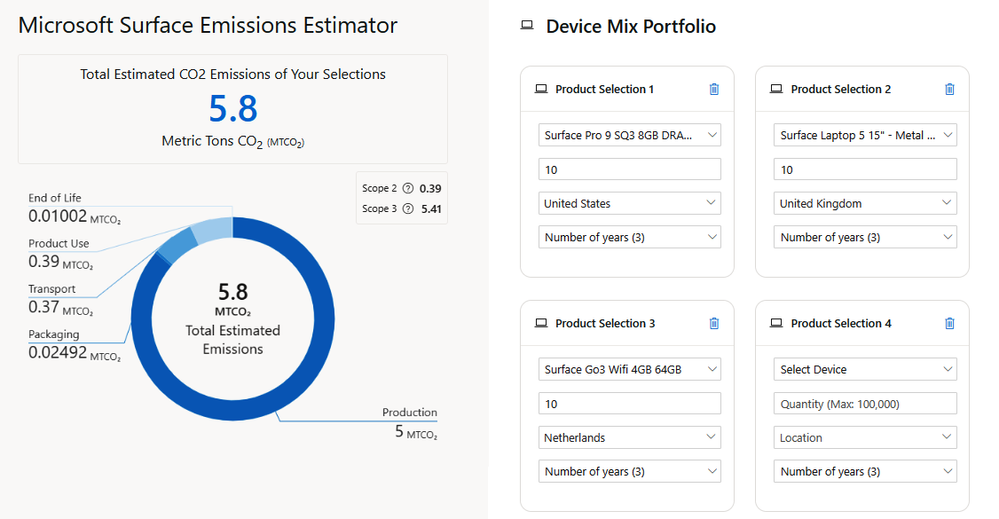
Launched earlier this year, the Surface Emissions Estimator is a tool that helps you calculate the carbon footprint of your Surface devices1. It provides an estimate of the carbon emissions associated with the production, use, and disposal of your device. You can use this tool to calculate the carbon footprint of your Surface devices by entering information about your device, such as its model, usage, and power settings. The calculator can even recommend ways of reducing your carbon footprint.
 

Surface Emissions Estimator.png

Sample results showing estimated carbon emissions for three devices


Ocean plastic

One of the more promising advances in device manufacturing is the use of ocean-bound plastic, recovered from plastic waste. First, it’s cleaned and processed into recycled plastic resin pellets and then blended in with virgin plastic during manufacturing.


Two years ago, we launched the Ocean Plastic Mouse with a shell made with 20% recycled ocean plastic, the first consumer electronics application of this material. Going beyond ocean-bound plastic (plastic collected within 50 km of shorelines), each mouse contains recycled resin derived from recycled water bottles taken directly from oceans, beaches, and waterways.

 

Recycling-Flow-Ocean-Plastic-Mouse.png

We’ve since carried this innovation to our newest accessory, Surface Thunderbolt 4 Dock for Business. The dock and power supply unit enclosures (excluding the AC cable) are attributed to 20% ocean-bound plastic2 and feature lighter materials than our previous docks. Single-use plastics have been removed from its packaging, making the packaging about 99% recyclable in OECD countries.3


surface-dock-rear.png


Design for circularity

The traditional “take, make and waste” model of electronics is becoming unviable. That's why, at Surface, we design products with the circular economy in mind, meaning we follow a reduce, reuse and recover model.


By 2025, our goal is for our packaging to contain zero single-use plastics and by 2030 will be 100% recyclable. We continue to integrate innovations from our most recyclable products into the rest of our products. We also make recycling convenient and secure with global recycling programs and data-wiping.


Designing for circularity minimizes waste and extends the lifespan of our devices for as long as possible, thanks to a modular design that lets commercial customers replace parts rather than throw away their devices. Surface Pro 9, for example, comes with 14 modular components, including the display, hard drive, motherboard, and battery. 4


Integrity in manufacturing

Our design process focuses on building products of the highest craftsmanship with a responsible supply chain that meets higher ethical and environmental standards. Integrity also reflects our commitment to transparency on the impact of our products and supply chain, which is why we produce eco profiles for all our major devices. As the EPEAT requirements become more rigorous, our products and operations are evolving to meet more stringent standards. We plan for our products to meet the new EPEAT requirements at the Gold level.Surface registered products can be found on the EPEAT Registry.


Crafting for longevity is vital to long-term sustainability across all three focus areas, as it can reduce emissions and increase circularity by keeping materials in use for longer. It's why our latest Surface products are the most repairable devices in their product lines.


This is also where our material innovation can shine as we weave in recycled materials. You'll see it in our packaging, made of sustainably forested material that's 99% recyclable6 for Surface Laptop 5. We're also excited for our latest products to continue to bring hardware and software together to optimize energy performance. All Surface laptop and tablet devices are ENERGY STAR certified with a focus on energy efficiency and battery life. And our Surface Laptop 5 and Pro 9 devices are over twice as energy efficient as the Energy Star recommended limits. They can all also take advantage of new sustainability features in Windows 11, the first PC operating system to offer a carbon-aware feature.7  


Ready for a new device?

There are multiple ways to responsibly recycle your device or give it new life.

  • Trade it in: The Microsoft Store Trade-In Program8 offers cash back for certain used devices suitable for refurbishment or reuse. See aka.ms/tradein.
  • Sell or donate: Consider selling or donating your used device to an authorized refurbisher to give it a potential second life for a new user. See aka.ms/refurbishers.
  • Recycle: Microsoft and other device manufacturers offer free mail-back recycling programs for used devices. See aka.ms/recycle.


Learn more


References

1. Emissions Estimator report provided for informational purposes only. You should not interpret the report you receive to be a commitment on the part of Microsoft; actual emissions may vary based on your location, purchase method, usage, and other factors.

2. Ocean-bound plastic is plastic waste recovered from oceans and waterways, cleaned, and processed into recycled plastic resin pellets. These recycled pellets are blended in with virgin plastic during the manufacturing process. To learn more, see Sustainable Products & Solutions | Microsoft CSR.

3. In OECD countries, Microsoft operates recycling programs either independently or through third parties covering Microsoft Devices. In addition, check local recycling programs for availability.

4. Customer Replaceable Units (CRUs) are components available for purchase through your Surface Commercial Authorized Device Reseller. Components can be replaced on-site by a skilled technician following Microsoft’s Service Guide. Opening and/or repairing your device can present electric shock, fire and personal injury risks and other hazards. Use caution if undertaking do-it-yourself repairs. Device damage caused during repair will not be covered under Microsoft’s Hardware Warranty or protection plans. Components will be available shortly after initial launch; timing of availability varies by component and market.

5. EPEAT rating availability may differ by market.

6. Recyclability dependent on recycling options in markets where products are discarded.  Check local recycling programs for availability. Learn more at aka.ms/recycle

7. See Windows Update is now carbon aware

8. Available in select countries only.

✇Latest Blogs from the Microsoft Tech Community

Skilling snack: Using Windows Update for Business

Simplify your update management experience with Windows Update for Business. It's an umbrella term for multiple products and services that we're unpacking in a series of skilling snacks. Today, let's learn about what it is, how to configure it, and how to use it with Intune or other familiar tools. Take it one bite at a time or allow a learning module to take you through the four-course meal. Leave some room for policies at the end!

timer-icon.png Time to learn: 87 minutes

watch icon.pngWATCH

Managing Windows updates in the cloud (The Blueprint Files)

Review the different ways to manage Windows updates in the cloud, how they work, and what's the difference. Find management tools you need and compare them with on-premises management with this easy-to-follow demo.

(24 mins)

WU + WSUS + Group Policy + Intune + App Compat + Safeguard Holds + Driver


read-icon.pngREAD

Configure Windows Update for Business

Learn how to configure Windows Update for Business. Follow this guide to group devices, configure them for the appropriate service channel, schedule or pause feature and quality updates, enable features that are off by default, and more.

(14 mins)

Windows 11 + Windows 10 + Windows Server + Windows Insider Preview + GA + MDM + GPO + ConfigMgr + WUfB


read-icon.pngREAD

Learn about using Windows Update for Business in Microsoft Intune

Already using Intune? Read how you can easily use Windows Update for Business with your familiar tools. Review Intune policy types to manage updates and follow guidance to switch from update ring deferrals to feature updates policy.

(4 mins)

Windows 11 + Windows 10 + Intune + Policy + Rings + Quality Updates + Feature Updates + WUfB


read icon.pngREAD

Integrate Windows Update for Business

Learn how to integrate Windows Update for Business with other management solutions. Specifically, find guidance and examples to integrate with Windows Server Update Services and Microsoft Configuration Manager.

(2 mins)

WSUS + ConfigMgr + Deferral + Office + Drivers + Windows 11 + Windows 10 + WUfB


read-icon.pngREAD

Enforce compliance deadlines with policies in Windows Update for Business

Need to set compliance deadlines? Learn how to do so from our official documentation. Configure deadlines, grace period, and reboot behavior for feature and quality updates with a policy made just for that.

(2 mins)

Compliance + Deadlines + Policies + GPO + Windows 11 + Windows 10 + WUfB


read icon.pngREAD

Update clients using Windows Update for Business

Leverage Windows Update for Business to control the distribution and methods for Windows Update delivery. Walk step by step with this 800-XP learning module to configure Windows Update for Business, enable Delivery Optimization, and to evaluate different scenarios.

(17 mins)

Maintenance + Deployment + Peer-to-Peer + ConfigMgr + Intune + Active Directory Domain Services + GPO + WUfB


watch-icon.pngWATCH

What is a policy? And why shouldn't I set registry keys?

When should you use policies, reg keys, or the graph API? Watch this video to learn about the differences and practical tips for managing Windows updates with Windows Update for Business.

(8 mins)

Policies + Reg Keys + Graph API + Intune + GPO + CSP + WUfB


read-icon.pngREAD

The Windows Update policies you should set and why

Your policy needs and practices may be different based on your industry and the types of devices you manage. Find policy names, paths, description, and setting recommendations for your context.

(16 mins)

CSP + GP + Personal Devices + Multi-User + Education + Kiosks + Billboards + Factory Machines + Teams Rooms + WUfB


If that got your appetite going for Windows Update for Business, I'll spill the beans! In the upcoming weeks, we'll package snacks on more control over approval, scheduling, safeguarding of updates (the deployment service), and getting information on compliance (reports).

For more general information on update management, revisit our Skilling snack: Windows monthly updates and Skilling snack: Windows feature update management.

As always, welcome to the table!


Continue the conversation. Find best practices. Bookmark the Windows Tech Community and follow us @MSWindowsITPro on Twitter. Looking for support? Visit Windows on Microsoft Q&A.

✇Office Videos

Viva Glint Overview

Viva Glint Overview

💾

Microsoft Viva Glint is a voice of the employee solution that helps organizations understand and improve employee engagement. Analyze strengths and opportunities, compare performance, and leverage suggested actions to drive business outcomes. Learn more: https://aka.ms/VivaGlint #microsoft #microsoft365 #microsoftviva

❌