Vue lecture

Il y a de nouveaux articles disponibles, cliquez pour rafraîchir la page.
✇M365 Admin

New Alert for Microsoft 365 Defender Password Spray Detection

Microsoft 365 Defender is introducing a new “Password spray attacks originating from single ISP” alert to detect password spray attacks originating from authentic cloud service providers. E5 P2 licensed customers will be impacted with this roll out.

When this will happen:

Rollout will begin in mid-April and will be complete by late April.

How this will affect your organization:

 If your team is impacted, please follow these steps:

  • Validate the sign in attempts from the ISP.
  • Validate user’s typical logon patterns.
  • Identify if any users are compromised.
  • Decommission compromised accounts or reset passwords. 
  • Contact your incident response team or contact Microsoft support for investigation and remediation services.

What you need to do to prepare:

 This alert will be enabled automatically. For additional information, please visit this documentation.

Message ID: MC543877

The post New Alert for Microsoft 365 Defender Password Spray Detection appeared first on M365 Admin.

✇M365 Admin

Microsoft Defender for Office 365: DMARC Handling

In order to better protect our customers from exact domain spoofing attacks and improve deliverability of email, we are making changes to how we handle DMARC p=reject and p=quarantine.

For the enterprise customers, we are also making updates to how DMARC policy-based reject can be handled. This change will help Security Administrators be able to choose how DMARC policy-based reject and quarantine can be applied within their organization. 

For the consumer service, this means that if an email fails DMARC validation, it will be dropped and will not be delivered to the recipient’s inbox. This change will help to ensure that only emails from verified senders are delivered to our customers’ inboxes.

This message is associated with Microsoft 365 Roadmap ID 117533

When this will happen:

Standard: Rollout will begin in late April 2023 and is expected to be complete by mid-May 2023.

Gov Cloud: Rollout will begin in mid-April 2023 and is expected to be complete by mid-June 2023.

How this will affect your organization:

For enterprise customers, within the actions section of the Anti-Phishing policy, the new setting to honor DMARC policy will be disabled by default. In this case, currently if DMARC p=reject, the action specified when spoof intelligence detects a message is applied. (Note: it is set to go to junk by default). 

Moving forward, using the updated actions for spoof intelligence settings within the Anti-Phishing policy, the recipient tenant admin will be able to choose how they want to honor DMARC policy settings. 

What you need to do to prepare:

If the tenant admin chooses to enable this new setting to honor DMARC policy, by default, the action applied will be “quarantine” in case of DMARC p=reject or p=quarantine. The tenant admin can change it as desired to either “reject” or “junk” the message instead (respectively).

If you wish to honor DMARC, before turning on the feature, you may choose to review spoof intelligence insight to identify legitimate senders who are sending DMARC reject or quarantine emails. Based on your organization’s email sending business, you may override the sender domain pairs to the Tenant allow block lists – Spoofed Senders. You may want to notify your users about this change and update your training and documentation as appropriate.

Message ID: MC543870

The post Microsoft Defender for Office 365: DMARC Handling appeared first on M365 Admin.

✇M365 Admin

Viva Goals: Changes to Members’ Listing in Organization and Team Administration pages

As part of our continued efforts to improve customer experience in Viva Goals, we are bringing in a few changes to how members of organizations and teams are listed in the admin pages in Viva Goals. 

In March 2023, we rolled out a feature that allowed Viva Goals team admins to add an AAD group as members to a team. As part of this feature, org admins can also add multiple groups as members to an organization. As groups can now be added as members of an organization/team, we will soon be launching an updated members listing page that will list both individuals and groups as members of an organization or team.

This message is associated with Microsoft 365 Roadmap ID 117470

When this will happen:

Standard Release: We will begin rolling out in mid-May 2023 and expect to complete rollout by late May 2023.

How this will affect your organization:

  • With the launch of the improved members listing pages, organization admins will be able to view and manage all individual members and groups that are added to their Viva Goals organization in a single list in the Admin > Members page.
  • Team admins will also be able to view and manage the individual members and groups added to their teams in a single list in the Team Members page.
  • Admins will be able to expand the groups by clicking on them to see all members in a group. Alternately, they can also search for a member (even those who are part of a group) from the search bars in the respective members pages.
  • Searching for a member will return all search results directly from AAD (Similar to the search function in MS Teams). Upon clicking on more options, admins will be able to know whether a particular member is already part of the organization or team or not. 

At the team level, if a user in the search result is already part of the team, the more options button will let team admins make the user a team admin or remove the team member from the team. If the user is not part of the team, the team admin can then add the user to the team.

What you need to do to prepare:

At the organization level, if a user in the search results is already part of the organization, the more options button will also let admins perform actions such as assigning admin role, changing user type from observer to regular and vice versa, removing a user and deleting a user. If a user is not part of the organization, the more options button will let admins add the user to the organization. 

Please reach out to your Viva account representative if you have any questions. If you do not have a Viva account representative assigned to you, you can reach us by creating a support ticket in Microsoft Admin Center.

Message ID: MC543873

The post Viva Goals: Changes to Members’ Listing in Organization and Team Administration pages appeared first on M365 Admin.

✇M365 Admin

Introducing Microsoft Whiteboard App in Teams

The new Microsoft Whiteboard app in Teams allows you to create, collaborate and share right within Teams, outside of Teams meetings.

You can now easily access all your whiteboards in one single place inside Teams, pre-prep a board for your next meeting or add a whiteboard tab to your favorite chat/channels to collaborate with your team asynchronously. 

When this will happen:

Rollout begins in mid-April and will be completed by the end of April.  

How this will affect your organization:

There are no changes required, the Whiteboard app comes pre-installed in Teams to supercharge your visual collaboration with a seamless experience. 

What you need to do to prepare:

There is no action required. You have an option to pre-pin the Whiteboard app for users in your tenant. To pre-pin Whiteboard, a setup policy can be created and assigned to the users in Teams Admin Center. 

Please click Additional Information to learn more.

Message ID: MC543868

The post Introducing Microsoft Whiteboard App in Teams appeared first on M365 Admin.

✇M365 Admin

SIP / H323 dialing from MTR-W to a VTC

Starting early June, you can configure your Teams Rooms on Windows with a Pro license (MTR-W Pro) to place and receive one-to-one calls from the room to a SIP/ H323 endpoint and vice versa. If you want to enable this calling feature, you must work with a CVI provider to enable the service.

This message is associated with Microsoft 365 Roadmap ID 95263

When this will happen:

Standard Release: We will begin rolling out in early June and expect to complete by mid-June.

How this will affect your organization:

There is no increased risk for you; the feature will be released disabled by default.

Only if you configure your MTR-W Pro by running the right PowerShell commands that enable the feature and if you have contacted a CVI provider that offers this service, your MTR-W Pro will be able to place and/or receive calls to and from SIP/H323 endpoints. These endpoints can be internal (within your organization) or external (outside your organization)

What you need to do to prepare:

If you do nothing, no change is needed and no impact for you. Your MTR-W Pro will continue working as today.

If you want to enable the feature, you must run the PowerShell commands to set up the MTR-W Pro and explicitly configure and enable if you want to allow the room to receive internal (from within your organization) or external (from outside your organization) calls from SIP / H323 endpoints.

How to disable the MTR-W Pro rooms you enabled:

If you want to disable an MTR-W Pro that you have enabled, you just need to run the same PowerShell command that you ran before and explicitly disable the feature.

Message ID: MC543860

The post SIP / H323 dialing from MTR-W to a VTC appeared first on M365 Admin.

✇M365 Admin

Join BJN meeting from MTR-W via Direct Guest Join

As part of a Preview release, around mid-May you will be able to configure your Teams Rooms on Windows to join BlueJeans meetings.

This message is associated with Microsoft 365 Roadmap ID 121769

When this will happen:

Preview:  We will begin rolling out end of April and expect to complete by early May.

Standard Release: We will begin rolling out late June and expect to complete by early July.

How will this impact you:

There is no increased risks for you. If you do not make any changes, your MTR-W will not be affected and will continue working as today.

What you need to do to prepare:

During the preview, you can configure your MTR-W to be able to join BlueJeans meetings by modifying your room XML settings file.

After the standard release, you can configure your MTR-W to be able to join BlueJeans meetings via the console.

If you configure your MTR-W to join BlueJeans meetings you might want to prepare communications for your users on how to join these meetings. BlueJeans is the latest Direct Guest Join partner onboarded to MTR-W. 

Message ID: MC543859

The post Join BJN meeting from MTR-W via Direct Guest Join appeared first on M365 Admin.

✇M365 Admin

Removal of Microsoft Store for Business tab from Microsoft Store app on Windows 10 and 11 PCs

We will be removing the Microsoft Store for Business tab from the Microsoft Store app on Windows 10 and 11 PCs. The Microsoft Store for Business tab will continue to be available on HoloLens devices. 

Note: The retirement of Microsoft Store for Business and Education on Windows 11 was announced in 2021

When this will happen:

We’ll be gradually rolling this out to all customers on or after mid-May.

How this will affect your organization:

Users will no longer be able to see Line of Business products listed in the Microsoft Store for Business tab in Microsoft Store when this change is implemented.

We recommend adding your apps through the new Microsoft Store app experience in Intune. If an app is not available in the Microsoft Store, you will need to retrieve an app package from the vendor and install it as a line-of-business (LOB) app or Win32 app. For instructions read the following articles:

Stay tuned to the Intune Customer Success blog as we will be publishing more information about this soon.

Message ID: MC543773

The post Removal of Microsoft Store for Business tab from Microsoft Store app on Windows 10 and 11 PCs appeared first on M365 Admin.

✇M365 Admin

Intelligent Meeting Recap in Microsoft 365 Feed

We are announcing Intelligent Meeting Recap functionality in Microsoft 365 Feed for both Teams Premium users and users without Teams Premium.

This message is associated with Microsoft 365 Roadmap ID 122529

When this will happen:

Targeted Release: We will begin rolling out mid-April 2023.

Standard Release: We will begin rolling out late April 2023.

How this will affect your organization:

For Teams Premium users

Focus on what matters with AI-powered meeting recap recommendations in the Microsoft 365 Feed. Get personalized recommendations to catch-up or revisit important meetings, including key insights from these meetings.

What’s in the card?

  • Indication of which part of the meeting you missed
  • Automatically generated AI tasks
  • When your name was mentioned
  • List of top speakers
  • Quick links to the full meeting recap and recording

What’s next?

  • Starting gradual rollout to GA by the end of April
  • GPT-based AI meeting notes
  • Recommending key meetings you attended
  • Rolling out to the Outlook Mobile feed
  • Showing Files related to the meeting

For users without Teams Premium

Focus on what matters with meeting recap recommendations in the M365 Feed. Get recommendations to catch-up or revisit important meetings.

What’s in the card?

  • List of speakers
  • Quick link to the full meeting recap and recording

What’s next?

  • Starting gradual rollout to GA during May
  • Rolling out to the Outlook Mobile feed
  • Showing Files related to the meeting

What you need to do to prepare:

There is no action needed to prepare for this change. You may want to notify your users about this change and update any relevant documentation as appropriate.

Message ID: MC543390

The post Intelligent Meeting Recap in Microsoft 365 Feed appeared first on M365 Admin.

✇M365 Admin

Activity policy – filter by file name

We will be retiring the ability to filter by ‘select file name’ from Microsoft Defender for Cloud Apps. 

When this will happen:

We will begin rolling out this change in mid-May.

What you need to do to prepare:

You are receiving this message because our reporting indicates you may have activity policy using the filter ‘select file name’. You can continue using the ‘select folder name’.

Users will no longer be able to use ‘select file name’ in activity policy, when this change is implemented.

What you can do to prepare:

You may consider updating your training and documentation as appropriate.

Message ID: MC543389

The post Activity policy – filter by file name appeared first on M365 Admin.

✇M365 Admin

File policy/filter ‘policy’ retirement

We will be retiring the File policy/filter ‘policy’ from the MDA file policy page. Instead, we recommend the utilization of the new Malware policy governance actions, which is where we will continue to invest our development resources.

When this will happen:

We will be rolling out this change beginning in mid-May.

How this affects your organization:

You are receiving this message because our reporting indicates your organization may be using this File policy – policy filter (allows to use Policy as part of a new file policy condition. this feature was used for Malware governance actions, and now we created the solution within ‘malware policy’ conditions.

Users will no longer be able to configure or use file policies that contain the ‘policy’ filter, when this change is implemented.

What you can do to prepare:

Instead of using the current file policy, please create a new Malware policy, with the new Governance action. 

Please click Additional Information to learn more – Activity governance actions

Message ID: MC543387

The post File policy/filter ‘policy’ retirement appeared first on M365 Admin.

✇M365 Admin

Outlook: New Outlook for Windows and web – Reading pane background image

To offer more personalization to end users, Outlook on the web and the new Outlook for Windows will now have the ability to display a background image in the reading pane whenever emails are not selected. This feature will be turned off by default for commercial customers.
A user will be able to turn on a background image by going to Settings General Appearance from Outlook.

Product Outlook
Release phase General Availability
Release date June CY2023
Platform Web
Cloud Instance Worldwide (Standard Multi-Tenant)
Created 2023-04-14
Roadmap ID 126221
Roadmap Link https://www.microsoft.com/microsoft-365/roadmap?featureid=126221

The post Outlook: New Outlook for Windows and web – Reading pane background image appeared first on M365 Admin.

✇M365 Admin

Microsoft Purview compliance portal: Endpoint Data Loss Prevention – Detect if a label is not assigned (not labeled as a condition) – U.S. Government clouds

With this capability you will be able to configure specific restrictions for PDF and Office files that are not labeled on the endpoint devices.

Product
Release phase General Availability
Release date April CY2023
Platform Web
Cloud Instance DoD, GCC High, GCC
Created 2023-04-14
Roadmap ID 124799
Roadmap Link https://www.microsoft.com/microsoft-365/roadmap?featureid=124799

The post Microsoft Purview compliance portal: Endpoint Data Loss Prevention – Detect if a label is not assigned (not labeled as a condition) – U.S. Government clouds appeared first on M365 Admin.

✇M365 Admin

Microsoft Purview compliance portal: eDiscovery (Premium) – Review set: Advanced filters

Updates to eDiscovery (Premium) review filters experience that allow admins to construct compound nested filters with either “AND” or “OR” conditions, go back and forth (undo/redo) between different iterations of filters, manage saved filter queries without navigating to a different panel, and use “Is empty/Is not empty” condition for each filter.

Product
Release phase General Availability
Release date May CY2023
Platform Web
Cloud Instance DoD, GCC High, GCC, Worldwide (Standard Multi-Tenant)
Created 2023-04-14
Roadmap ID 124796
Roadmap Link https://www.microsoft.com/microsoft-365/roadmap?featureid=124796

The post Microsoft Purview compliance portal: eDiscovery (Premium) – Review set: Advanced filters appeared first on M365 Admin.

✇M365 Admin

Microsoft 365 admin center: Viva Goals Usage Report

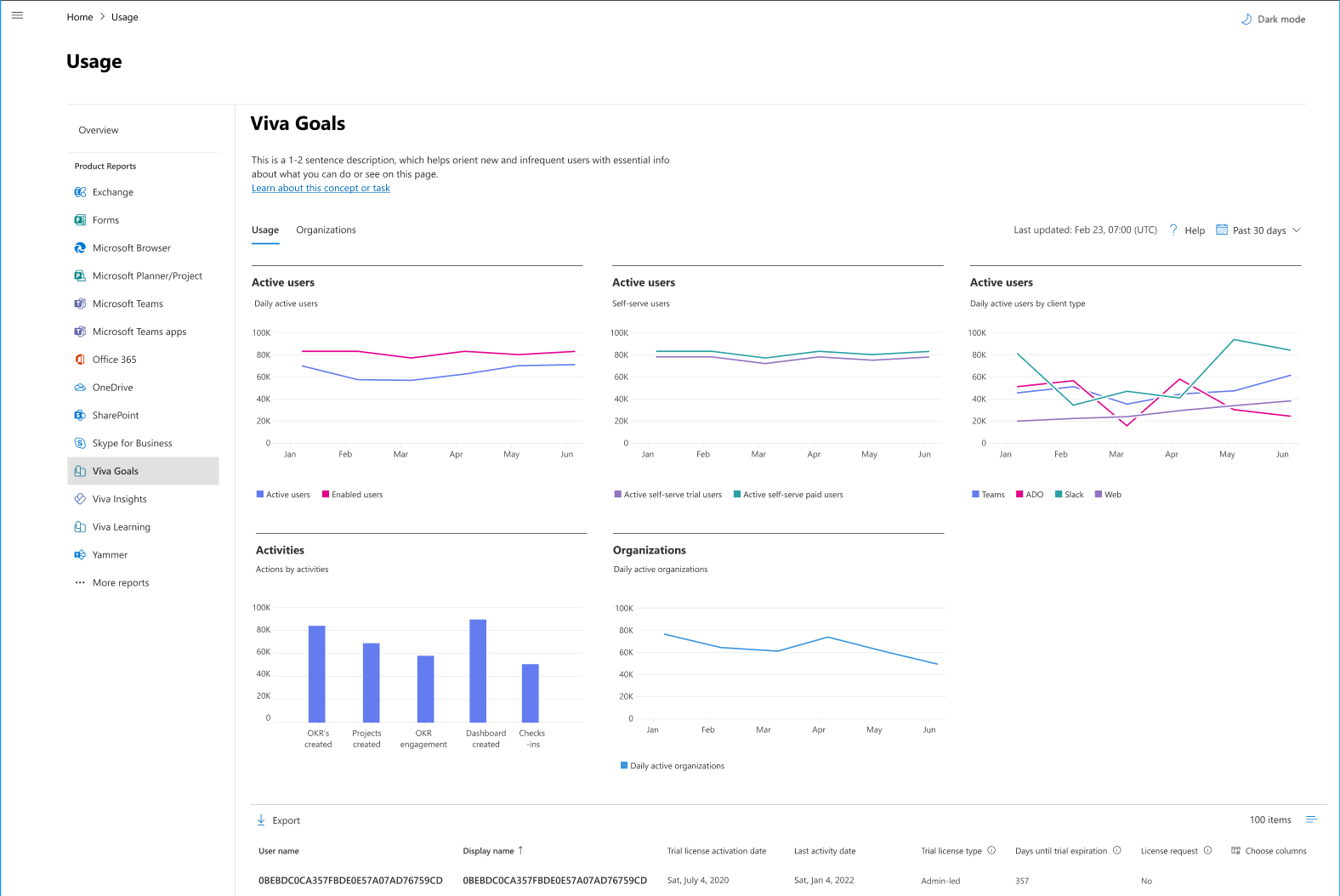
A new report will be made available to help you understand how Viva Goals is used within your organization. The new usage report in the Microsoft 365 admin center will provide metrics on the number of active users including trial and paid licenses and platform distribution (Teams, Slack, Azure DevOps, and Web) with the ability to view 7/30/90/180 day timeframes.

This message is associated with Microsoft 365 Roadmap ID 117599

When this will happen:

Rollout will begin in late April and is expected to be complete by late May.

How this will affect your organization:

Using the Viva Goals usage report, Admins will be able to view metrics for how people in your organization are using Viva Goals and in which platforms. 

View image in new tab

What you need to do to prepare:

Admins can assign the available licenses in their tenant to individual users based on their usage and license requests, via the Microsoft admin center. Once released, you can view Viva Goals reports by going to the Microsoft 365 admin center -> Reports -> Usage -> Viva Goals.

For more information on Viva Goals visit Introduction to Microsoft Viva Goals.

Message ID: MC541159

The post Microsoft 365 admin center: Viva Goals Usage Report appeared first on M365 Admin.

✇M365 Admin

Improved management of Teams apps with capabilities extended to Outlook and the Microsoft 365 app via Integrated Apps

In January 2023, Microsoft released the feature to manage Teams Apps with certain capabilities that extend to Outlook and the Microsoft 365 App (formerly known as Office.com) via the Microsoft 365 Admin Center. Now, we are introducing controls at an app and tenant level, for admins to define which users in their organization can install and use these apps on Outlook and the Microsoft 365 App via Integrated Apps in the Microsoft 365 Admin Center.

This message is associated with Microsoft 365 Roadmap ID 88942

When this will happen:

Standard Release: This feature will begin rolling out to standard release customers in early May 2023 and will complete mid-May 2023.

How this will affect your organization:

With this release, Global Admins can manage how these apps are accessed by users on Outlook and the Microsoft 365 App and set a default state for these apps in the organization. This control only impacts Outlook and the Microsoft 365 App. To manage these apps on Teams, continue to use the Teams Admin Center.

This feature is coming for the Azure Application Admin role by end of May 2023. For tenants that do not have access to the Azure Application Admin role, please use the Global Admin role to make changes until this role is made available to you.

 What new controls are we providing?

1. Per App Control over user installation and use: Admins can choose which users have access to install an app from the store and use the installed app on Outlook and the Microsoft 365 App. These changes can be made for 1P/3P store apps and custom/LOB apps uploaded by the admin.

• Admins can choose to make the app available for installation and use to all users, no users, or specific users. Note that when admins select a specific set of users, the unselected users will not be able to install the app from the store.

The above changes will only apply to Outlook and the Microsoft 365 App. To manage how these apps show up on Teams, please continue to use the Teams Admin Center. (Any previous settings made from the Teams Admin Center will continue to apply for how these apps show up on Teams.)

2. Tenant-wide Default: Admins can set a default state for their tenant for all 1P /3P apps on Outlook and the Microsoft 365 App.

The default tenant state will apply to the following apps:

a. All new and incoming Teams apps with capabilities extended to Outlook and the Microsoft 365 App.

b. All apps published in the past that were not blocked by the admin.

• If an app was previously blocked for Outlook and the Microsoft 365 App, it will continue to remain blocked even after the default state for the tenant is changed. When admins unblock the app, it will revert to the default state set for the tenant on Outlook and the Microsoft 365 App.

c. All apps published in the past that were deployed by the admin.

• The default tenant state will also apply to admin-deployed apps. If an app was previously deployed by the admin to a set of users for Outlook and the Microsoft 365 App, it will continue to remain deployed to the selected set of users, even after the default state for the tenant is changed.

The default tenant state will not apply to the following apps:

a. Custom/LOB apps uploaded by the admin.

• When a custom/LOB app is uploaded by the admin via the Microsoft 365 Admin Center, all users in the organization will have access to install the app by default.

i. Admins can continue to deploy the custom/LOB app to a selected set of users.

ii. Admins can also edit which users have access to install and use the custom/LOB app, as detailed in the ‘Per app control over user installation and use’ section above.

c. Apps that have any user selections made by the admin.

• The changes made by the admin as part of the ‘Per app control over user installation and use’ section detailed above will be honored over the default state in the tenant. Once an admin specifies users for an app, this setting supersedes the tenant-wide default setting for that app.

What does this mean for your organization?

1. All settings made via Integrated Apps will be honored on Outlook and the Microsoft 365 App. Any changes made on Integrated Apps will not impact the Teams client. To manage how these apps show up on Teams, please continue to use Teams Admin Center.

2. Admins can continue to deploy these apps for all or specific users on Outlook and the Microsoft 365 App as before, irrespective of who they have specified to self-install and use the self-installed app. (No action needed)

3. Admins can continue to block these apps on Outlook and the Microsoft 365 App for all users in the organization as before. When an app is blocked, all previous settings made for the app are superseded by the block. Users and admins can’t install or deploy the app, and users can’t use the app if it was previously installed or deployed. (No action needed)

4. Admins can continue to unblock these apps on Outlook and the Microsoft 365 App in their organization as before. When an app is unblocked, it will be restored to the last saved state. (No action needed)

What you can do to prepare:

There is no action you need to take to prepare for this change, but you might consider updating your user documentation.

Message ID: MC541155

The post Improved management of Teams apps with capabilities extended to Outlook and the Microsoft 365 app via Integrated Apps appeared first on M365 Admin.

✇M365 Admin

In-product announcements for the Yammer website rebrand to Viva Engage

We are thrilled to share the exciting news that the rebranding of Yammer and all its surfaces is nearly complete! The Yammer website, the SharePoint and embed integrations, as well as the Power Automate integration rebranding will take place during the last week of June of 2023.

This message is associated with Microsoft 365 Roadmap ID 117366

When this will happen:

We will begin rolling out in early May 2023 and complete by late June 2023.

How this will affect your organization:

There will be no impact to the existing profile, posts, bookmarks, etc. All rebranding updates don’t require additional actions; changes will be automatic. Outside of branding changes, there are no changes to the features, capabilities, and investments for Microsoft 365 customers. You will continue to experience and benefit from all the powerful features of Viva Engage just as you did with Yammer.

To ensure all users are fully informed and engaged in this stage of the rebranding process, we have developed an exciting in-product announcement plan that will provide key information at specific moments.

Our announcement plan is tailored to specific audiences, and it’s structured into two phases: prior the website rebranding and on the website rebranding date.

As shared in previous posts, to help make the transition as smooth as possible, we have also created a rebranding toolkit that includes a range of templates, logos, and other resources to help communicate the change. It can be found – here

Before the rebranding date

  1. Reminder banner only visible to network admins

reminder banner
View image in new tab

  1. We will begin rolling out in early May 2023 a dismissible banner on our website that will only be visible to network admins. The banner has been designed to serve as a helpful reminder to admins of the upcoming change and provide them with a convenient link to the rebranding toolkit, which contains valuable resources to assist them in effectively communicating the change to their teams.
  2. Heads-up banner visible to all users

heads-up banner
View image in new tab

  1. This banner will be displayed on the website and will be visible to all users. Its purpose is to provide a heads-up to users about the upcoming change and prepare them for what’s to come. We will begin rolling out this banner mid-June 2023, two weeks prior to the rebranding date.

On the rebranding date

  1. Announcement dialog on the website

announcement dialog
View image in new tab

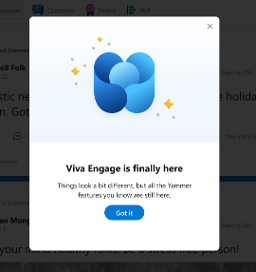
  1. We will roll out in late June, the day of the rebranding, an announcement banner. Users who access the website will be greeted with a welcoming dialog that will inform them of the brand name change. Once users dismiss the dialog, they will be able to access the rebranded experience.
  2. Announcement banner on email digests

announcement banner
View image in new tab

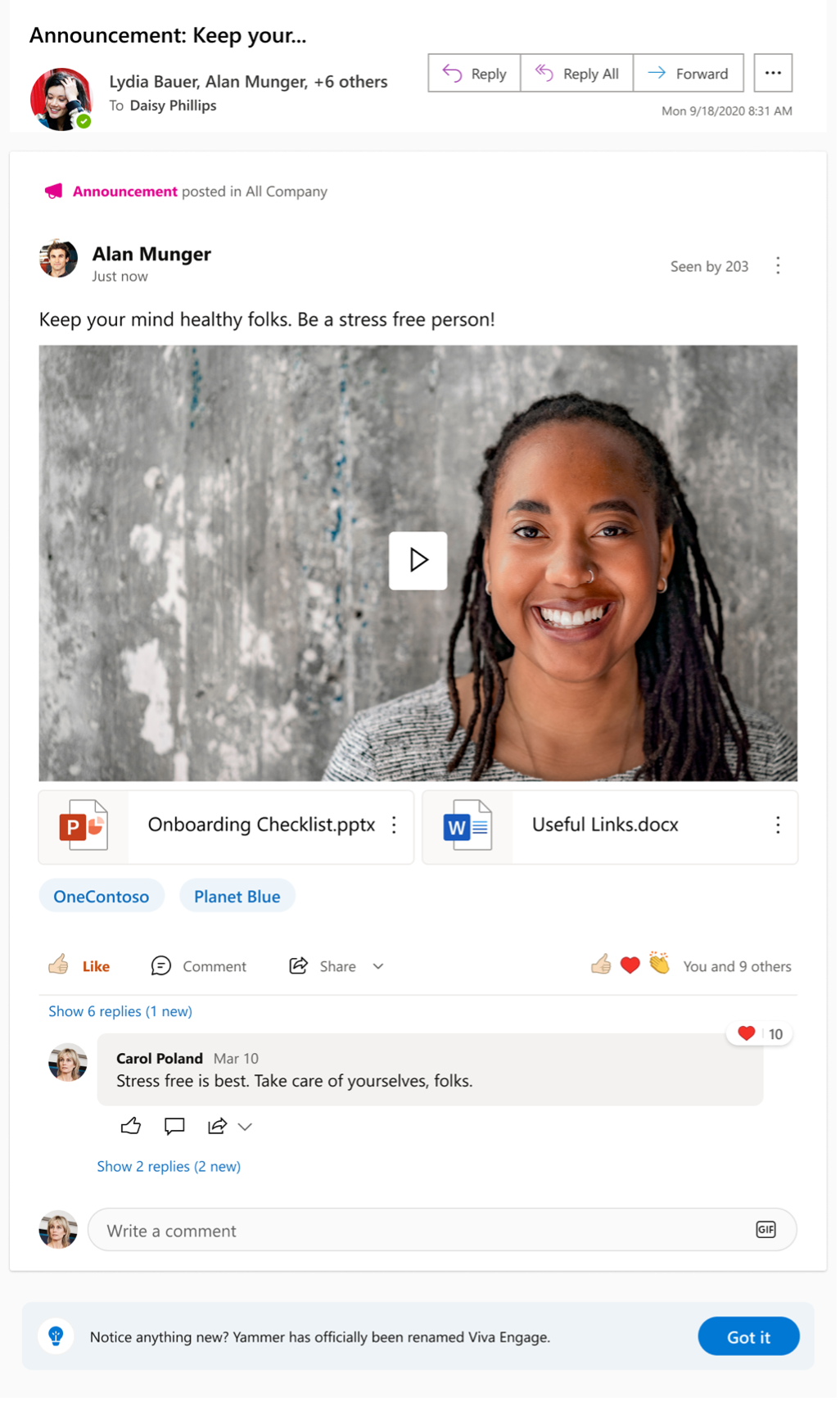
  1. In addition to the website dialog, we want to ensure that users who consume content through email are also made aware of the rebranding. To achieve this, we have included a banner in the digests that will be visible for a period of two weeks. We will begin rolling out this banner late June 2023.

What you need to do to prepare:

There is no action needed to prepare for this change. You may want to notify your users about this change and update any relevant documentation as appropriate.

Message ID: MC541154

The post In-product announcements for the Yammer website rebrand to Viva Engage appeared first on M365 Admin.

✇M365 Admin

Microsoft Purview – Data Lifecycle and Records Management – Scope the administration of retention and label policies

To assist in the implementation of security best practices, we are introducing new way to assign administrative privileges in the Microsoft Purview Data Lifecycle Management and Microsoft Purview Records Management solutions that will provide admins the least privilege access required for their job duties.

With this change, organizations can leverage Administrative Units in Azure Active Directory (AAD) to define who can configure and manage policies in Microsoft Purview. This update will include the ability to set up a Data Lifecycle Management or Records Management admin for a specific geography, department, or other unit, who can manage retention and label policies for their unit.

This message is associated with Microsoft 365 Roadmap ID 117354.

When this will happen:

Rollout to public preview will begin in late April and is expected to be complete by end of May.

How this will affect your organization:

Once this feature rolls out, Data Lifecycle Management and Records Management administrators in your organization will have the ability to use administrative units to granularly define access to who can manage retention policies and label policies for different parts of the organization.

Previously, you were only able to assign a tenant-wide admin for Data Lifecycle Management. These people would configure and administer retention and label policies for every part of the organization. Now, you can associate Data Lifecycle Management administrators to one or more admin units. This enables administrators who can view and manage policies for only part of an organization to do so confidently without affecting other units. For example, you can designate an administrator for the Finance Admin Unit. This person can then create polices that apply only to Finance users, groups, or sites.  

What you need to do to prepare:

There is nothing you need to do to receive this feature.

You may consider updating any training or reference material for your Data Lifecycle Management and Records Management administrators and evaluate if you would like to use this new capability. 

Get started with Data Lifecycle Management and Records Management in the Microsoft Purview compliance portal.

Learn more: Permissions in the Microsoft Purview compliance portal

Message ID: MC541152

The post Microsoft Purview – Data Lifecycle and Records Management – Scope the administration of retention and label policies appeared first on M365 Admin.

✇M365 Admin

Introducing Support for Concurrent Exchange Online License Assignments

We recently enabled a new feature in Office 365, which allows tenant admins to assign more than one Exchange Online license per AAD user. This provides license stacking support and automatic license feature upgrades and downgrades based on the most superior Exchange Online license pack assigned to a user.

SharePoint Online and Teams, for example, have been supporting concurrent license assignments for their own services for some time now. This new feature hence helps bring the same level of support to Exchange Online.

When this will happen:

This has already been rolled out in January 2023.

How this will affect your organization:

As a tenant admin, you would still need to run reporting on license assignments and determine which users might have more than one Exchange Online license assigned. You might then elect to remove the least superior licenses from that user and send them back to the pool of unused licenses, so other users can benefit from them. This is important to understand: if two (or more) licenses are assigned, all of them are “in use” (and might be billed).

What you need to do to prepare:

This message is for your awareness and no action is needed.

Message ID: MC541151

The post Introducing Support for Concurrent Exchange Online License Assignments appeared first on M365 Admin.

✇M365 Admin

Microsoft Viva: Viva Topics Teams app

Viva Topics Teams app as the new destination for discovering new and trending topics in the organization, providing feedback on suggested topics, catching up on activities on topics of interest and more.

Product Microsoft Viva
Release phase General Availability
Release date June CY2023
Platform Web
Cloud Instance GCC
Created 2023-04-13
Roadmap ID 118492
Roadmap Link https://www.microsoft.com/microsoft-365/roadmap?featureid=118492

The post Microsoft Viva: Viva Topics Teams app appeared first on M365 Admin.

❌