
Vue lecture

Il y a de nouveaux articles disponibles, cliquez pour rafraîchir la page.
✇SharePoint ...

[ATTENTION] Be careful with Copy-SPSite and Colligo!

Analysis of Copy-SPSite and Colligo

Folks be careful when using Colligo in your organization, careful with Copy-SPSite. Otherwise you may end-up with several issues regarding Colligo is unable to sync some sites:
According to the description provided by Microsoft Copy-SPSite:

Use the Copy-SPSite cmdlet to make a copy of a site collection from an implied source content database to a specified destination content database.The copy of the site collection has a new URL and a new SiteID. When you have database snapshot capabilities on a computer running SQL Server, a temporary snapshot of the source database is created for the duration of the copy to prevent any data changes during the copy process. If you do not have database snapshot capabilities on the server running SQL Server, you can back up the source and restore it to the destination to get the same result.

Copy-SPSite is creating a new site with new URL and a new SiteID, but the WebID is the same. The WebId of the original site and cloned one are the same. Yes that is true the WebID stay the same and this is what is confused for Colligo. Because Colligo relays on WebID as unique identifier.

How to get that? Here are the steps:

1. Find out which is the "Storage Location" for Colligo Briefcase. Go to View->Options
2. Go to this location, you will see "Sites.db" file:

3. Open the file with "DB Browser for SQL Lite", but first close Colligo and open Webs table.
Under Server Name is the WebID of the site and if you go to SharePoint server you will see it is the same GUID provided by Get-SPWeb. You can compare both WebID's of the sites, original ones and the one created with Copy-SPSite ... they are the same. Of course the logic that is used by Colligo is not allowing you to synchronize sites created with Copy-SPSite.

Interesting is that OneDrive for Business does not have this problem and synchronization is working fine. Why? Because Microsoft use a different logic for unique identifier. Normally the OneDrive for Business local cache access database is located here: C:\Users\Pavlov Aleksandar\AppData\Local\Microsoft\Office\15.0\OfficeFileCache\CentralTable.accdb. Open the DB in Access and than open MasterFile table.


As you can see the logic used by Microsoft for storing the information about the site is OneDrive for Business is GUID/relative path, in this case STID${CB935F8C-1D73-4BEC-B54E-D2E23D013CDC}/sites/loadtest22.

At the beginning to me it was also too strange to believe that WebID of two or more sites could be the same and in my opinion Microsoft changed this logic a while ago. But this may be a huge problem for companies using Colligo for file synchronization between SharePoint and local PC if somebody from Colligo do not pay attention to this problem.

Hope you will find this post helpful.

If so please share it.
-----------------------------------------------------------------------------
✇SharePoint ...

Deploying new solutions in SharePoint 2013 takes too much time

One of my customers is having TEST, QA and PROD environment. Where QA and PROD are equal (same amount of WFE servers (in this case 2 WFE servers), same configuration and settings, in case PROD is down we can switch to QA in a minutes and it will be the same). 

What happened: since a while deploying a new version of the solutions takes too much time, around 1.5 hours, compared with the past and QA - 15 min. It is horrible to stay in front of the monitor and wait the slow deployment to finish. Yes, it finished without errors but waiting was killing me. I wasn't aware of any changes in infrastructure level that can lead to this slowness. 

I have to mention that there wasn't any slowness on the sites and locally on the server everything was working fine, no high memory or CPU consumption, nothing that could tell you way the deployment is so slow. 

In QA environment the deployment time was normal, around 15-20 min. So this also exclude the .wsp's from the suspected root cause.

Start looking for a solutions in internet and I was surprised how many article and post related to SharePoint slowness, sites are loading too slow and etc. but nothing related to my case. That's why I decided to write this post because I was able to find the root cause.

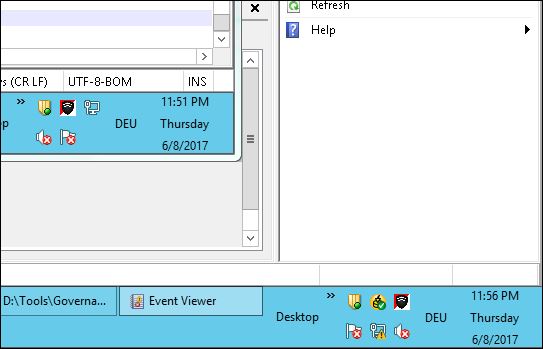
Incidentally I opened two RDP sessions to the WFE servers and size of the windows was different, guess what:

Can you see where is the problem from the picture above?

Yes, that is right. 

Both servers are having different time, the second server was 5 min behind the real time.

OK potentially I thought this could be the reason and went to check the time zones, but on both servers the time zones were correct, but not the time. After a while I checked the services and found out that "Windows Time" services on both machines were set to disable. Check how it is QA and there the services were running. Enabling the services and set them to automatic was the fix I needed.    

In the future if you have a slow deployment make sure you check the "Windows Time" service, set it to automatic and run it.

Hope you will find this post helpful, if so please share it.

Enjoy!
✇SharePoint ...

Proactively increase the max site storage quota

With this post I would like to show you my way of proactively increasing the site storage quota. My task was to eliminate the need of users to request site storage quota increase. I wrote a small PowerShell script which you can download from here

The script will check the current site size, compared it with the max site storage quota assigned and if the current occupied storage is over 80% the site is a potential candidate for increase the max site storage quota. Of course you can change this value to whatever it is suitable for you. You will be able also the see the assigned quota template, if you have custom quota created or it will be shown as "No Template Applied". That means that "Individual" quota has been assigned, but you will still need to increase the assigned max storage size. The Read/Only sites are displayed in the report only if the warning quota is reached, in my case the warning quota is 1024MB, so you have to switch back to Write/Read before you change the quota. Inside the script if it is necessary you can change the warning quota limit (please read the hints/comments inside the script). 

The output looks like:

The output will be stored in a file and this file will be sent via email. Please check the settings in the script to understand to whom to send the report. Reports older than 2 days will be removed from the folder.

So give it a try and let me know if it works or not.

Enjoy!
✇SharePoint ...

Could not retrieve profile schema from server

How many of you faced this strange behavior of SharePoint 2013 designer?


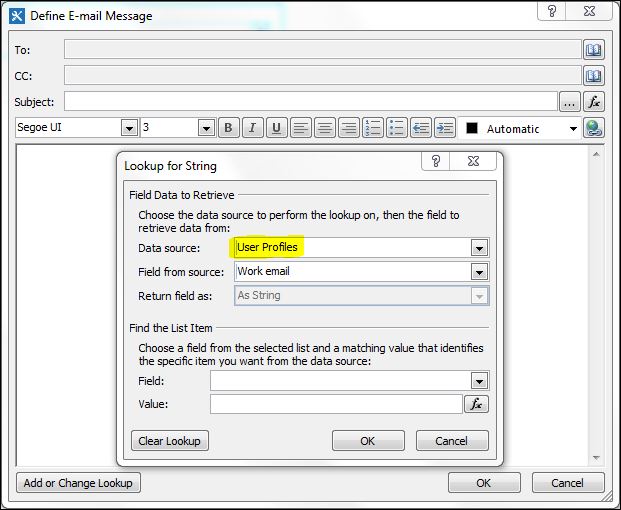
When trying to use User Profile as a Data Source in a workflow. Something similar to the screen shot below:

Try looking in google did not give me the expected solution. A lot of people suggested to grant permissions of the web app pool account to the search service database. But what actually that means? I granted read permissions to all search related databases, but as you expect the problem was still persisting.

So many articles were referring to Search I was start thinking that the problem is really there. But all of the explanations were not exactly correct. The right way to make it working is:
  1. Go to Central Admin
  2. Go to Manage Service Applications
  3. Select Search Service Application, but don't click on it
  4. Select Administrators
  5. Add the application pool account of the web application
  6. Grant "Read (Diagnostic Pages Only)" permission and click OK


Afterwards everything should work normally.

For now I don't have exact explanation why these settings are necessary. Will try to find out and post here as a comment.

✇SharePoint ...

[HOW TO] understand who deleted a SharePoint 2013 site

Very interesting task - How to find who deleted a site/sitecollection in SharePoint 2013. Few days ago I was tasked to restore a site, whcih was deleted 1 or 2 days ago. Easy task just found the site inside SPDeletedSite (Get-SPDeletedSite) and using Restore-SPDeletedSite was able to restore the site. But the next day again received the request to restore the same site, it has been again deleted and inside Get-SPDeletedSite information about who performed the deletion is not available.
I decided that I have to find out who deleted the site. So I downloaded the IIS logs (from SPDeletedSite object you can see the date the site has been deleted) for the coresponding day and start analyzing them. But the logs are too big.
And if you try to open them with Notepad or Notepad++ this is not going to work. So what is next? Fortunatelly there is LogParser. LogParser is the best IIS logs analyzing tool for every SharePoint administrator. So spare enough time and play with LogParser because it will definitelly save you time and will help you a lot in your day-to-day work and of course you will impress your manager with the capabilities offered by LogParser.
Then I have to find out how was the site deleted, in order to build LogParser query so I can execute it over IIS log files. They are 2 different ways to delete a site:
  1. From the Site Collection setting menu (deleteweb.aspx) or
  2. from Central administration (delsite.aspx)
In case I don't know the way the site has been deleted I build two LogParser queries:
  • LogParser.exe -i:W3C -o:W3C "select date,time, s-sitename, s-computername, s-ip, cs-method, cs-uri-stem, cs-username into 'C:\Tools\deletedSite.txt' from 'C:\Tools\u_ex*.log' where cs-uri-stem like '%delsite%'"
  • LogParser.exe -i:W3C -o:W3C "select date,time, s-sitename, s-computername, s-ip, cs-method, cs-uri-stem, cs-username into 'C:\Tools\deletedSite.txt' from 'C:\Tools\u_ex*.log' where cs-uri-stem like '%deleteweb%'"
I my case site has been deleted from the Site Setting menu (deleteweb.aspx) and the rusult is as follow:

And if you pay attention to the DeletionTime (from SPDeletedSite) and Date, Time form IIS logs you will see that we have an exact match, and they are no other entries for deleteweb.aspx in IIS logs. So this proves that this user deleted the site and he/she deleted it from the Site Settings menue (because of the deleteweb.aspx).
Hope this will help someone if so share this post or comment it.
And definitelly this is the last post from me for this year.
Enjoy the holidays and see you next year 2017.
✇SharePoint ...

Windows 10 Data DeDuplication after Anniversary update

This could be one of my last posts for this year.

One post out of the SharePoint world, but closely related. I'm using Windows 10 on my laptop (with 32 GB of RAM) where my virtual test machines (SharePoint 2013 and 2016) are running. Pretty usual environment for every SharePoint enthusiast.  And most of you know the problem with the speed (performance) when 3 VM's are running on a laptop. That's why I bought 2 additional SSD's (120 GB each) and put them in my laptop. So my OS is running on a SSD and I have one SSD (120 GB) and one HDD (1 TB) for SharePoint VM's playground, but this space, on the SSD drive is insufficient.

Most of you already know about Data DeDuplication really good feature which allows you to store more data than usually you can. But I' not going to explain here what is DeDulication and how it works, if you are interested you can check in google.

I'm very happy with this feature/technology even if it is not released for home usage. Officially it available for MS server products, but there is a way to install/activate it on your local Windows 10.

One day my machine needs to install some updates and I was shocked afterwards because my SSD drive, where the DeDuplication was enabled, was not accessible anymore. OK I was accept the fact that I'll lose the data on the disk and had to format it. But definitely I need this feature and start searching for a solution, unfortunately several days without success, tried a lot of suggestions, but none of them was working, pretty sad.

Fortunately I post a question to MSDN forum and with a lot of reading could find a solution. You just need to download these files from here (not working any more) and install them on your machine. then you will be able to enable DeDuplication on a drive which you want. My machine had installed Windows 10 Pro version 1607 OS build 14393.222.

So try if you want Data DeDulication feature on your Windows 10, let me know if it works for you or not and share if you think it could be helpful for others.

Enjoy the holidays, wish you all the best to you and your family. 
Hope to see you soon in the next 2017 year!
✇SharePoint ...

[SOLVED] Missing server side dependencies - [MissingAssembly]

Maybe most of you had seen this Health Analyzer Rule error:
[MissingAssembly] Assembly [WebProvisionedEvent, Version=1.0.0.0, Culture=neutral, PublicKeyToken=a505ed585a006cfc] is referenced in the database [WSS_Content_05], but is not installed on the current farm. Please install any feature/solution which contains this assembly. One or more assemblies are referenced in the database [WSS_Content_05], but are not installed on the current farm. Please install any feature or solution which contains these assemblies.


It happened to me after the farm solution has been redesigned and the new solution has been redeployed. If you search in Google for this error you will find a lot of suggestions how to fix it, but first of all you have to understand what exactly is causing this error and here I'll provide you my approach, afterwards you will be able to solve the issue without breaking your SharePoint 2013 farm. In my case it happened on SharePoint 2013 customer farm, but most probably the approach will work on SharePoint 2010.

First try to find what is inside the solution you deployed, simply unzip it with 7-Zip and look inside. Try to find which feature is related to this WebProvisionedEvent, in most of the cases EventReceiver is involved (as it was in my case). And because in the Content Database the path to the assembly was different (the one left from the old solution, before redesign). Thinking logically it make sens to reactivate the feature, so in the content database the path to the new .dll will be recorded. Sounds good and this should be the first step - reactivate the feature related to this EventReceiver. Some of the errors in the Health Analyzer will disappear, but not all of them. And this is normal because event receivers attached to the site, list or library are not removed when the feature is deactivated. And you need to remove them manually or with Power Shell.

I found the following script very helpful, but there is also a problem with the formatting and when you tried to import the script and use it you will get an error and maybe you can decide that the script is not working. What you need to do: Type the script manually in your text editor and save it as .ps1. Because as I already mentioned you try to copy and paste the script in your text editor or Power Shell ISE you may get an error due to a different formatting. It is  a bit long, but in order to work write the script manually in text editor.

OK, so after I manged to find out what was wrong with the code I was thinking YES finally I'll fix and get rid of this error in Health Analyzer. But unfortunately after I list which event receivers were left (using the "-ReportOnly" switch from the script) and deleted all of them afterwards, THE ERROR IN HEALTH ANALYZER WAS STILL THERE. And it was pointing to the same content database as it was from the begging.

After hours spending in troubleshooting and researching this error I was luckily able to find out that maybe the "old" event receivers exists in sites inside the recycle bin. I'm talking about Deleted Sites. And the aforementioned script is not removing the event receivers from sites which are inside the recycle bin (you can get a list of these sites with Get-SPDeletedSites). I was read somewhere in Google that if you remove these sites the entries in content database may left and then the only way to get rid of these event receivers is to manually remove them from content database.

So my approach was:
  1. Export the list of these deleted sites (Get-SPDeletedSite) 
  2. Restore them (Restore-SPDeletedSite) 
  3. Reactivate the "faulty" feature 
  4. Check if the issue is solved in Health Analyzer
  5. If not remove them with the script I already mentioned. 
For sure if you follow these steps the error will disappear afterwards. Then you can decide if you are going to Remove the sites you just restored or will left them as they are.

Let me know if try this approach, if it is working or not and share if you think it was helpful.

Link to the script uploaded in TechNet.

Happy SharePoint...ing :-)     
✇SharePoint ...

[HOW TO] remove Newsfeed, Onedrive and Sites from navigation bar

I'm writing this post because it was curious for me when I have to remove Newsfeed, Onedrive and Sites from SharePoint 2013 on-premises suite bar. The task was users should be able to see these buttons/links in the suite bar.
What I'm talking about:


Googling this question I was offered to use SharePoint Designer and to change the master page. Even there were also conclusion like "There is NO Out Of the Box solution" for this one.

But I doubt and managed to find one to remove these links from the suite bar :) You have to remove all users from "Permissions for User Profile Synchronization Service Proxy"or to put only these users which will be able to see suite bar


Usually here you will see "Authenticated Users", that means all AD users will see the suite bar.
I remove them and put only my account. So from now on ONLY me can see the suite bar links.
You have to go to "Central Admin -> Manage User Profile Synchronization Service -> Manage User Permissions" under People section of User Profile Service will take you the screen above.

Hope you will find this post helpful, if so please share it!

Enjoy!
✇SharePoint ...

Fix for "MS16-004 list view issue" SharePoint 2013

A solution for the list view issue caused by MS16-004 is found by Stefan Goßner and details can be found on his blog.
If you already installed MS16-004 on your SharePoint 2013 Farms you have 2 options to fix it:
  • Patch KB3114508 
  • January 2016 CU for SharePoint 2013 Server, but the CU was released to soon and I do not recommend installing it on your SharePoint Farms, because you don"t know what else could be broken.
So as a recommendation, skip MS16-004 patch installation or if you already installed it apply the patch KB3114508

Share this post, so more people are aware about this "workaround".

Update: There is a bug in SharePoint 2013 CU January 2016 that cause reports of Excel Services causing app pools to crash (Todd Klindt's blog).
✇SharePoint ...

Restore-SPSite error "0x80070003" - Solution

With this post I would like to share with you another strange issue with SharePoint 2013 and restoring site collection. The scenario in my case was:
  • I have a site collection with missing files
  • Last available SQL backup  - 3 months ago
So at the beginning restoring the missing files looks an easy task. I restored the content DB in SQL with different name and made a backup of the site collection (Central Admin -> Backup and Restore -> Recover data from an unattached content database). My goal was to restore the site collection under different URL, but when I tried to restore it the following error poped up:

PS H:\> Restore-SPSite http://test.contoso.com/sites/scr -Path D:\Backups\sitecollection1.bak
Confirm Are you sure you want to perform this action? Performing operation "Restore-SPSite" on Target "http://test.contoso.com/sites/scr". [Y] Yes [A] Yes to All [N] No [L] No to All [S] Suspend [?] Help (default is "Y"):
**Restore-SPSite : <nativehr>0x80070003</nativehr><nativestack></nativestack> At line:1 char:1 + Restore-SPSite http://test.contoso.com/sites/scr -Pat ... + ~~~~~~~~~~~~~~~~~~~~~~~~~~~~~~~~~~~~~~~~~~~~~~~~~~~~~~~~~~~~~~~~~~~~~~~~~~~~ ~~~ + CategoryInfo : InvalidData: (Microsoft.Share...dletRestoreSite: SPCmdletRestoreSite) [Restore-SPSite], DirectoryNotFoundException + FullyQualifiedErrorId : Microsoft.SharePoint.PowerShell.SPCmdletRestoreS ite**

This error message means that the backup of the site collection has older schema version then the current SharePoint. Actually the all content DB needs to be updated to the current SharePoint version in order to be able to do something with the backup otwerwise the backup is useless. As a next step you need to mount the content DB to existing or new web application and upgrade the database. I strongly recomend you to use powershell for these two steps:
  1. Mount the content DB with Mount-SPContentDatabase and AssignNewDatabaseId parameter, otherwise the cmdlet will trown error because there is already a DB with the same ID.
  2. Upgrade the DB with Upgrade-SPContentDatabase -Identity <DB name>
I strongly recommend you to check the upgrade logs, placed in the ULS folder. You have to discover a lot of the errors like this:
12/14/2015 18:36:20.12 powershell (0x20550) 0x26A38 SharePoint Foundation Upgrade SPContentDatabaseSequence ajxk1 ERROR Database [RM_SP_Content_02] contains a site (Id = [50340533-6c00-4187-8d01-f9eabdc514ed], Url = [/sites/scr]) whose id is already associated with a different database (Id = [95823bf0-4fe2-462e-bdf9-bb37b35b4c26], name = [SP_Content_02]) in the site map. Consider deleting one of these sites which have conflicting ids. d642bc3b-5bf4-4783-82da-47030365bb9b
I would say that all these errors are OK, because most of the sites still exist in SharePoint. But even the upgrade was successful you won't be able to browse or backup the site collections inside the restored content DB. As a next step unmount the content DB from SharePoint (Dismount-SPContentDatabase or use Central Admin) and backup your site collection via Unattached Content Database Data Recovery in Central Admin. After you backup your site collection you will be able to restore it with Restore-SPSite. 
Please share if you think this post is useful.
✇SharePoint ...

SharePoint Saturday Munich 2015


Hello everyone,

I'm very happy to share with you that I was able to attend the 1st SharePoint Saturday in Munich this month.

And with this post I will share what I found interesting at this event.

First we have to say a BIG THANK YOU to all sponsors and speakers:


On this event none of the speakers were paid. They cover all travel costs by themselves!!! 

Amazing, isn't it?

Below you can find a link to some of the slides from #SPSMUC2015

✇SharePoint ...

Authentication prompt issue, Office File, Read permissions

Hello again to all, I would like to share with you another strange / mystery issue with SharePoint 2013.
My customer just came to me with the question - I can't open an office file with explicit user permissions, why?
 
At the beginning I can't believe that the office file couldn't be opened when the users has explicit file permissions (permissions ONLY over the file, no web application, no site collection, no site permissions). When the user tries to open the file the login prompt pops up, asking for credentials, even if you enter valid credentials you will be unable to open the file, it will continue prompt you for credentials and at the bottom, at the status bar of the file you will see "Updating Workflow Status", but we don't have any workflows assigned to the site / site collection / library.
 
 
Inside the application log you will see EventId 8026 notifying you about this problem:
 
 
A lot of people in Tech Net Forum thought it must be related to the permissions or browser settings, but none of this was true. Even with ULS you will be unable to catch the root cause of this problem. 
 
In my case all of the site collections are using a custom template and I was thinking that the problem could be related to it. So I create a new site collection based on default Team Site template and granted to a specific user explicit modify permissions ONLY on one office file. Guess what - THE PROBLEM DOES NOT OCCURED :-)

OK, now I know for sure that the problem is with the custom template used for the site collections, but what is it?

I start comparing the site collection features, activate and deactivate features and trying to reproduce the issue - without success :-(

Until I found Limited-access user permission lockdown mode, remember this feature because this is the root cause of the aforementioned problem. Activating this feature will cause the users with explicit file permissions to be unable to open office files.

So deactivate Limited-access user permission lockdown mode site collection feature to eliminate issues with explicit user permissions over office files.

Please share this post if you think it is useful.

Happy SharePoint-ing to all :-)
 
✇SharePoint ...

Missing server side dependencies - SharePoint 2013

Maybe most of you are facing or faced this error message inside the SharePoint Health Analyzer Rule:
-------------------------------------------------------------------------------------------------------------
[MissingWebPart] WebPart class [8307a780-2546-f10b-551f-0e692d0fce39] (class [Microsoft.Office.Server.Search.WebControls.SearchApplicationShortcutsList] from assembly [Microsoft.Office.Server.Search, Version=15.0.0.0, Culture=neutral, PublicKeyToken=71e9bce111e9429c]) is referenced [1] times in the database [CA Content], but is not installed on the current farm. Please install any feature/solution which contains this web part. One or more web parts are referenced in the database [Content CA], but are not installed on the current farm. Please install any feature or solution which contains these web parts.
[MissingWebPart] WebPart class [63104819-a32f-88b6-ab4a-7bbd4fbb40e8] (class [Microsoft.Office.Server.Search.WebControls.FarmSystemStatus] from assembly [Microsoft.Office.Server.Search, Version=15.0.0.0, Culture=neutral, PublicKeyToken=71e9bce111e9429c]) is referenced [1] times in the database [Content CA], but is not installed on the current farm. Please install any feature/solution which contains this web part. One or more web parts are referenced in the database [Content CA], but are not installed on the current farm. Please install any feature or solution which contains these web parts.
[MissingWebPart] WebPart class [9328cc53-be2c-1cca-f310-ddd573a106a5] (class [Microsoft.Office.Server.Search.WebControls.FarmSearchApplicationList] from assembly [Microsoft.Office.Server.Search, Version=15.0.0.0, Culture=neutral, PublicKeyToken=71e9bce111e9429c]) is referenced [1] times in the database [Content CA], but is not installed on the current farm. Please install any feature/solution which contains this web part. One or more web parts are referenced in the database [Content CA], but are not installed on the current farm. Please install any feature or solution which contains these web parts.
[MissingWebPart] WebPart class [4465f30a-0604-4d3c-39fd-ecdb8812f3f3] (class [Microsoft.Office.Server.Search.WebControls.SearchTopologyOverview] from assembly [Microsoft.Office.Server.Search, Version=15.0.0.0, Culture=neutral, PublicKeyToken=71e9bce111e9429c]) is referenced [1] times in the database [Content CA], but is not installed on the current farm. Please install any feature/solution which contains this web part. One or more web parts are referenced in the database [Content CA], but are not installed on the current farm. Please install any feature or solution which contains these web parts.
[MissingWebPart] WebPart class [a9bc1035-cf56-e003-8a4d-fff0bb3da148] (class [Microsoft.Office.Server.Search.WebControls.SearchApplicationSystemStatus] from assembly [Microsoft.Office.Server.Search, Version=15.0.0.0, Culture=neutral, PublicKeyToken=71e9bce111e9429c]) is referenced [1] times in the database [Content CA], but is not installed on the current farm. Please install any feature/solution which contains this web part. One or more web parts are referenced in the database [Content CA], but are not installed on the current farm. Please install any feature or solution which contains these web parts.
-------------------------------------------------------------------------------------------------------------
If you are searching the internet for this error you may find a lot of solutions like:
  • This technet article 
  • Or inside "Search Administration" page under "Shortcuts" open the links "Add new link" and "Manage links" without changing or adding something
And then rerun the Health Analyzer rule.
Sounds really good because this solution does not require special knowledge or changes in SharePoint Farm ... and the TRUTH is that we may need to repeat the aforementioned steps several times until the message disappear ...  YES it is really working in this way.

Enjoy and happy SharePointing...
✇SharePoint ...

Search Index Location - SharePoint 2013

With this post I'll try to explain the complete step-by-step guide how to check and change Search Index Location in SharePoint 2013. Unfortunately in internet I found different posts but non of them was complete

For one of our customers we have to check Search Index Location and I found this post , great I'll find very easy the location. BUT I was surprised when I got the result in Power Shell:

  • $ssa = Get-SPServiceApplication –Name "Search Service Application"
  • $active = Get-SPEnterpriseSearchTopology -SearchApplication $ssa -Active
  • Get-SPEnterpriseSearchComponent -SearchTopology $active | ?{$_.Name -like "*index*"}


Root directory is empty in my case, in the aforementioned post I could not find what actually this means.

Another post stated that with only 2 Power Shell commands I'll get the necessary for me information. The result after execution was:


OK looks like the location is the default search index location and I've to change it.
Found one very useful Power Shell script which I highly recommend to use in case you would like to change index location. The only thing you have to change at the bottom of the script are:
  • SearchServiceName
  • Server (name)
  • Index Location (suggestion use non system drive)
Execution on my servers finished with success.

Then I would like to check index location again and executed again:
  • $ssi = Get-SPEnterpriseSearchServiceInstance
  • $ssi.Components
And SURPRISE the Index Location was the same ... C:\Program Files\Microsoft Office Servers\15.0\Data\Office Server\Applications ... I can't believe it.

Then I executed the first 3 cmdlets and  now the result is a bit different:


Actually the changes are here :-)

Conclusion

If you would like to check your Search Index Location in SharePoint 2013 you need the following power shell commands:
  1.  $ssa = Get-SPServiceApplication –Name "Search Service Application"
  2.  $active = Get-SPEnterpriseSearchTopology -SearchApplication $ssa -Active
  3.  Get-SPEnterpriseSearchComponent -SearchTopology $active | ?{$_.Name -like "*index*"} 
In case RootDirectory is empty that means your search index location is the default location - C:\Program Files\Microsoft Office Servers\15.0\Data\Office Server\Applications, if it shows something different like D:\SearchIndex this is you index location

I hope you will find this post usefull!

Please share!
-------------------------------------------------------------------------------------------------------------------------------
✇SharePoint ...

System.Runtime.InteropServices.COMException (0x800703FA)

Hello all,

today I faced another very interesting SharePoint 2013 issue :-) At least interesting for me.

Application log was filled out every hour with the following message:

Log Name: Application
Source: Microsoft-SharePoint Products-PerformancePoint Service
Date: 24.04.2015 10:41:34
Event ID: 1176
Task Category: PerformancePoint Services
Level: Error
Keywords:
User: contoso\test
Computer: mycomputer.local
Description:
An error occurred during maintenance cleanup.

Exception details:
System.Runtime.InteropServices.COMException (0x800703FA): Retrieving the COM class factory for component with CLSID {BDEADF26-C265-11D0-BCED-00A0C90AB50F} failed due to the following error: 800703fa Illegal operation attempted on a registry key that has been marked for deletion. (Exception from HRESULT: 0x800703FA).
   at Microsoft.SharePoint.Library.SPRequest..ctor()
   at Microsoft.SharePoint.SPGlobal.CreateSPRequestAndSetIdentity(SPSite site, String name, Boolean bNotGlobalAdminCode, String strUrl, Boolean bNotAddToContext, Byte[] UserToken, SPAppPrincipalToken appPrincipalToken, String userName, Boolean bIgnoreTokenTimeout, Boolean bAsAnonymous)
   at Microsoft.SharePoint.SPRequestManager.GetContextRequest(SPRequestAuthenticationMode authenticationMode)
   at Microsoft.SharePoint.Administration.SPFarm.get_RequestAny()
   at Microsoft.SharePoint.Utilities.SPUtility.GetLocalizedString(String source, String defaultResourceFile, UInt32 language)
   at Microsoft.PerformancePoint.Scorecards.ServerGlobalResources.SPGetString(String classKey, String resourceKey, CultureInfo uiCulture)
   at Microsoft.PerformancePoint.Scorecards.Server.Utilities.TempFCOTimedCleanup.Clean(DateTime expirationDateTime)


Suggestions like "Restart Performance Point service" or "Reboot the server" are not working in my case.

Fortunately I found that a solution working for me:

I changed the Load User Profile to true for Security TokenServiceApplicationPool inside IIS.

Hope this could help you too in resolving similar issues.

Share this post if you think it is helpful!
--------------------------------------------------------------------------------------------------------------------------
✇SharePoint ...

Could not create sub sites even with full control permissions SP2013

Few days ago I faced very strange (to me) behavior in SharePoint 2013. User with explicit full control permissions over a site collection is unable to create a sub site. The form for creating sub site could be loaded without any problems https://<my_site>/_layouts/15/newsbweb.aspx. I entered all the necessary data and click on create button. I got the following yellow screen:

"Wow what is going on here?" was my first thought. 
I'm using non administrative account, but with full control permissions over the site collection and I can't create sub sites! My top level site collection is using a custom template and I'm using the same template for my sub site. The next step was to set the ULS log level to verbose and reproduce the issue. Inside the ULS logs I found a lot of Access Denied messages 

... strange because I was using account with explicit full control permissions over this site collection. OK  then I decided to add the account to the site collection administration group and test again - working :-) 
But this is not what I want. Removed the user from site collection administration group and continue analyzing ULS logs.
As you could see my get request to the DeviceChannels list failed. Checking  the list I found out the there no permissions over this list and my account has also no permissions over this list even the account has explicit full control permissions. I granted read permissions to my account over this list.
Unfortunately I got again the same yellow screen when trying to create a sub site with same user ... :-(
No other way I open again the ULS logs and start analyzing them. Fortunately found this one:
I went to PowerShell and check the ListID inside my site collection and guess what, this was TaxonomyHiddenList. And again no permissions over this list. Granted read permissions to my account and ... SUCCESS I'm able now to create sub sites ... yeahhhhhh :-)     

I hope this post could help you solve similar issues.

Happy SharePointing and don't forget to share this post!

Enjoy!
✇SharePoint ...

Too many access denied files by manual/schedule scan of Symantec Protection for SharePoint Server

Hello all,
 
with this post I would like to reveal another mystery with Symantec Protection for SharePoint server!
 
If you choose to use different account than SharePoint Farm account as SPSS service account you need definitely to know that the following link from Symantec about the minimum permissions need is NOT full!!!
 
For one of our customers we have the situation where the customer would like to follow Best Practices of Microsoft for SharePoint 2013 Server and in order to accomplish this task we created SPSS service account and assign all the permissions, mentioned in aforementioned article and the result was: 


The first feel was "Symantec are you kidding me"? Almost all files couldn't be scanned.
 
All permissions are granted and the manual or schedule scan of Symantec Protection for SharePoint is not working. Opening a case to Symantec did not help too. 
 
Then I decided to troubleshoot this one and find a permanent solution. First think was to set the trace log level to verbose and found out inside the ULS logs too many access denied messages. In a while I decided to grant the SPSS service account Full Read or Full Control to all Web Applications inside the Central Admin:

 
 And voilà:

 
SPSS could now scan almost all files. There are still access denied files, but they are not so many and it is normal. 
 
So as a conclusion in case you would like to run SPSS under different account than SharePoint Farm account you need to keep this missing information in mind.
 
Enjoy!
 
 
✇SharePoint ...

SharePoint 2013 Distributed Cache service update!

Introduction
Maybe most of you want to update / updated or don't know that you could update SharePoint 2013 Distributed Cache Service.
First of all I need to say that you have to be very careful with Distributed Cache Service in SharePoint 2013!!!

I strongly recommend to read the Wictor Wilen SharePoint Blog carefully!!

I used the aforementioned procedure for several production environments and I could say it is working.

BUT there is only one exception when you are trying to update Distributed Cache in Cache cluster scenario!

Exception

There is a little exception I would like to share with you. When you gracefully stop Distributed cache.

Stop-SPDistributedCacheServiceInstance -Graceful

You will need to wait some time, so cached items are transferred to the another active node in Distributed cache cluster.

For example we have 2 servers in our Cache cluster: server1 and server2. Before we stop distributed cache service on server1 we could check the health of the cluster. Normally it should look like this:
  1. use-cachecluster
  2. get-cacheclusterhealth


Afeter Stop-SPDistributedCacheServiceInstance -Graceful you need to wait until "Unallocated named cache fractions" are transferred to server2, in our case.


You have to execute several time Get-CacheClusterHealth until Unallocated named cache fractions "disappear"

When you get the following:


You are ready to patch/update you distributed cache service.

In case you follow these additional steps you would be able to update your Distributed Cache Service without any issues/problems.

Feel free to contact me in case you need more help / information.

Enjoy!

❌
