Vue lecture

Il y a de nouveaux articles disponibles, cliquez pour rafraîchir la page.
✇Microsoft Tech Community - Latest Blogs - Yammer Blog

Improvements to conversations in Viva Engage (Yammer)

At Viva Engage (Yammer), we are committed to improving conversations to help make your employees feel even more connected. Organizations and employees use conversations as a way to keep everyone connected, informed, and engaged, both in communities and through storylines. We share below the improvements we have made to conversations, as we continue to make it easier and more intuitive to start and continue having conversations in Viva Engage. 

@mention first or last names directly in a conversation


Now you will be able to @mention colleagues by using just their first or last name, making it feel more natural and conversational. When employees @mention someone in the conversation, the conversation is ~3x more likely to get engagement. Viva Engage tenant admins will be able to enable this for your organization.


@mention first names to make conversations less formal@mention first names to make conversations less formal


Admins can find reported conversations and replies easier


When an employee reports a conversation, including replies, we now have a way to help admins find the exact part of the reported conversation. To help find the exact reported conversation, the notification includes a link to the exact message that was reported by an employee. Admins can quickly identify and take the necessary next action, providing a more efficient moderation process. Learn more about Report Conversations in Viva Engage.

More control for authors for conversation starters


Any conversation started, the author now has the ability to close their own conversations, giving more control to the content creator. Community Admins can still close conversations and can re-open conversations as necessary. When employees control the ability to moderate the conversations they start, it allows for greater confidence and sense of ownership in starting conversations within communities or their storyline.


Close the conversations you start, giving you more controlClose the conversations you start, giving you more control


More improvements to conversations 

As we continue to respond to customer feedback, we have also made other changes within the last year to make it easier to create conversations in Viva Engage. These changes include:


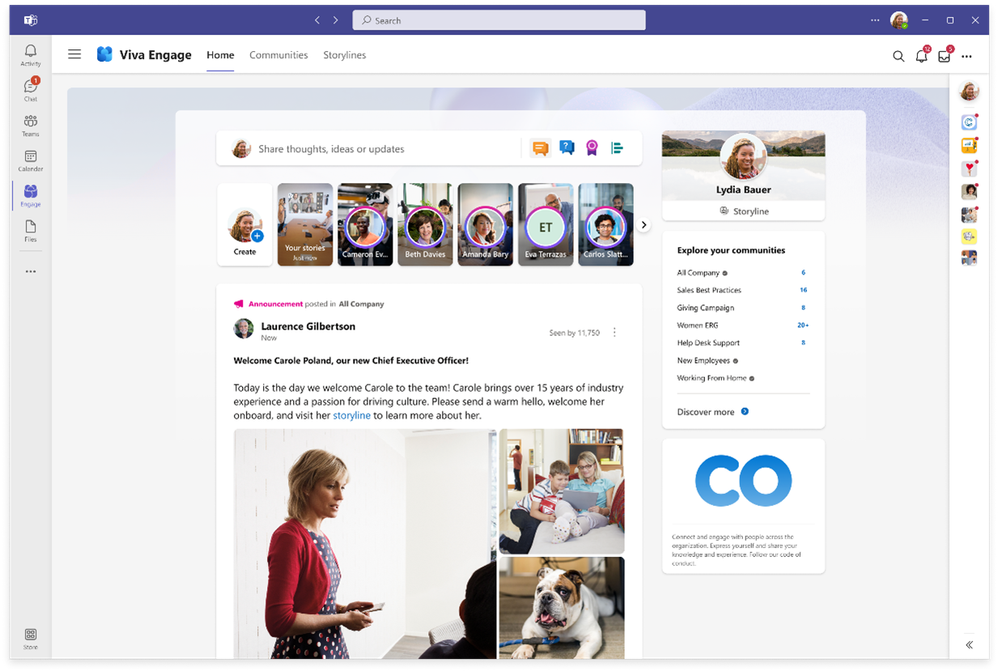
Discover announcements: Announcements serve as one way for admins to guarantee that their posts effectively reach their target audience, regardless of if the message is a discussion, poll, question or praise. First, we introduced an educational moment for community admins who have never used the announcement feature, explaining how and when they should use an announcement within their community. Secondly, we refined the icon's design to improve its discoverability. Announcements in Viva Engage get ~5x more viewers than a regular post. Learn more about announcements and how they deliver messages to employees to Outlook, Microsoft Teams or directly in Viva Engage.


Easily add images: To ensure employees are aware of the ability to incorporate images into their posts, we have introduced a simple icon to the publisher, making it easier for users to add images to their posts.  On average, posts with an image attachment get 1.5x more engagement than those without. 


‘Collapse’ the creation publisher: To enhance this interaction and clarify the button’s purpose, the 'X' button is now the 'collapse' button. Clicking on this button does not erase the content that you have already written within the publisher.


Announce any type of message. Add images to conversations. Collapse your messages.Announce any type of message. Add images to conversations. Collapse your messages.


Share thoughts with a discussion post type: To provide greater clarity on the purpose of a discussion post, the initial prompt has been updated to provide a more helpful nudge, "Share thoughts, ideas, or updates."


We continue to listen to your feedback and make it easier to create and contribute in Viva Engage. While these may seem like incremental changes, they have a big impact in helping employees start and continue to have conversations in Viva Engage.


Stay tuned on the blog and keep an eye on the Microsoft 365 Roadmap for ongoing updates and continuous improvements to Viva Engage.

✇Microsoft Tech Community - Latest Blogs - Yammer Blog

Introducing Viva Engage, now on iOS and Android!

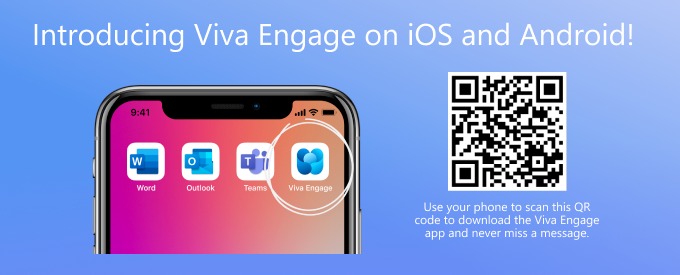
We are excited to announce that the Yammer mobile app has now been rebranded as the Viva Engage mobile app! Following the Yammer Communities app in Teams and Outlook rebranding, our mobile app will now reflect the same to align Yammer more closely with our Viva suite of employee experiences


With the new Viva Engage app on iOS and Android, you can stay connected with your colleagues, get updates on important projects, and share information easily, all from your mobile device. The app comes with a modern interface, support for device-specific features, and an improved user experience.  


evelynchan_0-1680904622057.png


Now, whether a user visits to Yammer.com or experiences the Viva Engage app in Teams, they will see the same content and communities directly from their mobile device.


With Viva Engage on iOS and Android, you can: 

  • Receive important messages and announcements 
  • Discover communities and conversations happening across your network
  • Upload pictures and videos, directly from your photo album 
  • React to messages and preview media right from the notifications
  • View Live Events while using other apps 
  • Drag and drop across apps to easily compose messages

For more information on how to set up Viva Engage on your mobile device, click here


To see the rebranded experience, update your Yammer mobile app. Or you can download the app on the App Store or Google Play and see the latest version.  


evelynchan_0-1681142652199.png


Viva Engage on the Play Store - Viva Engage (Yammer) - Apps on Google Play 

Viva Engage on the App Store - Viva Engage (Yammer) on the App Store (apple.com) 


The App Store and Play Store listings will continue to carry a reference to Yammer, as will the push notifications until Yammer.com is rebranded later this year. 


Existing Yammer (Viva Engage) mobile app users:  

Prior to updating, the Yammer app will continue to function like before! It is the same app, the rebranded experience will just come as a newer version of it. Existing installations will update depending on what your app settings are, either via auto-updates or you will need to manually update the app to see the rebrand. Once you have updated your app, you will notice the new Viva Engage branding and updated features. 


We are confident that you will enjoy the new Viva Engage mobile app and look forward to hearing your feedback.  

✇Microsoft Tech Community - Latest Blogs - Yammer Blog

Rebranding toolkit available and how to prepare your network for the Viva Engage Rebrand

We recently announced the rebranding of Yammer to Viva Engage and based on many conversations with our customers we want to give you the tools and resources to help prepare for the upcoming changes. In the rebranding kit, we have collected ideas, templates, logos and more for you to repurpose for your own needs and employees.


<Download the rebrand kit here>

Prepare with your stakeholders


Keep the stakeholders up to date on the changes by sharing the most recent announcements and blog posts. Use this as an opportunity to:


  • review governance and update your usage policy.
  • identify areas in Yammer where you may need to adjust and edit the info boxes, community cover photos or icons (example: a Yammer 101 Community may need to be renamed to a Viva Engage 101 Community).


Note: You can leverage sample resources including logos and other brand assets included in this rebrand kit. This includes a cover photo template that you can use to create new cover photos.


Outline a communication plan with your stakeholders to determine key messages and channels. The rebrand kit includes a sample plan with prompts for you to determine the channels, key messages, and timeline. The kit also includes an email template and Viva Engage announcement copy you can leverage. Be sure to update internal resources such as intranet pages that currently include the Yammer name.
 

VivaRebrand.png


Assess your current network


Before you get too far into the rebranding changes and communication to employees, take a step back and see if there is an opportunity to assess your current network. How could your organization use this moment as an opportunity to re-energize your network? Are there any upcoming internal moments/initiatives that would align with this change?


Many customers have capitalized on the rebrand to further support their community adoption efforts. For example, have you determined how to use All Company as a corporate communication channel? Or have you created a process or program around Official Communities today? Melanie Hohertz has written some great advice and best practices for making the most out of the existing product to maximize reach and engagement before any changes take place.


Additionally, you can choose to share your favorite success stories to reinforce how Viva Engage is benefiting the organization. Ask your champions for their success stories and see what could be included.


Involve your champions


Start a conversation with your champions about the rebranding of Yammer and what channels and resources they might want to consider renaming. Involve them by brainstorming a campaign to kick off broader conversation with employees. At Microsoft, we used #YammerisEngaged as an internal campaign for employees to share and highlight how Viva Engage has helped them feel connected over the years. Employee responses have taken us down memory lane while reminding us of the power of connection beyond geography and departmental silos.


Picture2.png


When key messaging is posted, encourage your champions and admins to help amplify and share to their communities. Have people share their favorite Viva Engage tips and tricks, using real examples and scenarios when possible.

If you need help starting a champion community, watch this video about Activating your Champion Program.


Inform your leaders


If you have leaders using Yammer today, encourage them to update or re-install their mobile apps to see the changes reflected. If leaders aren’t currently active, this may be an opportunity to start a conversation about engaging their employees in two-way dialog. By connecting leaders and employees to openly share, problem solve, and contribute across boundaries, Viva Engage empowers people and teams to be their best, have a voice, and feel included in the workplace.


Additionally, if they haven’t already set up delegates, use it as an opportunity to determine delegate access for posting.


Let your employees know


Communicate the upcoming changes with your employees and share key messages.


Here’s a sample message...


Yammer has been powering community experiences in Microsoft for over a decade. In that time, we’ve seen our use of Yammer influence company culture, bring employees together during times of trial, and accelerate knowledge sharing across departments. In short, Yammer is part of our strategy to help empower employees and impact change within our organization.

Last year, Microsoft took the first step to rebrand the Yammer Communities app for Teams into Viva Engage to align more closely with the Microsoft Viva suite that focuses on employee experience. Throughout 2023, Yammer will be rebranded to Viva Engage. This change will deliver an integrated experience and a single Viva Engage platform—wherever you choose to engage. The Yammer Communities App in Teams, Communities app for Outlook and Yammer mobile apps for iOS and Android will be rebranded to Viva Engage. Over the next year, all of Yammer will become Viva Engage. All the capabilities you enjoy today will continue to be available to you, just under a new name, Viva Engage. Like all rebrands, this shift will take time and occur over the coming months.


Throughout this change, you can expect a familiar experience. All the existing functionality you love, along with the latest features will remain the same. Small actions will be needed to update and communicate this change to everyone.


We’ll share updates along the way to keep you informed.

<Business leaders/owners of Yammer>


We hope that this blog post and rebranding kit starts the conversation with your organization and empowers you to inform your employees of the upcoming changes to Yammer.


Resources:


ICYMI –Viva Engage FAQ from the AMA Highlights  
 

We hosted a Microsoft Viva Engage Ask Me Anything event and had over 80+ questions asked and answered. We were very busy responding to many of the questions -- we pulled together some of the most commonly asked questions and grouped them together. And if you still have questions? Check out our resources including our rebranding kit on the Adoption Resources Site or post a comment below.  
 

Viva Engage: Web 

Q: How long will the redirect of old yammer URL to the new ones last? 

We will work out a URL redirection schema for Yammer.com URLs when we rebrand to Viva Engage to make sure the Yammer links will work as expected in Viva Engage, so you don't need to worry about updating your links when we rebrand.  
 

Q: Does Microsoft have any materials created for socializing this change to our colleagues? Any talking points or decks we can use? 

A: We just published a rebrand kit! The Viva Engage Adoption Center has resources for you to use https://adoption.microsoft.com/en-us/viva/engage/. 
 

Q: How is the transfer from Yammer to Viva Engage going to happen? What is the experience for organizations that aren't using Teams? 

A: From a mobile perspective, the Yammer app will update sometime in April through the respective app stores. The update to the mobile apps will happen just as any app gets its updates. Users will be responsible for updating their own apps. For the web, we don't anticipate dramatic changes, mostly cosmetic. We'll have more that we can share as we get closer to making the web updates which will be more in the September/October timeframe. 
 

Viva Engage: Outlook 

Q: Will you support interactive email notifications on desktop Outlook for Mac and Windows? Currently, you need to access Outlook on the web to get that level of full interactivity, especially when posting videos or link to videos. 

A: The feature parity between different Outlook platforms is an area we're explicitly working on right now. Our vision is for all Outlook users in Windows and Mac to have the same experience between desktop, Outlook on the Web, and mobile. In terms of videos and links, we're especially looking at how we can embed the content in emails viewed in Outlook desktop to match the app and OWA today. We don't have timelines for that work yet, but we know it's an issue and we want to fix it as users include more rich media in their posts. There are also updates coming to various versions of Outlook that will help solve some of these problems as well, so please stay tuned as we address from both the Viva Engage and Outlook sides. Thank you for the question! We know Outlook is so important for our customers' networks, and we want to make the experience as amazing as possible. 


Viva Engage: Desktop App 

Q: What will be the impact for the existing Edge/Chrome Yammer Progressive Web App (if any)? 

A: The PWA app for Yammer would be rebranded as well. We are currently validating if that would be done automatically or if there is a need for users to make the change. As soon as we have an answer, we'll post an update. We'll try our best to have this change done automatically so there's no effort needed from the users.   


Viva Engage: Webpart  

Q: How will the Yammer transition impact the SharePoint web part functionality? Rename of the webparts and potential reconfiguration? 

A: We are continuing to support these, and they will continue to work. The rename of these, and other integrations with Yammer, will come after we rename the core experiences (web, mobile). 


Viva Engage: API 

Q: Will the legacy Yammer API continue to function as this change is rolled out? We are using it extensively. Thank you! 

A: Current Yammer API's will continue to work against both Yammer and Engage. 


Viva Engage: Notifications 

Q: Are there any plans for notifications in the Viva engage application in Teams, it would be great to get notification and notification in the app in a similar way messages etc in teams. (like you have 2 missed messages) 

  1. We are working on a more refined approach of which types of notifications should appear as an email (i.e. an important Announcement) vs. going into other channels (i.e. Teams, Viva Engage Bell), so we will continue to update our customers as we work through these changes and updates. Thanks for your patience! 

 
Q: Will the notification email address "noreply@yammer.com" also change? 

A: Eventually we will be changing this, but not yet. We'll provide notice when this does change. 
 

Viva Engage: Admins 

Q: I noticed few enhancements to the Yammer network admin center reports. Do we foresee any major updates or changes to the admin center configurations? If so what will it be? 

A: We have a new admin center for managing Viva Engage, check out my full blog post here - Viva Engage Admin center overview | Microsoft Learn. We are continuing to bring more admin configurations into the new admin center, but for now you will see a integration between the Engage and the Yammer admin center for compliance and data export activities. Through the course of this year, more admin configurations will begin to live within the Engage admin center (given the rebranding). We will keep you posted as and when they release. 

 
Viva Engage: Leadership Corner, AMA, Campaigns 

Q: Do we need a separate license like Viva engage core to leverage the complete Viva engage experience? or is it included in the existing E5 license? 

A: The base capabilities that are available as part of 'Yammer' today, are available as part of the Viva Engage core license which is included in all the Microsoft 365 enterprise SKUs. There are new set of premium capabilities that we just released (https://techcommunity.microsoft.com/t5/microsoft-viva-blog/new-leadership-analytics-and-knowledge-experiences-for-viva/ba-p/3738818) that will require the Viva Suite license. More information about the Viva Suite license here: https://www.microsoft.com/en-us/microsoft-viva/pricing 

✇Microsoft Tech Community - Latest Blogs - Yammer Blog

Yammer is evolving to Viva Engage

Edit on March 3/7 - Rebranding timeline has been updated and added additional details. 


Yammer has been powering community experiences in Microsoft for over a decade. In that time, we’ve seen our customers use Yammer to influence their company culture, bring employees together during times of trial, share knowledge and empower employees with a voice that positively influences change within their organizations. During this period, you’ve inspired us, you’ve shaped us, and you’ve grown with us. Six months ago, we took the first step to rebrand the Yammer Communities app for Teams to Viva Engage, to align Yammer more closely with our Viva suite of employee experiences. Since then, we’ve continued to add new functionality to both Viva Engage and the Yammer apps including storyline. Over the last several months we’ve heard your feedback that having two apps surfacing similar experiences and the same services and content has introduced confusion and made it challenging to drive adoption and create clarity for end users.


Yammer will become Viva Engage


Over the next year, Yammer experiences will be rebranded to Viva Engage to better align with Microsoft Viva and become a key pillar of the Microsoft Employee Experience Platform. We are excited that this change will unify Viva Engage across web, mobile, Teams, Outlook and other experiences. This change is a direct result of the feedback we’ve heard from you, our customers, and it will help us deliver an integrated experience and a single Viva Engage platform across apps and endpoints—wherever you choose to engage.


I want to assure you that these branding changes will not change the current capabilities, value, or pricing of Yammer for existing Microsoft 365 customers and/or M365 SKUs. All the capabilities you enjoy today with your existing M365 license will continue to be available to you, just under a new name, Viva Engage.


New features are rolling out today


In September, we announced new capabilities coming to Viva Engage that enable leadership engagement, authentic expression, corporate communications, events, and knowledge sharing & discovery. Today, these experiences begin to roll out worldwide.


Newly-released features for Viva suite customers include:

  • Storyline Announcements for leaders
  • Leadership Corner for employees
  • Ask Me Anything Events
  • Social Media #Campaigns
  • Advanced Analytics
  • Answers in Viva


Answers in Viva is also available to Viva Topics customers.


Campaign.png

A look at the new campaigns experience in Viva Engage.


Learn more about these features here.


Getting the new features


- Native Mode: The new experiences require Native Mode, and soon we will require all networks to be upgraded to Native Mode to allow users, groups, and content to be compatible with and mapped to their counterparts in Azure Active Directory and Microsoft 365. Learn more about what this change means and how to plan your upgrade.

- New Admin Center: Admins will see a new Viva Engage Admin Center where they are able to complete tasks and assign roles and responsibilities for licensed Viva Suite users. Learn more about these new admin actions here.


What’s next for Viva Engage


In 2023, all of Yammer will evolve to become Viva Engage, retiring the Yammer brand. The first phase will start in March with updates to the Communities app for Outlook and a banner to announce the rebrand in Yammer mobile apps for iOS and Android.


In March the Communities app for Outlook will be updated to reflect Viva Engage branding. This change will happen automatically, with no action necessary to see this update.


In April, the Yammer mobile apps for iOS and Android will be renamed Viva Engage to provide a native mobile-first experience that’s optimized for social sharing and rich media. You will need to update the app to see the changes.


As we refine the timeline beyond March for the remaining Yammer endpoints to be rebranded to Viva Engage, we will continue to share details with you.


Join us for a Viva Engage AMA


The Viva Engage product and engineering teams look forward to building the future of this product with you throughout this year and beyond. To learn more about the changes announced today, join me February 23rd for an AMA with the product leaders from the Viva Engage team.


VivaEngageAMAupdated.png


So, what can you expect to happen next?


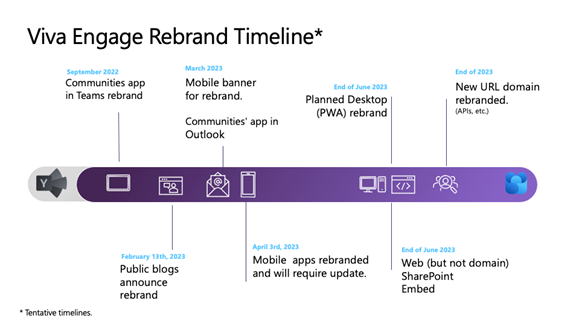
The rebrand to Viva Engage will happen in phases throughout 2023, with the Outlook and mobile apps to change first, followed by the web experience. Here’s a brief timeline:

  • February: You can expect an in-app rebrand banner to appear in the Yammer mobile app giving you advance notice of the change.
  • March: The Communities app in Outlook will also be rebranded to Viva Engage.
  • April: The Yammer mobile app becomes Viva Engage. It’ll still be discoverable as Yammer for a while (e.g., in Apple’s Spotlight Search). You can expect an in-app rebrand banner to appear in the Yammer.com web experience giving you advance notice of the change.
  • June 2023: The Yammer.com web experience becomes Viva Engage, with a few UX/UI enhancements. The Yammer.com URL will remain for a while as the team makes additional backend updates. The PWA (desktop app) will be rebranded. 
  • Later in 2023: Yammer.com URLs will be updated. We plan to support redirection for legacy URLs so that existing links and integrations continue to function.


Like all rebrands, this shift will take time. As we complete the rebrand of Yammer to Viva Engage, you can expect a familiar experience. All the existing functionality you love, along with the latest features, remain the same. We’ll share updates along the way to keep you informed. If you need assets for your rebranding efforts, check out the Rebranding Toolkit. 


Thank you for being our partner and guide on this journey. While this begins the retirement of our storied Yammer brand, it marks a thrilling new beginning for us to co-create with you experiences that will revolutionize the way your employees connect and thrive at work.


FAQ


Where can I get help setting up Viva Engage?
Reach out to FastTrack, your account manager, or learn how to deploy Yammer/Viva Engage here: https://docs.microsoft.com/en-us/yammer/configure-your-yammer-network/configure-yammer


You can also find helpful adoption materials at Viva Engage – Microsoft Adoption . We will continue to add materials for customers to use for communication and training as more capabilities become available.


Will the same content moderation and other admin policies set in Yammer be transferred over to Viva Engage?
Yes, all administrative policies and capabilities will remain.

✇Microsoft Tech Community - Latest Blogs - Yammer Blog

New Admin Center for Viva Engage

Introducing a new admin center to directly manage and enable capabilities for Viva Engage. This admin experience will be available within the Viva Engage Teams application for Microsoft Viva customers. Admins will now be able to easily plan the rollout of Viva Engage within the organization – configure and customize the application, manage security and compliance, manage core and premium Viva Engage features and overall build engagement for employees.

The following roles can access the Engage admin center: Microsoft 365 Global admin, Engage admin (Yammer administrator), Yammer network admin, Answers admin (Knowledge manager) and Corporate communicator role. The Engage admin center will reflect options based on the tenant’s license plan and the admin roles assigned.


Learn more about the Engage admin center here.


Screenshot 2023-02-10 at 2.15.08 PM.png


This experience will be available for customers who are in either Native Mode, Non-Native Mode, or have multiple networks in a mixed configuration.


Identify leaders and set up an audience


Admins can designate specific leaders and create an audience for them to engage directly with employees. Leaders and their delegates can post rich media messages or send an announcement to their audience. Leaders can also view specific audience sentiment analysis, find top trends, most engaged conversations, and understand overall reach and consumption.


New corporate communicator role


Assign the corporate communicator role to specific team members in your tenant. Corporate communicators have privileges such as creating or managing campaigns, defining leaders in an organization, and more to come as we evolve Viva Engage. This role was created to address the need to have a role catered towards content management in the organization that goes beyond a single community. Introducing the corporate communicator role allows you to designate individuals who can perform these actions without increasing the number of Engage admins, who are much more powerful. This role can be assigned or removed from users by the following admin roles: Global admin, Engage admin and fellow corporate communicators.


Enable Leadership Corner for employees


Additionally, Engage admins can disable/enable Leadership Corner for employees to gain a curated view of their leaders posting, reacting, and sharing in Viva Engage. Employees will also see upcoming Ask Me Anything’s (AMAs) from their leaders. Users identified as leaders will appear in the leadership corner directory, their activity will be highlighted in leadership corner for members of their audience, and they can connect directly with their audiences through storyline announcements.


Answers for your network


Admins with the appropriate license will see Answers on by default in Viva Engage. Global admins will be able to enable or disable the Answers and/or Rewards experience through the Engage admin center under Feature management. Global Admins can appoint additional Answers admins by assigning users to the Knowledge Manager role through AAD. Current and new users with the Knowledge Manager role will sync to Viva Engage as Answers admins. For the best Answers experience, it is best practice to have the same users that manage Viva Topics to manage Answers. Native Mode is a requirement for customers to use Answers and Yammer topics must be merged to Viva Topics.


As part of Answers, you can enable rewards and badging for employee contributions. Recognizing employee’s contributions to answer questions helps encourage knowledge sharing across the organization. You can also leave this up to the user to modify in their settings, if they would like to gain badges as based on Answers. Learn about Answers here.


What’s Next?


Stay up to date with what’s coming next for Viva Engage admin center and other upcoming capabilities in the Microsoft 365 Roadmap.


FAQ -


Q: Why do I see new service plans in SKU?
A: Service plans are the mechanism to provide experiences to our customers. Please note that Viva Engage Core service plan currently provisions Yammer services as well; this was done to maintain continuity with existing Yammer services.


Q: If I have disabled Yammer for my users, what action should I take to continue to disable Yammer?
A: If you have disabled Yammer for your organization, then make sure that you remove the Viva Engage Core license for those users as well. In addition, please ensure that you continue to enforce Yammer license checks for your users through Yammer admin settings. This will continue to disable Yammer access.


Q: What service plans enable Viva Engage?
A: The following service plans provision Viva Engage in your organization -
    1. Viva Engage Core
    2. Viva Engage Communities and Communication*
    3. Viva Engage Knowledge*


Feature enablement will still be controlled for you and your organization through enabling/disabling licenses to corresponding service plans.


*For more details, please refer to this blog post


Q: Why are these service plans already assigned to all the users?
A: The service plans have been enabled for all users to provide a smooth and easily controlled feature roll out process. If needed, you will still be able to control the roll out of features to users as per your requirements by disabling service plans for a specific set of users. For more details on controlling premium feature roll out, please refer to the MC Post# MC495879 (January '23) and MC495322 (January’23) for Viva Engage and Answers in Microsoft Viva premium features roll out respectively.


Q: What if I disable Viva Engage Core service plan?
A: If you disable the Viva Engage Core service plan then:
    a. If you have enabled Yammer for your users, this will have no change
    b. If you have disabled Yammer, this will make sure Yammer continues to be disabled


Q: My organization was already using Viva Engage features (like Storylines, Communities) before Viva Engage Core; Why do we have this new service plan now and what will change?
A: Currently, existing Yammer service plan provisions these features on Yammer as well as Viva Engage application in Teams for experience continuity. However, we are migrating to Viva Engage Core service plan to provision new features, while Yammer service plan will continue to provide access to Yammer.

Please note that currently Viva Engage Core service plan also enables Yammer access, to ensure your continued experiences with Yammer. If you wish to disable Yammer services, please make sure that you disable Viva Engage Core service plan for your users, in addition to disabling Yammer service plan.

✇Microsoft Tech Community - Latest Blogs - Yammer Blog

Viva Engage / Yammer Festival Recap 2022

In December 2022, we partnered with SWOOP Analytics to host our 2022 Viva Engage  Yammer Community Festival . We curated and designed this event with and for our customers and for you to learn from each other. We’ve broken them up into a few themes, listen to a few or all of them and get ready to take notes! 


Customers Highlights


Marks & Spencer – highlighting humanity during difficult times


Coles – Frontline focus


Kaiser Permanente – Activating your champion program


Uncief - 15X Growth in readership


Storyline


Storyline is a new adding to Viva Engage and Yammer and we have customers who are already using it and sharing their stories. Bryce Williams shares a rendition of Hamilton while talking about Storyline and how Eli Lilly is using Storyline – this is a must watch for tips and tricks to start using Storyline and stories in your organization.


National Grid: Using Storylines, best practices and how to make the most of storylines


Want to know more about what to do with Storyline, watch our Storyline PM show how uses this capability as a remote employee at Microsoft. 

Employee Engagement 


Curious about how to set up a campaign, using strategy and user generated content, these companies share their expertise of what works for creating content using Yammer.
Suncorp - Choose your own adventure Sammy Howarth – Senior Advisory Digital Channel


PHS Group transforming communication culture with support from leaders


Danfoss brings a smart worker community come to life, that involves everyone.


Frontline focus with Bendigo & Adelaide Bank


Community Management


Interested in learning more about community management and taking your communities to the next level? Check these sessions out to learn tactical ideas and practical tips that you can start using now.


90 day Club Community with Sarah Eqbal – Learning Strategy & Experience Lead


Best Practices for communications and collaboration at Philips


Juniper Networks: Community Branding


Viva Engage & Yammer Product Roadmap


Learn more about what’s new and what’s next from our product leadership. Deep dive into the product and find out more about what’s coming soon. 


It was great to be together again with our passionate global community of customers. A big thank you to the presenters, the Swoop Team and our participants for sharing throughout the event.  In case you missed any of the sessions, you can watch them here. Be sure to download the Swoop Analytics Benchmarking report too for more case studies and examples. 


✇Microsoft Tech Community - Latest Blogs - Yammer Blog

Register for the 2022 Yammer & Viva Engage Festival

We are excited to be partnering with SWOOP Analytics to host our 2022 Yammer and Viva Engage Festival on December 7th! This event is for our customers to learn from each another and hear how to build culture and community in your own organizations. If you are launching and not sure where to begin or are curious to hear what’s on the roadmap for Viva Engage, there are sessions for you!


Engage1.png

Agenda and Speakers 


This virtual event will span across European, Americas, and Asia Pacific time zones. Look at the agenda to see an idea of the types of stories and sessions that will be available and add them to your calendar! Feel free to attend sessions outside of your timezone.

 All sessions will be recorded to be able to watch on demand following the event. 


Customers from around the world are ready to share with you their experiences from all different types of industries and stages of adoption. Our speakers will share advice, tactics and best practices that you’ll be able to take and use at your organization. You’ll also hear directly from Microsoft and learn more about the future of Microsoft Viva.  Take a closer look at all the presenters here. 

Engage2.png


Nominate your colleagues for the Community Champion Award 


The Yammer Community Champion Award is an opportunity to recognize passionate community managers around the world who are committed to employee engagement, knowledge sharing, and collaboration in their Yammer networks and communities. 

As part of the Yammer Community Festival, we will announce regional winners of the Yammer Community Champion Award. 


Can you think of anyone who deserves this title? Tell us who you think should win this award! 


Register today! 


Secure your virtual seat and register now! We’re running the event as an interactive Microsoft Teams meeting with Q&A enabled. Bring your questions and ideas as we want to make the chat component active, with many voices heard. Speakers are there to prompt conversations in chat and be prepared to unmute!   

FAQs 


How much does this cost? 

This event is free so invite your whole team! 


Who should attend? 

With the variety of backgrounds from our speakers and other attendees, most roles will be able to find a similar role from one our customers that supports the work you do, if you are in marketing, communications, sales, product development or IT. Join us!

  Can I attend a session outside of my time zone? 

Yes! Feel free to attend any session that fits your schedule, regardless of your location. 


Will sessions be recorded? 

Yes, sessions will be recorded and made available after the event. 


How many people can I nominate for the Community Champion Award?

We do not have a set limit for the number of nominations by organization or person. Feel free to nominate all the Community Champions you know! 


How many winners will there be and how will they know that they have won?

There will be one winner per regional session and winners will be contacted in advance of session that they have been ‘shortlisted’ as a top contender for the Yammer Community Champion Award. This is to ensure the winners are present to virtually accept their award.


What do the Community Champion Award members win? 

There will be custom merchandise sent to each award winner. 

✇Microsoft Tech Community - Latest Blogs - Yammer Blog

Stories are now available in Public Preview

This year, Viva Engage introduced new ways to share, discover, and connect with coworkers across the organization through your storyline. On your storyline, you can create posts, ask questions, and share what you’re passionate about. And now, stories - short videos or photos are available in public preview in Viva Engage and Microsoft 365.


Stories overview


Stories deliver a familiar, delightful way to catch up and stay connected with your coworkers. You can find, browse, and engage with stories directly in your home experience or in the storylines tab in Viva Engage, Yammer, and coming soon to Outlook.


You can create or upload a story to share a quick update, capture an experience, celebrate a milestone, or highlight existing content. You can also use stories to connect with leaders and build your personal network to grow professionally and amplify your impact.


Yammer1.png


Create and interact with stories from across your organization


View stories from people you follow and suggested people. The stories carousel makes it easy to watch, react, and engage with stories. Stories remain on the carousel for 30 days, and stories stay on your storyline until they are deleted. Stories are stored in your OneDrive automatically.


Yammer2.png


Get started


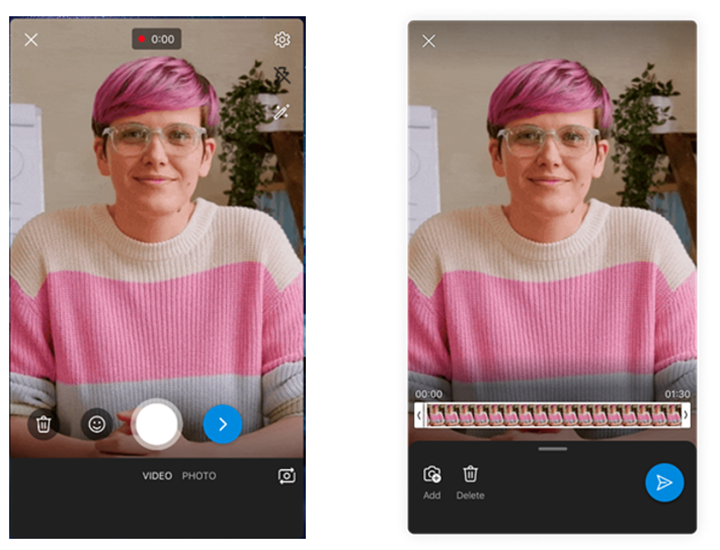
Upload or record up to a 3-minute video to share with your followers. You can record in portrait mode on mobile, or landscape by using your desktop camera. Simply record a video using the Yammer mobile app and upload it directly to your storyline or you can choose to upload an existing photo or pre-recorded video from your desktop or mobile device. You also have the option to add stickers or text to your story or make simple edits like trimming your video.


Yammer3.png


Use Stories today


As your organization begins to use stories, we encourage you to share your feedback about the experience with us!


Need more ideas about what to post or how to get your leaders involved? Check out the Storyline playbook to get tips and inspiration.


Stories FAQ


Do I need to enable storyline for my organization to use stories? Yes, learn how here.


How long do stories last and where are they stored? Your stories are always available on your storyline, and the photos and videos are saved in OneDrive.


Can anyone create a story? Yes, anyone in the organization can create a story.


Can I create a story on someone’s behalf? Stay tuned! Delegate posting is coming in the 1st quarter of calendar year 2023 to Viva suite users.


Can I create a story using the Yammer mobile app? Yes, you can use the Yammer mobile app to create stories, or you can use your desktop or Viva Engage app in Teams to create stories.


✇Microsoft Tech Community - Latest Blogs - Yammer Blog

Multiple Yammer networks within single tenants will no longer be supported (1:Many Mode)

Yammer is committed to strengthening the alignment of Yammer to Microsoft 365. This means we will no longer support tenants having more than one home Yammer network. This change will ensure Yammer networks have the same organizational boundaries as their corresponding M365 tenants. Integrating Yammer more fully into the Microsoft 365 ecosystem has been a multi-year effort and new networks created since October 2018 have not permitted this 1:Many configuration. Similarly, new Yammer networks provisioned after January 2020 have been created in Native Mode. In September 2022, the enforcement of Native Mode was announced. Automated network consolidation is an important prerequisite to reaching Native Mode and gaining access to broader safety, security, and compliance features. This will start on 5/1/2023 and continue through 5/1/2024.


Start the consolidation process


If you have secondary Yammer networks, you will lose access to all your secondary Yammer networks once you consolidate. Users from your secondary Yammer networks will be migrated to your primary network, but groups (communities) and data will be lost. In advance of this change, we strongly recommend that customers perform a full data export of their networks. You can read more about exporting data from your network here.


It is strongly advised that customers perform this network consolidation themselves. This will allow you to choose the time of the consolidation and allow the administrator to choose which primary domain will be associated with the remaining network.


Customers are encouraged to initiate network consolidation any time before or after 5/1/2023.


If you would like to self-initiate your network consolidation:

  •  There is a guide to network consolidation available to walk you through the process. A network administrator can run the network migration tool from within Yammer.


If you would like Microsoft to initiate your network consolidation:

  • You are not required to take any action. Microsoft will notify you via the M365 Message Center of your scheduled consolidation date and default primary network and domain. The network with the highest total message count will be the default primary network.
  • If you would like a different default primary network, contact Microsoft 365 support to log an exception.


If you need to postpone or schedule network consolidation around blackout dates:

  • Contact Microsoft 365 support to log an exception.


What happens next?


Post consolidation of the networks into 1:1 alignment with Microsoft 365, they will be upgraded to Native Mode. This provides access to the latest features in Yammer and ensures that customers are covered by the Microsoft 365 compliance features.


You can read more about our plans to ensure alignment to Native Mode here.


Need more help?

There are Microsoft partners that can help you migrate data from your secondary networks. Please reach out to your Microsoft Account Team or contact a partner for more information.


FAQ

Q: We know which network we want to be our primary network. How can we make sure that our networks are automatically consolidated to that specific network?

A: Please contact support to specify your desired primary network and domain.


Q: We do not want our networks consolidated. What can we do?

A: Please contact support to request an exception, which will include sharing business justifications, when the consolidation can proceed, and your plan to unblock it. This is not a permanent exception.


Q: We consolidated our networks, but we want to reverse the process so we can have a different primary network. Is that possible?

A: No. Network consolidation is an irreversible process.


Step-by-step instructions for network consolidation

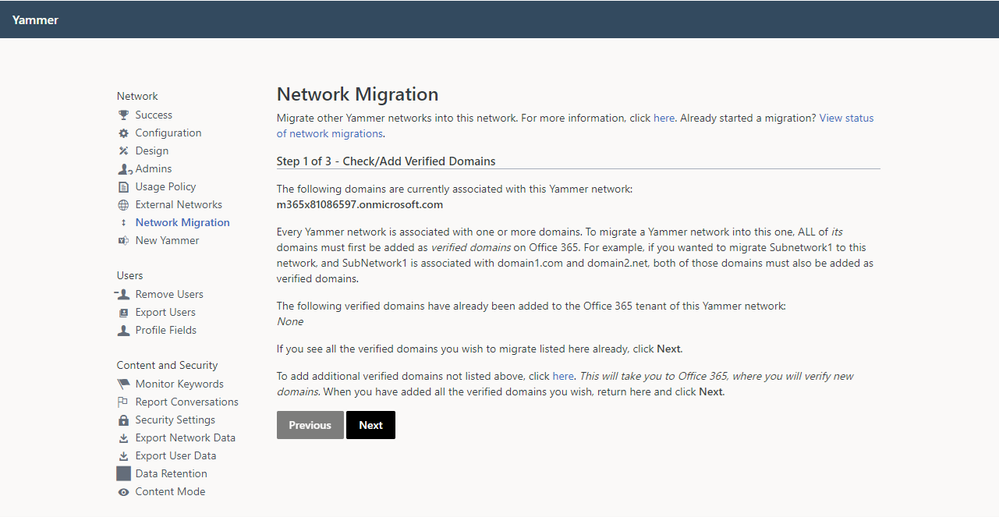
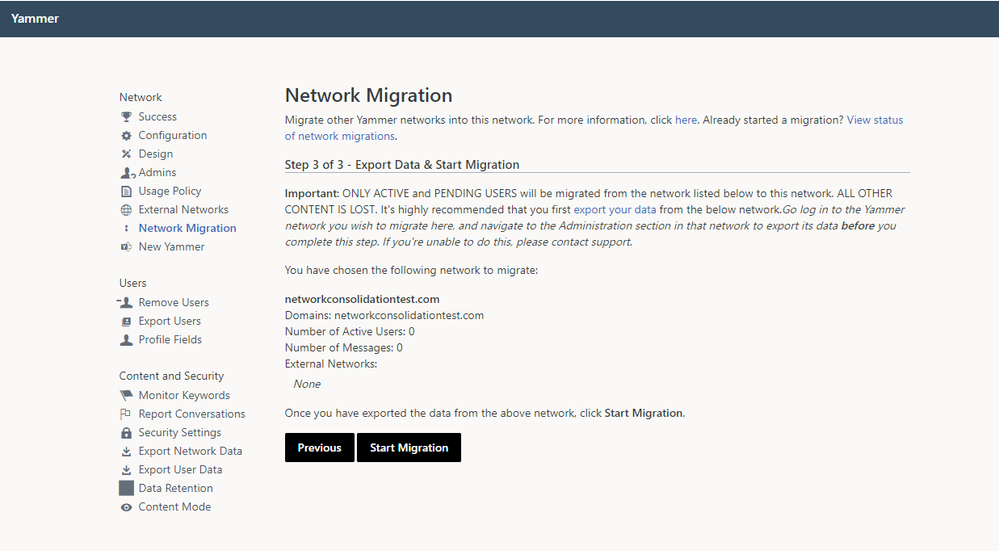
  1. As a network admin, visit the Network Migration page within the Yammer network admin settings of the primary network you want to keep. Make sure that all of the domains you wish to consolidate are listed. If they are not listed, you can follow the link to add and verify additional domains.

Picture1.png     

       2. Choose the network you wish to consolidate, and click Next.


Picture2.png


       3. Validate that you are ready to consolidate the selected network and have performed any desired data export prior to consolidation.


Picture3.png


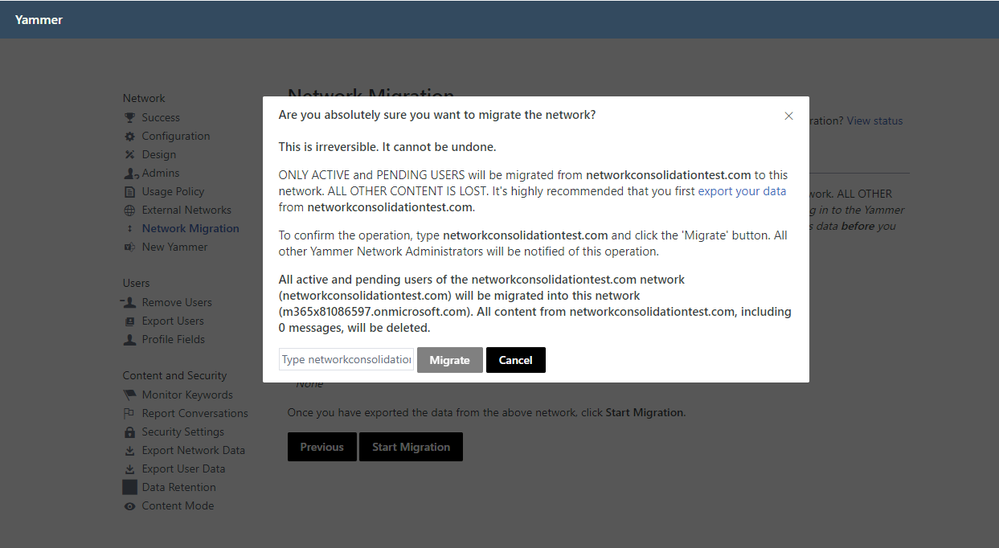
       4. Follow the instructions to initiate network consolidation.


Picture4.png


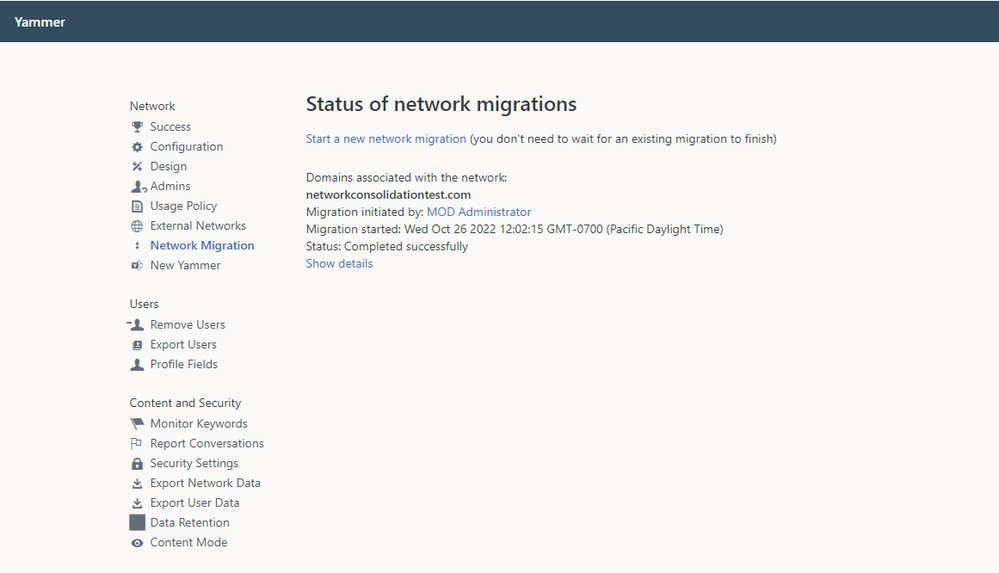
       5. You can view the status of your network consolidation on the Network Migration page.


Picture5.png


       6. When the consolidation is complete, the status will update.


Picture6.png


       7. Repeat this process until you only have one network associated with your tenant. Congratulations! You are now ready to migrate to Native Mode.


✇Microsoft Tech Community - Latest Blogs - Yammer Blog

New ways to connect with leaders and find solutions in Viva Engage

Yesterday we announced that some exciting new capabilities to Viva Engage, like Leadership Corner and Answers within Microsoft Viva.


Viva Engage connects employees and leaders through communities and conversations. We’re announcing powerful new leadership capabilities to unlock the potential of your organizations.


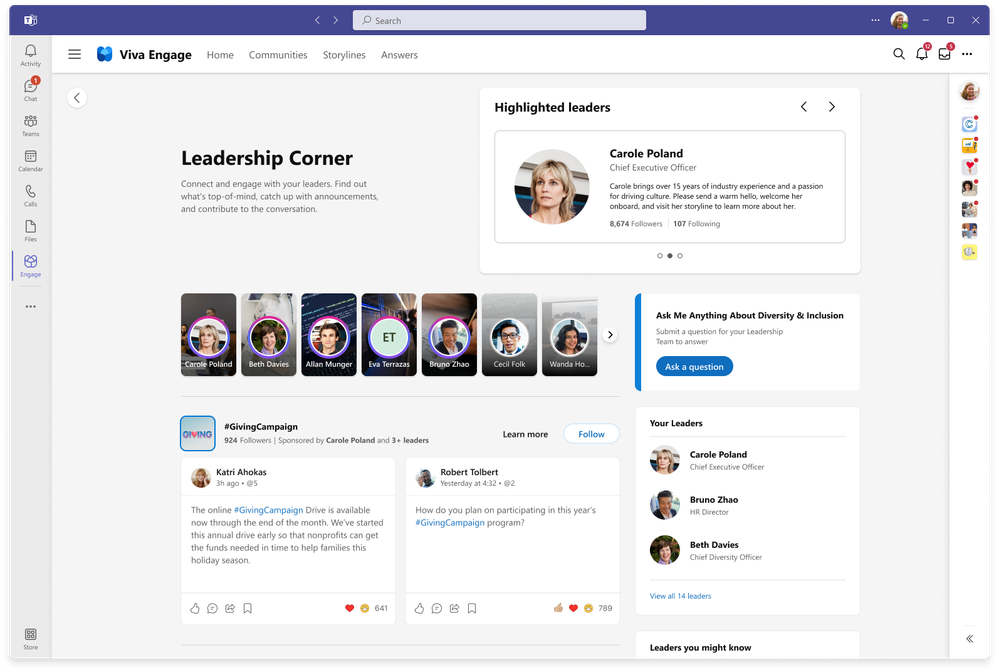
Leadership Corner is a new experience for employees to engage directly with key leaders. Employees can:

  • See and participate in activities from their leaders
  • Take surveys and join the discussion with #Campaigns and AMAs (Ask Me Anything)
  • Connect with new leaders across the company

MichaelHolste_0-1663873741863.png


For leaders, communicators, and their delegates we’re introducing:

  • A new leader dashboard with organizational analytics
  • Storyline announcements for reaching their teams
  • Powerful social #Campaign experiences
  • New “Ask Me Anything” style events


MichaelHolste_1-1663873797793.png


These experiences will bring leadership to life, fostering a two-way dialogue throughout the organization, and creating an environment where employees thrive. Learn more about these experiences in the Viva Engage announcement blog.


New Microsoft Mechanics Video featuring Viva Engage


Additionally, we released a walk-through video of Viva Engage on Microsoft Mechanics. I’ll show you a deep dive into how to build communities, share experiences with storyline and stories, a demo of the new leadership corner, Ask me Anything's and Answers within Microsoft Viva and more. Take a look and let us know how you are using Viva Engage in your organization.


Leadership Corner and Answers will be available in 2023 to licensed Viva suite users within the Viva Engage app.


Get Inspired


New to Viva Engage? Find best practices and inspiration on how to make the most of communities, conversations, and storyline in the new Viva Lookbook. And find even more playbooks and resources in our Viva Engage Adoption Center.


Learn more about what’s new for Microsoft Viva on the Microsoft 365 blog by Seth Patton, check out the Microsoft Viva website, and explore the Viva Innovation Brochure for the latest and greatest on how Viva empowers everyone to be their best.


- Michael Holste

✇Microsoft Tech Community - Latest Blogs - Yammer Blog

Storyline is now open for public preview

In July, we announced a new way to share and express yourself in Microsoft Viva Engage and Microsoft 365 called storyline. Storyline empowers everyone within your organization to connect and contribute, and enables your leaders to reach and engage employees. Through storyline, people can share updates, experiences, and perspectives to reach followers and colleagues across the organization. You can find, follow, and share to storylines from the applications you use every day including Outlook, Microsoft Teams, Yammer, and Microsoft Viva.


Meet Storyline


How to get Storyline

Yammer Network Admins will need to opt-in to public preview for their organization. Here is a detailed admin guidance for enabling and managing storyline.


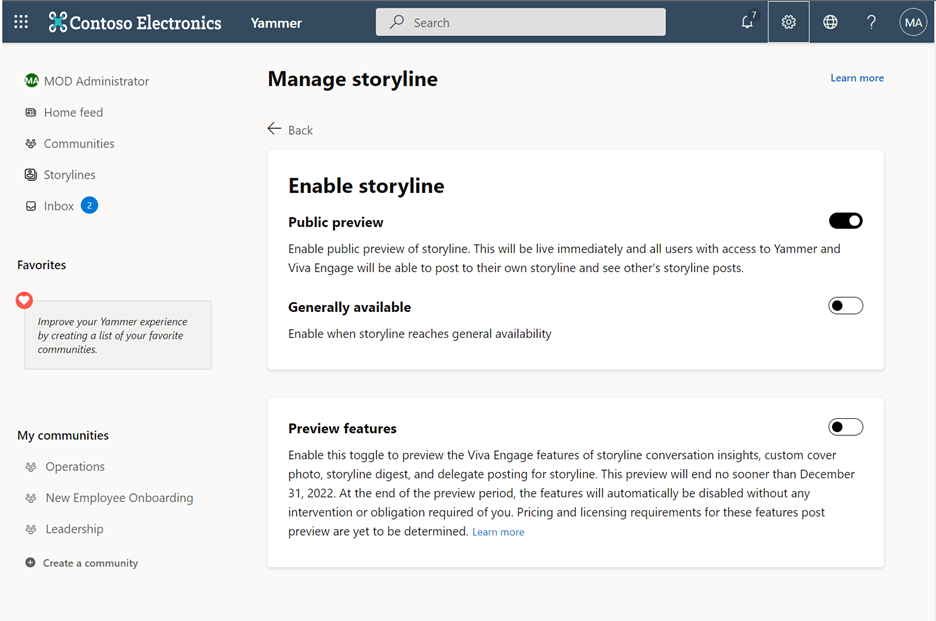
Yammer Network and Verified admins can manage storyline for their organizations by clicking the “Manage storyline” link that is behind the gear icon on Yammer.com, and behind the ellipsis in the global header for the Viva Engage app. 

Picture1.png


When you enable storyline in your organization, it becomes available to all internal users who have access to Yammer and Viva Engage. All internal users will have their own storyline feed on their profile pages and will be able to see, react, and respond to others’ storyline posts. Guests won't have their own storyline and won't be able to see or engage with storyline content from your internal users who do.


Storyline Preview

During public preview, admins will have two toggles for enabling storyline.


Enable public preview of storyline: This toggle is defaulted to the OFF position. Select this option if you would like to turn on storyline for your organization during public preview. This toggle will be removed once storyline has reached general availability.


Enable storyline when it reaches general availability: This toggle is defaulted to the ON position, which means storyline will become available to your users when the feature has been fully released. This control is independent of the public preview control, so that customers can choose whether or not to automatically enable storyline regardless of their usage of storyline in public preview.


Picture2.png


The Preview features toggle allows you to preview some of the features that will be available in Yammer and the Viva Engage app through Viva Engage. The features available through this preview will be available to all internal users in your tenant who have access to Yammer and Viva Engage, irrespective of license status. Pricing and licensing requirements for these features post-preview are yet to be determined.


Please note: stories are not included in the public preview at this time. Stay tuned for more information on stories.


Using Storyline

To learn more about how you can use Storyline, check out this guidance to get started. We’ve also created a Storyline Playbook for additional tips and inspiration.


Catch the recording of September's Yammer Brainstorm session as our customers shared great ideas for how they are using and planning to use Storyline and Stories in their organization. 


References:


✇Microsoft Tech Community - Latest Blogs - Yammer Blog

Non-Native and Hybrid Yammer Networks are being upgraded

Over the years, Yammer has added a lot of functionality that improves compliance, security, and overall administration of networks to streamline network management. Many of these features require what is known as Native Mode, and all new networks are configured this way by default.


Soon, all networks that are not in native mode or are in a hybrid state will soon be upgraded to Native Mode to allow users, groups, and content to be compatible with and mapped to their counterparts in Azure Active Directory and Microsoft 365. Native Mode also provides other benefits, such as the ability to host Live Events in every Yammer community and simplify file administration through SharePoint. Most critically, Native Mode supports eDiscovery through the Microsoft Purview compliance portal, allowing your organization to collaborate safely and securely within your Yammer network. 90% of Yammer networks are in Native Mode today, including our top 10 largest networks. We have tools and resources for you to begin the migration process yourself or for you to have Microsoft start the process for your organization.


When will Native Mode migration upgrades start?

We will begin migrating networks on December 01, 2022, and continue the upgrades through October 2023. We will begin the automatic Native Mode migration with smaller networks  


If you prefer to control the timing of your upgrade, you may initiate the process on your own at any time by visiting the M365 Native Mode page within the Network Admin pages of Yammer.


If you need to postpone or schedule your migration around blackout dates, please contact support by January 1st, 2023


How will this affect your organization?

In Native Mode, your Yammer network will no longer have the following features:

  • Network-level guests
  • Email blocked lists
  • Secret groups

If your organization has active guest users, Azure Active Directory B2B guest functionality can be used for guests who reside in the same geography as the Yammer network (US guests for US networks; EU guests for EU networks). Guests will need to be reinvited to your network.


If your organization currently uses an email blocked list to manage access to your Yammer network, you can continue to manage access from the Azure Active Directory Portal. Learn more by visiting Turn off Yammer access for Office 365 users and Manage Yammer licenses in Office 365.


These feature equivalents are only available to networks in Native Mode. There is no feature equivalent to secret groups in M365; all groups must be public or private.


As part of the migration process, the Yammer administrator account will be added to all groups in the network, and files may be renamed.


What do you need to do to prepare?

If you would like to self-initiate your migration:


There is a step-by-step guide to Native Mode migration available. You can run an alignment report that will identify gaps in your current network alignment with Native Mode. It is critical that you back up your network’s data and communicate the migration to your users prior to running the Alignment Tool mentioned in the guide, as some data may be deleted during the process.


If you would like Microsoft to initiate your migration:


You are not required to take any action. You can run an alignment report that will identify gaps in your current network alignment with Native Mode. It is strongly recommended that you back up your data and communicate the migration to your users prior to your scheduled migration start date. If your alignment report reveals any blockers to migration, you can log an exception with support.


If you need to postpone or schedule your migration around blackout dates contact support to log an exception.


More Support

We hosted a webinar and answered many Q&A's live on the call. Watch the recording for more information and best practices. 

This webinar recording can be accessed here. 

Native Mode Webinar.png


Stay tuned to the blog for more updates and product news. Let us know if you have any questions. 


Audrey Hosford, Product Manager 

Audrey is the product manager leading native mode migration for Yammer and Viva Engage. 


FAQ: Upgrading to Native Mode

Q: What is Native Mode and why are we upgrading to it?


A: Here is an overview of Native Mode. In Native Mode, your Yammer network is fully integrated with Microsoft 365, providing your organization with the richest Yammer experience possible today, as well as eDiscovery through the Microsoft Purview compliance portal. Requirements for Native Mode and a more detailed explanation of the migration process can be found here.


Q: How does Native Mode work with Microsoft Viva?


A: If your organization is interested in deploying Viva Engage, Native Mode provides full eDiscovery, legal hold, and compliance functionality. We strongly recommend that organizations upgrade to Native Mode to safely and securely deploy the new features offered by Viva.


Q: Can we opt-out of Native Mode?


A: No. You may log an exception with support in order to schedule your migration for a more convenient date (i.e. after completion of another IT process, to avoid a freeze period in your business, after a critical feature is generally available, etc.) but you may not permanently opt-out of Native Mode migration.


Q: How can we access the alignment report? What does the report contain?


A: Only tenant-level Global Admins can access the alignment tool and alignment report. You can access the alignment tool by logging into Yammer and navigating to Network Admin -> Native Mode for Microsoft 365. Click Generate Report to compile the alignment report. It will identify:

  • Which users are currently unmapped
  • How many files each user has stored in Private Messages
  • Which communities in your network are Private and Unlisted (Secret)
  • Which communities in your network allow external guests
  • Which communities in your network do not have owners or whose owners do not have M365 group creation rights


Q: What will happen to our files during migration?


A: All files previously uploaded to Yammer will be migrated to SharePoint. When files are moved to the SharePoint document library, only the latest version is moved over, and the version history is not copied. Files within private messages will be deleted. See Files in Native Mode - Yammer | Microsoft Docs for more information.


Q: What will happen to our Yammer groups during migration?


A: All external groups will be converted to internal groups. Private unlisted groups will no longer be supported. The alignment tool will connect all of your aligned groups to Microsoft 365. Groups without owners who have Microsoft 365 group creation rights will have the global admin added to the group as part of the migration process. Please check out Troubleshoot your Yammer network for Native Mode for Microsoft 365 - Yammer | Microsoft Docs under the Groups section for additional information.


Q: We started the migration process and we want to stop and go back to legacy Yammer. How can we do that?


A: Once started, the migration process is irreversible. Once your network has begun or completed migration, it cannot go back to non-Native Mode (legacy Yammer).


Q: We need cross-geo B2B guest functionality before we can migrate. What can we do?


A: Please determine the number of users impacted and contact support to log an exception. Your network will not be migrated until that feature is generally available.


Q: We need support for Gmail/Hotmail/personal email-based users before we can migrate. What can we do?


A: Please determine the number of users impacted and contact support to log an exception and file a DCR.

✇Microsoft Tech Community - Latest Blogs - Yammer Blog

Viva Engage is here!

Starting today, the Yammer Communities app for Teams is now Viva Engage, the newest app for Microsoft Viva, designed to connect people, find and share knowledge, express yourself, and find belonging at work.


Viva Engage gives leaders new tools to shape culture and align their workforce through new communication and engagement opportunities. For employees, it provides new ways to build a sense of community, strengthen relationships with coworkers, share their work and perspective, and find answers to their questions – all within Microsoft Teams desktop, web, and mobile. Viva Engage will be coming to Outlook soon. Viva Engage is available at no additional cost to most Microsoft 365 customers: It can be used by anyone enabled to use Yammer.


Picture1.png

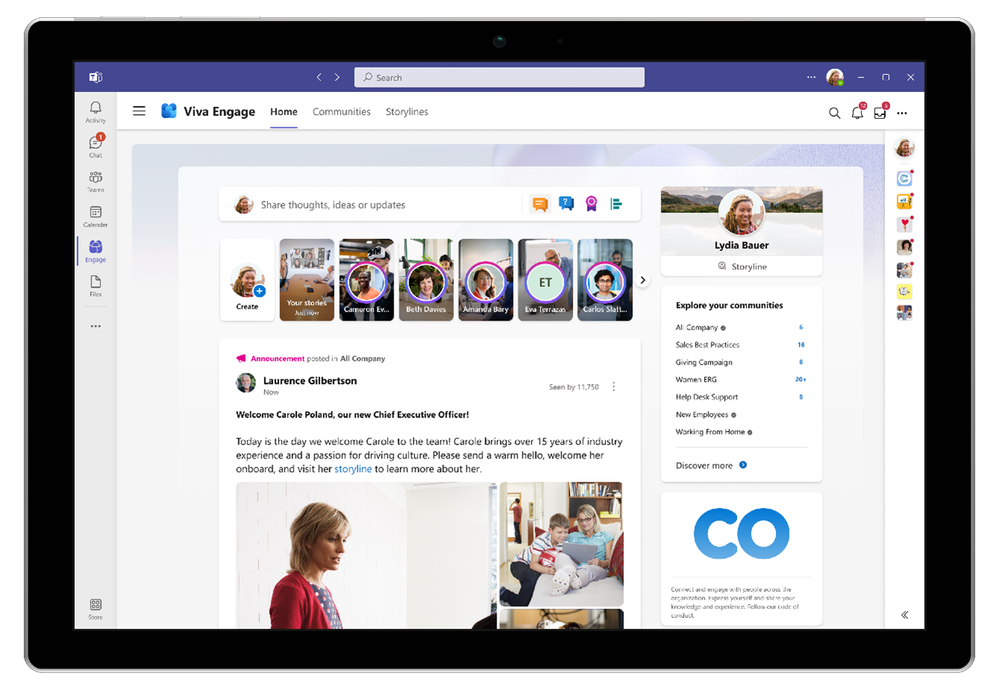
The new Viva Engage app in Teams.


Storyline and stories – a new way to share and discover

Viva Engage also introduces storyline and stories which enables employees to connect with colleagues and share and socialize their thoughts, knowledge, and experiences through conversations, images, and videos.


Learn more about what’s new for Viva Engage on the Viva blog.


Future of Yammer

Yammer is a key part of Microsoft 365 and Microsoft Viva and this change only impacts the Communities app for Teams & Outlook. Current users of the Communities app will be able to use Viva Engage with no additional licensing. The Yammer web experience and the native Yammer mobile apps will continue to be a part of Microsoft 365 SKUs and the same communities, storylines, and stories are made available through both Yammer and the new Viva Engage app. We are continuing to invest in Yammer and bring the powers of Yammer to Microsoft 365 and Viva.


How does Viva Engage and Yammer work together?

For nearly ten years, Yammer has been a leader in employee engagement. Now we are delivering these superpowers into the Microsoft Viva platform, to empower people and teams to be their best, have a voice, and feel included in the workplace. We know communities, conversations, cross-company relationships, and personal expression are critical to any thriving culture and organization – and essential pieces of employee experience.

Viva Engage will continue to show the same network, home feed, and communities that you see today in Yammer. Any content created in Yammer.com or mobile – including community conversations, storyline posts, and stories – will be viewable in Viva Engage. Likewise, content created in Engage will show up in Yammer web and mobile experiences. Viva Engage will continue to respect any custom branding done for the Communities app. To use Viva Engage, an organization must be licensed for Yammer.


How to get Viva Engage?

If you do not use the Communities app in Teams, you can simply install and pin the Viva Engage app globally in Microsoft Teams. Work with your IT Admins to pin, customize or adjust the app in Teams. If you are using the Communities app, the app will automatically update to Viva Engage branding starting today. The new Viva Engage UX will roll out from the end of August to the end of September.


Help your organization get ready for Viva Engage

Check out this blog for steps on how to get ready for Viva Engage. We have also published a new collection of adoption resources to help you deploy, rollout, and be successful with Viva Engage.


What’s Next?

Next, we’ll be opening up storyline for public preview in early September . This will appear as an option in the Yammer admin settings. We have a lot more to share about Viva Engage soon so keep an eye on the Microsoft Viva blog.


✇Microsoft Tech Community - Latest Blogs - Yammer Blog

The new Yammer Administrator role is now available in Azure Active Directory

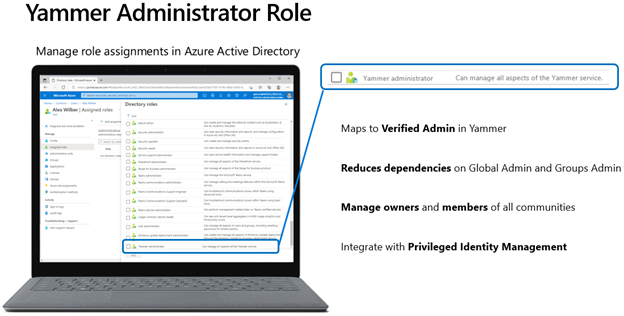
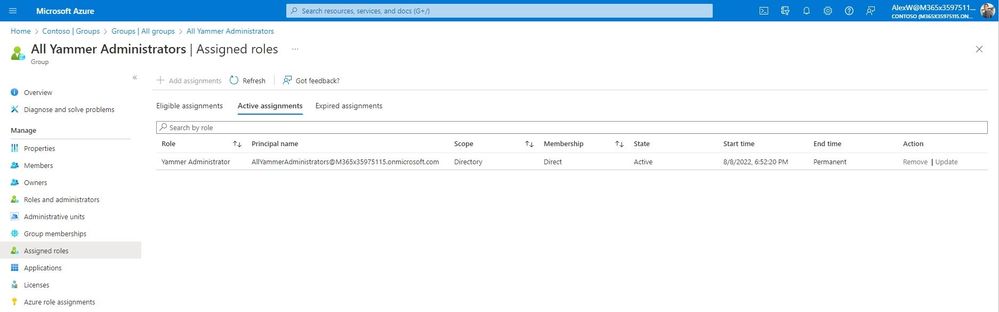
A new role specifically for Yammer administrators is now generally available in Azure Active Directory (AAD). This role allows an AAD administrator to designate who can manage the Yammer service, from directly within AAD. A user with the Yammer administrator role can manage all aspects of the Yammer service, along with modifying Yammer communities without becoming an owner or member of that community. 


Yammer Admin Role in AADYammer Admin Role in AAD


The Yammer administrator role will be available for customers who are in either Native Mode, Non-Native Mode, or have multiple networks in a mixed configuration. This new built-in role reduces dependencies on the Global administrator and Groups administrator roles to manage assets related to Yammer communities. 


Thanks to a coordinated effort across Microsoft 365, three core scenarios are available at launch:


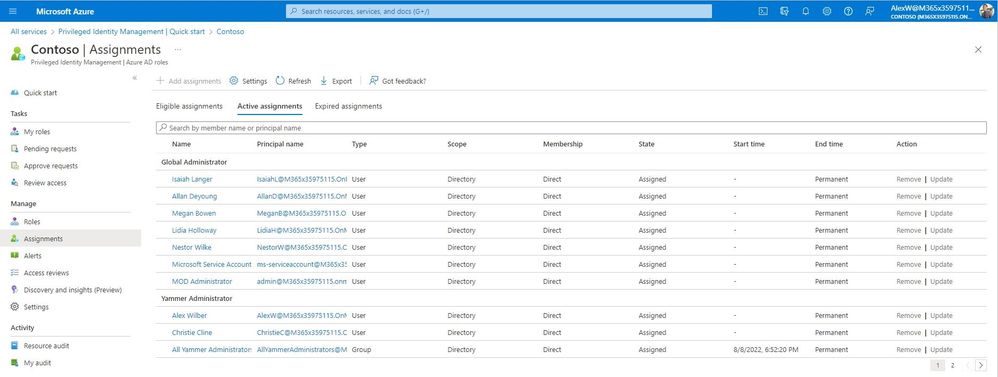
Privileged Identity Management: The Yammer Administrator role can be used in PIM for advanced management and control. Role assignments can be time-bound for specific start and end dates and integrate seamlessly with approvals and access reviews.

YammerAdministratorRole_02_PIM.jpg


Group-Based Role Assignment: Customers can use an Azure AD group to assign the Yammer Administrator role to a collection of users. This process allows companies to manage onboarding processes at scale and leverage existing governance workflows for auditing group membership.

YammerAdministratorRole_03_Group-BasedRoleAssignment.jpg


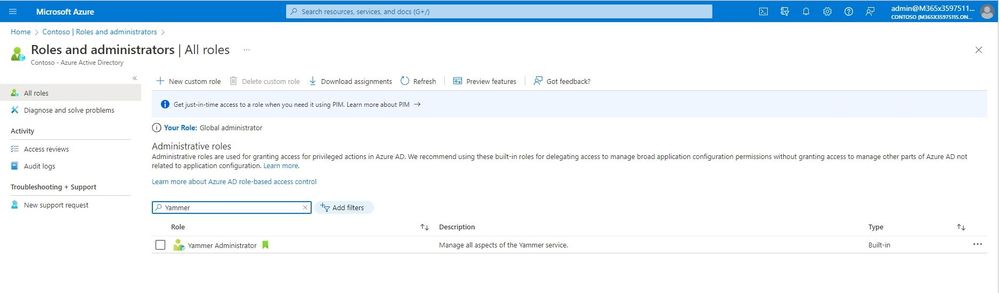
Azure Portal and PowerShell Role Assignment: The Yammer Administrator role has been integrated to both the Azure portal and Azure PowerShell commands, providing ultimate flexibility for role administrators.

YammerAdministratorRole_05_YammerAdministratorRoleCropped.jpg

How does the Yammer administrator role work? 

An admin who manages AAD roles will assign the Yammer administrator role from within AAD. Typically, this action is performed through the AAD user experience and is performed by a Global administrator or a Privileged role administrator.


Assigned Yammer Admin in AADAssigned Yammer Admin in AAD


Once the Yammer administrator role is assigned to a user in AAD, the assignment will be synchronized to the Yammer service. That user will appear in Yammer as a Verified Admin. From that point forward, the user can perform all actions available to a Verified Admin.  


Examples of some of the tasks that the Yammer administrator role can complete in AAD: 

  1. Change a community from public to private, or private to public 
  2. Delete a community 
  3. Modify owners and members of a community without being an admin of the group/community 

If the role is removed from the user in AAD, the service will synchronize that change to Yammer and the user will no longer have Verified Admin privileges.  


Responsibilities of a Verified Admin within Yammer 

As a verified admin, a user can configure security settings, monitor keywords for appropriate use, manage data retention, and export data. A verified admin can also perform integration with other tools. Additionally, a verified admin can perform the actions of a network admin, such as configure network settings, logos and colors, usage policies, and manage internal users and guests. These capabilities are provided to the Yammer administrator role in AAD since the Yammer administrator role maps to Verified Admin. For more details of each admin role, review this support article for a breakdown and their tasks. 
 

Best Practices for the number of Yammer Admins in your network  

Typically, we see that our customers have between 1-3 Yammer Admins, however this number varies based on organization’s size and number of members in the Yammer network. Having a core team from HR (Human Resources), IT (information technology), Communications, and Legal is a good place to start, and we recommend setting up a process for governance for addressing concerns and issues. With this new role in AAD, you might consider who else needs to have administration capabilities at your organization who did not have it prior. Learn more about best practices for Yammer governance here. 


FAQ  

Is this available in Native Mode and Non-Native Mode networks? 

Yes. Users can be assigned the Yammer Admin role in AAD regardless of Native Mode status.  


Will existing Verified Admins in Yammer automatically be assigned the new AAD role?  

No. Any Verified Admins created directly in Yammer need to separately be assigned the role of Yammer administrator in Azure Active Directory. 


Can a user with the Yammer Administrator role perform Native Mode migration?  

No. Due to the scope of changes involved in a Native Mode migration, only users assigned the role of Global administrator can conduct a migration to Native Mode.  


Can this role co-exist with Verified Admins and Network Admins assigned directly in Yammer? 

Yes. Users can be assigned the Yammer administrator role in AAD while other users are assigned Verified Admin or Network Admin within Yammer. 


Can the Yammer administrator role modify membership directly in Yammer? 

Since the Yammer Administrator role maps to Verified Admin, users will only be able to modify membership of public communities from directly within Yammer. However, the Yammer administrator role can manage owners and members of all Yammer communities from within AAD. 


Additional resources and FAQs can be found:  


The Yammer administrator role in AAD allows administrators to assign roles and permissions using similar processes developed for other built-in roles, such as the SharePoint administrator and Teams administrator roles. Use the new Yammer administrator role to manage Yammer today! 


✇Microsoft Tech Community - Latest Blogs - Yammer Blog

Are you ready for Viva Engage? 10 ways Yammer customers can get ready now

Last week, we introduced Microsoft Viva Engage, an evolution of the current Yammer Communities app for Microsoft Teams. Beyond community and virtual event experiences, it also features new consumer-like expression capabilities called Storyline and Stories, making it easier for employees to connect with colleagues and share and socialize their thoughts through conversations, images, and videos — similar to how they do within their personal social platforms.

Introducing Microsoft Viva Engage


Based on our initial conversations with customers, partners, and our product teams, we’ve heard some similarities about how to prepare for the upcoming change with Viva Engage. Here’s a list of things that network admins, community managers, and stakeholders can do to get ready for Viva Engage coming this August.


1. Watch the playback of the latest Yammer Best Practices call and learn about Viva Engage, what’s coming and when, and see a live demo of the new Viva Engage experiences, including storyline and stories. Many questions were asked and answered by our product teams. The recording is available here. Download the slides here


2. Install and pin the Communities app globally in Microsoft Teams. Work with your IT Admins to pin, customize or adjust the app in Teams. The app will automatically update to Viva Engage branding at the end of August. The new Viva Engage UX will rollout from the end of August to the end of September.


Picture1.png


3. Inform community admins that this change is coming. Let community admins know to prepare for Viva Engage. For example, branded communities are very useful to help bring recognition when navigating between communities and feeds within Viva Engage. If they haven’t already, encourage community admins to upload cover photos, edit information about the community, and upload community icons. Communities with icons will be easily recognizable on the right rail in the list of communities.


Resources: Cover photo template, Community of Interests deep dive


4. Consider moving to Native Mode. While this is not required to use Viva Engage, it's highly recommended for your organization to get your Yammer network into Native Mode. As we continue to build new functionality, having your Yammer network in native mode will be a requirement. Learn more about our Native Mode Alignment tool and what is required for Native Mode.


5. Help your users understand their notifications in Microsoft Teams. With the Viva Engage app installed, users will receive notifications in the Activity feed in Teams. By selecting the setting wheel in their Activity Feed, users can choose which Viva Engage notifications will appear, including Storyline.


Picture2.png


6. Use the opportunity to re-invigorate Yammer communities. Use the launch of Viva Engage and the Storyline capability to drive excitement and engagement in your Yammer network. For example: A) Help leaders to start posting on their Storyline. B) Create enthusiasm among your new hires with the Viva Engage app in Teams. C) Run a campaign to encourage users to add a cover photo to their Storyline. Use the opportunity to demonstrate the value that communities bring to your organization.


Resource: Campaign Playbook, Yammer Adoption Center


7. Update and review your Yammer governance, strategy, and user terms. Along with using Viva Engage to help you attract new users to your Yammer network, take the opportunity to review your current Yammer governance – how do you support community admins? How do you clean up old communities? How do you allow users to create new communities? You can also use the opportunity to review and update your usage policy or even to review your entire Yammer strategy. Need some good starting points? Watch our Customer Best Practices session on making Yammer a success.


8. Communicate and prepare users by updating your documentation. Here’s a starter FAQ (Frequently Asked Questions) for you to download, review and edit to be a resource that you can customize for your organization. Use this asset to help address the concerns and highlight the changes for your end users. Plus check out last week's blog post with more FAQs. 


Resources: Viva Engage Customizable FAQ; Viva Engage Video


9. Download the Microsoft Teams mobile app to access Viva Engage. The Communities app in Teams in iOS and Android will also be rebranded to Viva Engage, however the UX remains largely the same. Learn more about the mobile app here.


Picture3.png


10. Plan your Viva Engage integrations across the Microsoft Viva Employee Experience suite. Viva Engage is a great place to start your Microsoft Viva Employee Experience journey. By deploying Viva Engage, you will create dynamic two-way engagement that adds richness and further personalization in Viva Connections. The Viva Engage connection to Viva Topics enables social knowledge and conversation to complement your more static organizational knowledge (such as files). 


We are looking forward to what’s ahead and ready to help prepare you and your organizations for the upcoming changes. Stay tuned as we continue to share more and join us for the upcoming Best Practice session for the future of Yammer and Viva Engage. 


❌