Vue lecture

Il y a de nouveaux articles disponibles, cliquez pour rafraîchir la page.
✇mountainss Cloud and Datacenter Management Blog

Revolutionizing Hybrid Cloud Storage with Azure Container Storage Enabled by Azure Arc

In the dynamic world of cloud computing, Microsoft continues to innovate with solutions that empower organizations to manage hybrid and multi-cloud environments effectively. One such groundbreaking solution is Azure Container Storage enabled by Azure Arc. This technology is designed to simplify and enhance the management of persistent storage for Kubernetes clusters, providing a unified and adaptive approach to cloud storage.

What is Azure Container Storage Enabled by Azure Arc?

Azure Container Storage enabled by Azure Arc is a first-party storage system designed for Arc-connected Kubernetes clusters. It serves as a native persistent storage solution, offering high availability, fault tolerance, and seamless data synchronization to Azure Blob Storage. This system is crucial for making Kubernetes clusters stateful, especially for Azure IoT Operations and other Arc services.

Key Features and Benefits

  1. High Availability and Fault Tolerance: When configured as a 3-node cluster, Azure Container Storage enabled by Azure Arc replicates data between nodes (triplication) to ensure high availability and tolerance to single node failures.
  2. Data Synchronization to Azure: Data written to volumes is automatically tiered to Azure Blob Storage, including block blob, ADLSgen-2, or OneLake. This ensures that data is securely stored and easily accessible in the cloud.
  3. Low Latency Operations: Arc services, such as Azure IoT Operations, can expect low latency for read and write operations, making it ideal for real-time applications.
  4. Simple Connection: Customers can easily connect to an Azure Container Storage enabled by Azure Arc volume using a CSI driver to start making Persistent Volume Claims against their storage.
  5. Flexibility in Deployment: Azure Container Storage enabled by Azure Arc can be deployed as part of Azure IoT Operations or as a standalone solution, providing flexibility to meet various deployment needs.
  6. Platform Neutrality: This storage system can run on any Arc Kubernetes supported platform, including Ubuntu + CNCF K3s/K8s, Windows IoT + AKS-EE, and Azure Stack HCI + AKS-HCI and Azure Local.

Microsoft Azure Local solution


Azure Container Storage Offerings

Azure Container Storage enabled by Azure Arc offers two main storage options:

  1. Cache Volumes: The original offering, providing a reliable and fault-tolerant file system for Arc-connected Kubernetes clusters.
  2. Edge Volumes: The newest offering, which includes Local Shared Edge Volumes and Cloud Ingest Edge Volumes. Local Shared Edge Volumes provide highly available, failover-capable storage local to your Kubernetes cluster, while Cloud Ingest Edge Volumes facilitate limitless data ingestion from edge to Blob storage.

Use Cases and Applications

Azure Container Storage enabled by Azure Arc is particularly beneficial for organizations with hybrid and multi-cloud environments. It supports various use cases, including:

  • IoT Applications: Ensuring data integrity and synchronization in disconnected environments, making it ideal for IoT operations.
  • Edge Computing: Providing local storage for scratch space, temporary storage, and locally persistent data unsuitable for cloud destinations.
  • Data Ingestion: Facilitating seamless data transfer from edge to cloud, optimizing local resource utilization and reducing storage requirements.

Conclusion

Azure Container Storage enabled by Azure Arc represents the future of hybrid cloud storage, offering seamless onboarding, unified management, and adaptive capabilities. By leveraging this technology, organizations can overcome the challenges of hybrid and multi-cloud environments, streamline operations, and drive innovation.

Whether you’re just starting your cloud journey or looking to optimize your existing infrastructure, Azure Container Storage enabled by Azure Arc provides the tools and guidance you need to succeed. Embrace the power of this transformative solution and unlock new possibilities for your organization.

Jumpstart Drops is a good begin in your test environment, before you begin in production. Here you find a Jump start drop about “Create an Azure Container Storage enabled by Azure Arc Edge Volumes with CloudSync” by Anthony Joint.

More information:

Introducing Azure Local by Cosmos Darwin

Microsoft Adaptive Cloud

Announcement! Edge Storage Accelerator YouTube video. 

What is Microsoft Azure Arc Services?

✇mountainss Cloud and Datacenter Management Blog

Unlocking the Future of Hybrid Cloud Management with Azure Arc, Windows Admin Center, and Azure Copilot

Microsoft Azure Arc enabled Windows Server 2025 Insider Preview in Windows Admin Center

In the ever-evolving landscape of IT infrastructure, the need for seamless integration and management across on-premises, edge, and cloud environments has never been more critical. Enter Azure Arc-enabled servers, Windows Admin Center, and Azure Copilot—three powerful tools that together redefine hybrid cloud management.

Azure Arc: Bridging the Gap

Azure Arc is a game-changer for organizations looking to extend Azure management capabilities to any infrastructure. Whether your servers are on-premises, at the edge, or in another cloud, Azure Arc enables you to manage them through a single pane of glass. This unified approach simplifies operations, enhances security, and ensures compliance across diverse environments.

With Azure Arc, you can:

  • Deploy and manage Kubernetes clusters anywhere.
  • Apply Azure policies consistently across all your resources.
  • Leverage Azure services like Azure Monitor and Azure Security Center for comprehensive monitoring and security.

Windows Admin Center: Simplified Server Management

Windows Admin Center (WAC) is a browser-based management tool that brings simplicity and efficiency to server management. Integrated with Azure Arc, WAC provides a centralized platform to manage your Windows Servers, whether they are on-premises or in the cloud.

Key features of Windows Admin Center include:

  • Intuitive Dashboard: A user-friendly interface that provides a holistic view of your server environment.
  • Streamlined Management: Tools for managing server roles, storage, networking, and more.
  • Azure Integration: Seamless connectivity with Azure services, enabling hybrid scenarios like Azure Backup and Azure Site Recovery.

Azure Copilot: AI-Powered Assistance

Azure Copilot is the latest addition to the Azure ecosystem, bringing AI-powered assistance to your fingertips. Integrated with both Azure Arc and Windows Admin Center, Azure Copilot leverages machine learning to provide insights, recommendations, and automation, making your IT operations smarter and more efficient.


With Azure Copilot, you can:

  • Automate Routine Tasks: Reduce manual intervention with intelligent automation.
  • Gain Actionable Insights: Use predictive analytics to anticipate issues before they occur.
  • Enhance Security: Receive real-time security recommendations and threat detection.


The Power of Integration

The true strength of these tools lies in their integration. Azure Arc extends Azure’s reach to any infrastructure, Windows Admin Center simplifies server management, and Azure Copilot adds a layer of intelligence and automation. Together, they create a robust hybrid cloud management solution that empowers IT professionals to manage complex environments with ease.
This is called Microsoft Adaptive Cloud

Imagine a scenario where you can deploy a Kubernetes cluster on-premises, manage it through Windows Admin Center, and use Azure Copilot to automate updates and monitor performance—all from a single interface. This level of integration not only enhances operational efficiency but also ensures that your infrastructure is secure, compliant, and ready for the future.


Conclusion

As organizations continue to navigate the complexities of hybrid cloud environments, the combination of Azure Arc, Windows Admin Center, and Azure Copilot offers a comprehensive solution that simplifies management, enhances security, and drives innovation. Embrace the future of IT infrastructure management with these powerful tools and unlock new possibilities for your organization.

Ready to transform your hybrid cloud strategy? Dive into the world of Azure Arc, Windows Admin Center, and Azure Copilot today and experience the future of IT management.

For more information on these tools and how they can benefit your organization, check out the latest updates from Microsoft Docs:

Microsoft Azure Arc documentation

Microsoft Azure Copilot documentation

Microsoft Azure Windows Admin Center for Arc Enabled Servers

✇mountainss Cloud and Datacenter Management Blog

My Highlights Day 3 of Microsoft Ignite 2024

Mark Russinovich and Scott Hanselman on Stage talking about Copilot, ChatGPT and AI

Scott and Mark learn responsible AI

Always check the output of AI 😉

Microsoft Azure Local 

NEW Microsoft Introducing disconnected Operations (Preview) ✅

Azure Local with disconnected Operations
Awesome!

NSG with Azure Local ✅🚀

Security in Azure Local video


Defender for Cloud

Get Started Today 🚀

Azure Linux 3.0 on AKS kubernetes in Preview

QuickStart

AKS Automatic
Dynamic System Node pool in Preview

More Buit-in policies for AKS

Auto-Instrumentation with Application Insights
Preview in January 2025

Enhanced Risk & Attack Path Analysis for Containers

Microsoft Azure Container Registry – Image Auto Patching in Private Preview
Security on Vulnerabilities

Network Isolated Cluster in Public Preview
Here you find Best practices for cluster isolation in Azure Kubernetes Service (AKS)

Microsoft Container Vulnerabilities Management

Container Vulnerabilities Assessment throughout the software development lifecycle.

Defender for Cloud Container Security
Continuously reduce risks.

Attack path and remediation on your AKS Kubernetes Cluster Inside overview

Container Security posture from Code to runtime is important! ✅

Microsoft Azure Kubernetes Fleet Manager Auto-Upgrade

Microsoft AKS Static Egress Gateway for Pod-level Access Control.

Block pod access to the Azure Instance Metadata Service (IMDS) endpoint (preview)

Trusted launch for Azure Kubernetes Service (AKS)

Seccomp Default Public Preview

Node Auto Provisioning GA January 2025

Comprehensive Security Controls overview

Experience Security Copilot Today ✅🚀

My Conclusion

Always start small with New innovative features like Azure Copilot or making your Adaptive Cloud first in a test environment.
Do your own experiences, testing and make your Secure architecture designs for your production. Keep it simple because it can be quick complex with a lot of dependencies. Microsoft works hard to make your life more easy in this changing IT landscape 👍
I like to thank all the people who supported the Microsoft Ignite 2024 event, it was Awesome with a lot of Great News. 🚀

Here you find the Microsoft Ignite 2024 Book of News.


✇mountainss Cloud and Datacenter Management Blog

My highlights Day 2 of Microsoft Ignite 2024

Microsoft Azure Adaptive Cloud approach enabled by Azure Arc.

Adaptive Cloud approach Key Services and Products.

Operate everywhere with AI-enhanced management and security

AI-enhanced Central Management & Security

Get Started with Azure Arc Jumpstart here

Welcome to the heart of our mission at Azure Arc Jumpstart, where we strive to transform your learning experience into a smooth and empowering journey. Our commitment is rooted in the principles that drive us forward:

  1. Enabling immediate engagement: Arc Jumpstart is designed to offer a seamless “zero to hero” experience. We understand the value of your time, and our goal is to enable you to dive right into Azure Arc, eliminating barriers and complexities.

  2. Comprehensive guidance: We provide more than just guides; we offer comprehensive, step-by-step instructions tailored for various independent Azure Arc scenarios. Our content is meticulously detailed, incorporating extensive automation, vivid screenshots, and insightful code samples. This ensures that your learning journey is not just informative but also visually enriching and deeply engaging.

  3. Unparalleled user experience: Our dedication lies in delivering a rich and immersive experience. We go beyond the basics, curating a user-centric environment that resonates with both beginners and seasoned professionals. Whether you’re setting up your environment on-premises or in the cloud, our guides empower you to focus on Azure Arc’s core values without being bogged down by technical intricacies.

  4. Embracing platform flexibility: We recognize the diversity of your infrastructure, and our mission is to provide a platform-agnostic approach. Arc Jumpstart accommodates your infrastructure, whether it resides on-premises or in the cloud. Our focus is to ensure that regardless of your setup, you can harness the true potential of the Azure Arc platform effortlessly.

Investments to further the Adaptive Cloud Approach 🚀

Introducing Microsoft Azure Local enabled by Azure Arc

Scott Hanselman about Visual Studio and Copilot

More AI development in Visual Studio or VSCode

Microsoft Windows 365 Link

This is Awesome, my next question is:
How fast will this solution be on Mobile?
Windows Hotpatch will be Available Spring 2025
for Windows 11 and Windows 365.

Windows Resilient Security Platform

Quick Machine Recovery in Insider program early 2025.

Microsoft working together with Cybersecurity & Infrastructure Security Agency

Smart App Control only Verified apps are allowed.

Windows Hello for Business Update with support for passkey.

Administrator Protection.

Personal Data Encryption to Windows Enterprise
Only decrypted via Windows Hello

Microsoft 365 in File Explorer

Windows Search is Cool 😎
Coming in 2025

My Conclusion

Make your own test environment and become a Windows Insider to be one of the first to test these Awesome New features!
You can make this of course in Microsoft Azure Cloud or in your own Azure Local environment 🚀
There are so much possibilities, to keep yourself up-to-date with this changing IT landscape.


✇mountainss Cloud and Datacenter Management Blog

Microsoft Windows Server 2025 is available and System Center 2025

Windows Server 2025 and SystemCenter 2025 available!

Windows Server 2025 and System Center 2025: A New Era of IT Management

Microsoft has officially launched Windows Server 2025 and System Center 2025, marking a significant milestone in the evolution of IT infrastructure management. These releases bring a host of new features and enhancements designed to improve security, performance, and manageability for both on-premises and hybrid cloud environments.

Windows Server 2025: Key Features and Enhancements

  • Advanced Security Features: Windows Server 2025 introduces several security enhancements, including Credential Guard, which is now enabled by default to protect against credential theft attacks. The new Active Directory functionalities offer improved security for confidential attributes and default machine account passwords.
  • Hybrid Cloud Capabilities: With hotpatching enabled by Azure Arc, Windows Server 2025 allows for seamless updates without requiring reboots, minimizing downtime and enhancing operational efficiency. This feature is particularly beneficial for organizations operating in hybrid cloud environments.
  • Performance Improvements: Windows Server 2025 delivers up to 60% more storage IOPs performance compared to its predecessor, thanks to NVMe storage performance enhancements. Additionally, the introduction of block cloning support provides significant performance benefits when copying files.
  • User Experience Enhancements: The new Desktop shell in Windows Server 2025 adopts the Windows 11 look and feel, supporting features like Bluetooth mice and keyboards, 7z and TAR compression formats, and the new Task Manager.

System Center 2025: Streamlined Management

  • Infrastructure Modernization: System Center 2025 supports the latest Windows Server version from Day 0, providing management and monitoring capabilities for Azure Stack HCI 23H2 clusters. This ensures that organizations can manage heterogeneous infrastructure with a single management plane.
  • Enhanced Security: System Center 2025 includes support for Transport Layer Security (TLS) version 1.3, ensuring that all data transmissions are protected by the latest encryption standards. Additionally, Data Protection Manager (DPM) 2025 introduces the capability to securely store passphrases in Azure Key Vault.
  • Improved Automation and Monitoring: System Center Orchestrator allows for efficient creation and execution of runbooks using native PowerShell scripts, while System Center Operations Manager provides comprehensive monitoring of health, capacity, and usage across applications and infrastructure.
  • Backup and Disaster Recovery: DPM 2025 offers flexible and efficient data protection strategies, including the ability to exclude specific disks from backups in Hyper-V environments. This ensures that organizations can tailor their backup solutions to meet their specific needs.

Conclusion

The release of Windows Server 2025 and System Center 2025 represents a significant advancement in IT infrastructure management. With enhanced security, improved performance, and robust hybrid cloud capabilities, these new versions are set to empower organizations to achieve greater efficiency and agility in their operations. Whether you’re managing on-premises servers or hybrid cloud environments, Windows Server 2025 and System Center 2025 provide the tools and features needed to stay ahead in the ever-evolving world of IT.

For more detailed information, you can visit the official Microsoft blog.

Don’t forget Microsoft Ignite Global Event

✇mountainss Cloud and Datacenter Management Blog

Microsoft Azure Copilot Preview in the Cloud to Support you

Azure Copilot

Microsoft Copilot in Azure (preview) is an AI-powered tool to help you do more with Azure. With Microsoft Copilot in Azure, you can gain new insights, discover more benefits of the cloud, and orchestrate across both cloud and edge. Copilot leverages Large Language Models (LLMs), the Azure control plane, and insights about your Azure environment to help you work more efficiently.

You can try Copilot now in the Microsoft Azure portal in Preview !

Click on Copilot and click on Next.

Give your feedback.

Click on Try Copilot.

Now you can use Azure Copilot Preview.

for example, show me all running Virtual Machines.

Here you find the Microsoft Azure Copilot capabilities

Prompt engineering is the process of designing prompts that elicit the best and most accurate responses from large language models (LLMs) like Microsoft Copilot in Azure (preview). As these models become more sophisticated, understanding how to create effective prompts becomes even more essential. Read here more about Write effective prompts for Microsoft Copilot in Azure

Conclusion

Microsoft Azure Copilot preview can be very handy to support you with deployments, troubleshooting in Azure Cloud services and
Hybrid with Azure Arc. Time to market and going live in production can be quicker because you don’t have to search yourself for the right command or scripts. Copilot will be smarter and more efficient, and you can learn from Copilot approaches. You are still in control because you have to check it if Copilot advise is the right thing to do. Try it yourself and experience the Azure Copilot Preview version 😉

Join the Azure Copilot and Microsoft Security Copilot LinkedIn Community Group


✇mountainss Cloud and Datacenter Management Blog

Keep your Azure Connected Machine Agent Version Up-to-Date and your Extensions too

Windows Server 2025 Insider Preview Azure Arc enabled Server

The Azure Connected Machine agent receives improvements on an ongoing basis. To stay up to date with the most recent developments, this article provides you with information about:

  • The latest releases
  • Known issues
  • Bug fixes

Here you find more information about each new release of the Azure Connected Machine Agent

Further more, keep also your Azure Arc enabled Extensions up-to-date for your Azure Hybrid Services.

Automatic extension upgrade supports the following extensions at this moment:

  • Azure Monitor agent – Linux and Windows
  • Log Analytics agent (OMS agent) – Linux only
  • Dependency agent – Linux and Windows
  • Azure Security agent – Linux and Windows
  • Key Vault Extension – Linux only
  • Azure Update Manager – Linux and Windows
  • Azure Automation Hybrid Runbook Worker – Linux and Windows
  • Azure extension for SQL Server – Linux and Windows

More extensions will be added over time. Extensions that do not support automatic extension upgrade today are still configured to enable automatic upgrades by default. This setting will have no effect until the extension publisher chooses to support automatic upgrades. So have a look at your manual upgrade extensions too!

Here you find more information about Azure Arc extensions for your Servers.

Update your Azure Arc enabled Server Extensions.

Some are not Automatic Upgraded by Default!

Updating the Azure Arc enabled Server Extensions.
Important Message:

Don’t forget Migrate to Azure Monitor Agent from Log Analytics agent

Updating the Azure Arc enabled Server Extensions Succeeded.

Keep your Azure components Up-to-date 😉

✇mountainss Cloud and Datacenter Management Blog

Running CBL-Mariner 2.0 Azure Linux on Hyper-V for Docker Container Host and Azure CLI

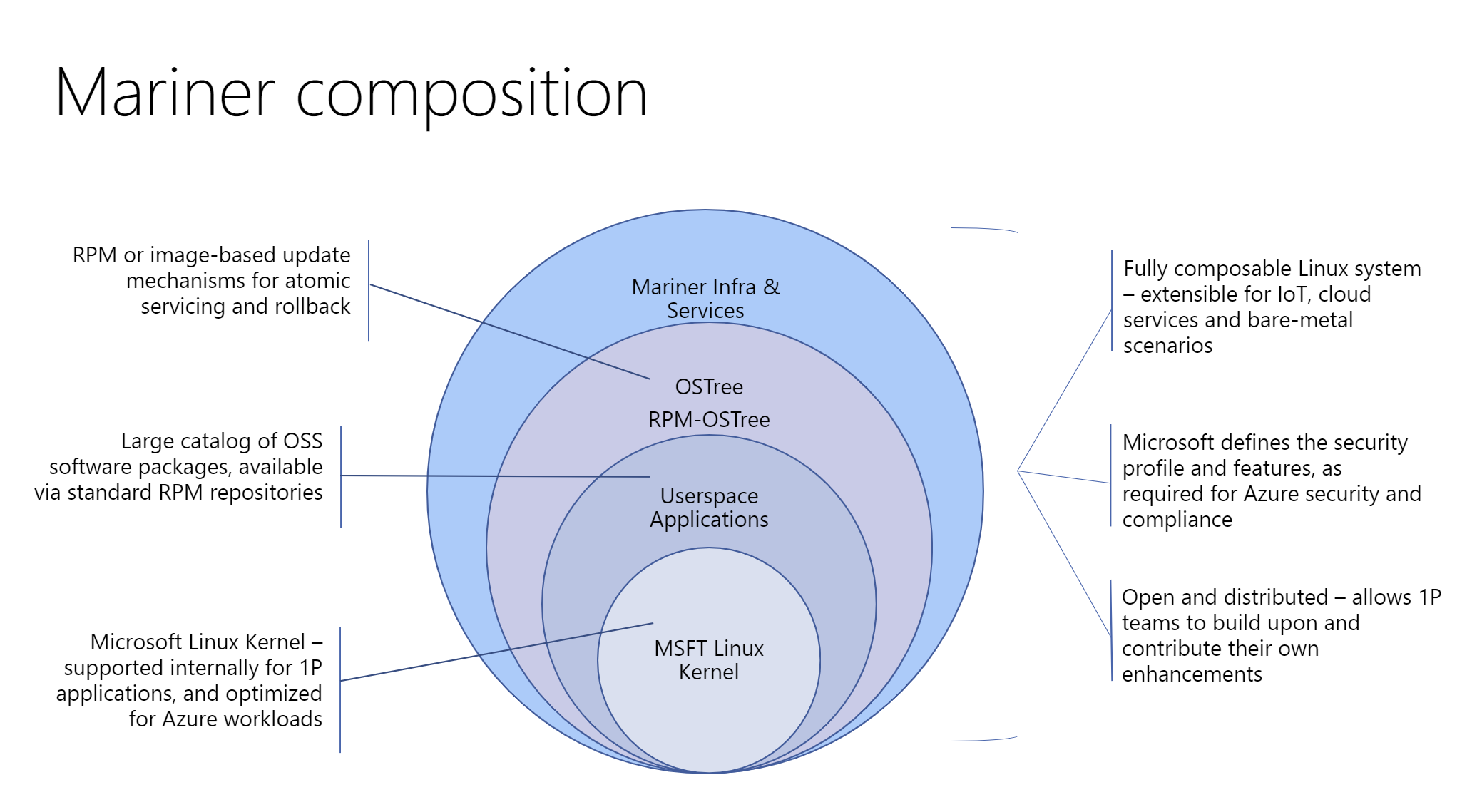
CBL-Mariner Linux is a lightweight operating system, containing only the packages needed for a cloud environment. CBL-Mariner can be customized through custom packages and tools, to fit the requirements of your application. CBL-Mariner undergoes Azure validation tests, is compatible with Azure agents, and is built and tested by the Azure Edge & Platform to power various use cases, ranging from Azure services to powering IoT infrastructure. CBL-Mariner is the internally recommended Linux distribution for use with Microsoft cloud services and related products.

In the following steps we are going to install CBL-Mariner 2.0 on Hyper-V as a virtual Docker Container Host.
First you have to download CBL-Mariner 2.0 (Azure Linux) ISO here

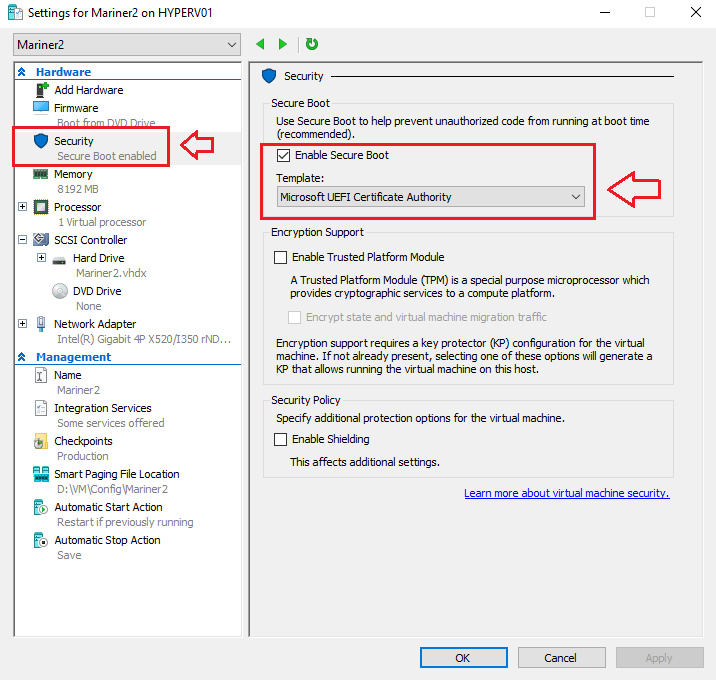
Enable Secure Boot Template: Microsoft UEFI Certificate Authority

When you have made your Virtual Machine on Microsoft Hyper-V, you have to change the Security Boot Template from Microsoft Windows to Microsoft UEFI Certificate Authority and then you can boot from the ISO.

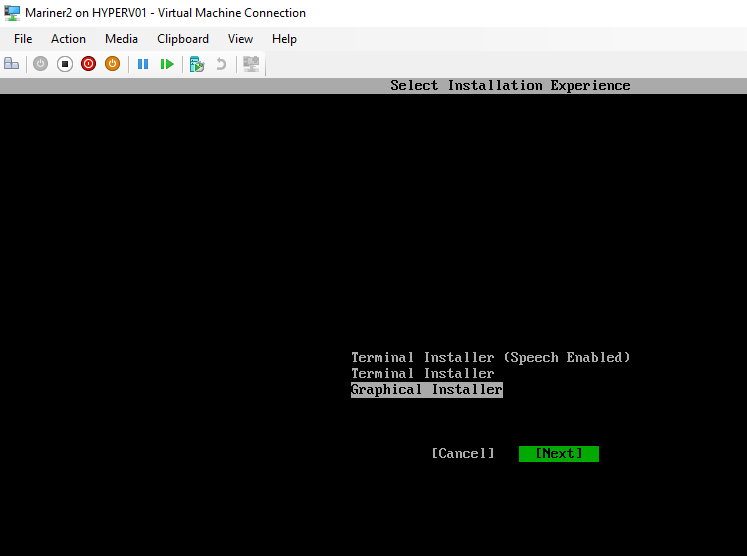
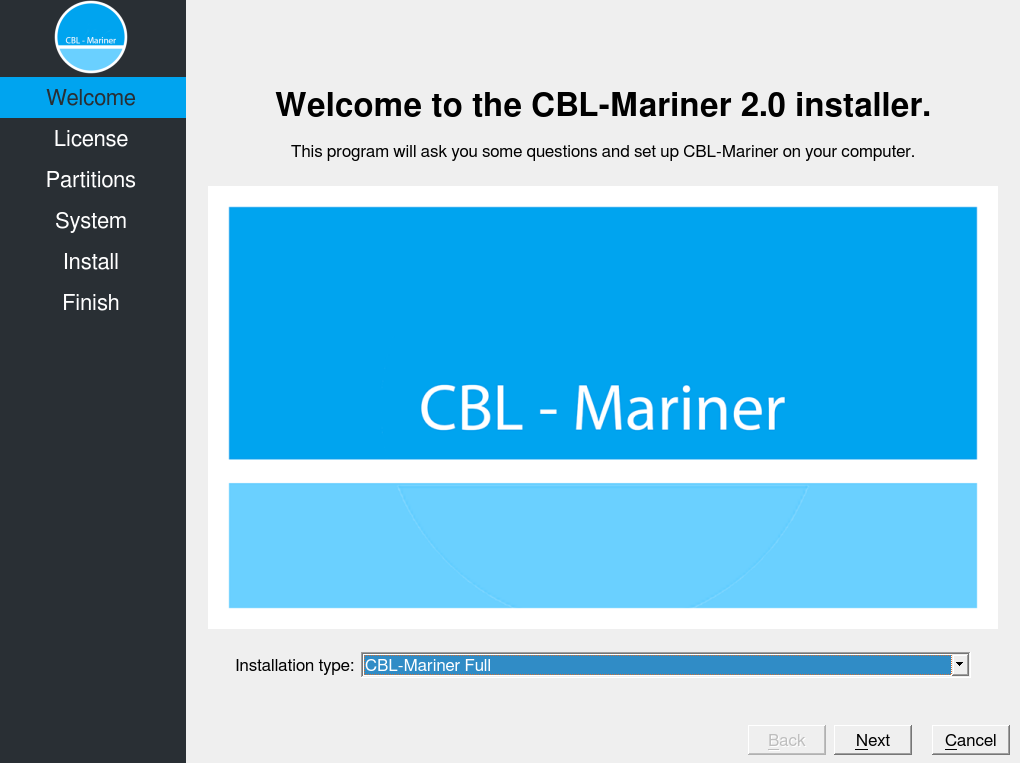
Select the Installation Experience
I used the Graphical Installer,
Select Next.

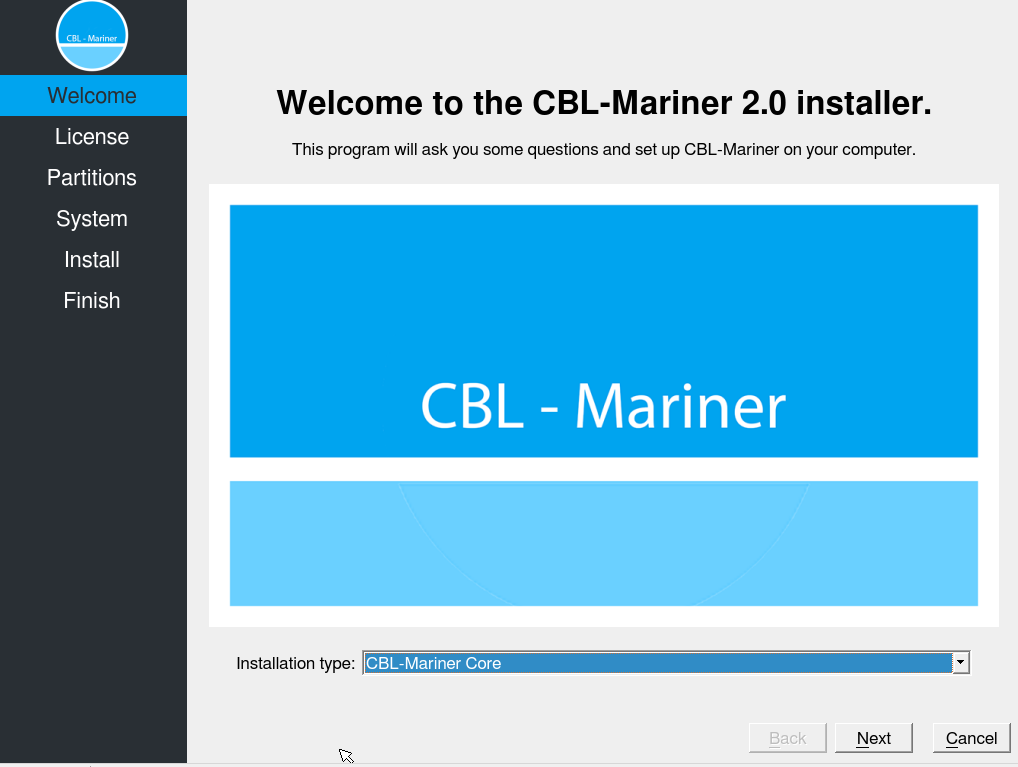
Default is the installation type: CBL-Mariner Core

I selected Installation type: CBL-Mariner Full

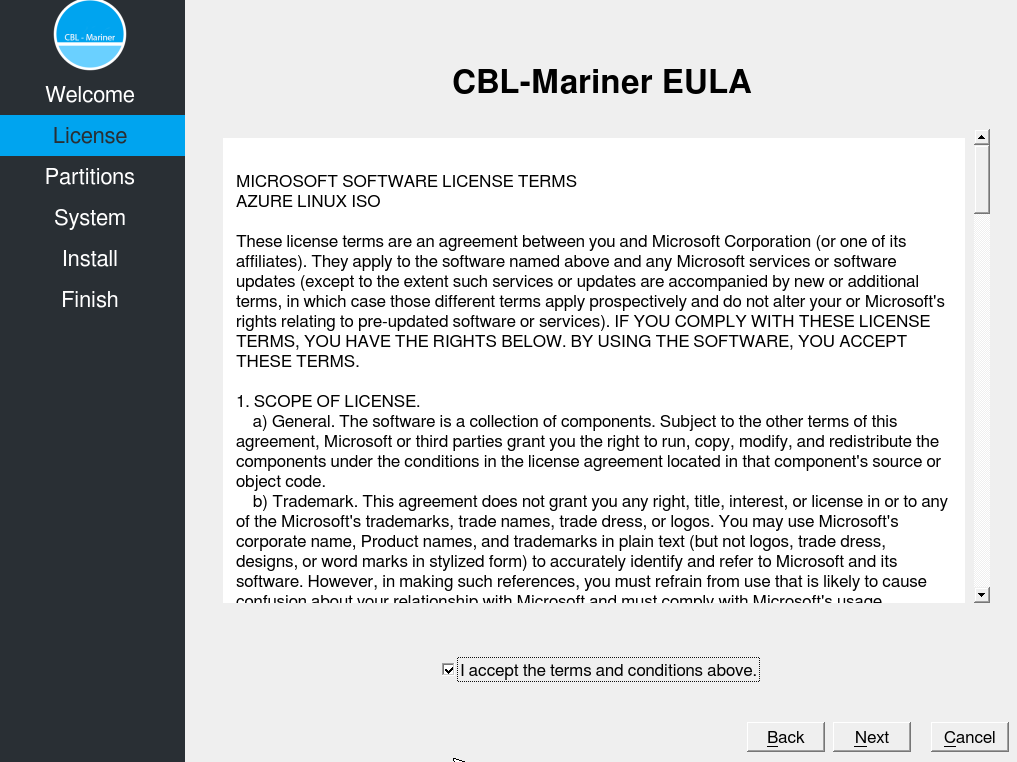
Read and Accept the CBL-Mariner Eula.

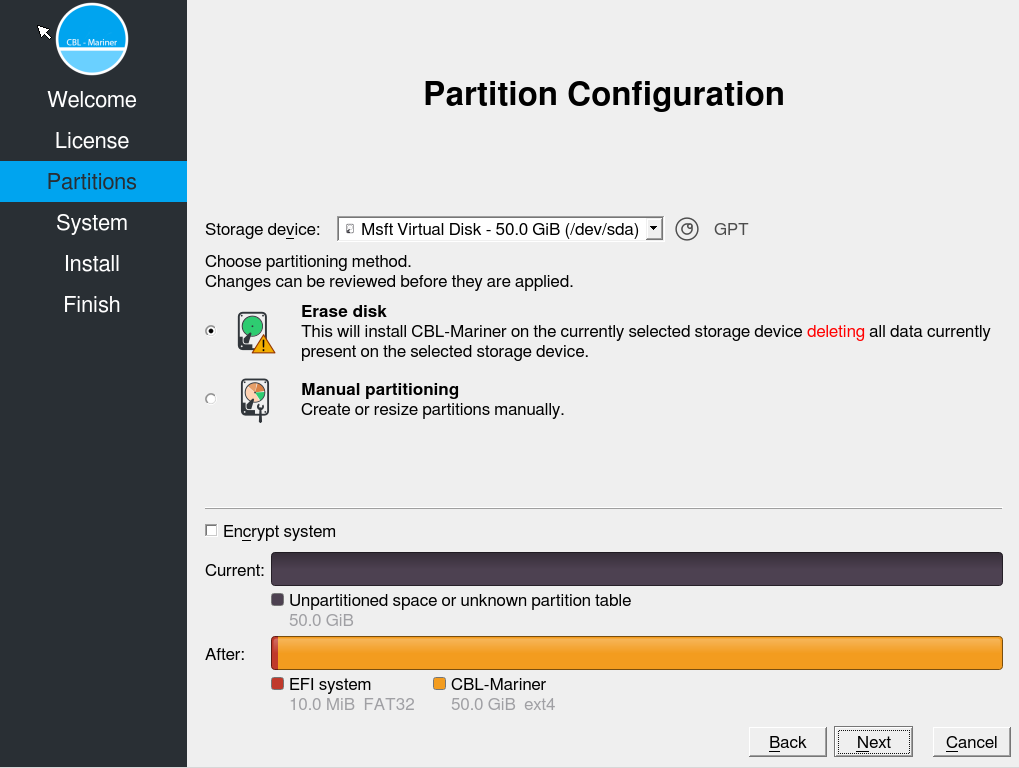
Here you can Partition your Storage.


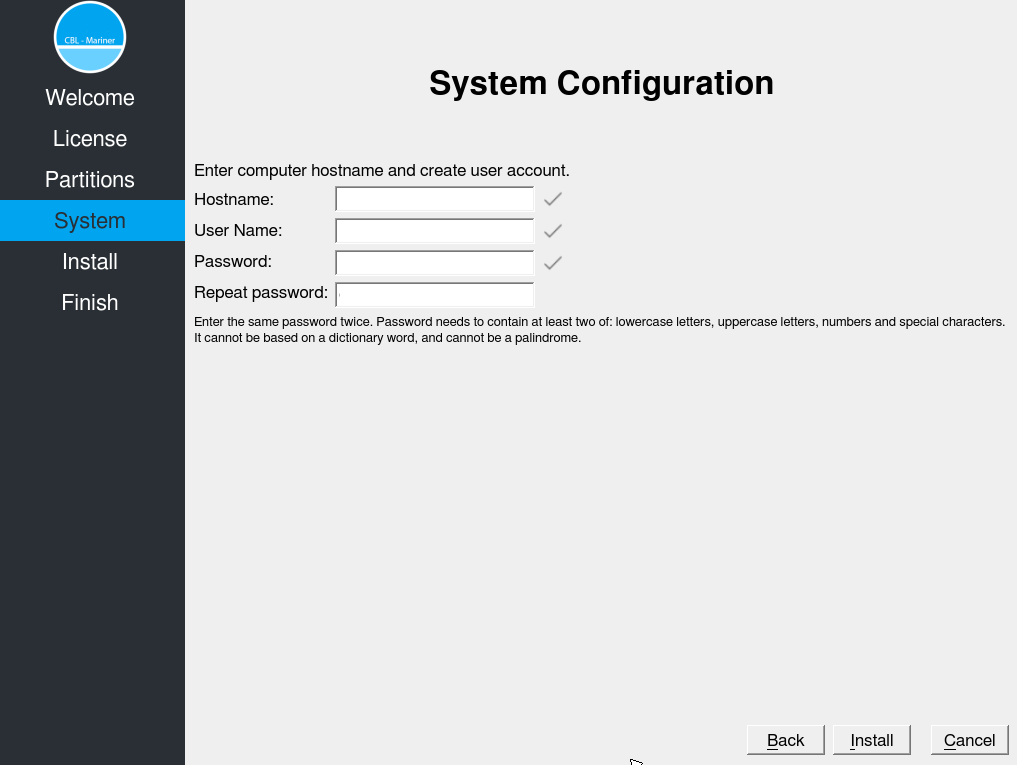
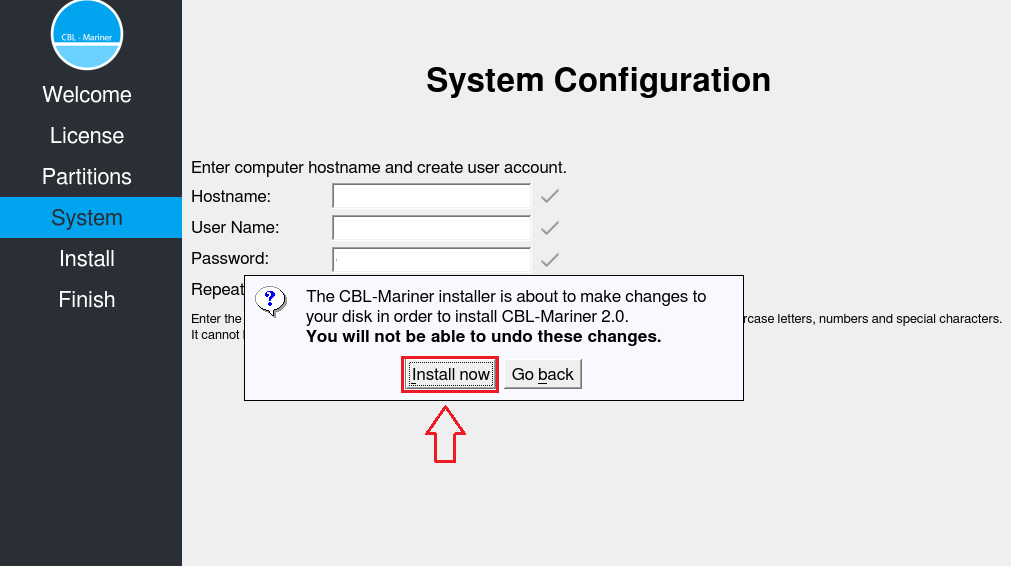
Enter the Computer hostname and Create a User account.

Install Now.

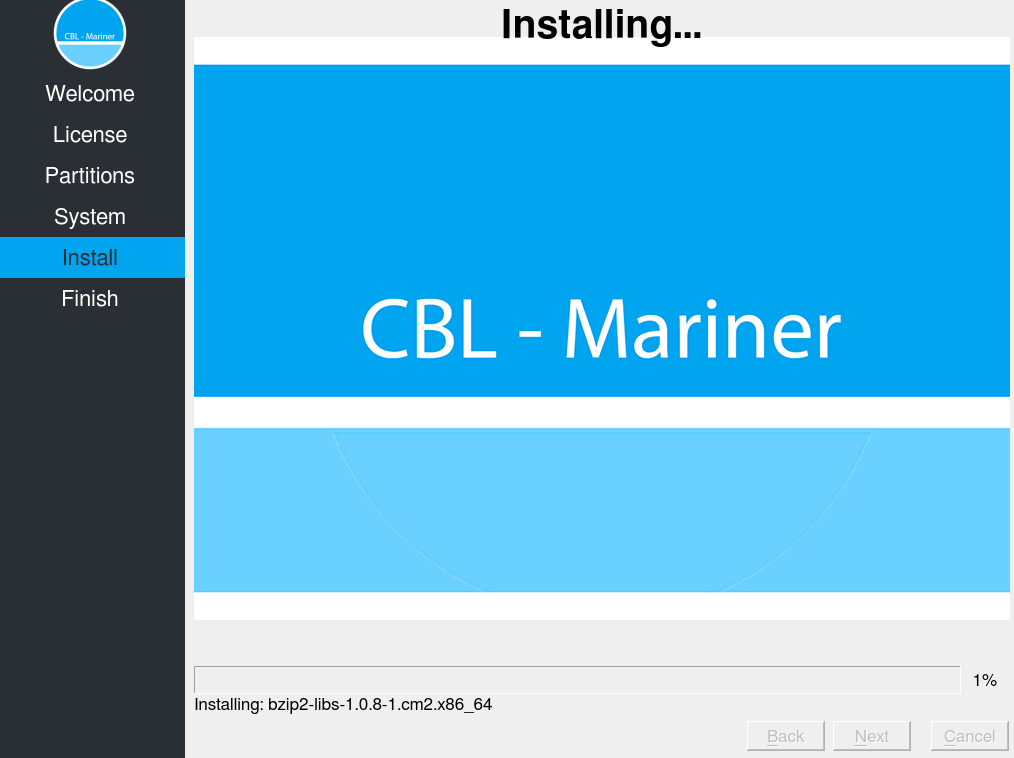
Installing CBL-Mariner 2.0 on the VM.

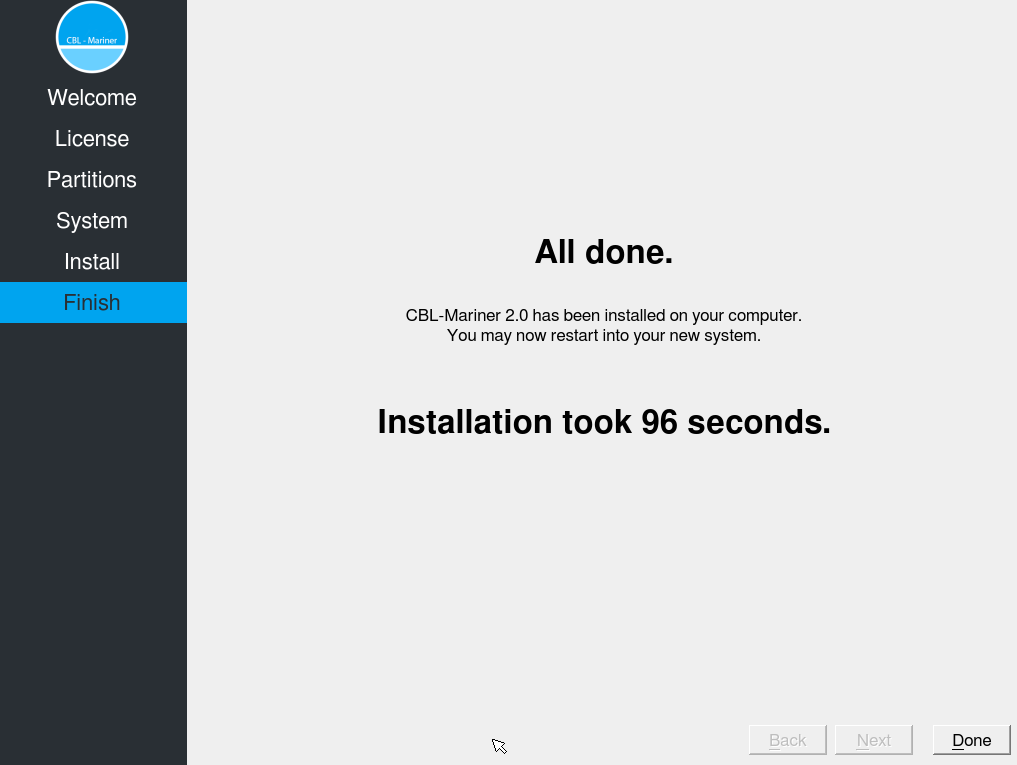
And yes It’s fast 😉

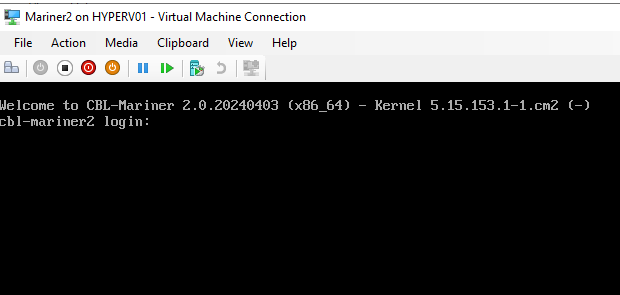
Login with your new created user account.

It’s a habbit of my to update always the OS before doing other installations, so in the next steps we are going to upgrade to the latest updates since the ISO is released. Then we are going to install Azure-CLI and Docker Host for Containers.

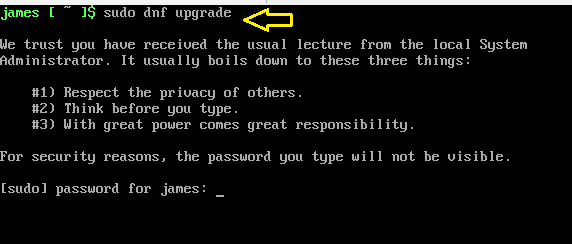
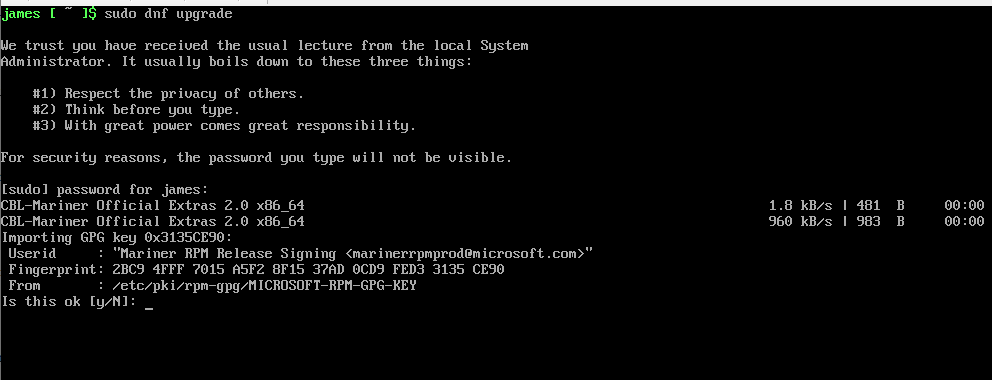
Type the Command: Sudo dnf upgrade

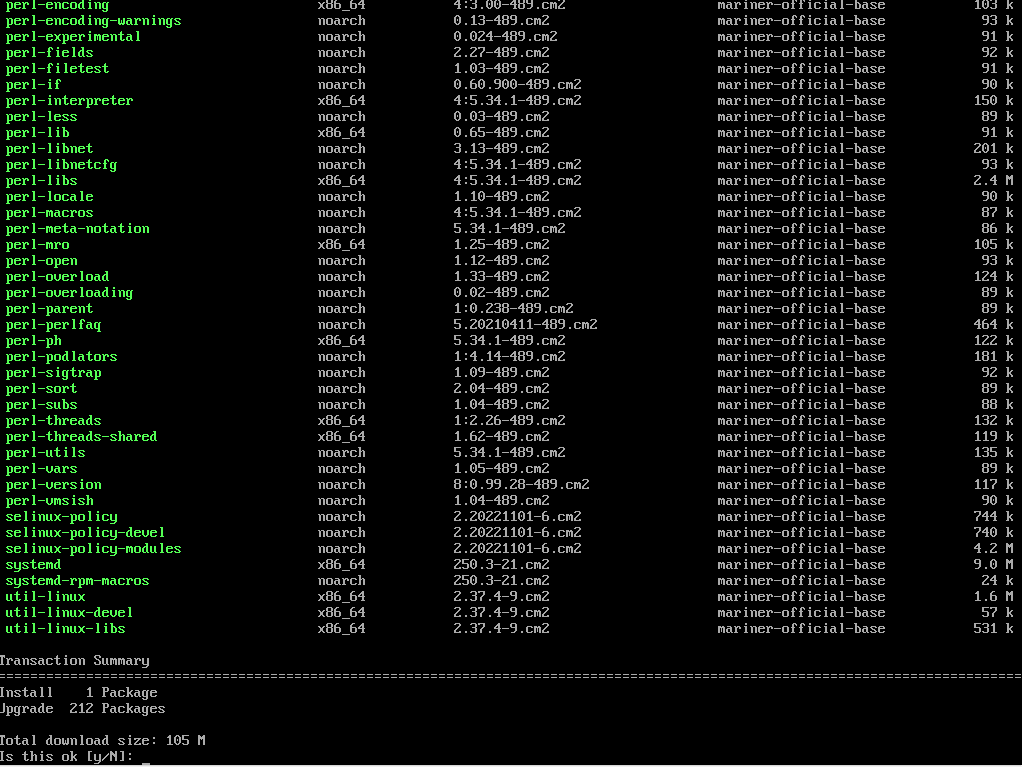
The OS is now asking a couple of times if it’s OK to install.

Installing of Packages to update the System.

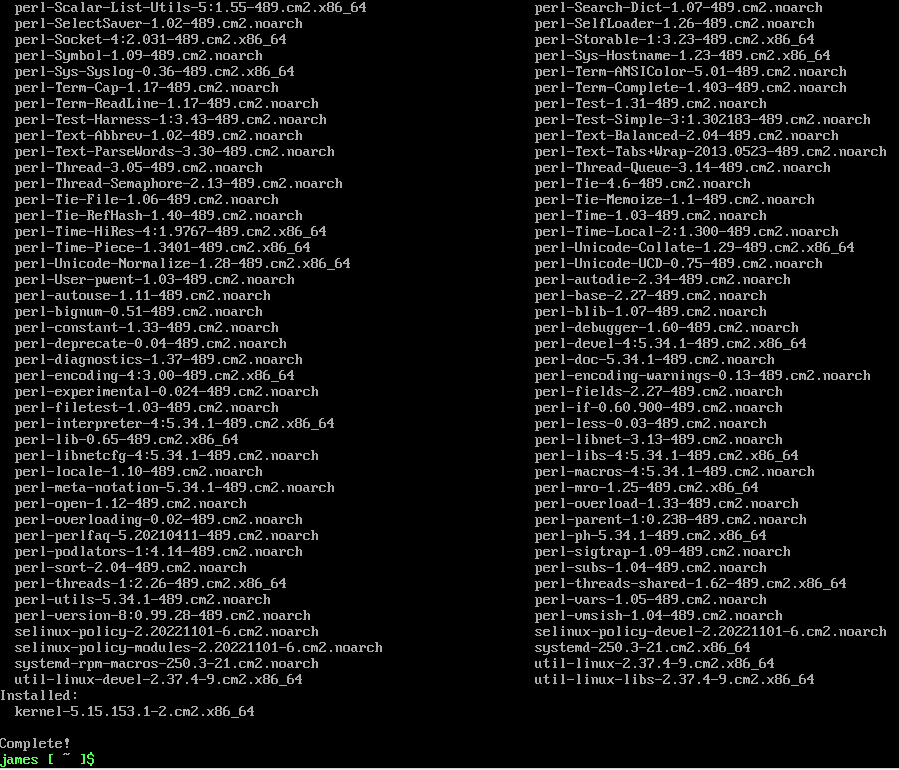
Upgrade of CBL-Mariner 2.0 is Completed.

Installing Microsoft Azure-CLI on CBL-Mariner 2.0

The Azure Command-Line Interface (CLI) is a cross-platform command-line tool to connect to Azure and execute administrative commands on Azure resources. It allows the execution of commands through a terminal using interactive command-line prompts or a script. Here you can find more about Microsoft Azure-CLI


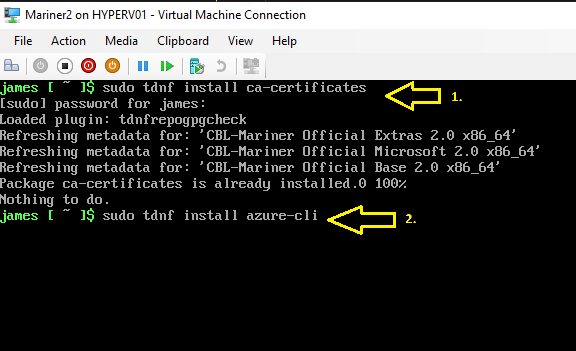
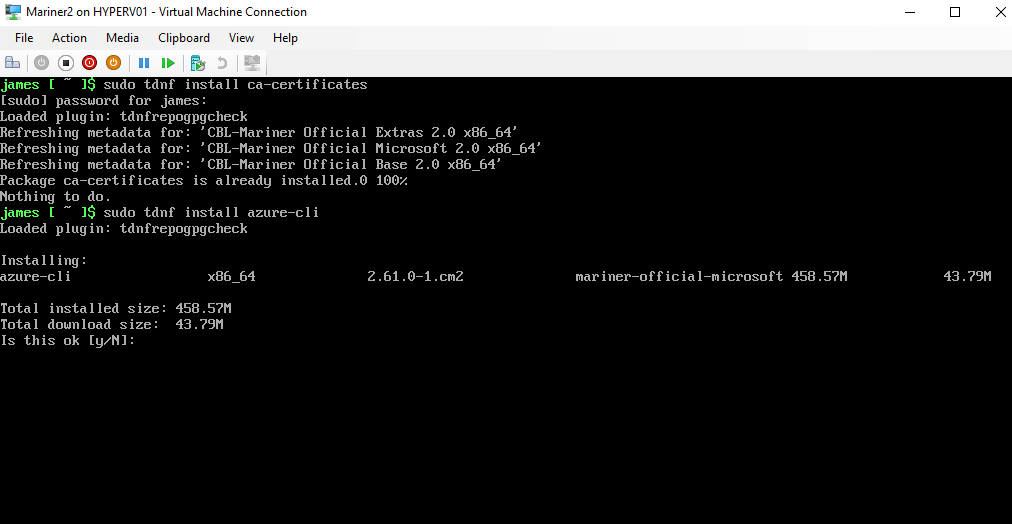
First, we install the ca-certificates
then
we install Microsoft Azure-CLI 

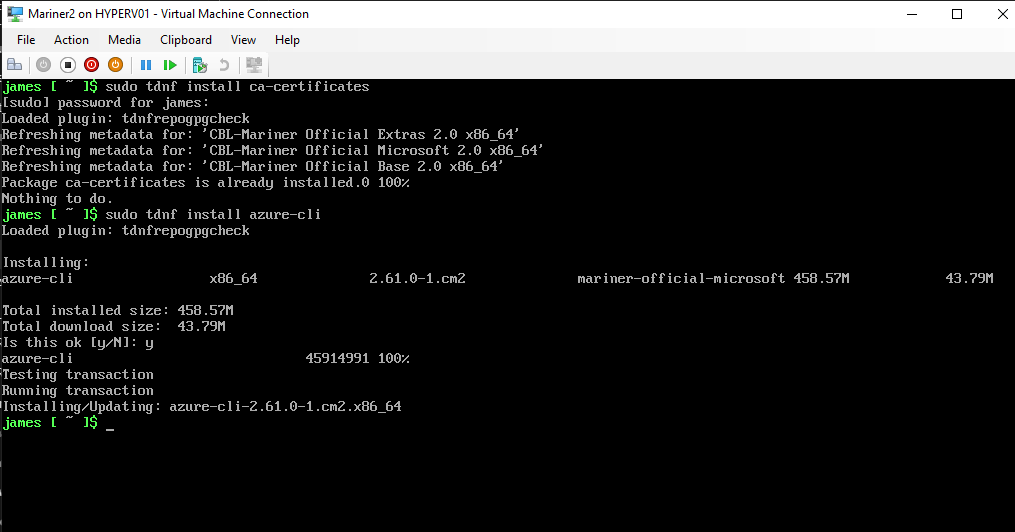
       type Y if this is OK.

Azure-CLI is installed.

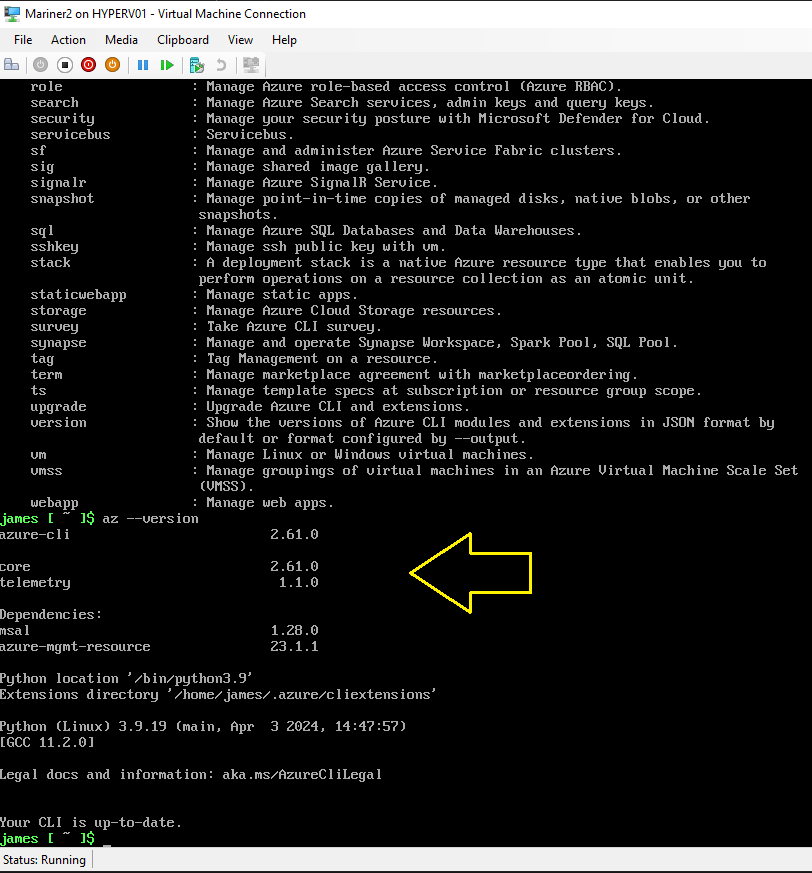
The Latest Microsoft Azure-CLI is running on your up-to-date CBL-Mariner VM.

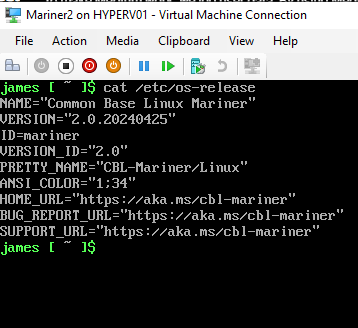
Type command: cat /etc/os-release
and you can see the exact version of CBL-Mariner 2.0

Installing Docker Container host on CBL-Mariner 2.0

Docker provides the ability to package and run an application in a loosely isolated environment called a container. The isolation and security lets you run many containers simultaneously on a given host. Containers are lightweight and contain everything needed to run the application, so you don’t need to rely on what’s installed on the host. You can share containers while you work, and be sure that everyone you share with gets the same container that works in the same way.

Docker provides tooling and a platform to manage the lifecycle of your containers:

  • Develop your application and its supporting components using containers.
  • The container becomes the unit for distributing and testing your application.
  • When you’re ready, deploy your application into your production environment, as a container or an orchestrated service. This works the same whether your production environment is a local data center, a cloud provider, or a hybrid of the two.

Now we are going to install the Docker Container host software on Microsoft CBL-Mariner 2.0 (Azure Linux):

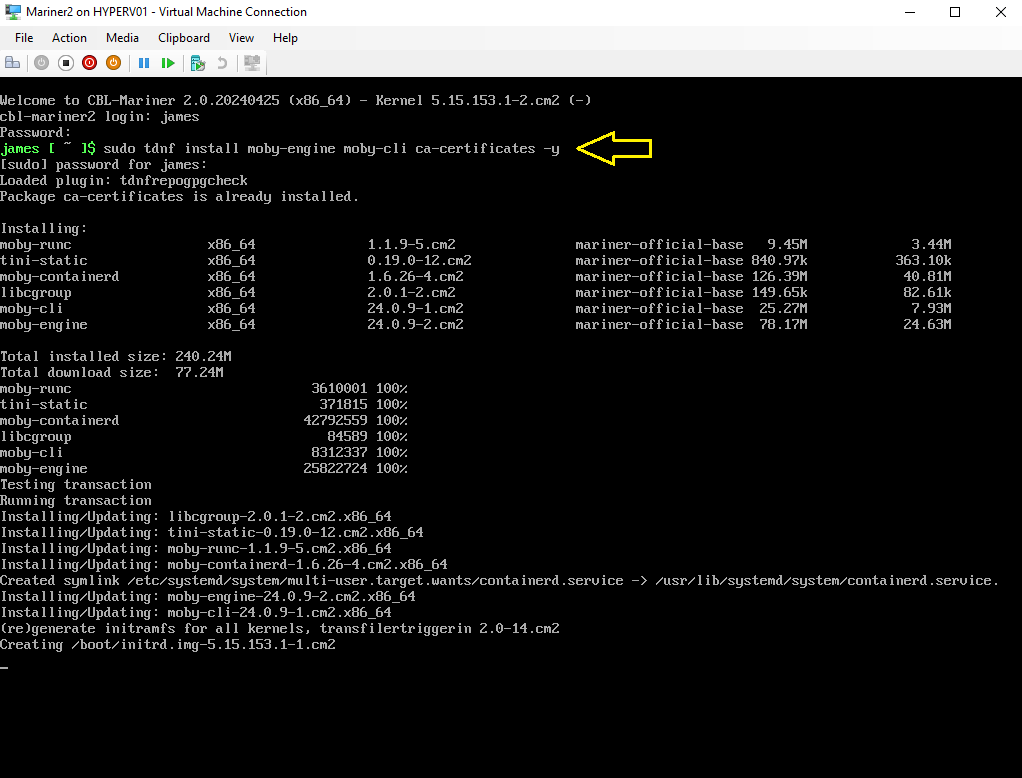
Type Command: sudo tdnf install moby-engine moby-cli ca-certificates -y

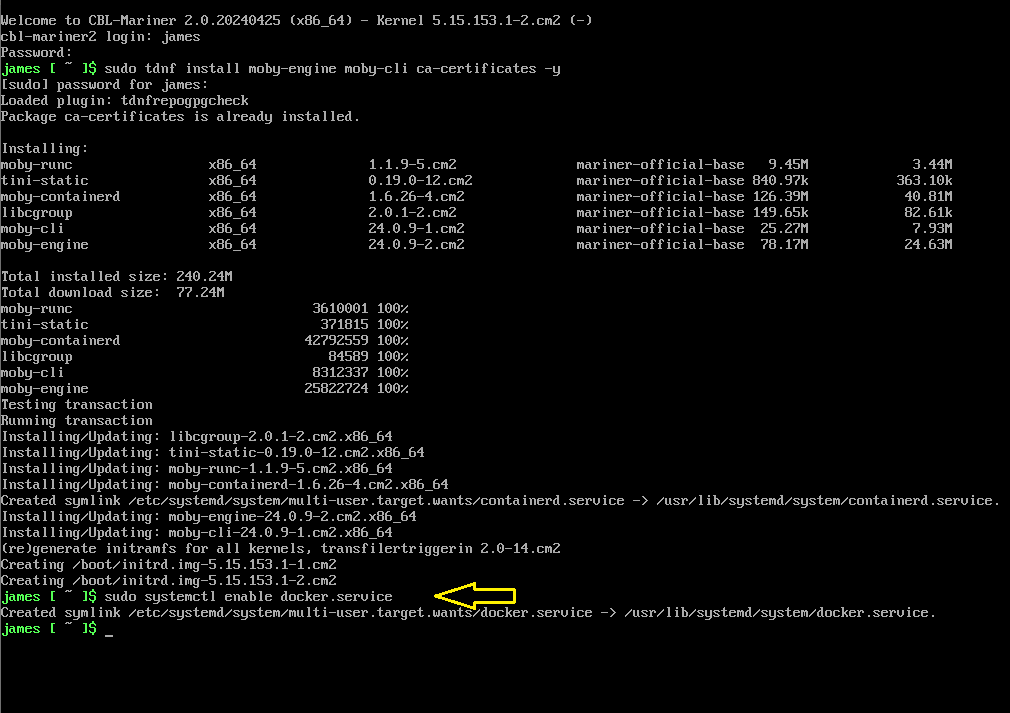
Type command: sudo systemctl enable docker.service

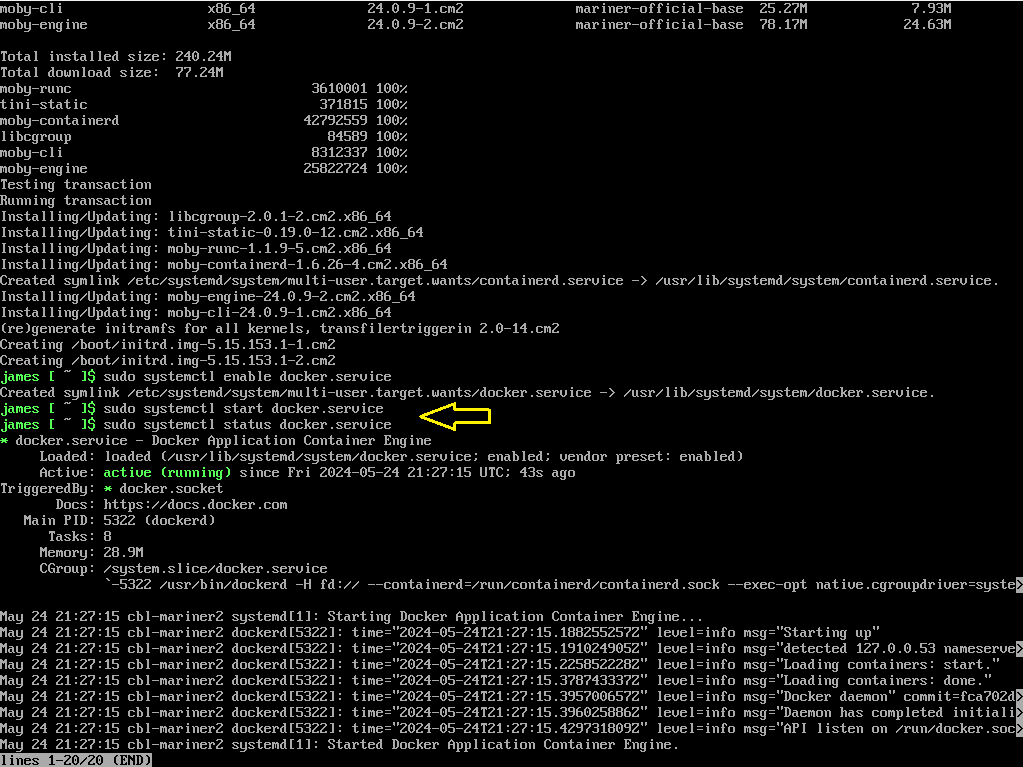
Type command: sudo systemctl start docker.service
and then
type command: sudo systemctl status docker.service

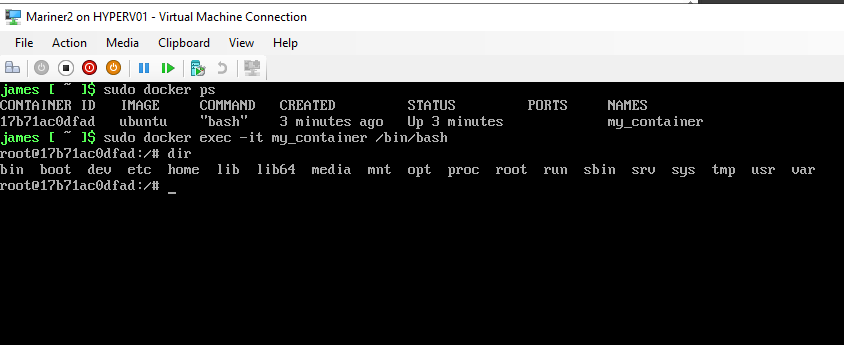
Now you can pull or create your containers from here for example:
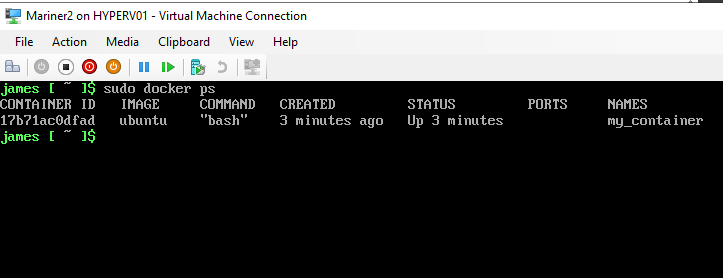
Type Command: docker run -it -d –name my_container ubuntu bash

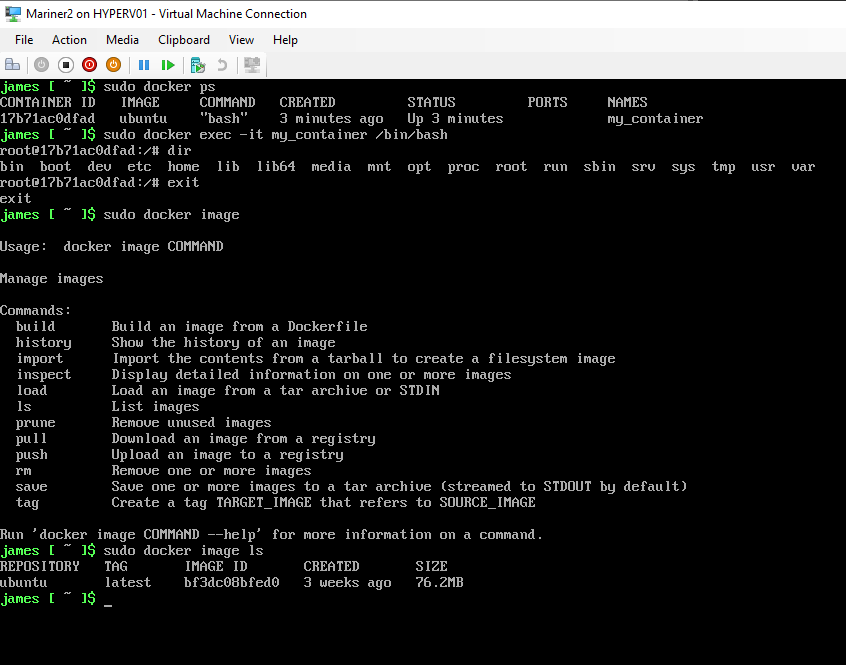
Here I’m inside the Ubuntu Linux Container running on CBL-Mariner 2.0 with Docker Container Host.

Docker Container Ubuntu image.

More information about Microsoft CBL-Mariner 2.0 you can find here:

Microsoft CBL-Mariner 2.0 (Azure Linux) on Github

Microsoft CBL-Mariner 2.0 (Azure Linux) Security

Microsoft CBL-Mariner 2.0 (Azure Linux) Toolkit docs

Conclusion

Running Microsoft CBL-Mariner 2.0 (Azure Linux) on Azure Stack HCI Hyper-V Cluster or in Microsoft Azure Cloud can be very powerfull as a lightweight Linux operating system at the Edge. Now we did running Docker Container Host on CBL-Mariner 2.0 (AzureLinux) but you can also install Microsoft Azure Arc agent to use this Operating System in a Adaptive Cloud way for Azure Hybrid Management and security. Try it yourself first in your test lab and when you have build a great security by design solution, use it in production for your business.

Join Containers in the Cloud LinkedIn Community Group for Free

✇mountainss Cloud and Datacenter Management Blog

Add Kubernetes Cluster to Microsoft Azure Arc #Containers #AzureHybrid

Microsoft Azure Arc Services for Adaptive Cloud

Azure Arc-enabled Kubernetes allows you to attach Kubernetes clusters running anywhere so that you can manage and configure them in Azure. By managing all of your Kubernetes resources in a single control plane, you can enable a more consistent development and operation experience to run cloud-native apps anywhere and on any Kubernetes platform.
Azure Arc-enabled Kubernetes works with any Cloud Native Computing Foundation (CNCF) certified Kubernetes clusters. This includes clusters running on other public cloud providers (such as GCP or AWS) and clusters running on your on-premises data center (such as VMware vSphere or Azure Stack HCI).

In the following step-by step installation, we are going to connect a Kubernetes Cluster with Azure Arc services.

Add Kubernetes Cluster

Before you begin, you need this prerequisites

Extension add

the Extension was already installed.

Here you set the subscription and resource group first.
Cluster name in Azure and the Microsoft Azure Region.
and at last, the network connectivity method, in my scenario a public endpoint.

you can add your tags.

Here you can select your script type Bash or PowerShell
Then download your script.

Azure login

Enter the code and login your Azure subscription.

You now have signed in.

Check these Provider registrations (requirement)

Running the bash script.

Starting to install Azure Arc agents on the Kubernetes Cluster.

In Azure Portal, Kubecluster is connected to Azure.

kubectl get pods -n azure-arc

Kubecluster Overview in Azure portal.

the kubecluster is Azure Arc enabled and running. 🙂

Azure Arc-enabled Kubernetes with Azure Monitor options.

Azure ArcNetworking extension for loadbalancer service.

Arc Enabled kubernetes Cluster features.
Azure provides an automated application deployments capability using GitOps 

Try your Azure Arc enabled Kubernetes Cluster Today first in your test lab and see all the features you can use for your environment.
Join Containers in the Cloud Community on Linkedin

Join Azure Hybrid Community on Linkedin

✇mountainss Cloud and Datacenter Management Blog

Windows Server 2025 watch on demand Windows Server Summit 2024

All the recordings of the Microsoft Windows Server Summit 2024 event sessions are available on YouTube.
You can watch them on demand here

Here are some highlights of the Windows Server Summit 2024 event which I picked out:

Full Stack Native NVMe Support

Container Flexibility

SMB in Windows and Windows Server 2025

The Intel Xeon Processor Designed for AI

You can Upgrade to Windows Server 2025 via Windows Update.

Windows Server 2025 Security.

Delegated Managed Service Account.

Hotpatching for Windows Server 2025

Watch The evolution of Windows Authentication by Ned Pyle

✇mountainss Cloud and Datacenter Management Blog

#Microsoft Windows Server Summit 2024 #Winserv #Hyperv #HybridIT

Don’t miss this Awesome Microsoft Windows Server Summit 2024 virtual event to get the latest and Greatest information powered by the Engineering team!

When: March 26-28, 2024. Mark your Calendar 😉

Topic wise: it will be wide ranging covering all the new goodness of Windows Server 2025, on-prem and Hybrid scenarios, Azure Arc, Identity, Virtualization, SMB updates and more! 
Here you can find more information: Windows Server Summit 2024

Get started Today with Windows Server 2025 Insider Preview Build in your test environment!

✇mountainss Cloud and Datacenter Management Blog

Updating my MVPLAB with Windows Server 2025 Insider Preview Build 26040

Microsoft Windows Server 2025 Datacenter Insider Preview Build 26040

Microsoft released a new Windows Server Insider preview Build 26040 on January 26th and changed Windows Server vNext name into Microsoft Windows Server 2025!

So time to update my MVPLAB domain stack.local.

I’m updating my domain controller from build 26010 to 26040.

Before we can move further, we have to run adprep.

Run adprep from the new ISO on the Domain controller.
by Typing C and enter it will run.

Schema upgrade from 90 to 91

adprep /domainprep.

Adprep successfully updated.

After this click on refresh in the Windows Server Setup if you have this still open.


I want to keep my files, settings and apps on my domain controller.
Click on Install

Installing Windows Server 2025 Insider Preview Build 26040

Don’t turn off your machine. 😉

Microsoft Windows Server 2025 Datacenter Insider Preview Build 26040
is running as my Domain Controller.

Don’t forget the last updates.

Running Schema object version 91.

Here you can find more information about Windows Server 2025 Insider Preview Build 26040

Follow Jeff Woolsey on X (Twitter) here

Follow Ned Pyle on X (Twitter) here

Get started by joining Windows Server Insider program

Make your Windows Servers Hybrid with Microsoft Azure Arc
for more Hybrid IT management Benefits

✇mountainss Cloud and Datacenter Management Blog

Keep your Azure Arc Server extensions up-to-date #AzureHybrid #HybridIT #Azure

Microsoft Azure Arc enabled Servers

When you have your Servers Azure Arc enabled, you will work with Azure Arc extensions to work with Azure hybrid features like Defender for Cloud, Azure Monitor, Windows Admin Center and more. For each Azure Arc extension you can get updates, and it’s important to keep them up-to-date for new functionality and security. You have Azure Arc extensions for Windows Servers but also for Linux Servers.
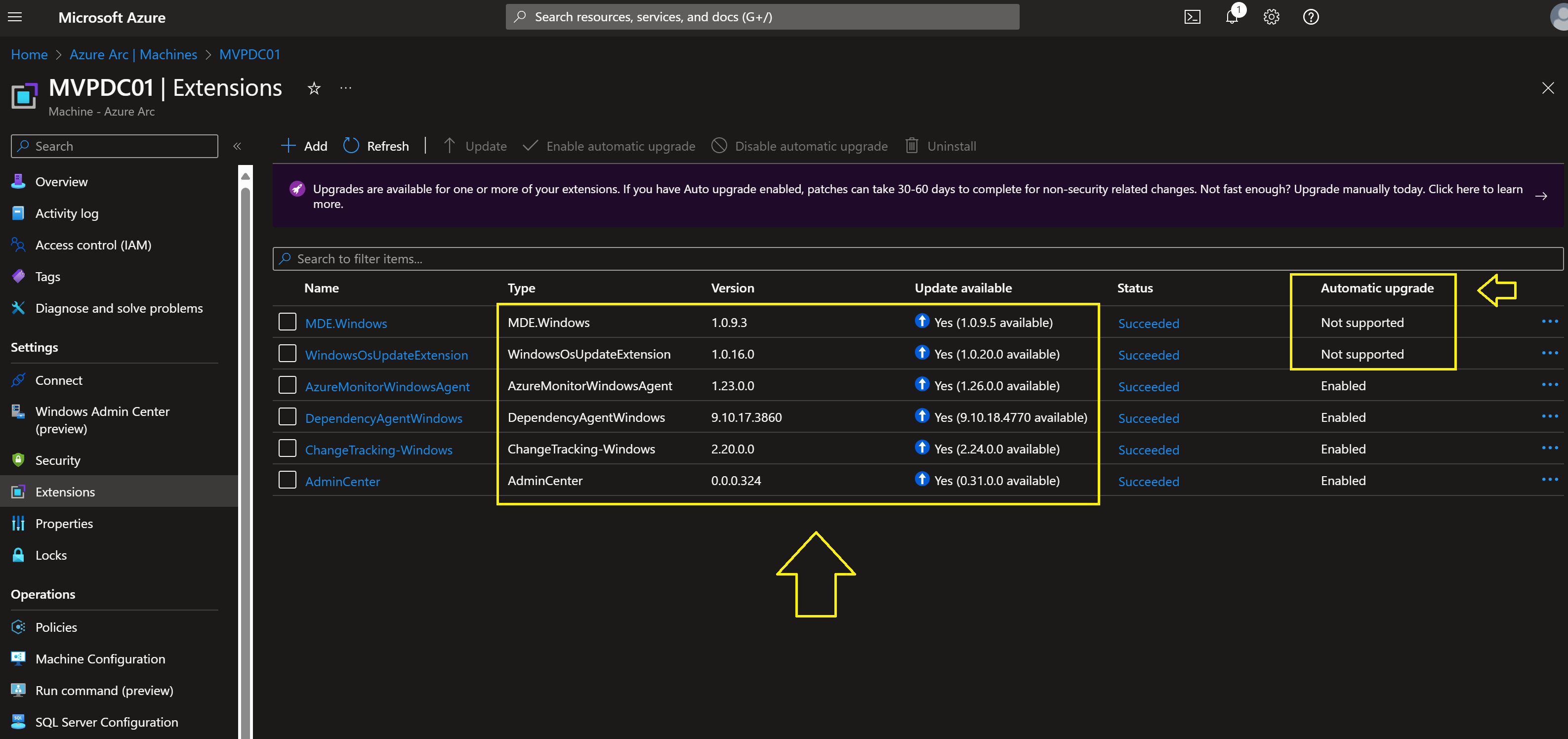
Some of the Azure Arc extensions will automatic upgrade when you have enabled it and some must go manually from the Azure Portal.
More information about Azure Arc extensions you can find them here

In the next steps you will see the Update management of the Azure Arc enabled extensions :

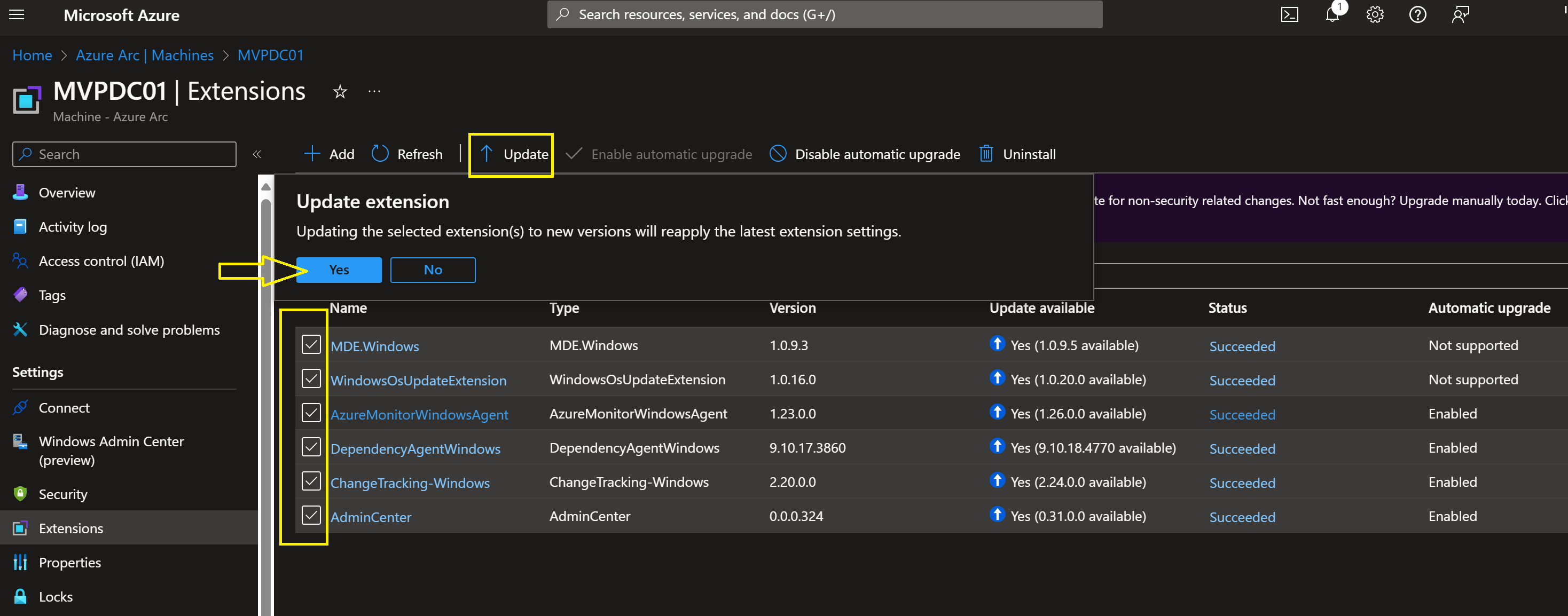
Here I update one extension.

Inside the WindowsOsUpdateExtension

Here you can see that the WindowsOsUpdateExtension is up-to-date
and Status Succeeded

On the right of this screenshot you see Automatic Upgrade and some extensions are enabled, but some are not supported.
That’s why it’s important to check these updates.

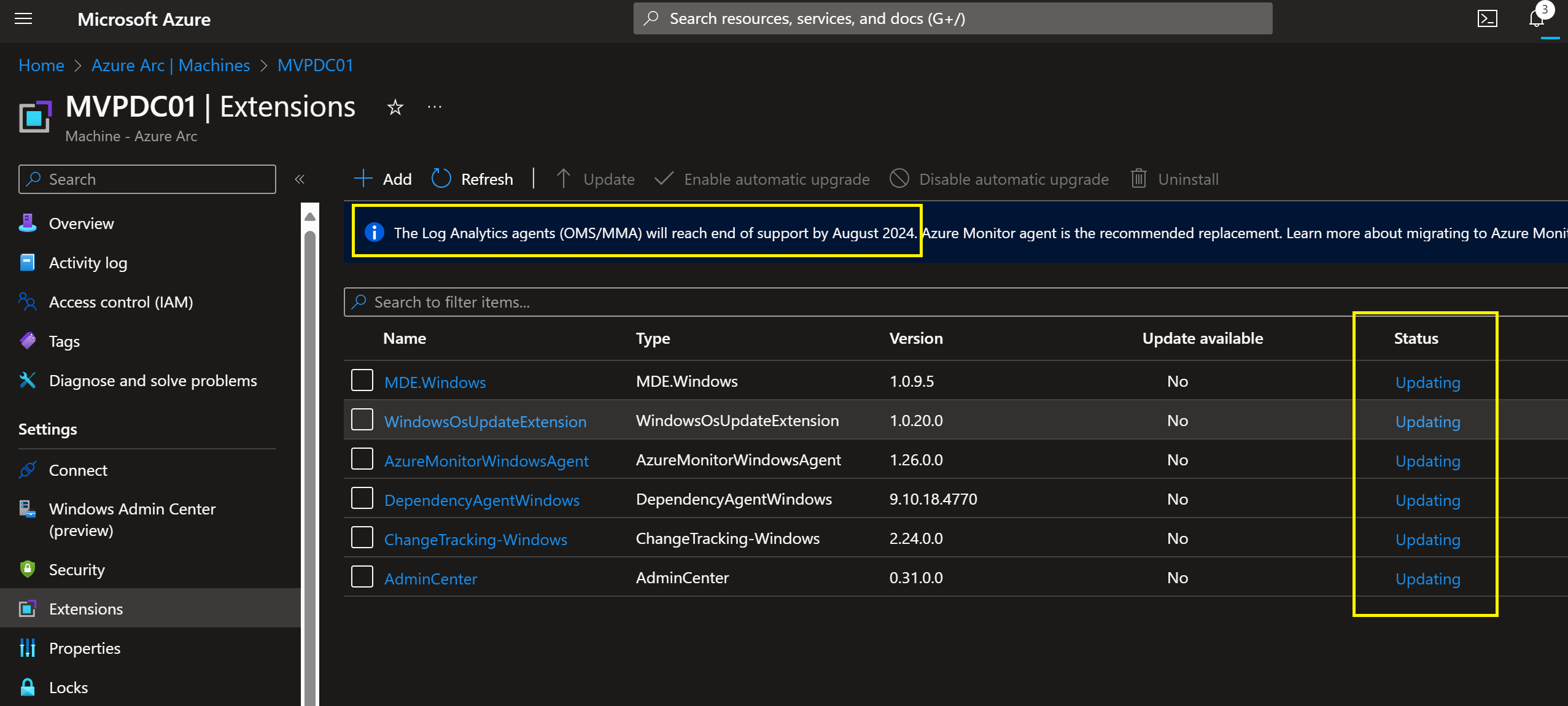
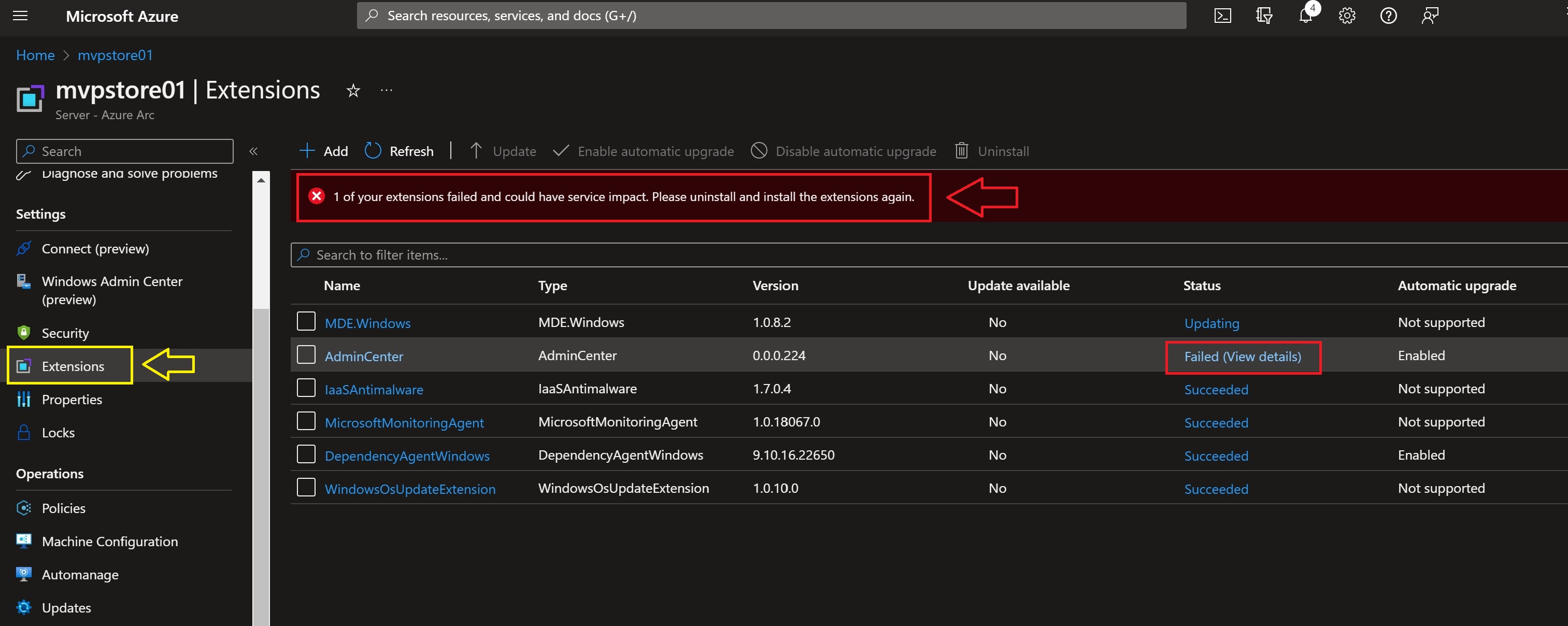
Here you can see in the Status that two Azure Arc extensions are updating

And sometimes it failed to update.
But you can see what you can do best with this failed Status.

Here you see the error message and the Tips.
And when you can’t fix it yourself you can make a Support ticket right away.

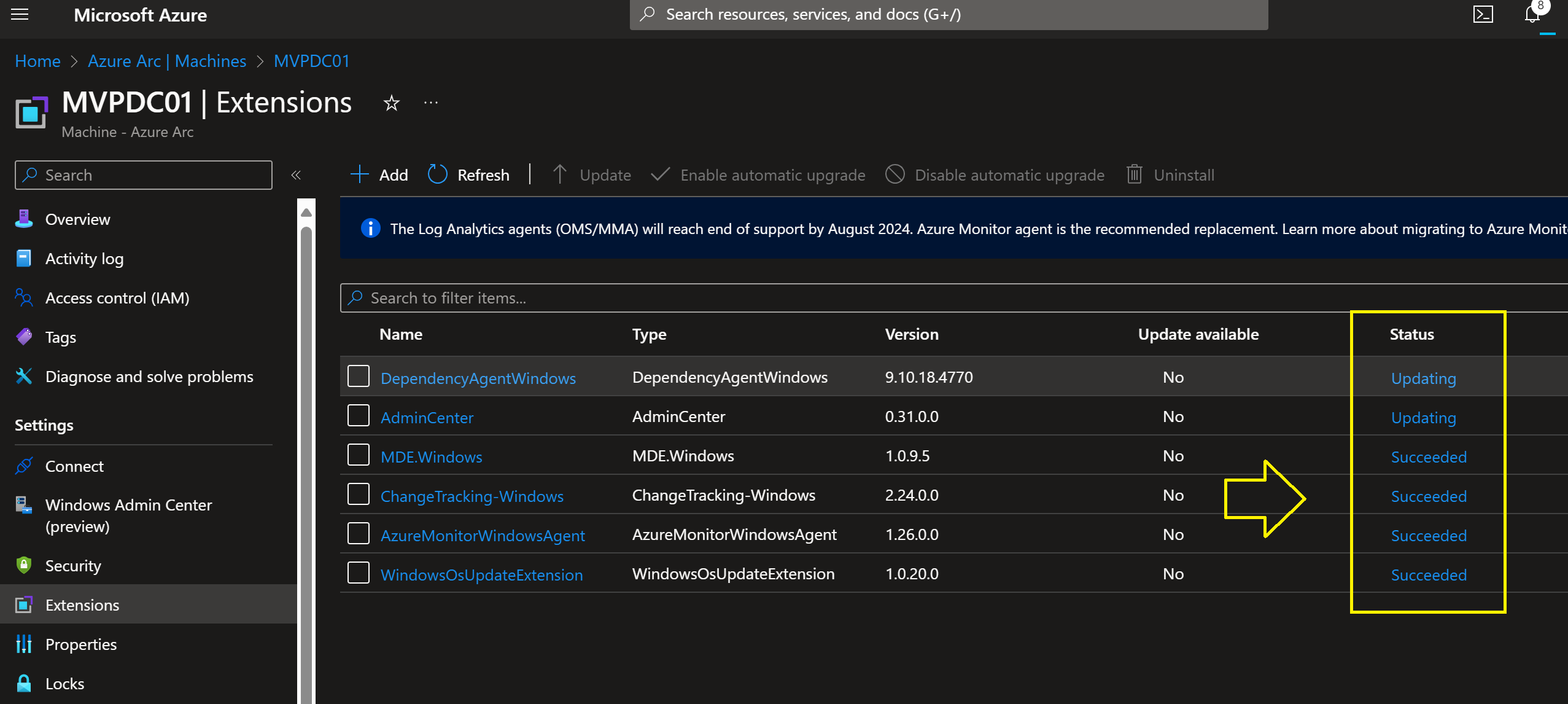
Here you can see that all the Azure Arc extensions are updated successfully

So I selected all my Azure Arc enabled Servers and updated them all.

Conclusion

With Microsoft Azure Arc enabled Servers you have do some IT management to keep your Azure Arc extensions up-to-date.
I did this without rebooting Servers, just from the Azure Portal update Azure Arc extension.
Here you find more information about Microsoft Azure Arc for Azure Hybrid IT

Join Azure Hybrid Community Group on LinkedIn

mountainss

✇mountainss Cloud and Datacenter Management Blog

Thank you #Community and #Microsoft for this Awesome Year 2022! Happy Holidays

What a Year 2022!!

I like to thank you Community for Supporting, Sharing and Reading New Microsoft technologies on my Blog, Twitter, Facebook and
LinkedIn Community Groups 💗 I wish you all happy Holidays, Merry Christmas and a Healthy New Year 2023 may the Best Wishes comes true ! 🎄🥂

I’m very proud and Honored  on the Microsoft Global MVP Awards 2022-2023 !

  • MVP Award for Cloud and Datacenter Management
  • MVP Award for Windows Insiders
  • MVP Award for Azure Hybrid

Thank you Microsoft Product Groups, MVP Award Program, Windows Insider Team, Azure Hybrid Team, Windows Server and Azure Stack HCI Team for all your support, NDA PGI sessions, and for the Awesome software, Features, solutions you are building 🙂
Wish you all Happy Holidays, Merry Christmas and a Healthy New Year 2023 may the Best Wishes comes true ! 🎄🥂

Here are some Great links for Reading and Sharing :

JOIN these LinkedIn Community Groups for free and Share New Microsoft Technologies Together:

Windows Admin Center Community Group

Containers in the Cloud Community Group

Microsoft Azure Monitor & Security for Hybrid IT Community Group

Azure Hybrid Community Group

Azure DevOps Community Group

What I really love is the Microsoft Tech Community platform


For Microsoft Azure Hybrid:

Azure Arc Jumpstart site

Azure Hybrid and Multi Cloud documentation

Microsoft Azure Arc Community monthly Meetup (GitHub)

Follow on Twitter for Azure Hybrid:

——————————————————————————————————————————————————-
For Windows Insiders:

Microsoft Windows Insiders Blog

Windows Insider Team on YouTube

The Windows Insider Program Team is really active on Twitter:
@WindowsInsider

@JenMsft

@NorthFaceHiker

@brandonleblanc

@amanda_lango


Get started with the Windows Server Insider program

What’s New in Windows Server 2022

Overview of Windows Admin Center

What’s New in SQL Server 2022


mountainss

✇mountainss Cloud and Datacenter Management Blog

#MVPLABSerie Azure Defender for Cloud with #AzureArc enabled SQL Server #AzureHybrid #Security

Azure Arc enabled SQL Servers Architecture

To keep your Business running, It’s important to secure and monitor your data. One of the security measures is doing Vulnerability assessments in your datacenter(s) to see the status and results for remediation. With Microsoft Azure Arc Defender for Cloud you can do a SQL Server vulnerability assessment in your on-premises datacenter or anywhere with the Azure Arc agent running.
Here you find more information about Azure Arc enabled SQL Server

Microsoft Defender for Cloud on Azure Arc enabled SQL Server

Here I activated Microsoft Defender for Cloud on Azure Arc enabled SQL Server, and Azure Defender for Cloud is doing a SQL vulnerability assessment to get the security status and results for remediation.

On this same Azure portal page you will see the Vulnerability assessment findings.

When you Open a Vulnerability finding, you get more information and the remediation for the issue.

Here you see the complete Resource Health of the Azure Arc enabled SQL Server.
Look at the Status of each severity.

Here you see all the vulnerability findings on these four databases.

When you do the remediation you will see the healthy status.
on the Passed tab.

Here I open only the OperationsManager database.
Now you see only the Vulnerability findings on this database.

Here you see a vulnerability finding on the SCOM database with the Remediation 🙂

You can make your Own Workbooks or use them from the Gallery.

Workbook example of Vulnerability Assessment findings.

Conclusion

With Azure Defender for Cloud vulnerability assessment and management you will learn a lot to set your Security Baseline on a higher level in your datacenter(s). Getting the right remediation of Microsoft to solve security issues is Great! You can do your assessments frequently to show your current status on demand. I Really like these Azure Hybrid Tools to make my work easier and the data more secure for the business.


Please join the Azure Hybrid Community Group on LinkedIn for free ( Sharing is Caring together )

mountainss

✇mountainss Cloud and Datacenter Management Blog

#MVPLABSerie Azure Arc enabled SQL Server Health Assessment #AzureHybrid #AzureArc #SQLServer

Azure Hybrid

In earlier MVPLABSerie blogpost I wrote about making your on-premises Servers hybrid with Azure Arc enabled Servers.
In my mvplab.local domain, there is a SQL 2022 Cluster running which also has the Azure Connected Machine Agent version 1.24.

One of the benefits of Azure Arc enabled Servers for SQL is that you can do on-demand SQL Health assessments on your SQL Environment in your On-premises Datacenter. In the following step-by-step guide we will prepare the SQL Cluster nodes.

Go to this link to watch the video

In my mvplab.local domain I’m doing the following steps :

Go in the Azure Portal to Azure Arc
Click on SQL Servers
under Infrastructure.
Click on Add

I Choose for Connect Servers
because both SQL Nodes are already connected in my MVPLAB.local domain.

Prerequisites
Click on Next Server details.

Select the right Azure Subscription and Resource Group
Select the region and Operating System
Set Proxy server URL
if you need one
Click on Next.

Set your owner tags if needed.
Here you can find more information about Tags Management

From here you have to download the Script
and Run it locally on both SQL Nodes. ( or your Single SQL Server )

Run the script in administrator modus of Powershell ISE.
go to page https://microsoft.com/devicelogin
and enter the Code

Login and continue.

Here you see that the Azure Connected Machine Agent already is installed.
But it will now add the SQL Extension.

Installation Completed Successfully.

Now we have two Azure Arc enabled SQL Servers connected.

Overview of SQL 2022 Node in Azure Arc.

You can see the Databases running.

Here you can set your Admin from Azure Active Directory.

But we want to do a SQL Assessment, but the Azure Monitoring Agent is still missing.

Here you see that the SQL extension is installed.
Now we will add the Azure Monitor Agent to my existing Log Analytics Workspace.
Click on Add

Select Log Analytics Agent – Azure Arc.

Add your Workspace ID
Add your Workspace Kay
Click on Review + Create

Validation Passed.

Azure Monitoring Agent is Installed.

From here you can do the On-Demand SQL Assessments via
Microsoft Azure Arc enabled SQL Servers.

The SQL Server Assessment focuses on several key pillars, including:

  • SQL Server configuration
  • Database design
  • Security
  • Performance
  • Always On
  • Cluster
  • Upgrade readiness
  • Error log analysis
  • Operational Excellence

Example of SQL Server Assessment results.

On each assessment result you get a recommendation from Microsoft so you can make your SQL environment Health and Secure!

Conclusion

To get these health results of your SQL environment is Awesome 🙂 You are in control of your Azure Hybrid Arc enabled SQL Servers to keep them Healthy and Secure. The following Azure Arc enabled SQL Server blogpost is about Azure Defender for Cloud for your SQL Servers. With these two Azure Arc for SQL Server features you get the best Insights to keep your data as save as possible.

mountainss

❌