The security baselines can be configured through PowerShell, Windows Admin Center, and Azure Policy. The OSConfig tool is a security configuration stack that uses a scenario-based approach to deliver and apply the desired security measures for your environment. The security baselines throughout the device life cycle can be applied using OSConfig starting from the initial deployment process.
To verify that the OSConfig module is installed, run the following command: Get-Module -ListAvailable -Name Microsoft.OSConfig
Here we check the Baseline Security Compliance: Get-OSConfigDesiredConfiguration -Scenario SecurityBaseline/WS2025/MemberServer | ft Name, @{ Name = “Status”; Expression={$_.Compliance.Status} }, @{ Name = “Reason”; Expression={$_.Compliance.Reason} } -AutoSize -Wrap
You will see that the Security Baseline is not Complaint.
Now we do the Security Baseline Compliance Check again:
Get-OSConfigDesiredConfiguration -Scenario SecurityBaseline/WS2025/MemberServer | ft Name, @{ Name = “Status”; Expression={$_.Compliance.Status} }, @{ Name = “Reason”; Expression={$_.Compliance.Reason} } -AutoSize -Wrap
Conclusion
With OSConfig you can set the default of Microsoft Security Baseline in a quick way. It’s important to test everything first in a test environment before you set these settings in production. Here you find more information on GitHub
Docker Scout is a tool designed to enhance the security of your software supply chain by analyzing your container images. It creates a detailed inventory of the components within your images, known as a Software Bill of Materials (SBOM). This SBOM is then checked against a continuously updated vulnerability database to identify any security weaknesses.
Docker Scout is versatile and can be used with Docker Desktop, Docker Hub, the Docker CLI, and the Docker Scout Dashboard. It also integrates with third-party systems like container registries and CI platforms. Essentially, it helps you proactively manage and mitigate vulnerabilities in your container images, ensuring your applications are more secure before they hit production.
Container Images in the Cloud
When you pulled the Image into Docker, you want to know is it secure before using it.
Here is Docker Scout Security in place.
With Docker Scout we will analyze the Container Image.
Scan vulnerabilities results is 0 and can be used
SBOM with 135 packages and no vulnerabilities found.
Now I can run my Kali Linux Container after Security vulnerability check with Docker Scout.
But there are also images available which have vulnerabilities in the SBOM in some of the packages because they are not up-to-date and behind patching for example. This is why Docker Scout is a very handy security tool to keep your images secure and warn you if security remediation is needed. So don’t pull and run container images fast because you are in a hurry, first check your container image with Docker Scout!
This Container is also pulled from the Cloud and has vulnerabilities because software packages are not up-to-date in the Container image.
Important vulnerabilities found by Docker Scout analyzer!
Click on View Packages and CVEs
The vulnerabilities in this Container image.
You can go deeper into the CVEs.
I always say Security by Design. Docker Scout supports you to keep your Container images as secure as possible before your containers are in a running state.
Keep your images in your Cloud registries up-to-date and clean from vulnerabilities in your packages (SBOM). I really like how docker is improving the product in a secure way with Docker Scout and make it easy to understand for DevOps, developers and security people to keep compliance in place and why it’s important not to run public images right away from the Cloud because of the risks. Here you find more information about Docker Scout:
Make it more secure by design with Windows 11 and do security assessments / scans for vulnerabilities on your pc’s in your company.
I hope this free E-Book will give you more security insights.
I just spent an exhausting 36 or so hours helping a customer out of a really bad situation. Well, technically they aren’t out of the woods yet, but things are clearing up anyway. And I am at the point now where I exit, handing off the bulk of remaining tasks to their internal team. I won’t go into the gory details (the customer did give me permission to share VERY limited information, but I am going to keep it even more generic here). What I will tell you is that it all came down, once again, to negligence of cyber essentials. Specifically, I want to take this opportunity to remind my readers about the importance of least privilege access and basic hygiene especially for admin accounts. I believe this is probably one of the most often overlooked items in terms of basic principles of cybersecurity. And I still don’t know why.
On the one hand, I get it: we do not always have time to dot every “i” or cross every “t”: how many of us can truly say with a straight face that we are 100% certain every single user and service account under our care has only the access required for its specific function, and no more? I think the number is very small.
But you know what? I am not going to ask you to wipe out your calendar in order to tackle a full audit and access review of all the accounts and permissions in your environment. Nope, not today. All I want you to do is mind some of the most basic rules of least privilege access, paying special attention to your “superuser” or “global admin” accounts.
Many organizations take a laissez-faire attitude when it comes to admin or “super-user” privileges in their environment. Especially as regards third-party apps. For example, it is not uncommon for employees to randomly adopt software packages or subscriptions and manage them independently of IT. Oftentimes, this is happening without any knowledge or consent from business owners, IT stakeholders, or other management (this is so-called “Shadow IT”). Worse yet, whenever I audit Microsoft 365 tenants, I regularly find that too many people have full global administrator privileges here as well, and those permissions often exist on “everyday” accounts which are also used for email and file sharing.
So here are the (bare minimum) five rules I wish everyone would follow with respect to their admin accounts, and yes, you have time to do this list:
Minimize the number of accounts with Global administrator privilege: Microsoft recommends a maximum of 5 global admin accounts. This should be achievable in an SMB environment. Use built-in RBAC roles to limit privileges as needed (e.g., delegate Billing administrator, Helpdesk administrator, etc.). Find a list of Azure AD roles and permissions here.
Make sure privileged accounts are separate from normal user accounts: Primary user accounts with access to apps and email should not be used for administrative purposes; for example, if Mary Contrary is an employee with an email address and UPN of Mary.Contrary@contoso.com, she should use a completely separate account for performing administrative tasks such as Mary.Admin@contoso.onmicrosoft.com.
Do not reuse admin credentials across domains or services: This is a big one. I know, I know: it is so much easier to rely on muscle memory everywhere you work, but seriously, you have to stop this egregious practice. We have password managers for a reason. This rule applies to using the same credentials in multiple cloud apps, in different on-premises domains, and/or in Microsoft 365 tenants, as well as the all-too-common scenario where the same identity is used as an admin account on-prem and in the cloud through Directory Synchronization (Azure AD Connect / Cloud sync). Just do not do this. Do not do any of this.
Require strong authentications for ALL your admin accounts: Yes, this includes emergency access accounts. Even if you are excluding admin accounts from every Conditional Access policy in Azure AD, you should still plan on using something to protect that account (per-user MFA with an alternate sign-in method, anything). Read more about emergency access accounts here: Manage emergency access admin accounts.
If you are a Microsoft partner managing lots of tenants, implement GDAP: Granular Delegated Admin Privileges (or GDAP) replaces legacy DAP, and allows partners to manage least privilege access, so that their employees no longer have to use only the Global admin role to help customers with everyday tasks and subscription-related requests. Learn more about GDAP here. Consider using Lighthouse to make this process easier across multiple tenants.
Is there more you can do? Absolutely. For example, if you buy an Azure AD P2 subscription for just your administrative accounts, you could implement Privileged Identity Management to enable “Just-in-time” access when making administrative changes to a tenant. You could also (and probably should) remove admin privileges on desktop computers. You can also review my last post to be sure your strong authentication policies are all up-to-date.
So yes, there is always more you can do, more money you can spend, etc. But guess what? The story I referenced at the beginning of this article could have been avoided easily by minding certain items (more than one) in the above list. So always, always start with the basics, and then go forward from there. I often find that the essentials do not get implemented because there is a larger “to-do” list that includes items which, even if they are very good ideas, are just “biting off too much,” and this prevents the low-hanging fruit from becoming properly prioritized. Or maybe it is because these things are perceived as so “easy” or “obvious” that they never get double and triple checked. I dunno. But the same stuff seems to come up a lot.
Okay, end of rant.
I also just noticed that this is my first blog post in 2023, and it’s already the end of January. Wow. What a way to start the Year of Rabbit. Anyway, Happy New Year Everyone!
Network security is paramount, which is why next-generation firewalls are the future.
Next-generation firewalls (NGFW) are the wave of the future for small businesses to large enterprises. So far, in 2023, they represent a 20% market share! These advanced firewalls improve the existing technology, enabling more security features than traditional ones.
Generally, firewalls can only grow as challenges advance. So security teams must rise to meet them with better protection. That’s where NGFWs come into play. They’re more effective than your traditional firewalls and are great for SMBs that don’t have a large dedicated security team. So let’s dig into why they’re great for SMBs and some of our top NGFWs.
Why Are Next-Generation Firewalls Important for Small Businesses?
Next-generation firewalls offer more than just port/protocol info and inspection. Newer protocols and rules provide robust security for constant monitoring and automatic threat detection and notification. This is important for SMBs, where most employees wear multiple hats. So besides network segmentation and multiple firewalls, you can have one firewall rule them all!
9 NGFW Features to Look For
When buying next-generation firewalls, keep an eye out for essential features traditional firewalls don’t offer. Check out these 9 features and keep them in mind when shopping.
1. Application and Identity Awareness
As mentioned before, it’s not just about analyzing ports and protocols. Next-generation firewalls also have new abilities to recognize identities that help administrators to enable access protocols. This access can be based on specific criteria. As a result, you’re able to give the right access to the right people without worrying about anyone breaking the rules.
2. Centralized Management, Visibility, and Auditing
Administrators need access to a user-friendly interface to view and adjust various security systems, like NGFW devices. NGFWs typically include features like log analysis, policy management, and a management dashboard. These features allow admins to monitor the network’s overall status, examine traffic patterns, and export firewall configurations.
3. Stateful Inspection
Traditional firewalls generally inspect network traffic up to Layer 4 using stateful inspection. In contrast, NGFWs inspect traffic at Layers 2-7, providing a more comprehensive view of network traffic. This improvement allows NGFWs to perform the same packet-inspecting duties as traditional firewalls while also being able to identify safe and unsafe packets. Extending this to the application layer is extremely valuable as more and more important resources are located at the network edge.
4. Deep Packet Inspection (DPI)
DPI takes packet inspection one step further by inspecting the content of the packets rather than just the headers. It performs this inspection by looking into both the data and header parts of the transmitted packets. DPI can identify, classify, prevent, or redirect packets that contain suspicious code or payloads that stateful inspection might miss.
5. Integrated Intrusion Prevention (IPS)
As cybersecurity technology has evolved, IPS has become an increasingly popular feature in next-generation firewalls. While the differences between these two types of products are becoming less distinct, this creates a challenge for buyers. They have to decide whether the IPS technology included in their NGFW is good enough compared to a standalone product. IPS plays a crucial role in preventing attacks like brute force, known vulnerabilities, and DoS attacks.
6. Network Sandboxing
Depending on your NGFW, you may be able to use network sandboxing, a method of advanced malware protection. It allows IT professionals to send potentially malicious programs to a safe, isolated, cloud-based environment to analyze for security purposes.
7. Secured Traffic
HTTPS is currently the norm for secure communication over the internet, utilizing the SSL/TLS protocol to encrypt traffic. As next-generation firewalls have become the leading network traffic inspection device, they have been adapted to decrypt SSL and TLS communications, frequently including features like remote access VPN. This type of monitoring ensures the infrastructure can detect and prevent any potential threats that may be under wraps.
8. Threat Intelligence and Dynamic Lists
Generally, next-generation firewalls offer some type of threat intelligence feature. As new cyber threats appear regularly, it’s unrealistic to expect admins to monitor and respond constantly. NGFWs can use threat intelligence feeds from external sources to stay updated on the latest threats and attack origins. They use this information to block or automatically eliminate malicious traffic or flag events requiring attention. With threat intelligence feeds and dynamic lists at their disposal, NGFWs make threat hunting more automated and less prone to human error.
9. Integration Capacity
Regardless of their size, many businesses increasingly use third-party services to improve their operations and processes. This includes a wide range of popular and essential SaaS applications and APIs. As IT managers evaluate new products to incorporate into their organization’s infrastructure, these products must have the ability to integrate easily with third-party applications. For example, integrations include SIEM software, 2FA, Active Directory, and reporting tools.
Without further ado, let’s dive into the top NGFWs on the market for 2023.
Top 9 Next-Generation Firewalls for 2023
Check out our top NGFW picks for 2023! Source: Pixybay
After a thorough review of different key security aspects, we’ve arrived at our top picks for 2023!
1. Palo Alto Networks
Palo Alto Networks has a comprehensive set of next-generation firewalls. These include physical appliances, virtualized firewalls, and container firewalls. The firewalls are based on a consistent single-pass architecture and can inspect all types of traffic, including applications, threats, and content.
In particular, they can link the traffic to a specific user, regardless of their location or device type. Their NGFWs can also secure businesses that use multiple clouds with their cloud identity engine and protect from the increasing use of SaaS applications with an integrated Cloud Access Security Broker.
2. Fortinet
Fortinet offers a wide range of firewall products, suitable for different deployment use cases and available on public cloud platforms. They also continually develop their firewall services, providing customers with access to cutting-edge security tools necessary.
Their next-generation firewalls also come with high-performance appliances, adding intrusion prevention, application control, and anti-malware to traditional firewall-VPN combinations. So Fortinet gives you one platform for end-to-end security across your network.
3. Check Point
Check Point offers a wide range of features and capabilities, including stateful inspection, VPN support, and intrusion prevention. It also features a SmartConsole management console that allows admins to easily configure and manage firewall policies and view real-time security events and statistics. Check Point is well-known for being the solution of choice for several large enterprises and government organizations.
4. Barracuda
Barracuda is a hardware-based firewall designed to provide comprehensive security for small and medium-sized businesses. One of the main advantages of the Barracuda firewall is its ease of management with a web interface that makes it easy for admins to set up and maintain firewalls.
Additionally, Barracuda provides a cloud-based management and reporting platform to help admins manage multiple firewalls from a single console. Their firewall is a good option for SMBs as it’s relatively affordable and has a good balance of features and accessibility.
5. Cisco
Cisco offers a variety of firewall options that can scale from small branch offices to large carrier-grade data centers. These firewalls are also available in virtual form, which allows for security in both private and public cloud environments.
Their Secure Firewall 3100 series is designed for hybrid work environments, providing remote workers with up to 17 times faster VPN performance. These firewalls use machine learning to passively identify user applications and potential threats in encrypted traffic without decrypting.
6. Forcepoint
Forcepoint offers a variety of network security solutions, including 9 different firewall series designed for different purposes. They include central management and extensive security features like VPN, IPS, encrypted inspection, SD-WAN, and more.
Their NGFW intends to simplify getting a network running securely and efficiently and keep it that way. The Forcepoint NGFW is built around a unified software core that provides consistent capabilities, acceleration, and central management across all types of deployments.
7. Juniper
The on-premises devices provided by Juniper can collect and analyze data from any external firewall or data source. This allows companies to quickly respond to threats, detect malware and avoid being tied down to a single vendor.
The Juniper ATP platform functions as an open ecosystem and can be used with any firewall and SIEM system. This makes it highly compatible and able to be implemented quickly in any environment. The platform’s ability to detect and analyze threats, as well as automate response actions, allows for one-touch mitigation of malware. It offers a unique approach to addressing advanced malware.
8. Sophos
Sophos offers next-generation firewall (NGFW) features that allow you to safeguard your network with an enterprise-class firewall while ensuring the safety of your web traffic. It protects against threats like drive-by downloads and botnets and enables secure communication by providing flexible VPN options. Additionally, it offers detailed reports to help you understand and analyze the network’s performance and protection and gives the insight to improve them.
9. KerioControl
KerioControl is a software-based firewall that offers many features, including stateful inspection, VPN support, and intrusion prevention. It also includes content filtering, bandwidth management, and real-time reporting.
One of the key features of Kerio Control is its flexibility and ease of deployment. You can install it on various hardware, including physical servers, virtual machines, and even on a cloud platform like AWS. Kerio Control also offers a comprehensive and intuitive web-based management interface that makes it easy for admins to set up and manage firewall policies.
Kerio Control is a solid firewall solution that is well-suited for small and medium-sized businesses and provides a good balance of features and accessibility. It can be easily deployed in a variety of scenarios making it a versatile option for different businesses.
Before we wrap up, I’ll quickly take you through some of the top firewall trends in 2023 that you should know about.
Firewall Trends in 2023
Demand for NGFWs will continue to grow in 2023. Source: Unsplash
In 2023, we can expect that the industry will continue moving towards the cloud, which provides the same level of protection as traditional firewalls but is more cost-effective and easier to manage. Virtualization and software-defined networking will also be more widely adopted, allowing for scalability and flexibility.
Growth Will Be in Demand for NGFWs
The market for next-generation firewalls is expected to grow in the coming years. Factors like the increasing adoption of cloud-based services, the growing use of mobile and IoT devices, and the rising threat of cyberattacks are all driving demand. Additionally, the growing use of virtualization and software-defined networking contributes to the NGFW market’s growth. The growing focus on compliance and regulatory requirements also drives the need for more advanced security solutions, like NGFWs.
Cloud-Built NGFWs
The future of cloud-built next-generation firewalls is expected to be positive. More and more companies are moving their operations to the cloud, so the demand for cloud-based NGFWs is expected to increase. Cloud-built NGFWs offer many benefits over traditional on-premises NGFWs, including ease of deployment, scalability, and flexibility. Additionally, since the firewall runs on the cloud provider’s infrastructure, it can handle higher traffic loads and provide better performance than on-premises NGFWs.
Time for some quick final words as I wrap up this guide.
Final Words
The NGFWs are pretty revolutionary and are poised to be the market leader in the near term. They are also very beneficial for small businesses since they have a lot of automation, which is very helpful to smaller teams. As security threats become more advanced, so do the security tools that keep them at bay. It would only be wise to jump on the NGFW bandwagon to use the best firewall to secure your network.
Want to learn more about NGFWs or have more questions? Read the FAQ and Resources sections below!
A next-generation firewall uses advanced features to protect networks from cyber threats, like intrusion prevention, application control, and malware protection. NGFWs provide a higher level of security than traditional firewalls.
What are the benefits of next-generation firewalls?
NGFWs provide a higher level of security than traditional firewalls, including intrusion prevention, application control, and malware protection. Additionally, they offer better visibility into network traffic and allow you to control access to network resources based on user identity.
How do next-generation firewalls differ from traditional firewalls?
NGFWs differ from traditional firewalls because they provide additional security features like intrusion prevention, application control, and malware protection. Additionally, they offer better visibility into network traffic and allow you to control access to network resources based on user identity.
How are next-generation firewalls managed?
NGFWs can be managed in several ways, including through a web-based interface or a command-line interface. Some NGFWs also include support for APIs, which allows them to be integrated with other tools and systems.
What types of threats can next-generation firewalls protect against?
NGFWs can protect against a wide range of cyber threats, including intrusion attempts, malware, and malicious traffic. Additionally, many NGFWs also include features like intrusion prevention, application control, and malware protection, which can help to protect networks from a wide range of threats.
Resources
TechGenix: Article on Stateful and Stateless Firewalls
Beazley issues the first cyber catastrophe bond to assist a flailing cyber insurance industry. Source: Pexels
Beazley, a UK insurance company contracted with Lloyd’s of London, has launched the market’s first cybersecurity catastrophe bond, intended to protect insurers from massive cyber payouts. Risks of these crippling payouts have increased exponentially in proportion to the rise in cybercrime. The catastrophe bond will cover a total payout of USD 45 million (£37 million) for claims exceeding USD 300 million.
A catastrophe bond covers major events that fall outside premium coverage. It’ll cushion the cyber insurance industry against an increasingly volatile cybersecurity environment that its clients find themselves in. The cyber catastrophe bond is the outcome of a three-year project involving multiple firms, including Gallagher Re and Fermat Capital Management.
Speaking to the Financial Times, Beazley CEO Adrian Cox stated that the new financial instrument will give cyber insurance firms access to a wider pool of capital: “What that taps into is a pool that is trillions rather than hundreds of billions, and is a pathway for us to be able to hedge and grow.”
Cyber Catastrophe Bond to Ease Insurance Burden
Cyber Insurance coverage is a matter of weighing risks vs rewards. Source: Pexels
Catastrophe bonds work much like ordinary bonds. Investors take out the bond on floating interest rates and pay back the principal sum at the end of the bond duration. Like all bonds, the rewards balance out the risks. But in certain events — like extreme weather events — investors could lose some or all of their investments.
The cyber catastrophe bond eases the pressures on insurers by adding more market actors to contribute to the capital pool. These kinds of bonds act as a form of secondary insurance or “reinsurance” for underwriters. Institutional investors looking for returns pour billions of dollars into these ILS instruments, providing large insurance companies with a form of reinsurance.
Cyber Insurance Industry Teetering in the Face of Cyberattacks
Can insurance firms cope with the stress of modern cybercrime? Source: Pexels
The Beazley catastrophe bond, though much anticipated, is the first instrument to deal with the ever-evolving threat of cybercrime. Recently, Zurich Insurance CEO Mario Greco stated that cybercrime could soon become uninsurable. However, Beazley’s Cox doesn’t share Greco’s pessimism and says that the cyber insurance industry can be resilient enough to absorb shocks if adequate safeguards are implemented.
To become more resilient, cyber insurance companies will need accurate risk assessments. While all insurance companies do risk assessments, it’s especially difficult for cybercrimes. This is due to the scale of recent attacks and their increasing sophistication. To make matters worse, many of these breaches go unreported, leading to a void in accurate statistical data. A miscalculation in premiums and risk assessment can mean bankruptcy for a large insurance firm.
Cyber insurance is a global issue. Cybercriminals are finding ways to attack vulnerable networks and businesses with increasing confidence in an interlinked world. This has hurt cybercrime insurance. The US cost of cybercrime insurance doubled between 2016 and 2019. Despite this, the US Government Accountability Office has outlined the difficulties with cybercrime insurance, such as limited historical data and lack of standardized definitions. The result of this has been that cyber insurance companies are increasing premiums but lowering overall coverage.
SMBs Hit the Hardest
All businesses have to face the cybercrime threat, not just larger organizations. Source: Pexels
A potentially overlooked commercial class in terms of cyber insurance is small to medium businesses (SMBs). These businesses need to help themselves by maintaining resilient network security. With mounting premiums for cyber insurance, business owners must decide between insurance, in-house cybersecurity personnel, or high-quality antivirus and malware toolkits.
New research has indicated that cybersecurity budgets are stretched thin for small business owners. The research shows that, in 2023, business owners will cut back 50% on cybersecurity budgets, from €117,000 to €58,000. This is a concerning level of cutbacks for an area in dire need of resources, given that 79% of SMBs experienced a cyberattack in 2022. Since 32% of SMBs don’t even have a disaster recovery plan in place, a serious priority readjustment is needed in the industry.
Even if SMBs have their priorities straight, they can’t afford to get the best insurance policies, in-house personnel, and software toolkits like large enterprises. They’ll have to be picky and choose cost-effective security precautions. These invariably include implementing multifactor authentication, conducting employee awareness training, and telling employees to maintain strong passwords.
For safer data storage, SMBs can look into cloud storage options. Despite many breaches, cloud storage services are cheaper and more secure than in-house storage. Additionally, cloud storage providers tend to have more powerful security precautions, and you can take advantage of this at a much better price than storing sensitive information in-house. Having said that, remember that the liability rests with the original data owner in case of a data breach.
Cyber Insurance Needs to Evolve—Quickly
The industry’s failure to standardize definitions has left insurers with no means of assessing business network security before issuing quotes. For example, the industry has no information regarding ransomware payments. This is a sorry state of affairs where insurance companies are at a loss to respond to the rise in cybercrime, which seems to be evolving at a clip faster than can be accurately quoted.
With all this in mind, Beazley’s catastrophe bond couldn’t have come at a better time.
The catastrophe bond serves the useful purpose of making cyber insurance more affordable for all business entities, providing a level of safety for insurers to issue better policies. Without these kinds of financial innovations, cyber insurance would continue its death spiral of lower and lower coverage accompanied by higher and higher premiums, potentially to the point where business owners may be forced to take a chance without it.
Yet, this doesn’t leave the business owners off the hook. Given cybercriminals’ recent onslaught, SMBs will do better by allocating their budgets to cost-effective security protocols to defend against threats as soon as they arise.
Zoom application has been phished to deliver IcedID malware. Source: Unsplash
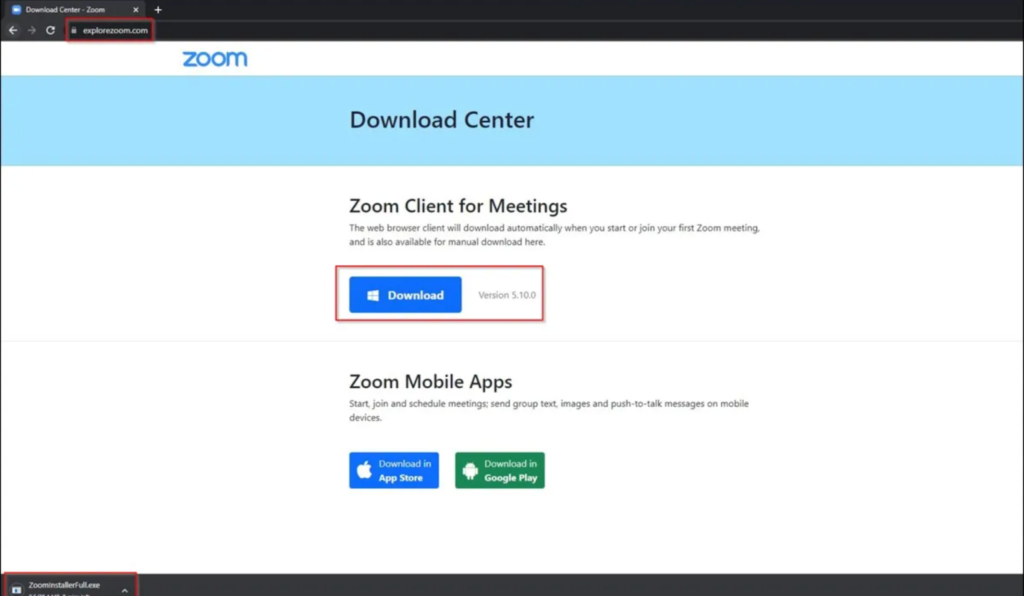
Cyber threat actors have created a phishing site impersonating the official Zoom video conferencing application to deliver IcedID malware to installers, according to a report Cyble Research and Intelligence Labs (CRIL) issued. IcedID, also referred to as “BokBot,” is designed to steal user banking credentials and primarily targets businesses. The phishing site impersonates the original Zoom site, leading unsuspecting users to download the IcedID along with the application.
Threat actors usually deliver IcedID via spam emails. But this time, they used a phishing website to carry the malicious load, breaking away from their known methods. IcedID malware steals login credentials for banking sessions using man-in-the-browser attacks. The attackers use multiple injection methods and frequently update their IcedID operations to evade detection from scanners.
The IcedID Zoom Phishing Scam: Technical Specifications
Beware when downloading Zoom. You could be downloading malware along with the application. Source: CRIL
The download URL for the latest IcedID phishing campaign is explorezoom.com, as opposed to the official Zoom.us. This highlights the importance of always checking domains before downloading anything online. Closely examining domain names or URLs can help reveal whether a download is legitimate.
Upon download, the Zoom IcedID malware drops two files into the temp folder: ikm.msi and maker.dll. Ikm.msi is a legitimate Zoom file, put there intentionally to lull suspicion. Users downloading from the link may use the application unaware of the threat. The second file, maker.dll, is highly malicious. It’s initiated using rundll32.exe with the “init” parameter. When executed, it uploads the IcedID malware into the memory.
The IcedID malware is a 64-bit DLL file that uses the following Windows API functions to gather user information and converts the output into numerical data:
GetTickCount64()
ZwQuerySystemInformation()
RtlGetVersion()
GetComputerNameExW()
GetUserNameW()
GetAdaptersInfo()
LookupAccountNameW()
CPUID
Later, in the final stage of malware execution, IcedID assigns an ID to the converted numbers and sends them to the C&C server as a cookie. The malware then deploys more malware strains in the %programdata% directory of the C&C server.
IcedID Malware IOCs and Recommendations
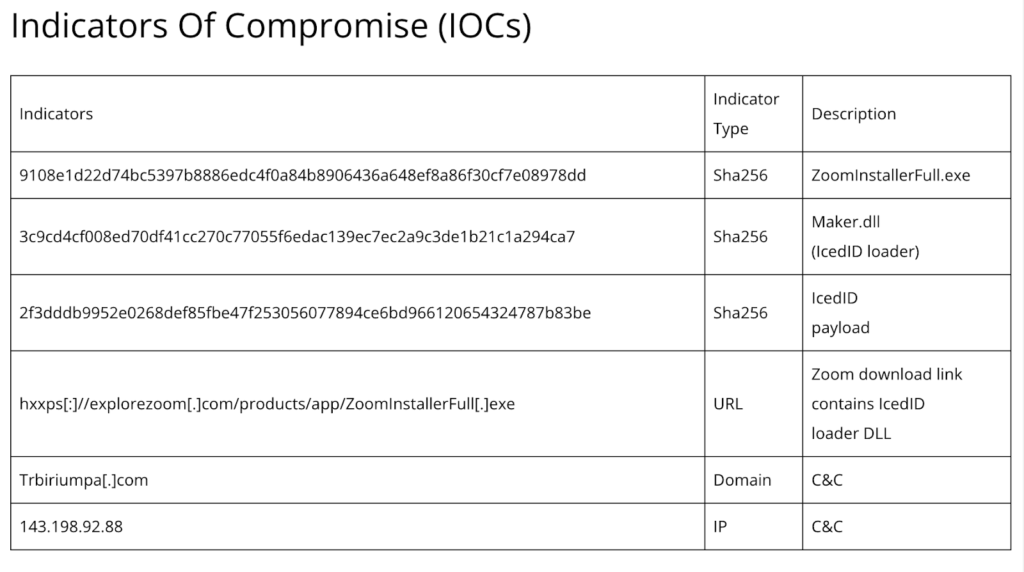
Network admins should know the ins and outs of IcedID malware to stay ahead of the curve. Source: CRIL
CRIL has listed the indicators of compromise (IOCs), including the malicious link, SHA addresses, domains, and IP addresses. This is useful information for security researchers and network administrators, who can use it to avoid falling prey to the same threats. CRIL has also listed some security recommendations, which are often standardized after a cybercrime event. These include:
Enforcing strong passwords and 2FA as much as possible
Using a high-quality malware scanning tool in tandem with antivirus software
Holding employee awareness training for suspicious URLs, particularly in email links
Blocking known malware-distributing URLs
Out of all the recommendations, companies shouldn’t underestimate the importance of malware detection and antivirus tools. Even if these fail to prevent the initial breach, they reduce the detection time and, thus, limit the cost and severity of an attack. Early detection helps contain the threat within a few hours rather than weeks or months. This has major cost implications for businesses.
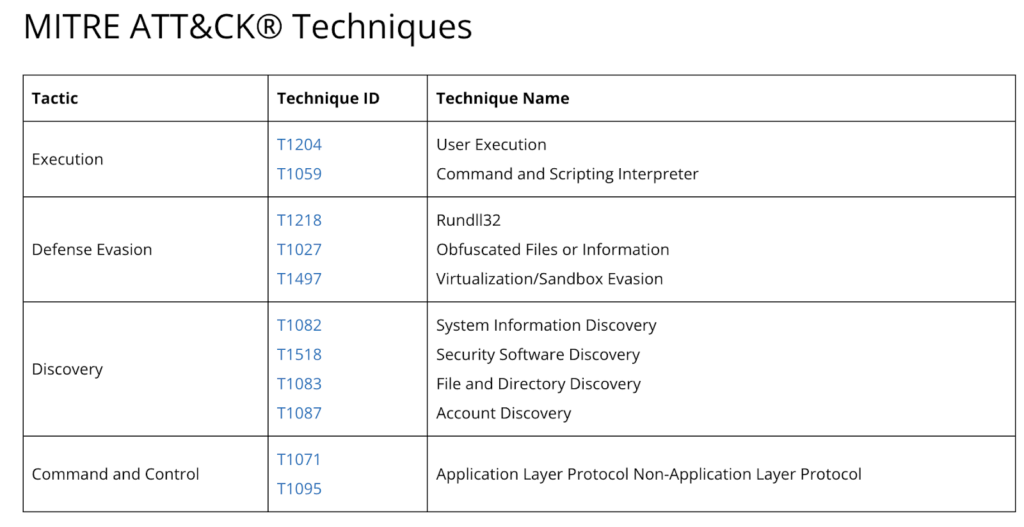
In its report, CRIL has also detailed the methods of attack used in this latest IcedID malware campaign to help network administrators and business owners identify the attack patterns. These include T1071 and T1095 C&C tactics, which relate to application and non-application layer protocols. Execution tactics include T1204 and T1059, which relate to user execution and the command and scripting interpreter.
Updated attack vectors often pass by undetected. Source: CRIL
Since the Covid-19 pandemic, cybercriminals have increasingly sought to compromise remote work applications like Zoom. Two reasons that make such applications such prime targets for cybercriminals are their widespread adoption and that they serve as means to access more lucrative businesses outside a highly secured network.
The issue here isn’t just the scale of these attacks — but that these are becoming increasingly adaptive and versatile with time. Cybercriminals are continually tweaking and adapting their models, leaving researchers a step behind in mapping their attack patterns and developing software that can fend them off.
Commenting on the threat posed by IcedID, CRIL refers to it as a “highly advanced, long-lasting malware that has affected users worldwide.” Cybercrime groups, including Emotet, TrickBot, and Hancitor, have also deployed IcedID malware. Though it’s usually spread through email phishing, cybercriminals created a phishing site to carry the malware in this instance. This also marks the first time that threat actors have used such tactics for deploying IcedID malware.
Yet, despite their sophistication, such attacks are easy to mitigate. For instance, users only need to practice a little awareness and caution to discern the legitimacy of software applications. Email phishing attacks often contain grammatical errors, typos, and poor English.
Moreover, some websites intentionally use incorrect URLs, known as typosquatting, to masquerade as the original website it’s impersonating. Hurried employees looking to download applications quickly may overlook these subtle signs and unwittingly invite trouble.
While commercial and enterprise networks may prevent these downloads automatically, remote employees who can navigate any site may be more at risk from the IcedID variant. Since many businesses nowadays employ large remote staff, this could spell disaster for the safety and integrity of a company’s internal communication and sensitive information.
The Key to Staying Safe from Malware in 2023
The best way to remain safe from malware online is to take a pause before downloading an application from any site, as legitimate as it may seem. Cybercriminals are even exploiting Google Ads to rank their phishing site higher in the SERPs to assume legitimacy and trick users into downloading from malicious links.
Aside from Zoom, other applications targeted through the MasquerAds campaign include AnyDesk, Dashlane, Grammarly, Malwarebytes, Microsoft Visual Studio, MSI Afterburner, Slack, Audacity, Teamviewer, Brave, and more. Under such circumstances, a user’s best defense is exercising vigilance online. A momentary pause and a closer look can reveal what even sophisticated software might fail to detect.
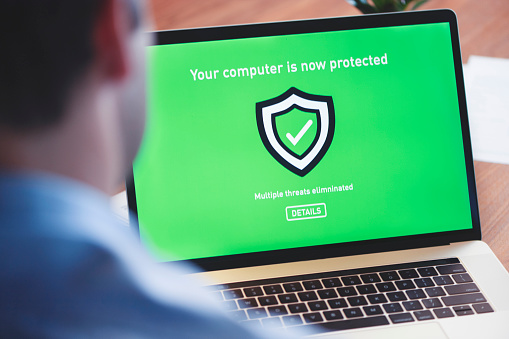
Does your computer have the proper protection to defend you from advanced threats? Source: iStock Photo – Courtneyk
Malware is a serious threat to both individuals and enterprises. It can compromise your sensitive data, disrupt operations, and even cause physical damage to computer systems. That’s not the end of the rope, though. If malware infects your system, it could severely damage your company’s reputation in the case of a data breach. In addition, data breaches usually require a settlement to affected customers, which is very costly. As if regular malware wasn’t enough, we’ve got bigger, smarter, and worse malware out there. So, it’s important to have advanced malware protection in place to protect your enterprise.
In this article, I’ll define advanced malware protection and its importance for your business. You’ll also gain a complete understanding of its 4 different types. So without further ado, let’s find out what advanced malware is.
What Is Advanced Malware?
Malware includes many different types like viruses, worms, Trojans, ransomware, etc. Each type has its own unique characteristics and can cause different types of damage. For example, a virus might replicate itself and spread to other devices. Meanwhile, ransomware might encrypt important files and demand a ransom for their release. Advanced malware can also evade detection or act like a friendly file. We haven’t seen these actions before, and they require better protection. Clearly, you need to deploy the big guns to safeguard your enterprise.
What Is Advanced Malware Protection?
Advanced malware protection (AMP) involves using specialized tools and techniques to detect, prevent, and respond to malware threats on a network or system. This can include a variety of approaches like antivirus software, firewalls, intrusion detection and prevention systems, and sandboxing. This also includes incident response plans and forensic analysis to help respond to and mitigate the impact of malware attacks.
Advanced malware protection is critical for helping businesses protect their networks and systems against cyber threats. It’s also critical for preventing cybercriminals from stealing sensitive data. It also stays up to date with evolving threats and provides multiple protection layers to help defend against new and sophisticated malware attacks.
So, employing advanced malware protection allows you to better protect yourself, your company, and your bottom line from cybercriminals. Malware has evolved so much, and you’ll need this advanced protection.
Drawbacks of Regular Malware Protection
One of the main drawbacks of common malware protection is that it may not be sufficient to better protect against sophisticated malware threats. For example, antivirus software relying on signature-based detection may not be able to detect new or unknown malware. On the other hand, advanced threats may bypass firewalls and intrusion prevention systems relying on rules-based approaches.
In addition, SMBs may face significant security risks if they rely on common malware protection while being attacked by advanced malware. Without advanced protection, they may be more vulnerable to data loss, downtime, and other negative impacts of malware attacks.
Now, let’s see why your business needs advanced malware protection.
5 Reasons Why Advanced Malware Protection Is Important
Advanced malware protection is important for many reasons, but most of all, it’s the prevention that counts. You want to ensure the safety of your data to avoid a costly settlement in case something happens to your data. Let’s look at how APM can benefit you:
1. Protects against Malware Threats
Malware threats are constantly evolving and becoming more sophisticated. This puts you at a higher risk of being attacked and losing valuable assets like data. So, it’s important to have protection that can adapt and stay up to date with new threats. Advanced malware protection uses different approaches to help defend against these threats. These approaches include machine learning algorithms and regular updates. You can think of it as artificial intelligence against malware.
2. Protects against Data Loss
Malware attacks can result in the loss or theft of sensitive data in your system. In return, this can result in serious consequences for your business and costly ones too. Advanced malware protection helps to prevent these attacks and protect against data loss. It also helps prevent the execution of malware on a network or system in the first place.
3. Protects against Downtime
Malware attacks can also cause disruptions and downtime. This can be costly and disruptive for businesses and enterprises. Advanced malware protection helps to minimize these disruptions and protect against downtime.
4. Detects and Removes Unknown Threats
Advanced malware protection can detect and remove malware that is still unknown to the security community. Traditional malware protection involves identifying known threats based on their unique characteristics or “signatures.” But new malware is constantly being developed. This means it can take time to identify these signatures and add them to security software. Advanced malware protection, on the other hand, uses more sophisticated techniques, like machine learning and advanced AI, to identify potential threats even if they don’t match any known signatures.
5. Prevents Malicious Installations
Another important benefit of advanced malware protection is that it can prevent malware from being installed in the first place. Many malware threats make it to your network through phishing attacks or other forms of social engineering. In these cases, the victim falls into the trap of downloading and installing malicious software. Advanced malware protection can block these attempts and prevent the malware from being installed on the system.
Now that you know why advanced malware protection is a must, you may wonder what’s running under the hood. Let’s see.
What’s Involved in Advanced Malware Protection?
Advanced malware protection is critical for helping businesses protect their networks and systems from cyber threats. As we discussed above, advanced malware protection involves 3 different approaches, including:
1. Detection
Advanced malware detection involves using specialized tools and techniques to identify and detect malware. This includes different approaches like:
Signature-based detection, which looks for known malware patterns
Behavior-based detection, which monitors the behavior of programs and looks for anomalies indicating the presence of malware
In addition, advanced malware detection systems may use machine learning algorithms to analyze data and identify potential threats. They also regularly update their databases with new malware signatures to keep up with evolving threats. Overall, advanced malware detection is critical for protecting businesses and enterprises and preventing sensitive data loss or theft.
2. Prevention
Advanced malware protection has many prevention methods like:
Antivirus software, which scans files and blocks the execution of known malicious software
Firewalls, which block unauthorized network traffic
Intrusion prevention systems, which monitor network traffic for signs of malicious activity and block it before it can execute
Advanced malware protection systems may also use machine learning algorithms to analyze data and identify potential threats. So, they help protect your business’s network and prevent the loss of sensitive data.
3. Response
To effectively respond to and mitigate the impact of malware attacks on a network or system, advanced malware protection has several approaches to responding that include:
Incident response plans, which outline the steps to be taken in the event of a malware attack
Forensic analysis, which involves analyzing the attack and determining how the malware was able to bypass security
Containment and eradication measures like isolating infected systems or devices from the rest of the network or cleaning and repairing systems to remove any remaining traces of malware
Essentially, the response aspect is critical for helping businesses quickly and effectively respond to malware attacks. They also help minimize these attacks’ impact on the network or system.
Now, let’s take a look at the 4 different types of advanced malware protection.
Malware is getting stronger, but so are our defenses. Source: Ahmed Adly
4 Types of Advanced Malware Protection
Here, we’ll take a look at the different types of advanced malware protection. Understanding these types allows you to better protect your email and systems, avoid costly data breaches, and more!
1. Cloud-Powered Cybersecurity
Cloud-powered cybersecurity involves using cloud computing technologies to provide security solutions for your business. These solutions can include services like cloud-based antivirus and malware protection, firewalls, and intrusion detection and prevention systems.
Since it’s in the cloud, you can access and manage cloud-powered cybersecurity solutions remotely. This makes it easier for businesses to protect their networks and data from threats. The security solutions are hosted in the cloud. So, you can scale them up or down to meet the changing needs of your enterprise.
Cloud-powered cybersecurity solutions can also provide additional benefits like increased reliability and uptime. In addition, they provide reduced costs compared to traditional on-premises security solutions. For example, businesses can pay for only the security services they need rather than investing in expensive hardware and software upfront.
2. Rapid and Seamless Cybersecurity Deployment
Rapid and seamless deployment allows you to integrate new technologies, systems, or applications into a network or environment without disrupting normal operations. This can be particularly important in cybersecurity, where it’s often necessary to deploy new security controls or updates to protect against new threats.
AI or algorithm-based cybersecurity solutions often provide administrators with an abstraction layer to help with deployment, configuration, and management. This control layer sits between you and system settings allowing it to directly manage port blocking, web filtering, etc.
During deployment, you simply have to answer a few questions about your security goals, and the software does the rest. All connected network devices are mapped and security configured according to the administrator’s goals. This makes deployment to highly complex networks far easier and ensures you don’t miss vulnerabilities.
Automated sandboxing is a security technique that involves executing potentially malicious code in a controlled environment. Sandboxing helps determine the malware’s behavior and assess its potential risk. You can use it to detect and prevent the execution of malicious code on a network or system, helping to protect against cyber threats.
Automated sandboxing typically involves using specialized software to create an isolated and virtualized environment. This allows the execution of potentially malicious software without affecting the rest of the system or network. In return, security analysts can observe its behavior and assess its potential risk.
Using automated sandboxing as part of a cybersecurity strategy has several benefits. For example, it helps identify and prevent the execution of malware before it can cause harm, like the loss of sensitive data. You can also use it to evaluate the effectiveness of security controls and identify any weaknesses that need addressing. Finally, you can use automated sandboxing can analyze and classify new types of malware. This helps improve the overall security of a network or system and ensures the safety of your data.
4. Adding and Securing Multiple Entry Points
Multiple entry points refer to having multiple ways for users to access a network or system. This can be useful for several reasons, like providing backup access in case of a failure or outage. It also enables different groups of users to access the network or system from different locations.
You can implement multiple-entry points in a network or system in several ways. One common approach is a Virtual Private Network (VPN). It allows users to connect to a network or system remotely using an encrypted connection over the internet. This helps enable remote access from anywhere with an internet connection.
Another approach is Remote Desktop Protocol (RDP). It’s a protocol that allows users to remotely access and control a computer or device from another location. This helps enable remote access to specific computers or devices on a network or system.
In addition, you can add secondary routers to a network to increase the number of access points available. To improve wireless network coverage, you often see wireless routers added where signal dead spots occur.
Adding multiple entry points enables you to improve network availability to users. When adding these access points, you also add ways for bad actors to access your network and deploy malware. Advanced malware protection solutions can help reduce the risk of malware passing your perimeter and running riot inside your network.
Let’s recap what we’ve covered!
Final Thoughts
Advanced malware protection is essential to any robust cybersecurity strategy. It protects your enterprise against many different threats. It also provides an additional layer of defense against sophisticated cyber attacks. This is important to succeed in combating cybercriminals and preventing costly data breaches. Whether you’re an individual concerned about protecting your data or an enterprise responsible for protecting critical infrastructure, advanced malware protection is an important investment in your security.
Do you still have some lingering questions? Would you like to read more about AMP and similar topics? Read the FAQ and Resources sections below.
Malware, short for “malicious software,” refers to any software designed to harm or exploit a computer system or network. Malware can take many forms, including viruses, worms, Trojans, ransomware, adware, and spyware. It can make it to your network and system through various means like email attachments, infected websites, or drive-by downloads. Once it does, malware can perform many harmful actions like stealing sensitive information, deleting or corrupting data, or using the system to attack other computers.
Can a firewall prevent a malware attack?
Firewalls block or limit incoming and outgoing network traffic based on predetermined security rules to prevent cyber attacks. A firewall acts as a barrier between a trusted network, like a private home network, and an untrusted network, like the internet. It can help protect against external threats by blocking traffic from known malicious sources, like known malware-infected servers or IP addresses. It can also inspect incoming traffic for signs of malicious activity. To be most effective, you should pair firewalls with other security measures.
How does advanced malware differ from other types of malware?
Advanced malware is typically more sophisticated and difficult to detect than other forms of malware. That’s because it’s designed to avoid detection by traditional security measures like antivirus software and firewalls. It may also use complex tactics to infiltrate a system, like zero-day vulnerabilities and spear-phishing attacks.
How do I know if my system has been infected with advanced malware?
It can be difficult to detect advanced malware, as it’s designed to evade detection. That said, some signs may indicate a possible infection. Some of these signs are unusual system behavior or performance, strange network activity, or the presence of unfamiliar files or programs.
How long do advanced malware campaigns last before detection?
It’s difficult to determine the average time an advanced persistent threat (APT) campaign lasts before detection. This is because it can vary widely depending on several factors. Some APT campaigns have been active for years before detection. Meanwhile, others have been detected within weeks or even days of their inception.
It has been a while since I took a question from a reader and turned it into a blog post. It is one of my favorite things to do here on ITProMentor, but the “busy-ness” of life has taken me away from the keyboard a lot in recent months. Now that I am (mostly) settled in a new home, I plan to rekindle some of these old joys.
This one came from Devin, who lives in the U.K.:
Hi Alex, I hope this message finds you well. I watched a recorded presentation of yours where you compared Conditional Access to a “Firewall for the Cloud,” but you mentioned that there are important differences. Specifically, you made the point that most firewalls have a “deny-all” rule by default, and it is up to the administrator to open the inbound ports that are necessary. In Conditional Access, you said it is almost the exact opposite, where everything is open by default, and you have to tell the system what you want closed.
This got me thinking, wouldn’t it be possible to start by creating a “deny-all” rule and then add other rules in front of that, to open the specific applications and access scenarios that you wanted, and no more? Wouldn’t this be more in line with the whole ‘Zero Trust’ concept?
Thanks for your insights!
–Devin, U.K.
Great question Devin, and I am glad that you asked it. No analogy is perfect, and it is actually because of these imperfections that the “firewall” comparison can be so illuminating. This will give us the chance to clarify a few things about Azure AD Conditional Access in general, and as well, offer some potential solutions to certain problems.
The first thing to remember is that Conditional Access differs from firewalls in another important way: there is no “ordering” to the rules. I cannot place one rule “in front of” another. All rules are evaluated simultaneously in Conditional Access. So, if I create a rule that says, “Block X,” it does not matter if that rule is located further up or down in my list. It will always be evaluated the same way. “X” will always be blocked.
This also implies that any “block” control always will always win over any “grant” control. Therefore, if I created one rule that said, “Block access to Email” (scoped to All users) and another one that said, “Grant access to email but require MFA” (either scoped to All users, or enabled for a specific security group), then guess what happens? Access is still blocked. In order to get the desired effect with these two policies, you would need to create a security group called something like “Email allowed users” and add that security group to the “Exclude” tab on the Block access… policy.
So, the answer to your question is both yes and no: it is possible to create “Deny-by-default” rules, but not exactly in the way you suggested. But in fact, this type of design (writing explicit block rules for everything then making many exclusions) would be unnecessary for most organizations. I will explain why shortly.
First, just notice that writing your “default deny” rule or rules quickly increases the complexity of your implementation. For example, you would need to manage double the policies and several security groups and exclusions for every access scenario you wanted to open/allow.
Deny mobile access for all users / Allow mobile access for approved users
Deny browser access from the desktop / Allow browser access from the desktop
Deny client app access from the desktop / Allow client app access from the desktop
Deny access to administrative services / Allow admin access
Deny all guest access / Allow guest access to approved apps
Etc.
I think these designs tend to get messy very quickly. You might say, so what? Why not do it this way?
Before we answer that question, let’s take a closer look at one of the other concepts I normally address during my talks on Conditional Access: the two so-called “Architecture types.”
Open (or targeted) architecture: This means targeting your policies to address specific access scenarios. For example: “Require MFA for access to Office 365,” or “Require managed devices for access to Email.” In this architecture, you are putting specific requirements around certain applications or access scenarios, while leaving others “open” or unguarded (i.e.. you do not have policies covering “All cloud apps”).
Closed (or universal) architecture: This means targeting your policies as broadly as possible, for example All users / All cloud apps, e.g.: “Block legacy authentication globally,” or “Require MFA for all users.”
Closed architecture is better aligned to the concepts of Zero Trust since you are not leaving any “holes” or scenarios free of the constraints imposed by the policy. Note that it is also possible to combine these architecture types into a single policy set. For example, you may have a universal requirement for MFA across all cloud apps, but you only require managed devices for access to email, or certain other applications. That is completely fine and up to each individual organization.
Why Closed Architecture is more like Deny-By-Default
Now, let’s assume your goal is ultimate Zero Trust protection across all cloud apps, and that you want to impose both a multi-factor as well as a managed device requirement everywhere. In this case we require multiple policies for various reasons (e.g., easier troubleshooting, better for making more granular exclusions, and covering various access scenarios).
To begin, we need several policies enforcing the MFA requirement:
Block all legacy authentication: legacy authentication is vulnerable to password spray and replay attacks, and it does not support MFA challenges, so we should eliminate it for all users and all cloud apps.
MFA required for all admins: it is a best practice to have a policy covering this scenario even if you plan to place the same requirement against all users; that way, if the policy for standard users changes or needs to be temporarily disabled, admins are still protected.
MFA to register/join devices: We have a separate “User action” to control this behavior, as it is not covered by the “All cloud apps” selection above.
Secure the security info registration page: We have a separate “User action” to control this behavior, as it is not covered by the “All cloud apps” selection above. Also, it is recommended to enable the Temporary Access Pass option so that users can still get in to edit authentication methods with help from an administrator, even in the absence of another factor such as a mobile app or hardware token.
MFA for guests: Note that we can also trust MFA claims from other tenants, so that users are not double-prompted. If you have a policy for the guest access scenario, be sure to modify your default trust settings from Azure AD > External identities > Cross-tenant access settings.
And we need another policy set enforcing device-based requirements, for example:
I suggest that this configuration achieves the “Deny-by-default” posture that we want, without needing to add another “Block” policy on top of it, with additional exceptions, etc. Let me explain why.
When you create a policy with access controls that say, “Grant access” and “Require X, Y or Z” then you could also read this policy as saying, “Access is denied unless X, Y or Z can be met/satisfied.” Therefore, if you do not satisfy MFA, or do no have a managed device, and your policy explicitly says those things are required, then guess what? No access for you!* This is already “deny by default.”
(*By the way, if you target “All cloud apps” with a compliant device requirement, then you must also exclude the Intune enrollment app or else you will be unable to enroll new devices. It’s like a chicken-and-egg problem: you can’t get enrolled in the first place to become evaluated for compliance if there is a compliance requirement in order to get enrolled. Note there may be other impacts as well with other cloud apps when enabling closed policies.)
Additional Deny-by-default rules
Another popular policy set is to have broad “location-based” rules that “deny-by-default” except from approved countries or locations. Example:
Block access from non-domestic countries: this policy is usually scoped to All cloud apps (closed), with a Block access control placed against All locations, excluding a named location containing the domestic country (e.g. USA, or wherever you live). Optionally, you can also use filters for devices to exclude managed devices (that way you can travel with devices that are already enrolled/managed)
And you can apply this concept to device platforms as well:
Let me briefly relate another story that hopefully clarifies the point further. This one combines the concepts of Open architecture with a “Deny-by-Default” policy (for a specific application: email).
Recently a non-profit organization contacted me with a very particular request. They wanted to use Closed architecture for their core policies (i.e., block legacy auth & require MFA), and at the same time use Open architecture for their device-based policies, especially for personal (mobile) devices. The main concern was around corporate email on personal devices. Okay, that’s no problem, and in fact is very common. Here is the catch. They had a very specific on-boarding process whereby a user would not be allowed to gain access to their corporate email using a mobile app until they had completed an E-safety training module. HR would assign them to a security group shortly after passing the exam, and they would thereupon be granted access (but not before then). It was basically a carrot for completing the course material.
They did not want a closed architecture because the scope for this requirement was no wider than email (Exchange Online). However, they still needed a “fail closed” policy set for this application because they did not want a user to gain access on mobile devices before passing the exam. So here is what we did: We implemented the usual policy set for block legacy auth, MFA requirements, etc. Then for the device-based requirement, we only targeted Exchange Online, and used a security group called “Allowed to access email on mobile devices.” We then created two policies:
The first policy was called “Block access to email on mobile devices” and it was configured as follows:
Users and groups:
Include: All users
Exclude: Allowed to access email + Emergency access accounts
Cloud apps: Office 365 Exchange Online
Conditions: Device platform > iOS & Android
Access controls: Block access
Then the second policy was called “Allow access to email on mobile and desktop apps” and it was configured as follows:
Users and groups:
Include: All users
Exclude: Emergency access accounts
Cloud apps: Office 365 Exchange Online
Conditions: Client apps > Mobile apps and desktop clients
Access controls: Grant access w/ Compliant device or Approved App or App protection policy
Remember that all other access scenarios around this application are already covered by our “closed architecture” design for the MFA requirement, etc. This is an additional requirement that says access is granted only when the device is managed (MDM), or the app is protected (MAM), and when the user belongs to the proper security group (indicating they passed the E-safety course).
Now, in my opinion this configuration is not any “safer” or “more secure” than simply deploying the second policy and forgoing the first policy altogether. The reason we deployed both policies wasn’t “because security” or “because deny-by-default,” rather, we did this specifically to enable the custom workflow that they wanted to have, with the training pre-requisite. That’s it.
Conclusion
If your goal is to align your Conditional Access strategy as closely as possible with a ‘Zero Trust’ model, then you should probably be aiming for Closed architecture. However, a closed architecture approach may not be right for every organization and every application/access scenario. Whenever I implement Conditional Access, I always push closed policies for the basics: blocking legacy auth and enforcing MFA. After that, I think it is a good idea to begin evaluating device-based policies with regard to corporate email access specifically, and go further where it makes sense, even all the way to a closed policy set, especially in high-sensitivity or high-security environments. Just be aware there may be other impacts to certain applications (e.g. Intune enrollment, etc.).
Hopefully this cleared up the confusion for you, Devin. Thanks for writing in.
When I talk to customers about their Digital Transformation Journey, I always like to give them the “10,000 foot view” so to speak. I suggest that we explore two different angles or “big pictures” in order to paint an image that customers can then imagine themselves into. The first picture is Security & Compliance, and the second is Productivity & The Modern Workplace. Let’s start by examining the first.
With regard to Security & Compliance, we have to set the stage a bit: why should customers care about this stuff? After all, cybersecurity initiatives typically struggle to get funding and other traction, especially in the small and mid-sized business where resources are more scarce to begin with.
The structure of your pitch
You will often see security vendors at conferences begin their presentations with scary statistics about how many breaches occur each year, and how the cost of an average breach has been steadily increasing year-over-year; I find this type of information to have a very limited effect on people. If something like that is going to be your angle, it is far more effective to relate real-life stories, and the “closer to home” each story hits, the better (yet some orgs will refuse to act until it is their own home which is hit, and they become one of those stories you end up telling to others).
But selling customers on the importance of security & compliance should not be based on scare tactics, anyway. You also have to paint a picture of value. Give them a preview of what it looks like to live in the new world you want to guide them into. Remember that all changes are going to be met with some resistance (this is only natural), yet these changes are ones that must take place sooner or later. Plus, you can highlight new features such as Sensitivity labels, which grant users new superpowers they’ve never had before. In general, it is much more difficult to prod people from behind into the darkness than it is to coax them into the light, leading from the front. In other words, carrots are better than sticks.
The corollary in this message which you must communicate explicitly is that you have already walked this path yourself, and you have no regrets about doing so. You will also take them down this path, and it will go just as smoothly, or even better, since you already know the pitfalls and dangers that lie along the way. As you paint this canvas, also be sure to highlight how the new tools or capabilities would have prevented or mitigated the problems you shared earlier in your anecdotal stories.
In addition to sharing relatable anecdotes and painting the preview or picture I want them to inhabit, I normally make it very clear that this past decade has seen such a radical shift in the cyber landscape, that I can no longer afford to waste my time with customers who will not take this journey seriously. If they cannot even be bothered to implement a basic level of cyber hygiene such as CIS Implementation Group 1, then they are essentially begging to be compromised, and simply I cannot give my precious attention to folks who will not even address the most essential of risks, and therefore any further engagement is off the table. This is also why I suggest beginning your new engagements from Security & Compliance rather than Productivity & The Modern Workplace.
Let me be clear: this might mean you have to fire some existing customers, even long-standing ones. But that’s okay: you are going to replace them with better ones (the ones who will actually listen to you and trust your recommendations). Notice this is different from either a stick or a carrot. It is more like a “filter” or disqualifier. Holding up this barrier is only fair to them, and enormously helpful for you, plus it sends a very strong message (it projects confidence in your own practice).
So let’s review: you should plan your Security & Compliance pitch using these key components:
Relatable anecdotes from the wild (and the closer to home the better)
A preview or “picture” of where your customer is heading and the new capabilities you will bring to them
An ultimatum / disqualifier
So what does good look like?
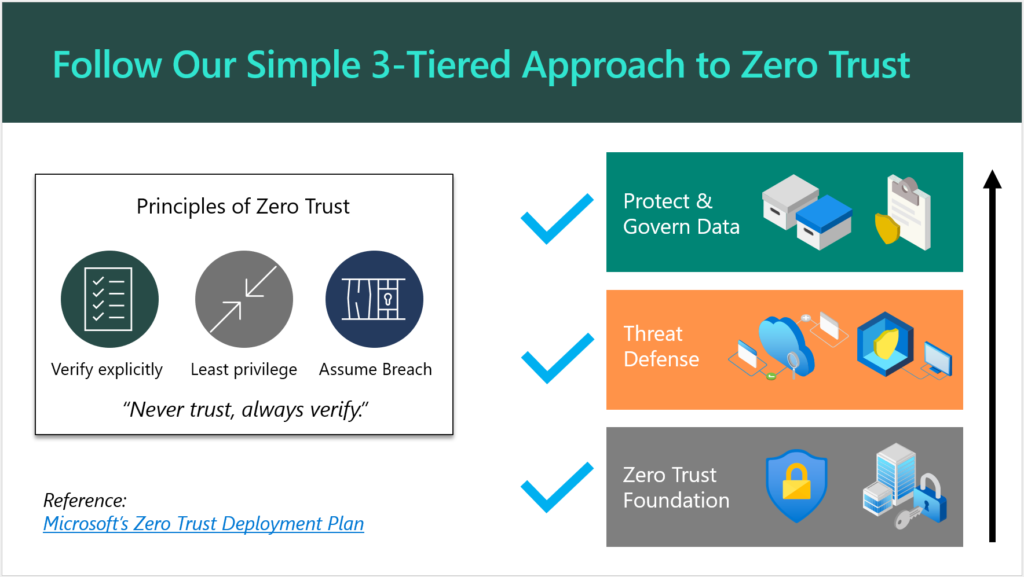
Once you have a prospect’s attention, you will need a simple and engaging way to explain your Security & Compliance offering to them. If you are primarily selling solutions built on top of Microsoft 365, as I am, then I suggest leveraging the concepts, marketing and language that Microsoft themselves have already produced. For example you will see them speak and write frequently about “Zero Trust,” and what that phrase means to them.
They have also published some detailed documentation such as the Zero Trust Deployment Plan, which is targeted for Enterprise (read: E5) customers. You can simplify this for SMB a bit further, as I have done here:
There is no need to reinvent the wheel (that’s what Microsoft’s materials are there for). Plus, if a customer decides to “spot check” your pitch, they would find solid validation with a quick Google search.
Aren’t Security and Compliance different things? Why not two offerings?
You can sell separate offerings if you want to, sure. Remember that a “compliant” environment is not necessarily a secure one. On the other hand, the items that are generally called for in a high-regulation, compliance-intensive scenario most often exist becauseof concerns around data security. For this reason, I always suggest that you approach your engagements from a “Security-First” mindset. When you build a good, secure foundation, you will very often find that compliance is a breeze thereafter, and this is because most compliance requirements will map back to common cybersecurity frameworks such as NIST anyway.
And yes, I am aware that in some cases “compliance requirements” actually contradict the latest cybersecurity guidance. The most common example I see thrown around is password complexity & rotation requirements, which are moot after the implementation of a good Zero Trust baseline including Multi-Factor Authentication and other identity protection systems. Look, I have gotten into with auditors before: I have found that the spirit behind the law is more important than meeting the letter of the law itself. So with regard to this particular example, the point is not to put people through the discomfort of changing passwords every 90 days, the point is to protect them from credential theft and identity compromise. We have better, more sophisticated ways of doing that now which are more comfortable, so why would we go backwards? I have fought this battle and won on more than one occasion (so that we could end password rotations), and I won because I supported my claims with reputable references.
Anyway, my original point is that you can splinter off a cybersecurity essentials baseline offering, and then have “compliance” add-ons for helping organizations meet more specific requirements such as PCI, HIPAA, GDPR, etc. as needed. Some service providers will specialize around a particular vertical, and get to know their requirements really well, and then just focus on those (then a single, flat-rate Security & Compliance offering makes a lot of sense). How you bundle this stuff and sell it to your customers is largely up to you. I would not say there is just one right answer here.
Conclusion
Once your customer has committed to the Security & Compliance journey, then you are off to a very good relationship indeed. From here, you can begin to explore the next big picture, which is improving productivity and modernizing outdated, tired business practices. This will require a new change of frame, so to speak, and another pitch. But this second journey is going to be taking place against a more secure background than what you had before (this actually makes life easier and less stressful for both you and your customer). Without the first journey, you could jeopardize all of your subsequent efforts in the second: the modern workplace transformation should be undergirded by that Security-first foundation.
If you enjoyed this blog post and would like to see more content like it, which goes into greater detail and gives you an opportunity to work with myself and other peers who are implementing these solutions for customers, I would suggest you check out our SquareOne Practice Development Group.
After you get your customers onboarded to your “Security-First” services, the next step is helping them to complete their digital transformation and maximize the value they invested into the modern workplace. But that is a topic for another day.

 Connexion