Vue lecture

Il y a de nouveaux articles disponibles, cliquez pour rafraîchir la page.
✇SharePoint Maven

How to open Office files in the desktop application by default

If you are accessing Office documents from within SharePoint and Teams and not Windows Explorer, I am sure you noticed that by default, MS Office file types (Word, Excel, PowerPoint, OneNote) always open up in the browser. It is quick and straightforward, but you probably need a full desktop experience majority of the time (for formatting in Word, additional functionalities in Excel, etc.). Luckily, we have a way to change the default. In this article, I would like to summarize the available options we have – the one you choose depends on how and where you open files from.

To change the default in SharePoint

If you primarily access Office files from the SharePoint site/interface, you would be better off adjusting a setting on a document library that I describe in this post.
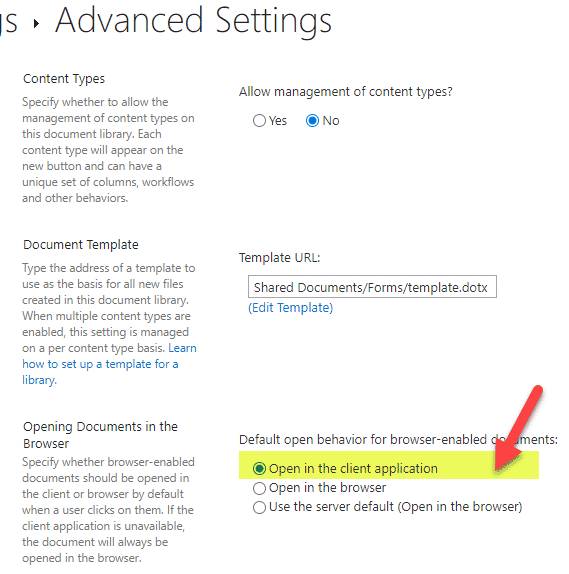
open Office files in the desktop application

Important Notes

  • This change will affect everyone using this site/document library
  • If you access the same files from the Teams interface, this change will not affect it

To change the default in Teams

If you primarily access Office files from the Teams interface, you can do the following.

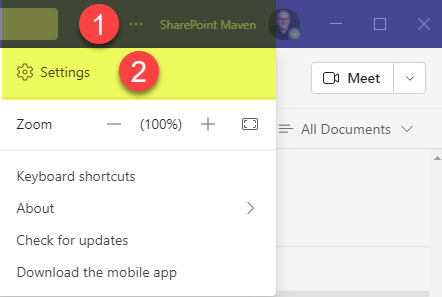
  1. In the upper-right-hand-corner of Teams, click three dots > Settingsopen Office files in the desktop application
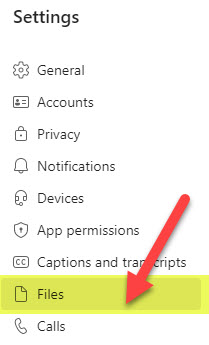
  2. Under Settings, click on the Files sectionopen Office files in the desktop application
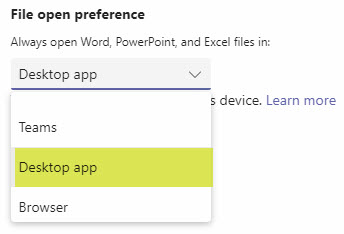
  3. Change the default to Desktop appopen Office files in the desktop application

Important Notes

  • This change will only affect you, and not the other members of the team
  • This change does not affect how files are opened from SharePoint
  • This setting can only be adjusted in the Teams Desktop application – you will not be able to adjust this in Teams if you access Teams via Browser
  • Sometimes this setting might not be available – for the above to work you must purchase and install Office application via the same licensed subscription you have with Teams (check out this article from Microsoft for additional information)

The post How to open Office files in the desktop application by default appeared first on SharePoint Maven.


✇REgarding 365 - Medium

Sign Language View in Teams meetings

Sign language interpreter video will be prioritized in Teams meetings, making them more visible and using higher quality video. PowerPoint Live in Teams will allow users to magnify slides in their personal experience of a meeting. Microsoft Viva admin becomes more organized but hasn’t yet got its own admin center. More on this week’s episode:

Sign Language View in Teams meetings - #260

This week on the 365 Message Center Show

In this week’s show:

— Changes to navigation in Outlook for Android — MC450188
 — Outlook for Windows: Cloud Signatures Coming Soon — MC450845
 — Sign Language View — MC450498
 — PowerPoint Live in Teams: Magnify Slide — MC452198
 — New Viva admin experience in M365 Admin Center — MC452213
 — Announcing the New Look of Office for the Web — MC452253
 — Stories available for public preview in Yammer and Microsoft Viva Engage beginning early November — MC452234
 — New home experience for Viva Connections desktop — MC447338

Join Daniel Glenn and Darrell as a Service Webster as they cover the latest messages in the Microsoft 365 Message Center.

Check out Daniel and Darrell’s own YouTube channels at:
Daniel — https://www.youtube.com/DanielGlenn
Darrell — https://www.youtube.com/modernworkmentor

Select a podcast app below to open our podcast on your favorite device!

Alternatively manually add our podcast via your favorite app:
https://www.messagecentershow.com/feed.xml

View ALL app options on our website: http://MessageCenter.show

Listen to the podcast on Apple Podcasts
Listen to the podcast on Google Play
Listen to the podcast on Spotify
Listen to the podcast on iHeartRadio
Listen to the podcast on Overcast

See all the other 365 Message Center Show posts: #365MCS Recap Posts

Originally published at Daniel Glenn.


Sign Language View in Teams meetings was originally published in REgarding 365 on Medium, where people are continuing the conversation by highlighting and responding to this story.

❌