
Vue lecture

Il y a de nouveaux articles disponibles, cliquez pour rafraîchir la page.
✇EnjoySharePoint

Power Apps Set ThisItem Value [With Real Examples]

In this Power Apps Tutorial, We will learn how to set a ‘ThisItem‘ operator within the Power Apps. Also, We will discuss how to work with the ThisItem operator within the Power Apps gallery based on different scenarios.

Currently, We got a requirement from one of our clients while working with a certain canvas app. As per their requirement, they want to set a variable value using the ThisItem operator.

Also, Read: How to Select First Item in a Power Apps Gallery

What is Power Apps ThisItem?

In Power Apps, ThisItem is a formula that refers to the currently selected item in a gallery or form control. When a user interacts with a gallery or form control, Power Apps automatically sets the context of ‘ThisItem‘ to the item that was selected.

The Power Apps ThisItem refers to the properties of the currently selected item, such as its ID or name, in formulas and expressions throughout your app. That is, it represents the current data structure for each section of the record within the respective gallery.

Working with the Power Apps ThisItem

Here, we will see how to work with the Power Apps ThisItem operator within a gallery control. For this, the following steps are:

  • On the Power Apps screen, add a blank vertical gallery.
  • Add a text control to the Power Apps gallery. We can see as the gallery didn’t connect with any data source, it will display a sample text within the text control with the below expression.
Text = ThisItem.SampleText
Power Apps ThisItem
Power Apps ThisItem
  • Let’s add a button control to the gallery and create a global variable to store the SampleText of each section of the record.
  • For this, add a button control to the above Power Apps gallery and insert the below expression on the button’s OnSelect property.
OnSelect = Set(VarValue, ThisItem.SampleText)
Set ThisItem in Power Apps
  • Again, we will add a text input control on the outside of the Power Apps gallery. Insert the below expression on the Text property.
Text = VarValue

Where VarValue is the name of the global variable that we have created. Now, we can see when we click any button the respective item will be displayed on the text input control.
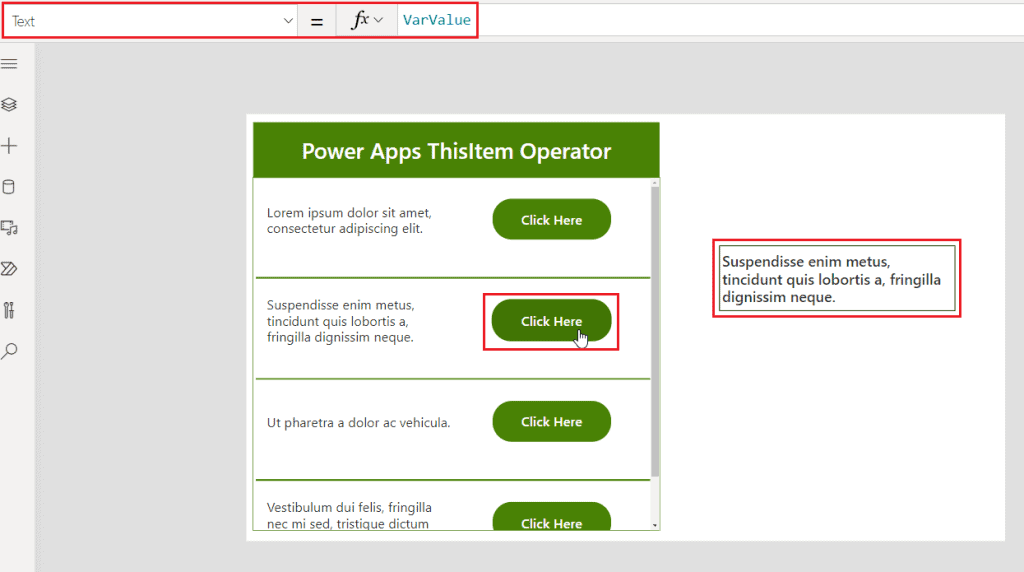
Power Apps set ThisItem value

This is how to work with the ThisItem value in Power Apps.

Check out: How to get selected value from gallery in Power Apps?

Set ThisItem value in the Power Apps gallery

Here, we will see how to set a value using the ThisItem operator within a Power Apps gallery. For this, we have a SharePoint list based on ‘Content Scheduler’ having different types of columns such as single line of a text column, choice column, and date as shown below:

Power Apps set ThisItem value in a gallery

On the Power Apps screen, let’s add a blank vertical gallery and connect the gallery with the above SharePoint list.

How to set ThisItem value in Power Apps gallery
How to set ThisItem value in a Power Apps gallery
  • Add a text label control to the above Power Apps gallery and insert the below expression on the Text property to display the content’s title.
Text = ThisItem.Title

Once we insert the above formula it retrieves all the data from the title column of the specified SharePoint list.

PowerApps set ThisItem value in a gallery
  • Similarly, we can add another text label control to display the date column data. For that, the expression will be as below:
text = ThisItem.'Draft Date'
Set ThisItem in Power Apps gallery
Set ThisItem in Power Apps a gallery
  • In the case of the choice column, the expression will be a little different. For this, add a text label control to the Power Apps gallery and insert the below expression on the Text property to display the blog status value.
Text = ThisItem.'Blog Status'.Value
How to set ThisItem value in a Power Apps gallery

Similarly, we have added 2 more text label control to add publish date and blog type as shown below:

PowerApps set ThisItem value in gallery
PowerApps set ThisItem value in a gallery

This is how to set the ThisItem value in a Power Apps gallery.

Have a look: How to add text input to Power Apps collection?

Update ThisItem value in Power Apps gallery

In this section, we will discuss how to update a value in Power Apps gallery using the ThisItem property. That is, we will add an icon to the above Power Apps gallery. When the user clicks on that icon, the respective item’s ‘publish date’ will be updated to a specific date value.

To work with this scenario, the following steps are:

  • Add an icon (calendar or right) to the above Power Apps gallery.
  • Insert the below expression on the icon’s OnSelect property.
OnSelect = Patch(
    'Content Scheduler',
    ThisItem,
    ContentScheduler_Gallery.Selected,
    {'Publish Date': Today()}
)

Where

  • ContentScheduler_Gallery is the name of the above Power Apps vertical gallery.
  • ‘Publish Date’ is the name of the date column where the date value will be updated.
  • Today() reveals the current date.
Power Apps update ThisItem value in a gallery

Let’s publish and preview the app. We can see when we click on any icon the respective date value will be updated within the above gallery.

Update ThisItem value in Power Apps gallery

This is how to update a particular item’s value by using the ThisItem in a Power Apps gallery.

Furthermore, you may like some more Power Apps tutorials:

Conclusion

From this Power Apps Tutorial, we learned all about Power Apps ThisItem property based on different scenarios. Such as:

  • What is Power Apps ThisItem?
  • How to work with the Power Apps ThisItem?
  • Set ThisItem value in the Power Apps gallery.
  • How to update the ThisItem value in a Power Apps gallery?
✇ITProMentor

Selling the Digital Transformation Journey: Security & Compliance

When I talk to customers about their Digital Transformation Journey, I always like to give them the “10,000 foot view” so to speak. I suggest that we explore two different angles or “big pictures”  in order to paint an image that customers can then imagine themselves into. The first picture is Security & Compliance, and the second is Productivity & The Modern Workplace. Let’s start by examining the first.

With regard to Security & Compliance, we have to set the stage a bit: why should customers care about this stuff? After all, cybersecurity initiatives typically struggle to get funding and other traction, especially in the small and mid-sized business where resources are more scarce to begin with.

The structure of your pitch

You will often see security vendors at conferences begin their presentations with scary statistics about how many breaches occur each year, and how the cost of an average breach has been steadily increasing year-over-year; I find this type of information to have a very limited effect on people. If something like that is going to be your angle, it is far more effective to relate real-life stories, and the “closer to home” each story hits, the better (yet some orgs will refuse to act until it is their own home which is hit, and they become one of those stories you end up telling to others).

But selling customers on the importance of security & compliance should not be based on scare tactics, anyway. You also have to paint a picture of value. Give them a preview of what it looks like to live in the new world you want to guide them into. Remember that all changes are going to be met with some resistance (this is only natural), yet these changes are ones that must take place sooner or later. Plus, you can highlight new features such as Sensitivity labels, which grant users new superpowers they’ve never had before. In general, it is much more difficult to prod people from behind into the darkness than it is to coax them into the light, leading from the front. In other words, carrots are better than sticks.

The corollary in this message which you must communicate explicitly is that you have already walked this path yourself, and you have no regrets about doing so. You will also take them down this path, and it will go just as smoothly, or even better, since you already know the pitfalls and dangers that lie along the way. As you paint this canvas, also be sure to highlight how the new tools or capabilities would have prevented or mitigated the problems you shared earlier in your anecdotal stories.

In addition to sharing relatable anecdotes and painting the preview or picture I want them to inhabit, I normally make it very clear that this past decade has seen such a radical shift in the cyber landscape, that I can no longer afford to waste my time with customers who will not take this journey seriously. If they cannot even be bothered to implement a basic level of cyber hygiene such as CIS Implementation Group 1, then they are essentially begging to be compromised, and simply I cannot give my precious attention to folks who will not even address the most essential of risks, and therefore any further engagement is off the table. This is also why I suggest beginning your new engagements from Security & Compliance rather than Productivity & The Modern Workplace.

Let me be clear: this might mean you have to fire some existing customers, even long-standing ones. But that’s okay: you are going to replace them with better ones (the ones who will actually listen to you and trust your recommendations). Notice this is different from either a stick or a carrot. It is more like a “filter” or disqualifier.  Holding up this barrier is only fair to them, and enormously helpful for you, plus it sends a very strong message (it projects confidence in your own practice).

So let’s review: you should plan your Security & Compliance pitch using these key components:

  1. Relatable anecdotes from the wild (and the closer to home the better)
  2. A preview or “picture” of where your customer is heading and the new capabilities you will bring to them
  3. An ultimatum / disqualifier

So what does good look like?

Once you have a prospect’s attention, you will need a simple and engaging way to explain your Security & Compliance offering to them. If you are primarily selling solutions built on top of Microsoft 365, as I am, then I suggest leveraging the concepts, marketing and language that Microsoft themselves have already produced. For example you will see them speak and write frequently about “Zero Trust,” and what that phrase means to them.

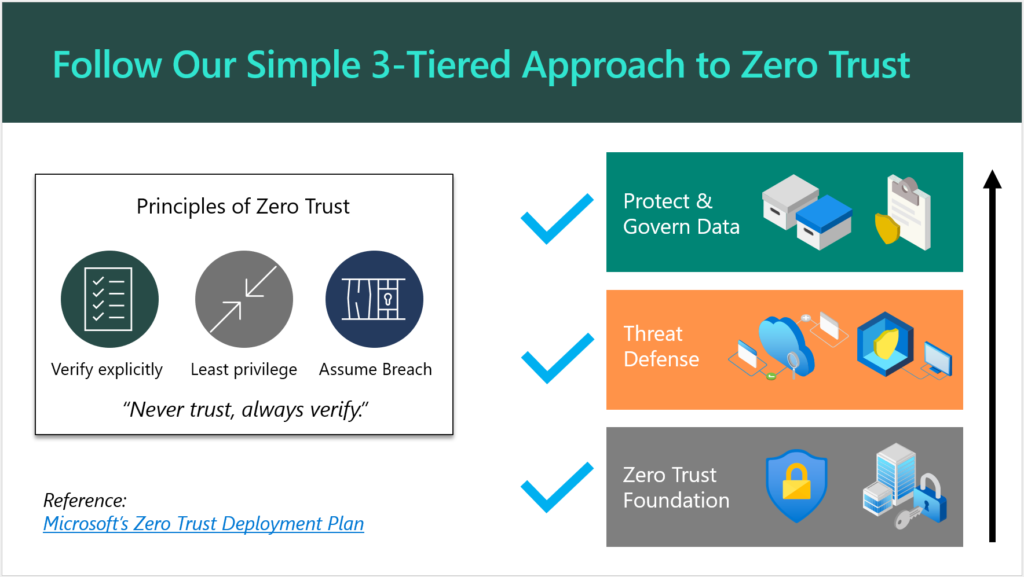
They have also published some detailed documentation such as the Zero Trust Deployment Plan, which is targeted for Enterprise (read: E5) customers. You can simplify this for SMB a bit further, as I have done here:

Follow our simple 3-tiered approach to Zero Trust

There is no need to reinvent the wheel (that’s what Microsoft’s materials are there for). Plus, if a customer decides to “spot check” your pitch, they would find solid validation with a quick Google search.

Aren’t Security and Compliance different things? Why not two offerings?

You can sell separate offerings if you want to, sure. Remember that a “compliant” environment is not necessarily a secure one. On the other hand, the items that are generally called for in a high-regulation, compliance-intensive scenario most often exist because of concerns around data security. For this reason, I always suggest that you approach your engagements from a “Security-First” mindset. When you build a good, secure foundation, you will very often find that compliance is a breeze thereafter, and this is because most compliance requirements will map back to common cybersecurity frameworks such as NIST anyway.

And yes, I am aware that in some cases “compliance requirements” actually contradict the latest cybersecurity guidance. The most common example I see thrown around is password complexity & rotation requirements, which are moot after the implementation of a good Zero Trust baseline including Multi-Factor Authentication and other identity protection systems. Look, I have gotten into with auditors before: I have found that the spirit behind the law is more important than meeting the letter of the law itself. So with regard to this particular example, the point is not to put people through the discomfort of changing passwords every 90 days, the point is to protect them from credential theft and identity compromise. We have better, more sophisticated ways of doing that now which are more comfortable, so why would we go backwards? I have fought this battle and won on more than one occasion (so that we could end password rotations), and I won because I supported my claims with reputable references.

Anyway, my original point is that you can splinter off a cybersecurity essentials baseline offering, and then have “compliance” add-ons for helping organizations meet more specific requirements such as PCI, HIPAA, GDPR, etc. as needed. Some service providers will specialize around a particular vertical, and get to know their requirements really well, and then just focus on those (then a single, flat-rate Security & Compliance offering makes a lot of sense). How you bundle this stuff and sell it to your customers is largely up to you. I would not say there is just one right answer here.

Conclusion

Once your customer has committed to the Security & Compliance journey, then you are off to a very good relationship indeed. From here, you can begin to explore the next big picture, which is improving productivity and modernizing outdated, tired business practices. This will require a new change of frame, so to speak, and another pitch. But this second journey is going to be taking place against a more secure background than what you had before (this actually makes life easier and less stressful for both you and your customer). Without the first journey, you could jeopardize all of your subsequent efforts in the second: the modern workplace transformation should be undergirded by that Security-first foundation.

If you enjoyed this blog post and would like to see more content like it, which goes into greater detail and gives you an opportunity to work with myself and other peers who are implementing these solutions for customers, I would suggest you check out our SquareOne Practice Development Group.

After you get your customers onboarded to your “Security-First” services, the next step is helping them to complete their digital transformation and maximize the value they invested into the modern workplace. But that is a topic for another day.

The post Selling the Digital Transformation Journey: Security & Compliance appeared first on ITProMentor.

❌