Vue normale

Il y a de nouveaux articles disponibles, cliquez pour rafraîchir la page.
À partir d’avant-hierFlux principal

How to Create an Emailable Exchange Distribution List with Internal and External Contacts?

Scenario:

If you need a distribution list in Exchange that includes both internal organization contacts and external contacts—without requiring external users to be invited as guest accounts—there’s a simple way to achieve this.

In Exchange Online, external contacts are referred to as Mail Contacts. These allow you to add external email addresses to your organization’s address book, making them available for inclusion in distribution lists. By leveraging Mail Contacts, you can create a fully functional distribution list that includes both internal users and external recipients while keeping everything manageable within Exchange.

Managing email distribution lists efficiently is crucial for organizations that need to communicate with both internal and external contacts. While Exchange Online allows us to create Mail Contacts programmatically using PowerShell scripts or the Exchange Online Management API, automating this process is key—especially when integrating it with Dynamics 365 Marketing Lists.

The Automation Challenge

In my case, I wanted to automatically add new contacts from a specific Dynamics 365 Marketing List to a corresponding Exchange Distribution List. Initially, I considered using Power Automate to invoke a PowerShell script, but that introduced additional complexities:

  • Using Power Automate to trigger an Azure Automation Runbook
  • Managing authentication and execution permissions
  • Handling execution timing and monitoring

A More Efficient Approach: Logic Apps

Instead of relying on Power Automate, I found a better and more streamlined approach—using Azure Logic Apps. Unlike Power Automate, Logic Apps offer built-in functionality to create and execute Runbook Jobs directly within Azure Automation.

What This Blog Covers

In this post, I’ll walk you through:
✅ Setting up an Azure Automation Account
✅ Creating a Runbook to execute a PowerShell script that adds Mail Contacts
✅ Using Azure Logic Apps to trigger the Runbook
✅ Handling authentication across these services

By the end, you’ll have an end-to-end automation setup that seamlessly adds external contacts to Exchange Distribution Lists as soon as they join a Dynamics 365 Marketing List—without requiring manual intervention.

Let’s dive in! 🚀

Step 1: Set up the Azure Automation Account

  1. Log in to Portal Azure https://portal.azure.com/ and in the search box, type Automation Accounts


2. Click on Create, Select your Subscription and Resource group, and type in the Automation Account Name

2. Then click the Advanced Tab, and on the Managed Identities, select User Assign; we will set up the User Managed Identity in the next steps.

3. Click Review and Create.

Step 2: Setup the User Managed Identity

A common challenge for developers is the management of secrets, credentials, certificates, and keys used to secure communication between services. Managed identities eliminate the need for developers to manage these credentials.

A common challenge for developers is the management of secrets, credentials, certificates, and keys used to secure communication between services. Managed identities eliminate the need for developers to manage these credentials.

While developers can securely store the secrets in Azure Key Vault, services need a way to access Azure Key Vault. Managed identities provide an automatically managed identity in Microsoft Entra ID for applications to use when connecting to resources that support Microsoft Entra authentication. Applications can use managed identities to obtain Microsoft Entra tokens without having to manage any credentials.

So Let’s see how to setup the account with the Required Permissions!

  1. On the Search, Type Managed Identities

2. Click Create, Select the subscription, Resource group, and give it a name

3. Then Press Review and Create

4. Open the automation account that we have created in Step no. 1

5. Search for Identity, open the link, select user assigned, and click Add.

6. Add the managed identity that we have just created.

7. Next comes setting the Permissions for the Managed Identity, so go back and open the Managed Identity.

8. Go to Azure Role Assignments and add the Automation Contributor Role; this is required to enable the Logic app to execute the RunBook (we will be creating this in the next step) on the automation account.

9. Grant the Exchange.ManageAsApp API permission for the managed identity to call Exchange Online, Unfortunately, this step can’t be done through the Azure / Entra Portal, so we will be using Graphy API Explorer to achieve this.

Get the Managed Identity’s Object ID

Get Exchange Online Service Principal ID

Open Grap API Explorer, Login ,and run the below query and grap the Exchange online service Principal ID

Method: Get

https://graph.microsoft.com/v1.0/servicePrincipals?$filter=appId eq '00000002-0000-0ff1-ce00-000000000000'

Assign the Exchange.ManageAsApp Permission

Using Graph Explorer API again, use the below to assign the Exchange.ManageAsApp Permission

POST https://graph.microsoft.com/v1.0/servicePrincipals/{MANAGED_IDENTITY_OBJECT_ID}/appRoleAssignments
Authorization: Bearer YOUR_ACCESS_TOKEN
Content-Type: application/json

{
  "principalId": "{MANAGED_IDENTITY_OBJECT_ID}",
  "resourceId": "{EXCHANGE_ONLINE_SERVICE_PRINCIPAL_ID}",
  "appRoleId": "dc50a0fb-09a3-484d-be87-e023b12c6440"
}

10. Assign Microsoft Entra roles to the managed identity; you will need to assign the Exchange Administrator Role

In the Search type role and select Microsoft Entra Roles and administrators

11. Open Exchange Administrator Assignments and add the user Managed Identity by clicking the Add Assignments Button .. Global administrator privileges will be required for this.

Step 4: Import Exchange Management Modules

  1. Open the Automation Account that we have created in step 1
  2. Navigate to Shared Resources -> Modules
  3. Click Add Module

4. Click Browse from gallery

  1. Open the Automation Account
  2. Navigate to Process Automation -> Runbooks
  3. Search for PackageManagement and select and choose the Runtime Version 5.1

4. Repeat for Add PowerShellGet and choose Runtime Version 5.1

5. Repeat for ExchangeOnlineManagement and choose Runtime Version 5.1

Step 5: Create a runbook in Azure Automation

  1. Open the Automation Account
  2. Navigate to Process Automation -> Runbooks
  3. Click on Create a runbook. Make sure you are using Runtime Version 5.1 because PowerShell works only for this Version

4. Open the Run Book and click Edit in Portal.

5. Paste the below Powershell Script that connects to exchange

//The below piece of code sets parameters on the run book so that when called from a logic app we can pass these parameters to the run book.
param (
    [string]$MailContactName,
    [string]$MailContactEmail,
    [string]$DistributionList
)
// Connects to Exchange online via the managed Identity that have been setup in step 3
Connect-ExchangeOnline -ManagedIdentity -Organization Organisationdomain.onmicrosoft.com -ManagedIdentityAccountId {Managed Account Identity ID}

//Creates a mail contact in Exchange
New-MailContact -Name $MailContactName -ExternalEmailAddress $MailContactEmail

//Add mail Contact to the Distribution List
Add-DistributionGroupMember -Identity $DistributionList -Member $MailContactEmail

6. After that Click Save and Publish

7. You can then test the runbook by clicking the Test Pane on the Edit in Portal Screen of the runbook, entering the parameters and clicking start.

Step 5: Create the Logic App

So the Logic app will be created in a schedule and can query any enterprise connector like dataverse and then call the runbook that has been created in Step 5

  1. From the Azure Portal , Look for Logic Apps and click Add
  2. Choose the Hosting Plan, and here you can select the Consumption plan

3. Select the subscription, the Resource Group and add the logic app name

4. Click Review and Create and then Create

5. On the created Logic app, search for Identity, Navigate to user assigned and add the Managed identity created in step 2

5. Navigate to the Logic app designer. On the Add Trigger step, choose schedule and set the recurrence schedule. Then, add Action and look for Create Job and select the one under Azure Automation

6. Set the Connection Name and Choose the Authentication Type as Logic Apps Managed Identity

7. Select the Subscription, Resource Group, Automation Account, Run book and pass the required Parameters

8. Save and test the Logic App

Resources:

https://learn.microsoft.com/en-us/entra/identity/managed-identities-azure-resources/overview
Office 365 for IT Pros April 2023 Update Available

Files for Monthly Update #94 for the Most Comprehensive Office 365 Book Available for Download

Office 365 for IT Pros 2023 edition

The Office 365 for IT Pros team is delighted to announce the availability of monthly update #94. The files for the April 2023 update are now available from Gumroad.com and Amazon Kindle. Details of the changes made to individual chapters are available in our change log.  We’d appreciate if subscribers download and use the updated content because a lot has changed over the last few months and it would be a pity to refer to old information after it has been updated. You can always access the latest files through your Gumroad account or by using the link in your original receipt. See our FAQ for more information.

Major Microsoft Announcements in March

March 2023 featured several major Microsoft announcements that will affect Microsoft 365 operations over the coming years. The most important announcements are:

  • Microsoft 365 Copilot: We don’t expect to see this in production until much later in the year, perhaps after the Ignite conference. No details are available about licensing. The Security Copilot announcement might also affect how Microsoft 365 organizations work in the future. There’s a lot of hype around artificial intelligence and machine learning at present, and we plan to take a pragmatic approach to assessing how the technology works when exposed to the rigors of day-to-day operations.
  • The Loop app: Now in public preview, but Microsoft must resolve important issues like compliance and eDiscovery before general availability. Loop components are already available in OWA, Teams, Outlook desktop, and the Office web apps. The biggest issue we have with Loop technology is that it’s very inward-focused and currently doesn’t support collaboration with external people.
  • The Teams 2.1 desktop client is now available in public preview. Many features work in the public preview but some major chunks of functionality are missing (like breakout rooms).
  • The plan to block email from unsupported on-premises Exchange servers. Starting initially with Exchange 2007 servers in hybrid organizations, this plan will evolve to bring all Exchange on-premises servers into scope. Our recommendation is that hybrid organizations should eliminate unsupported Exchange servers from their roster as soon as possible.

We mention these changes in the current edition of the Office 365 for IT Pros eBook. However, there’s not much that we can say at this point about the operational and practical aspects of these technologies as they’re either incomplete or unavailable. We will keep a close eye on what happens and incorporate the information into future Office 365 for IT Pros updates as time goes by.

Other Changes

Alongside these important topics, day-to-day change continued unabated. Among the changes are:

We can only predict that a similar batch of changes will appear in April.

On to the 2024 Edition

The Office 365 for IT Pros eBook first appeared in 2015. We even had a print version then, something that’s impossible now given the volume and type of change that happens monthly. The size of the book is also a challenge for on-demand print runs, most of which are designed to cater for much smaller books (like novels). We moved to annual editions in 2016 and the current version is the ninth in the series.

We’ve started work on the tenth (2024) edition. If all goes well, we will deliver the new edition on July 1, 2023. We issue new editions on July 1 because it aligns with the start of the Microsoft fiscal year. We hope that our subscribers will stay with us for another year when the 2024 edition is available. Meanwhile, on to update #95 as we continue to improve the 2023 edition.

How to use Azure Managed Identity

Azure resources, like Azure Automation or Azure Virtual Machines, often need to have access to other resources. For example, when accessing the Azure AD from within a Runbook. To grant access, you usually need accounts, passwords, or certificates. But you don’t want to store this ... Read moreHow to use Azure Managed Identity

The post How to use Azure Managed Identity appeared first on LazyAdmin.

Office 365 for IT Pros March 2023 Update Available

93rd Monthly Update Released for the Office 365 for IT Pros eBook

Office 365 for IT Pros

The Office 365 for IT Pros writing team is thrilled to announce the availability of the 93rd monthly update for the eBook. Subscribers for the EPUB/PDF version can download the updated files from Gumroad.com while Kindle users can request the updates from Amazon. See our FAQ for more information about fetching updated files for the book.

Many Changes in February 2023

This past month was hectic in terms of the number and types of changes that emerged across the Microsoft 365 ecosystem. Our change log captures where changes occurred in book chapters. Some of the changes deserve highlighting. Here’s my take:

Microsoft announced the rebranding of Yammer as Viva Engage. The core functionality of Yammer won’t change as it comes under the Viva brand. Book publishers hate product rebranding because of the effect it has on text and graphics. The February edition (92) of Office 365 for IT Pros included more than 250 mentions of Yammer in the text. This update reduces that number significantly. In some cases, we need to wait for Microsoft’s rebranding to be complete.

As part of the Viva Engage rebranding, Microsoft introduced a new Viva Engage Core service plan as part of some licenses. The thought behind the new service plan was good in that it made sure that users who depend on Yammer-sourced services like the Q&A app in Teams could continue working. However, the new plan caused a lot of hassle for tenants where Yammer wasn’t used because suddenly Yammer was available to users. In any case, it was a good opportunity to test the license management cmdlets in the Microsoft Graph PowerShell SDK as we head towards the deprecation of the license management cmdlets in the Azure AD and MSOL modules at the end of March 2023.

Speaking of the Microsoft Graph PowerShell SDK, several foibles (some would call them bugs) exist that you should be aware of when converting scripts from the old Azure AD and MSOL modules. Or read chapter 23 of Office 365 for IT Pros and use the advice presented there. If you write code for Azure Automation runbooks, remember that Microsoft will pause out Run As accounts in September 2023.

A new Syntex advanced management license is on its way to control access to security and management features for SharePoint Online and OneDrive for Business. The license is currently in preview, so you can test features like setting a default sensitivity label for SharePoint document libraries or blocking file downloads from sites. Microsoft hasn’t said how much they plan to charge for Syntex advanced management.

In the world of Exchange Online, we learned that Microsoft restricts the creation of inbound connectors for new tenants. Apparently, this is because of some security concerns. The connectors are created but remain in a disabled state until approval is gained from Microsoft Support.

More positively, the new and improved recall message feature is rolling out. Unlike the previous version, the server processes message recall requests and promises a recall success rate of 90% against the 40% attained by the old code. Message recall only works within a tenant, but it’s nice to have something that has a high chance of working, even when recipients have read a message or filed it out of the inbox.

This month, we took a look at Mesh Avatars in Teams. Not everyone will like the idea of an avatar taking their place during Teams meetings (only visually). On the other hand, if you’re not looking your best, maybe an avatar is the right thing to use.

The Teams Premium license is now generally available even if some of its features are still not fully baked. This month, we looked at the premium meeting templates feature and how templates could be used to manage different types of meetings within large organizations. Also in relation to Teams premium, if you use the trial licenses to check out the premium features, make sure that you remove those licenses after the 30-day trial is over. It’s less confusing that way.

So Much Change All The Time

The list above is only a snapshot of what happened during February 2023. The volume and kind of change underlines the value of a living book. It’s tough to keep text updated but after 93 monthly updates we’re in a kind of a rhythm. At least, I think we are.


Support the work of the Office 365 for IT Pros team by subscribing to the Office 365 for IT Pros eBook. Your support pays for the time we need to track, analyze, and document the changing world of Microsoft 365 and Office 365.

5 sites pour trouver facilement des ebooks gratuits

kindle ebook | 5 sites pour trouver facilement des ebooks gratuits

Quand on parle d’ebooks, il y a ceux qui détestent, préférant le contact du papier, et ceux qui sont convaincus et qui ne remplaceraient pour rien au monde leur Kindle ou autre liseuse. Pour ma part, je fais partie de la deuxième catégorie… n’ayant jamais autant lu de ma vie que depuis que j’ai un […]

L'article 5 sites pour trouver facilement des ebooks gratuits est apparu pour la première fois sur Byothe.fr.

February 2023 Update for Office 365 for IT Pros

Update #92 Released to Subscribers

Office 365 for IT Pros

The Office 365 for IT Pros writing team is pleased to announce the availability of monthly update #93 for the Office 365 for IT Pros eBook. Subscribers to the EPUB/PDF version can download the updated files from Gumroad.com while Kindle subscribers must contact Amazon support to ask them to release the updates. Please consult our FAQ for more information about obtaining updated files.

Update #92 includes changes to many chapters. More details about the major changes covered this month are in our change log. However, it’s important to realize that we do not document every small change made in chapters. For instance, if we rewrite a paragraph to improve its clarity or make a point more forcibly, we might not note that fact. It’s all part of the constant maintenance we perform for the book.

User Feedback

We love receiving feedback from readers and were happy to receive several notes in January that helped us to improve the book. If you find something that doesn’t seem right or could be clearer, let us know by sending email to me. Before you do, please check the latest update to make sure that the fault exists there. When you write, it’s great if you include the chapter name, the heading where the problem exists, and details of why you think we’ve got something wrong.

82 Different Countries

As our subscribers know, we use Gumroad.com to distribute Office 365 for IT Pros. Every year, Gumroad lets us know where our books go. In 2022, people in 82 countries subscribed to Office 365 for IT Pros. The top ten countries for subscribers are:

  • United States.
  • United Kingdom.
  • Germany.
  • Australia.
  • Canada.
  • The Netherlands.
  • Switzerland.
  • Belgium.
  • France.
  • New Zealand.

It’s a great feeling to know that our work gets to so many places. We know that Office 365 is available in many more countries (Microsoft says 249 different markets), so we’ve still got some room to grow.

Microsoft 365 Security for IT Pros

On 16 January 2023, the team that takes care of the Microsoft 365 Security for IT Pros eBook released their 2023 edition. We don’t have anything to do with the Security book, which is staffed by a team of competent individuals that don’t need our help. We like to think that the Security book learned from our processes and procedures, but that’s about the limit of the connection. If you want to contact the security book team, head over to their website.

Time Running Out to Upgrade Azure AD PowerShell Scripts

We’ve invested a lot of time to continually improve and expand the coverage of the Microsoft Graph and the Microsoft Graph PowerShell SDK in Chapter 23 of Office 365 for IT Pros. PowerShell is a critical automation tool for Microsoft 365 tenant administrators and we are very conscious that time is running out to upgrade scripts written using cmdlets from the Azure AD, Azure AD Preview, and MSOL (Microsoft Online Services) modules. Although the formal deadline to retire these modules is June 30, 2023, the license management cmdlets will stop working from March 31, 2023, after Microsoft 365 switches to a new licensing platform.

Make sure that your scripts are ready for the transition. Migrations are always painful, but at least if you understand the technology and understand how the Graph works, you can take on the task of switching out old cmdlets with confidence. Before you do, be sure to read the sections in Chapter 23 that deal with the Graph and the Graph SDK. We’ll continue to update our coverage by adding new examples to Chapter 23 to help people through the migration with confidence.

Enjoy Update #92!

Ne plus faire apparaître votre profil Facebook sur les moteurs de recherche

telecharger donnees facebook

Il existe parmi nous des personnes qui n’assument pas ou plus à 100% le profil Facebook. Photo de profil douteuse, souvenirs de soirées trop arrosées… En fonction des paramétrages de confidentialité que vous avez réglé sur votre compte, les gens qui ne sont pas vos amis, mais qui retrouvent votre profil Facebook sur Google peuvent […]

L'article Ne plus faire apparaître votre profil Facebook sur les moteurs de recherche est apparu pour la première fois sur Byothe.fr.

Irish DPC Fines Meta $414 Million for GDPR Violations concerning Targeted Ads

The image shows a post with stickers, one of which reads, "Big Data is watching you."
EU regulatory authorities are tightening screws on Big Tech, slapping it with fines and violations.
Source: Unsplash

Ireland’s Data Protection Commission (DPC) has fined Meta a total of €390 million ($414 million) in a ruling against Facebook’s and Instagram’s use of targeted advertising. The ruling declared both subsidiaries’ method of furnishing user consent under its updated terms and service a violation of Article 6 of GDPR. The fines levied against Facebook and Instagram amount to €210 million ($225 million) and €180 million ($191 million), respectively. 

NOYB, a user privacy protection group, first lodged complaints against Meta’s subsidiaries in May 2018 — immediately after GDPR came into effect. Following this outcome, Meta and its subsidiaries won’t be able to rely on their terms of service as legal cover for obtaining user consent to process their information for personalized ads.

Authorities have repeatedly found Meta in violation of user privacy regulations in Europe, under the GDPR, and also in the US. Just last month, in the Cambridge Analytica settlement, authorities slapped Meta with a $725 million fine, the largest US data privacy class-action lawsuit ever.

The Basis for the $414 Million Fine against Meta

The image is a snapshot of the official DPC statement in regard to the $414 million Meta fine for GDPR violations.
The DPC reversed its initial decision and imposed a much larger fine on Meta.
Source: Data Protection

Article 6, under which this recent DPC ruling was made, allows data processing only when an entity complies with one of its six legal premises. In advance of the GDPR implementation in 2018, Meta — then Facebook — changed its terms of services. The company made consent to its processing of user information a precondition for its services. 

Arguing its case, representatives of Meta alluded to their terms of service as a legal contract. The “contract” allowed its subsidiaries to process customer data. However, the DPC disagreed and found it in violation of Article 6, and Articles 5 (1)(a), 12, and 13(1)(c) that concern data transparency. 

“In breach of its obligations in relation to transparency, information in relation to the legal basis relied on by Meta Ireland was not clearly outlined to users, with the result that users had insufficient clarity as to what processing operations were being carried out on their personal data, for what purpose(s), and by reference to which of the six legal bases identified in Article 6 of the GDPR,” read the DPC statement. 

Meta’s Subsidiaries Tried to Bypass GDPR

The image shows a snapshot of the NOYB page showing the Meta story, while an animation below declares it a victory for user privacy.
Meta has lost the battle of forced consent for personalized ads. And it’s losing more and more often.
Source: NOYB

Max Schrems, who leads NOYB, claims that the prohibition of the use of personal data for targeted advertising is a win for individual privacy. According to NOYB, Meta hid the yes/no binary opt-in decision concerning targeted advertising in its terms and conditions. 

According to Schrems: “Instead of having a ‘yes/no’ option for personalized ads, they just moved the consent clause in the terms and conditions. This is not just unfair but clearly illegal. We are not aware of any other company that has tried to ignore the GDPR in such an arrogant way.”

Meta very nearly succeeded in its attempt to bypass GDPR as well. DPC’s original fine was €36 million. But when authorities referred the case to the European Data Protection Board (EDPB), it reversed DPC’s decision that Meta and its subsidiaries could use user information for targeted ad campaigns on a legal contract basis. Consequently, the fine was increased by over 1,000%, from €36 million to €390 million. 

Schrems has gone as far as to claim that the DPC colluded with Meta: “This case is about a simple legal question. Meta claims the ‘bypass’ happened with the DPC’s blessing. For years the DPC has dragged out the procedure and insisted that Meta may bypass the GDPR, but was now overruled by the other EU authorities. It is overall the fourth time in a row the Irish DPC got overruled.”

GDPR Affects More than Just Meta

The image shows a snapshot of the official GDPR enforcement tracker page, listing recent violations.
GDPR is affecting businesses, large or small, that fail to comply.
Source: Enforcement Tracker

The latest DPC fine puts Meta in a bind. It’ll be unable to operate, in the EU at least, under its current business model. This is especially the case because it’s also struggling to comply with the transatlantic data processing directives. EU authorities are tightening the screws on Big Tech companies. This is in an effort to rein them in and to ensure their compliance with the GDPR. 

Apple and Twitter have also recently found themselves in the line of fire. However, fines against Twitter are much less frequent and far lesser than those against Meta. Twitter is currently under a DPC investigation for a breach that could potentially affect 5.4 million users. Apple, meanwhile, has been fined $8 million by the French regulatory authority Commission Nationale de l’informatique et des Libertés (CNIL) for a non-consensual targeted ad campaign toward iOS 14.6 users. The authority leveled the fine under Article 82 of the French Data Protection Act. CNIL previously fined Google for a breach of the same article.

Small and medium-sized businesses are also subject to GDPR provisions, but these cases don’t make major news headlines. The enforcement tracker has a full list of GDPR cases. The tracker includes details such as entity name, fine amount, relevant GDPR provision, jurisdiction, decision date, and official press statement. 

To avoid GDPR fines, business owners should tread carefully when processing and using user data. In protecting user information, companies must ensure that their databases are secure. Implementing a combination of cybersecurity protocols, including powerful firewalls, multi-factor authentication, antivirus protection, malware scanners, email spam filters, and automated patch management, can help companies avoid violations. 

Implications for Big Tech 

For a long time, Big Tech has been operating above the law. This is even though its involvement in feeding deep analytics with user information is an open secret. All this seems to be changing, with the authorities, in Europe especially, calling for stricter GDPR compliance. These stricter user-privacy enforcement measures have led to Meta signaling its withdrawal from the EU. This is because its subsidiaries rely on the processing of user information to remain operational. 

Other social media and Big Tech platforms and companies also employ targeted advertising. Big Tech, with its use of sophisticated tracking and surveillance and cross-device, cross-platform monitoring, had eluded accountability for quite some time, with little transparency on how it uses user data. 

With GDPR and other directives curtailing Big Tech’s power and enforcing user privacy rights, the playing field is leveling. However, the dream of reclaiming user data and a more sovereign internet still seems distant. 

The post Irish DPC Fines Meta $414 Million for GDPR Violations concerning Targeted Ads appeared first on TechGenix.

Les GAFAM aussi ont des incidents

Les GAFAM aussi ont des incidents

Dernièrement Facebook a eu un incident majeur et a disparu du net pendant plusieurs heures.

Les réactions que cela a suscitées, dans la sphère technique, m’ont quelque peu surpris, donc nous allons parler dans ce billet des pannes chez les big tech.

Par big tech, j’entends ces boites que l’on pense bien trop grandes pour avoir le moindre incident visible de l’extérieur.

Facebook : Tu me vois, tu me vois plus !

Facebook a rencontré un incident réseau impressionnant et très simple en même temps. Une erreur de manipulation a conduit à la suppression des routes BGP vers Facebook.

Ce sont ces routes qui permettent d’indiquer à Internet comment arriver à Facebook.

L’incident peut sembler anodin, mais repropager des routes BGP peut prendre du temps, surtout pour une infrastructure de la taille de Facebook.

De manière visuelle, voici ce que ça a provoqué :

Visualization of Facebook withdrawing its ASN, made with https://t.co/REvbPepOHK and Yakety Sax. pic.twitter.com/aGVXOPtliu

— Steve Weis (@sweis) October 4, 2021

Point ayant empiré la situation : Facebook ayant perdu son réseau, il était nécessaire d’aller en datacenter pour accéder aux machines, datacenter qui était impossible d’accès vu qu’il nécessitait un accès réseau pour l’authentification.

C’est un point qui a été remonté par Facebook dans leur communiqué de presse :

We’ve done extensive work hardening our systems to prevent unauthorized access, and it was interesting to see how that hardening slowed us down as we tried to recover from an outage caused not by malicious activity, but an error of our own making.

AWS : Une erreur de configuration Kinesis plonge Internet dans le noir

J’en avais parlé sur ce blog à l’époque, AWS a rencontré en fin d’année dernière un incident majeur, suite à l’ajout de stockage sur leur moteur Kinesis, pour les usages internet (IAM notamment), un incident majeur a paralysé une énorme partie d’Internet pendant plusieurs heures.

Arretez Internet : AWS ne répond plus!
Il y a quelques jours, un incident impactant le fournisseur cloud AWS a eu un écho important chez beaucoup d’entreprises et de services, directement touchés par cette instabilité. J’ai vu sur les réseaux sociaux de nombreuses réactions, souvent à côté du sujet (malheureusement) et je me suis dit
Les GAFAM aussi ont des incidentsTFerdinand.netTeddy FERDINAND
Les GAFAM aussi ont des incidents

Une fois de plus, le communiqué de presse de l’entreprise est transparent sur la cause de l’incident :

The new capacity had caused all of the servers in the fleet to exceed the maximum number of threads allowed by an operating system configuration. As this limit was being exceeded, cache construction was failing to complete and front-end servers were ending up with useless shard-maps that left them unable to route requests to back-end clusters

Vu de l’extérieur, l’incident semble assez bête en fait, un problème de dimensionnement des machines qui a conduit à une indisponibilité mondiale.

Google GCP : Je ne te connais pas

Quelques semaines après l’incident AWS, Google rencontre aussi un incident majeur : l’authentification de l’ensemble de ses applications ne répond plus.

Que ce soit YouTube, GCP, Google Workspace, plus aucun utilisateur ne parvient à se connecter.

De par l’intégration des services de Google un peu partout, l’impact a été visible par beaucoup de monde.

Une fois de plus, l’entreprise a été transparente sur la cause de cet incident dans son communiqué de presse :

Google uses an evolving suite of automation tools to manage the quota of various resources allocated for services. […] An existing grace period on enforcing quota restrictions delayed the impact, which eventually expired, triggering automated quota systems to decrease the quota allowed for the User ID service and triggering this incident.

Azure AD et les incidents distribués

En septembre/octobre 2020, Azure AD a rencontré un incident rendant le service d’authentification de Microsoft inaccessible (en grosse partie).

La root cause : une double anomalie, un package en test (slow ring) déployé en production, et un déploiement en parallèle sur l’ensemble des serveurs au lieu de le déployer en rolling update.

Azure AD is designed to be a geo-distributed service deployed in an active-active configuration with multiple partitions across multiple data centers around the world, built with isolation boundaries. Normally, changes initially target a validation ring that contains no customer data, followed by an inner ring that contains Microsoft only users, and lastly our production environment. These changes are deployed in phases across five rings over several days.
In this case, the SDP system failed to correctly target the validation test ring due to a latent defect that impacted the system’s ability to interpret deployment metadata. Consequently, all rings were targeted concurrently. The incorrect deployment caused service availability to degrade.

Pourquoi tu me parles de ces incidents ?

La bienveillance : connait pas

Dans un premier temps, j’ai constaté que la bienveillance de beaucoup de communautés techniques disparaît lorsque l’on parle des GAFAM. Sans en être un grand fan, je n’oublie pas que ce sont des femmes et des hommes comme mes collègues et moi qui sont derrière. Beaucoup sont passionnés par leur travail et le niveau requis pour rentrer dans ces entreprises est loin d’être anodin.

Pour autant, nombre de messages sur les réseaux sociaux considéraient que c’était "amateur" que d’avoir ce type d’incident.

Pour avoir connu nombre d’incidents majeurs dans ma carrière, parfois, il ne s’agit pas d’incompétence, mais d’un concours de circonstances imprévu et difficilement prévisible !

Personne n’est too big to fall

Point intéressant à retenir, même des colosses comme les GAFAM rencontre des incidents impactant. La différence majeure pour moi reste le facteur d’échelle : chez les GAFAM, l’incident est directement très visible.

Personnellement, je trouve cela rassurant de se dire que même ces boites aussi énormes rencontre des incidents somme toute assez classiques.

Les entreprises valorisent leurs erreurs

Pour chacun de ses incidents, on a pu constater un post mortem clair et transparent sur ces derniers. Permettant ainsi de mieux appréhender la portée de ces anomalies et pourquoi leur résolution à parfois pris du temps.

Mais on voit aussi que les entreprises communiquent de suite sur la manière dont elles vont éviter que cela se reproduise.

Le poids du legacy

Le legacy, cette dette technique éternelle que l’on voit dans toutes les entreprises (ou presque). Il serait idiot de penser qu’il n’y a pas de legacy ou de manque de documentation chez les GAFAM.

Quand bien même ils ont des processus bien huilés (en tout cas en public), comme toutes les boites, ils ont un historique et des composants qui sont anciens et/ou mal documentés.

La différence majeure étant le facteur d’échelle, du legacy chez Microsoft n’a pas le même poids que chez une entreprise de taille plus modeste.

En conclusion

Ce billet a avant tout pour but de mettre un peu en avant ces incidents et la toxicité de certaines communautés Tech autour de ces derniers.

Les GAFAM ne sont pas invincibles et rencontre des incidents d’exploitation comme toutes les entreprises. D’un côté, je dirais même que c’est rassurant de se dire que cela leur arrive aussi !

Et vous, qu’en pensez-vous ?

January 2023 Update Available for Office 365 for IT Pros

Office 365 for IT Pros Monthly Update #91

Office 365 for IT Pros

Lots of things happened in December 2022 to give the Office 365 for IT Pros writing team work to do. Among the changes are:

  • Azure AD: Support for IPV6, registration for Linux devices, new branding options for tenants, and general availability of multi-tenant passwordless authentication through Authenticator for iOS.
  • Exchange Online: The deployment of cloud (aka roaming) email signatures is showing up in Outlook for Windows and causing heartache for some organizations. RBAC for Applications is available in preview. This is important because it’s the new method to limit the access that apps have to user mailboxes.
  • PowerShell: Microsoft is removing remote PowerShell for Exchange Online with the final deprecation due by July 2023. The preview of the Microsoft Graph PowerShell SDK V2.0 includes some good updates; it also proposes changes that will lead to the need to update scripts.
  • SharePoint Online/OneDrive for Business: The sharing dialog now shows the sensitivity label assigned to a document (if one exists).
  • Microsoft 365 Groups: The collaboration policy blacklist or whitelist can accept up to 25,000 characters, which should be enough to block 1,600 domains if you so choose.
  • Teams: Meeting co-organizers can manage breakout rooms. Test licenses are available for Teams Premium. The new webinar experience is showing up in tenants. Users can add people to group chats with an @ mention.
  • Compliance: communications compliance policies will accept adaptive scopes to define the scope of policies from February 2023.

All of this and more is in monthly update #91 of the Office 365 for IT Pros (2023 Edition) eBook, the only book updated monthly to cover the constantly changing Microsoft 365 Office ecosystem.

Ongoing Change

The list above is just a snapshot of the changes made across the book. More detail is available in our change log. We’re not always as good as we should be at recording precisely what changes appear in chapters. Suffice to say that there’s lots going on every month within Microsoft 365. This simple fact underlines and emphasizes the value of being able to publish a completely refreshed book monthly. No one likes dealing with outdated information and we do our best to make sure that our subscribers have the most current data available to them.

Download Updated Files

Subscribers of the EPUB/PDF version can fetch the updated files from their Gumroad account or by using the link in the receipt emailed to them when they bought the book. Amazon readers can ask the Amazon support team to refresh their book. More detail about downloading updated book files is available in our FAQ.

Office 365 for IT Pros in 2023

Development continues at full pace and the number of updates Microsoft releases has not reduced. The Microsoft 365 admin center team has made several changes to improve the quality of communication around changes and to help administrators understand the impact of individual changes on tenants. The addition of a release status for updates is the latest improvement.

Our mission is to track the changes as Microsoft announces them in message center notifications, blogs, and other places, analyze the updates, and figure out if they’re important enough to include in the book. We do not include everything because some of the announced changes are simply user interfaces updates. Instead, we focus on what’s important to tenant administrators. As we enter 2023, our dedication to tracking and documenting change within Microsoft 365 continues. We hope that you find our work and output useful and will continue to do so as the new year unfolds.


So much change, all the time. It’s a challenge to stay abreast of all the updates Microsoft makes across Office 365. Subscribe to the Office 365 for IT Pros eBook to receive monthly insights into what happens, why it happens, and what new features and capabilities mean for your tenant.

Office 365 for IT Pros December 2022 Update Available

Download Office 365 for IT Pros eBook Updates Now

Office 365 for IT Pros

The Office 365 for IT Pros eBook team is delighted to announce the availability of the December 2022 update for Office 365 for IT Pros (2023 edition). This is the 90th monthly update delivered since May 2015. As with all our updates, we’d appreciate if our subscribers can download the new files when convenient. There’s no point in us updating chapters if subscribers don’t use the new content.

Subscribers to the EPUB/PDF version can download the updates from their Gumroad.com or by using the link in the receipt received by email after buying the book. If you have difficulties getting into your Gumroad.com account, please send email to support at gumroad dot com.

Those who bought a copy from Amazon.com should contact Amazon support for access to the updated files. The Amazon Kindle model struggles with books that receive regular updates (as you probably know, most novels are never updated), so there’s no way available to us to distribute automatic updates. It’s one of the more frustrating aspects of working with Kindle.

For more information about how to obtain book updates, please consult our FAQ.

Changes in Office 365 for IT Pros December 2022

Like any month, the December 2022 update includes a bunch of changes across large swathes of the book. Some details about the changes are listed in our change log. However, the notes in the change log don’t highlight the importance of some of the detailed updates. For instance, the latest version of the Microsoft PowerShell Graph SDK include refreshed group management cmdlets that address some of the shortcomings we listed previously. These restrictions no longer exist, or a more elegant solution is available. In either case, we’ve rewritten examples to clarify and explain the changes.

Other changes include:

  • New tenant branding options for Azure AD sign-in screens.
  • The Microsoft Authenticator app will implement mandatory number matching for its MFA challenges in February 2023.
  • A relevance indicator is now available for Microsoft 365 message center notifications.
  • Microsoft has pushed out the deployment date for a change they want to make to Exchange Online object naming.
  • The deployment of roaming signatures for Outlook and OWA has now happened for Outlook subscription versions (it’s fair to say that some tenants are finding this has caused issues with ISV signature management products).
  • Microsoft will implement a block to stop administrators attempting to move auto-expanding archives back to on-premises Exchange. Apart from speculating that someone tried this and failed abysmally, we have no idea why Microsoft is doing this.
  • Yammer stories are now available. Not many people noticed.
  • Teams now supports a delete chat option.
  • The Teams Common Area phone license is now the Teams Shared device license. And there’s a good reason why.
  • The Office click-to-run desktop clients now have full native support for information protection, so Microsoft will stop tenants using the unified labeling client to apply sensitivity labels.
  • Tons of changes in the PowerShell chapter. And we mean lots.

To go along with our headline changes, we have many other smaller updates in chapters.

Not All Chapters Updated

Some might ask why not all content chapters received updates. The usual reason is that we don’t have anything compelling that must be changed in those chapters. In other cases, it might be that we’re waiting for Microsoft to complete the delivery of functionality or for a set of changes to come together (for example, all released from preview to general availability) so that we go over an area once.

But don’t worry: we keep an eye on everything that we can using as many sources as we can consume to stay on top of what’s happening.

Please Update!

As always, we close with an appeal to go ahead and update book files now. We hate to think that someone might read and use outdated information when an update is available. It’s important to us that you use the best and most complete information we can deliver. It’s how it should be.

Building simple parent/child relationship grid in Azure Sentinel Workbook

There are many different visualizations in Azure Workbooks. A grid can be just a plain grid, or a grid with a parent/child relationship, or grouped by values in columns. This post will show you how to build the grid with a parent/child relationship. We want to group guest user activity for this scenario. We will be needing OfficeActivity logs to get the activity from guest users.

Setting up the Azure Workbook query

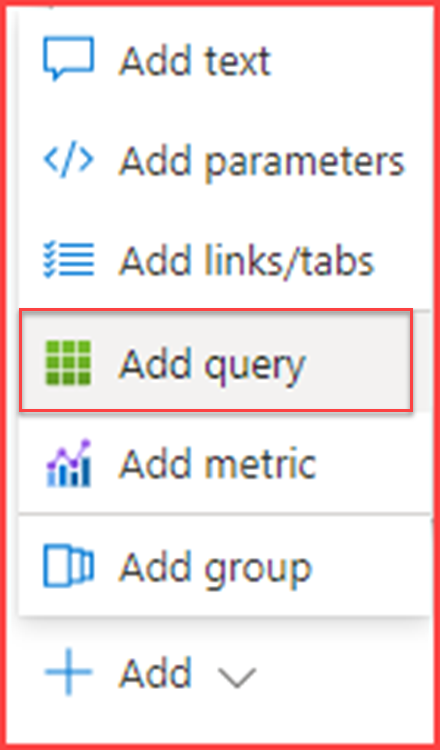
Build your own workbook and add a new query

image

Add query

image

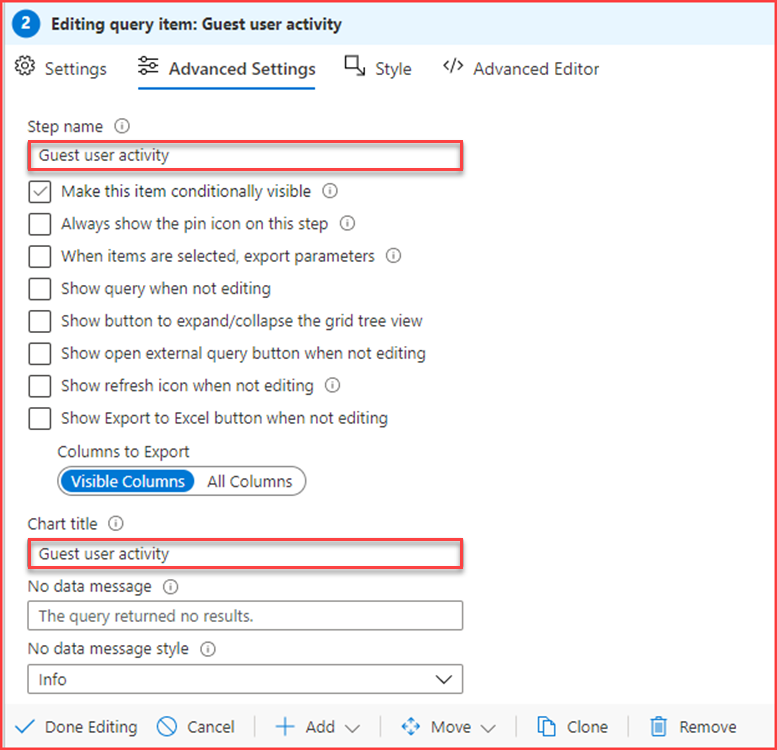
Give it a name and go to settings

image

Fill in the query (you can copy/paste the JSON representation of this item below).

Query breakdown

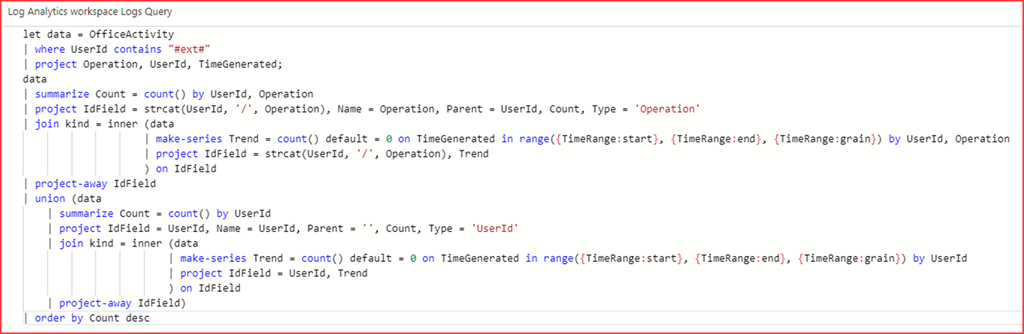
First get the required information and place them in a variable

image

This will get all Office Activity where the UserID contains #ext# and we only need the operation, UserId and TimeGenerated.
Note that you need to end with “;”

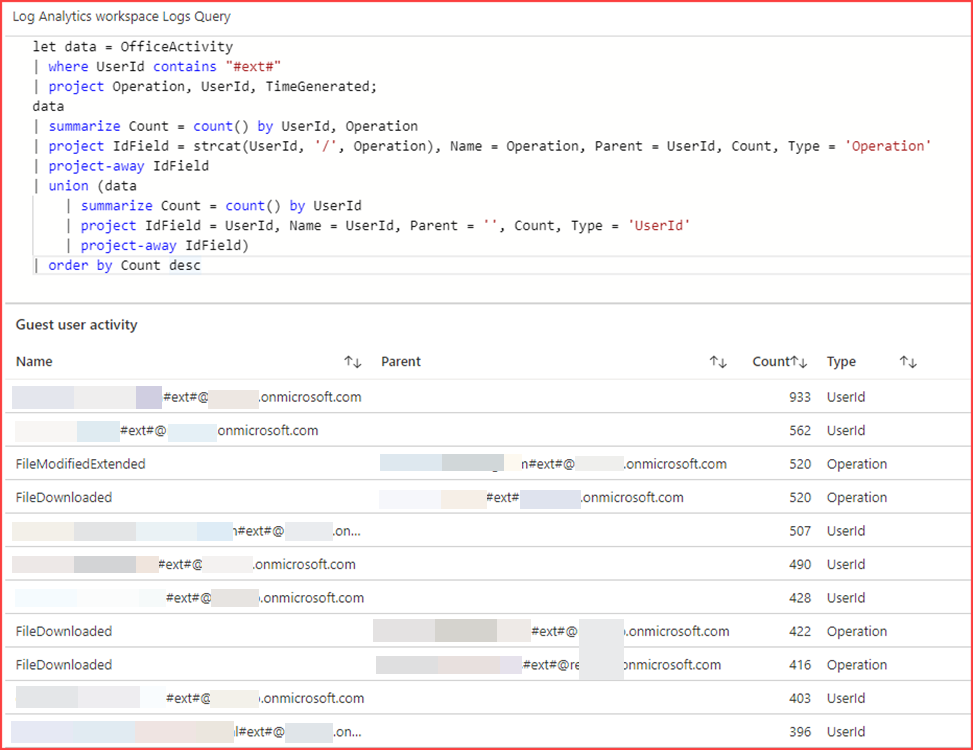
Running only this will get us the below output.

image

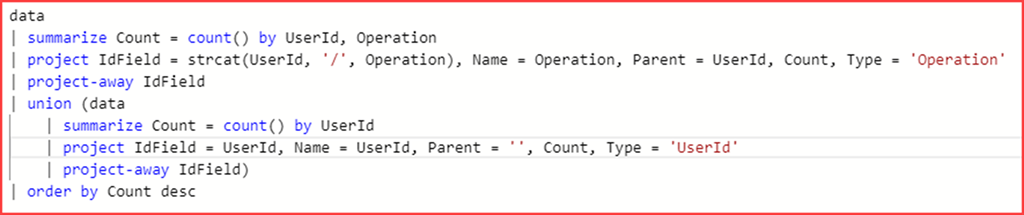
The next bit will map the parent with the child.

image

First we project the columns IdField, Name, Parent, Count and Type. IdField is a concatenation of UserId and Operation. Project-away is used to remove the IdField from the output.
We will add additional rows with the union operator. These will have the same columns but the IdField is only filled with the UserId. This column is also removed from the output.
The output will be ordered by Count

SNAGHTML151c44eb

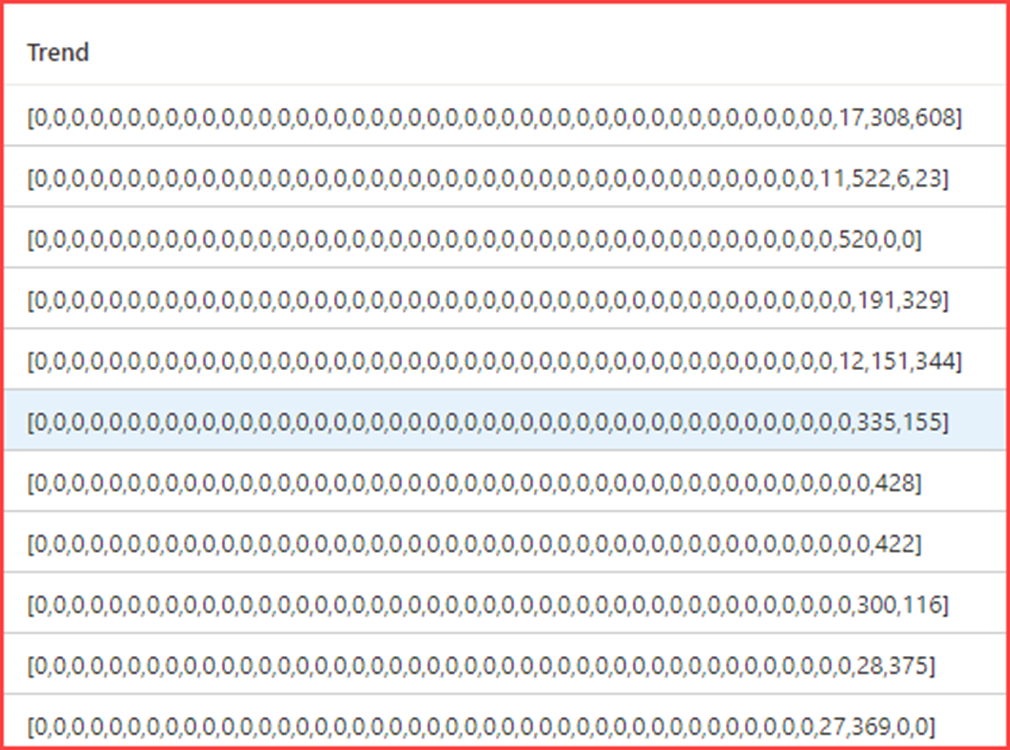
Next we will also want to add a trend line. We will be using the join operator for this. The join operator will merge the rows of two tables to form a new table by matching values of the specified columns from each table.

image

image

It will count the number of occurrences and place it in the Trend variable

image

Look and feel

Customize the column settings

SNAGHTML1523f780

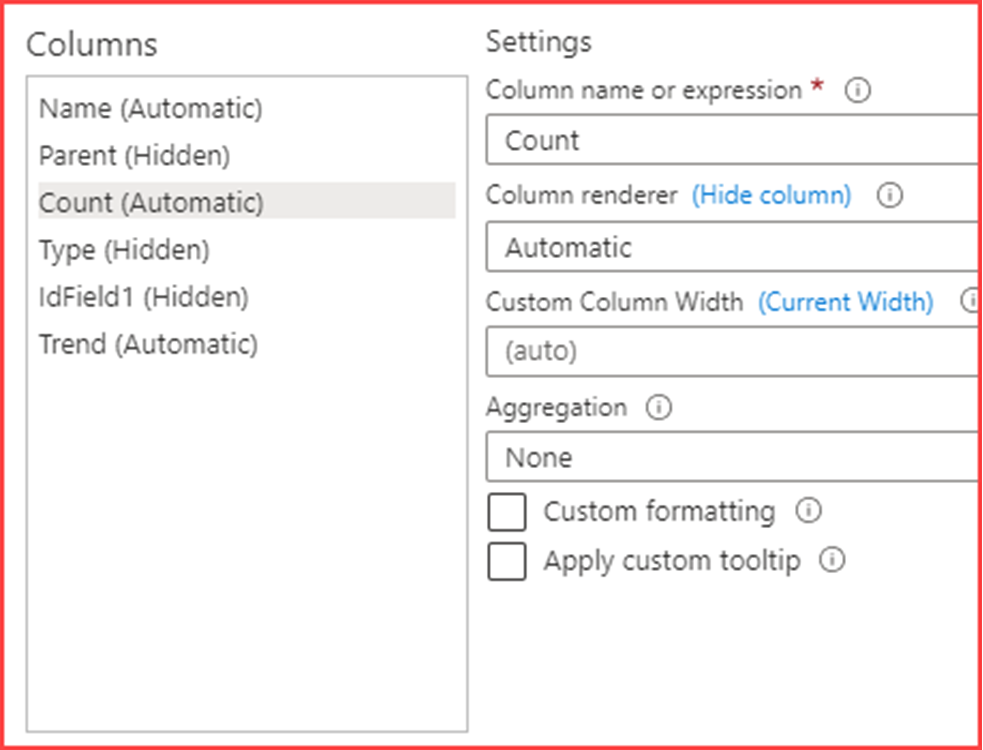
Hide Parent, Type and IdField and configure Count

image

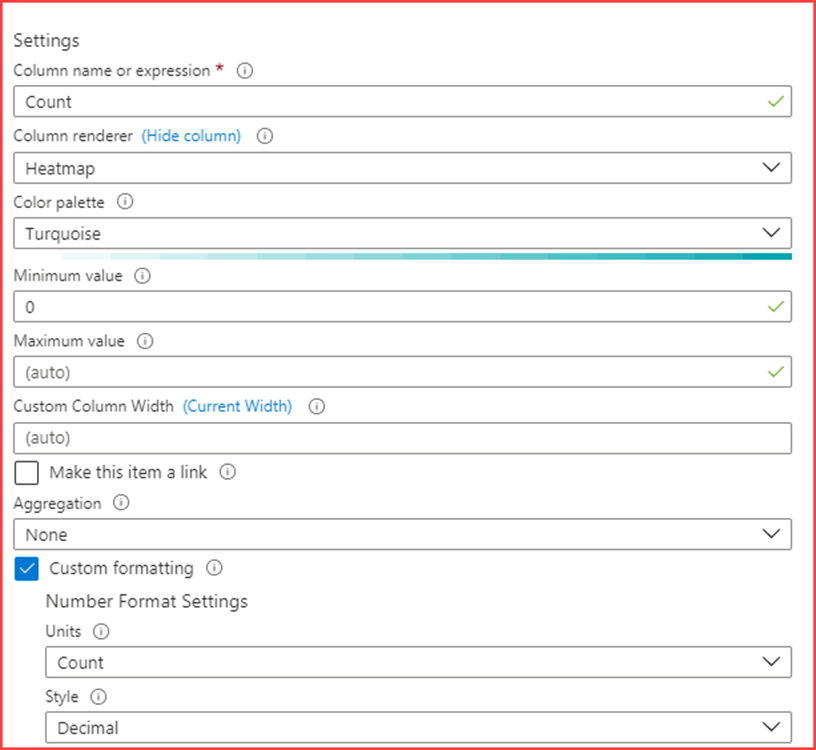
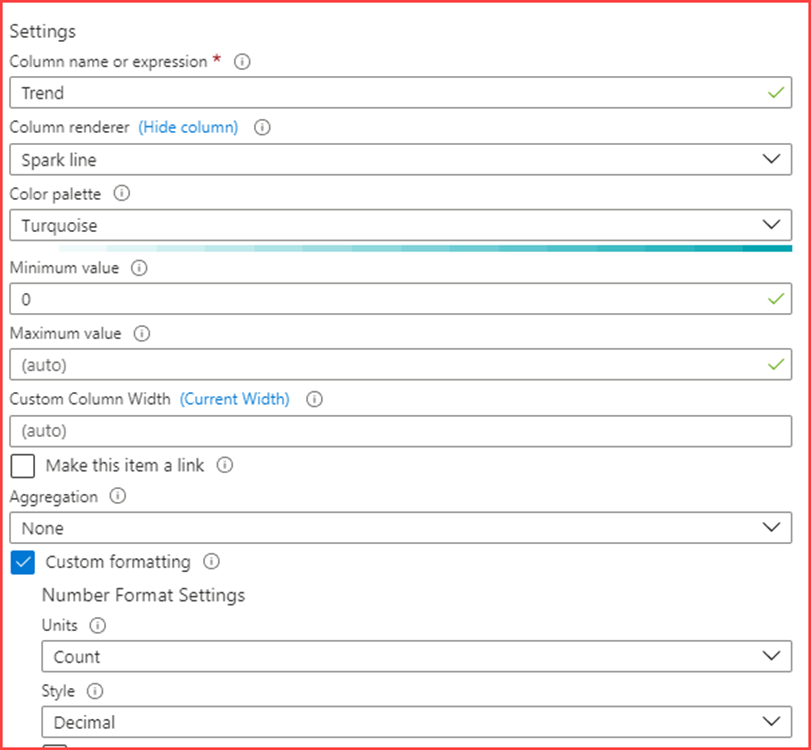
Create a Heatmap with the above settings. Next configure the Trend column

image

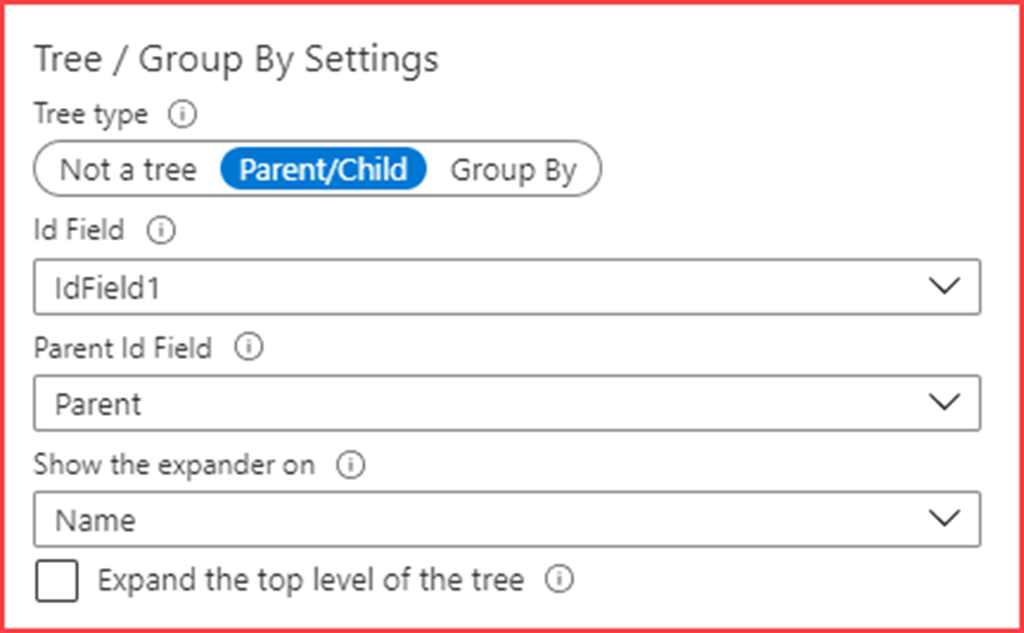
Also change like above and configure the Tree / Group By Settings like below

image

Apply and close which should change the look and feel to

image

JSON representation

You can copy and paste the below code in the advanced editor for a query.


{
  "type": 3,
  "content": {
    "version": "KqlItem/1.0",
    "query": "let data = OfficeActivity \r\n| where UserId contains \"#ext#\"\r\n| project Operation, UserId, TimeGenerated;\r\ndata\r\n| summarize Count = count() by UserId, Operation\r\n| project IdField = strcat(UserId, '/', Operation), Name = Operation, Parent = UserId, Count, Type = 'Operation'\r\n| join kind = inner (data\r\n                    | make-series Trend = count() default = 0 on TimeGenerated in range({TimeRange:start}, {TimeRange:end}, {TimeRange:grain}) by UserId, Operation\r\n                    | project IdField = strcat(UserId, '/', Operation), Trend\r\n                    ) on IdField\r\n| project-away IdField\r\n| union (data\r\n    | summarize Count = count() by UserId\r\n    | project IdField = UserId, Name = UserId, Parent = '', Count, Type = 'UserId'\r\n    | join kind = inner (data\r\n                        | make-series Trend = count() default = 0 on TimeGenerated in range({TimeRange:start}, {TimeRange:end}, {TimeRange:grain}) by UserId\r\n                        | project IdField = UserId, Trend\r\n                        ) on IdField\r\n    | project-away IdField)\r\n| order by Count desc",
    "size": 0,
    "title": "Guest user activity",
    "timeContext": {
      "durationMs": 2592000000
    },
    "queryType": 0,
    "resourceType": "microsoft.operationalinsights/workspaces",
    "visualization": "table",
    "gridSettings": {
      "formatters": [
        {
          "columnMatch": "Parent",
          "formatter": 5
        },
        {
          "columnMatch": "Count",
          "formatter": 8,
          "formatOptions": {
            "min": 0,
            "palette": "turquoise"
          },
          "numberFormat": {
            "unit": 17,
            "options": {
              "style": "decimal"
            }
          }
        },
        {
          "columnMatch": "Type",
          "formatter": 5
        },
        {
          "columnMatch": "IdField1",
          "formatter": 5
        },
        {
          "columnMatch": "Trend",
          "formatter": 9,
          "formatOptions": {
            "min": 0,
            "palette": "turquoise"
          },
          "numberFormat": {
            "unit": 17,
            "options": {
              "style": "decimal"
            }
          }
        }
      ],
      "hierarchySettings": {
        "idColumn": "IdField1",
        "parentColumn": "Parent",
        "treeType": 0,
        "expanderColumn": "Name"
      }
    }
  },
  "name": "Guest user activity"
}
❌
❌