Azure AD system-preferred authentication means that users must use their strongest authentication method when they sign-into Azure AD. The change emphasizes the desirability of strong authentication methods over weak. Now in preview, Microsoft plans to make the policy effective for everyone in July 2023.
Passwords are easy to crack, thanks to some solid guesswork and government laxity. Source: Pexels
Password crackers at the Office of Inspector General (OIG), tasked with testing security protocols at the US Department of the Interior (DOI), successfully breached 21% of the active accounts’ passwords inside the department within 90 minutes.
The rig created for the purpose cost less than USD 15,000, but it exposed the many flaws in DOI’s authentication protocols. These included a lack of two-factor authentication (2FA) and extremely weak password management. Among the passwords cracked were the easily-guessable “Password-1234,” and its variations. Surprisingly, that password met the department’s criteria for password complexity.
Despite decades of guidance from the government on enforcing 2FA protocols, the DOI has failed to follow through. This puts at stake billions of dollars in department revenue and funds. Its other responsibilities involve managing parks and cultural heritage sites, protecting the environment, and assisting indigenous populations.
The report alluded to the Colonial Pipeline ransomware attack — where a single password leak cost over USD 4.4 million in payments. It warned that such weak password protocols might result in an attack with similarly disruptive consequences.
Another major issue that the OIG has referred to in the report is the presence of inactive accounts. These accounts could also become a security liability if not fixed.
Giving its detailed examination of these password vulnerabilities within the department, the OIG has provided the department with eight recommendations. Essentially, the department must implement these recommendations no later than 2024.
A Damning Report on Password Protocols in the DOI
Passwords used by the DOI are easy to guess and commonly reused. Source: OIG
The DOI didn’t enforce password limits nor disable inactive accounts on time. Moreover, 89% of high-value assets under the department had no 2FA protection. These actions are in clear violation of Executive Order No. 14028, which mandated the enforcement of 2FA across federal systems by Nov. 8, 2021.
Of the 85,944 active accounts, the OIG cracked 18,174, including 288 with elevated privileges and 362 belonging to senior employees. The department’s password protocols were so lax that they allowed employees to use the same weak passwords across many accounts. For example, 478 unique employee accounts used “Password-1234”.
The OIG conducted these tests after a previous inspection had revealed weak authentication protocols across DOI’s various sub-departments and agencies. This test came on the heels of that inspection. The OIG conducted the test to determine if the DOI’s cybersecurity protocols were robust enough to protect against stolen and recovered passwords. They were not.
Password Encryption and Publicly Available Password Lists
Senior government employees often reuse the same weak passwords. Source: OIG
Aside from an appalling disregard for password management by a federal agency, the report debunks the impenetrability of password hashing. This process encrypts and scrambles passwords, and many public and private companies and departments rely on it. Many believe it to be enough to foil threat actors’ plans to obtain credentials, assuming it to be impenetrable. This complacent thinking leads companies to shun 2FA measures that would further bolster security.
The consequences of not following through on recommended password security measures are now too evident from this story: OIG created a USD 15,000 commercial password cracking rig and ended up cracking over 14,000 passwords within 90 minutes. They cracked another 4,200 hashed passwords within the next eight weeks.
Since people reuse passwords, password-cracking teams know the hashes for those passwords. For example, the word “password” converts to “5f4dcc3b5aa765d61d8327deb882cf99”. With the enormous number of password breaches at private and public organizations, lists of common and reused passwords are publicly available for anyone to see.
All the password crackers have to do is input these password lists to speed up their operations. As a result, a cybercriminal group with resources like an efficient password-cracking rig can easily crack vulnerable accounts. They can do this using known hashes and publicly available lists. As such, to ensure that employees don’t reuse passwords shown on these publicly available lists, some tech agencies even purchase them to avoid using the same passwords on their networks.
Preventing Password Theft
Password complexity is quite poor at the DOI. Source: OIG
Incidences of password theft across social media and other applications have increased the demand for zero-knowledge architectures. These allow clients to hold the private key that decrypts passwords. While still crackable, it’s regarded as far more secure than conventional encryption, where the service provider holds the encryption and decryption keys.
On a more basic level, 2FA still counts as the most effective way to ensure network security against an increasing variety of attack vectors. A second authentication layer “adds a layer of security that protects organizations — even when passwords are compromised,” according to the OIG report. Companies that ensure 2FA across as many services as possible make it harder for cybercriminals to infiltrate their network security.
The next phase in the evolution of stronger user authentication is the replacement of passwords with passkeys. Passkeys have certain inherent advantages over passwords when it comes to security. For instance, a cryptographic key pair is created for users on each website, allowing users to hold onto the private key on their device. Users reuse passwords for convenience, but passkeys will relieve them of their responsibilities to memorize, change, or alter credentials. This will cut back on user error and time lost in password management, developing stronger passwords, and changing and resetting them. Some in the tech space, like Google, have already started rolling passkeys out to users.
A Migration From Traditional Encryption?
Migration from the conventional means of data storage, encryption, and user authentication is nowhere near the frequency or speed at which cybercriminals are breaching networks. A focus on strengthening security and password protocols is the need of the hour.
The combined use of passkeys and 2FA across all platforms and devices could go a long way in reducing cybercrime. Unfortunately, as evidenced by the DOI, many organizations still won’t follow through even when a cybersecurity procedure is recognized and mandated.
Azure Active Directory Certificate-Based Authentication (Azure AD CBA) allows you to authenticate to Azure Active Directory using a certificate from your internal Public Key Infrastructure (PKI). To know how to implement Azure Active Directory CBA, please refer to the Microsoft doc.
Certificate authentication will happen on the URL https://certauth.login.microsoftonline.com. By default, your web browser will prompt you to select a certificate installed on your Personal User Certificate store.
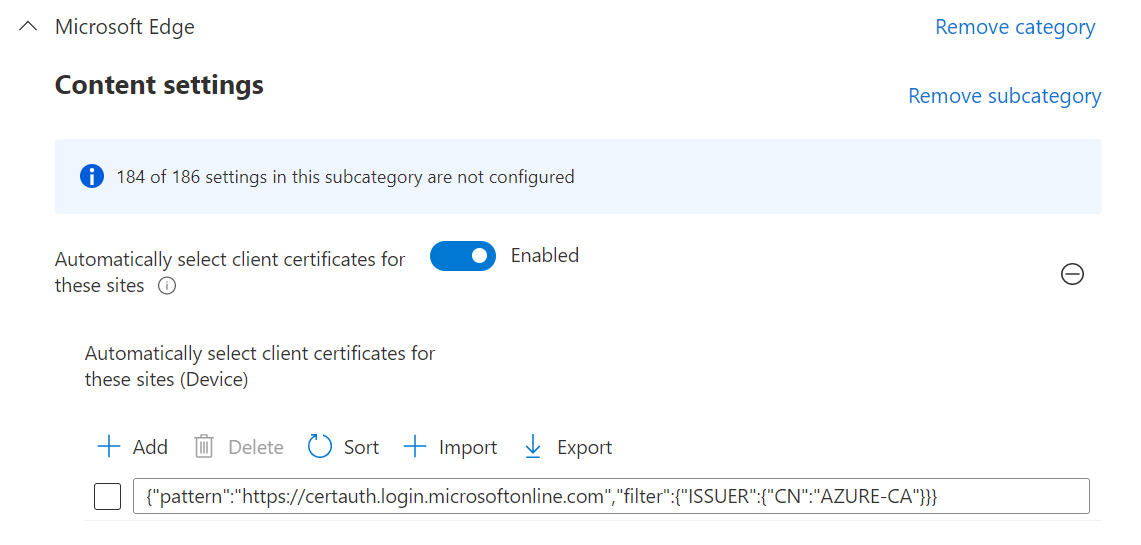
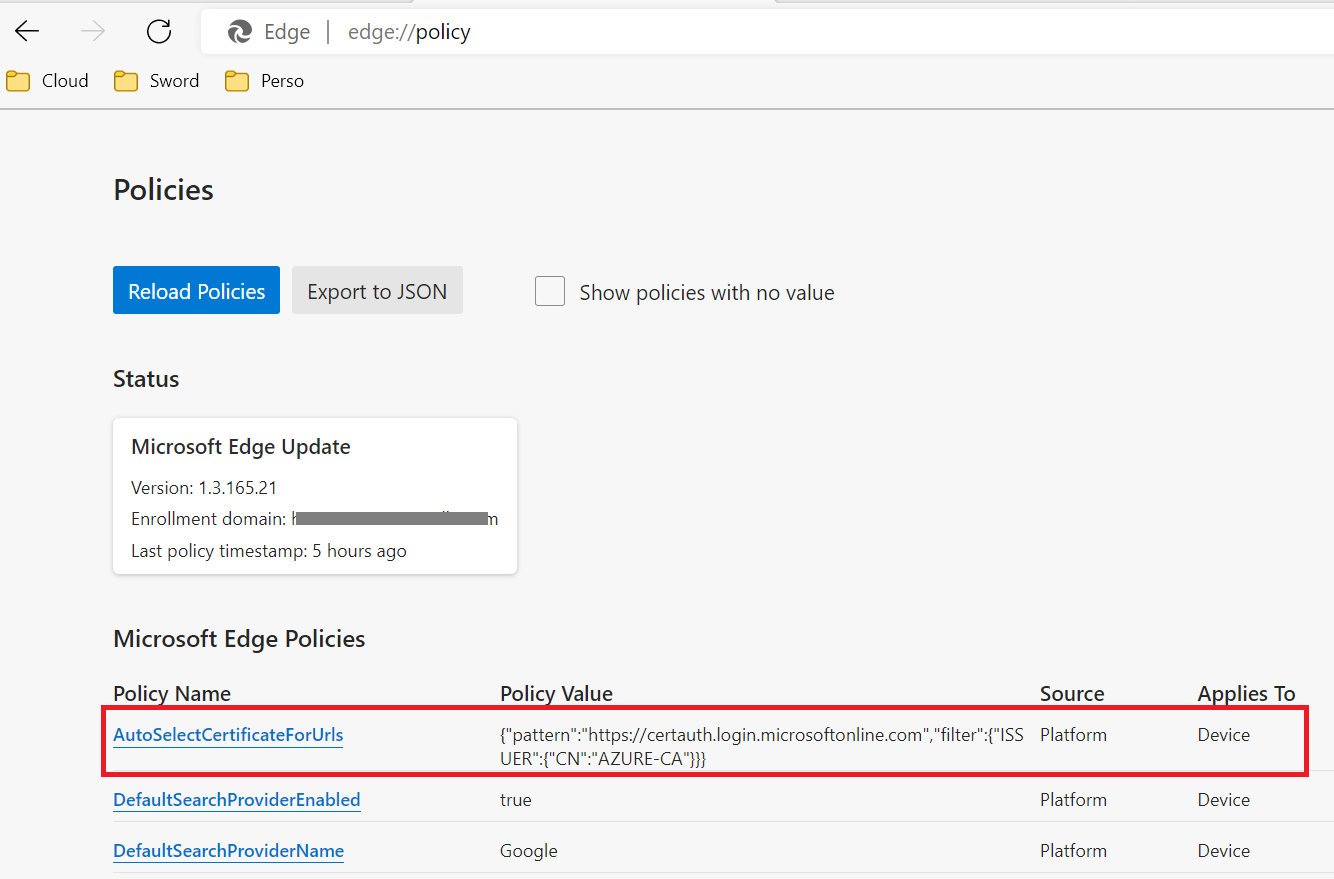
To avoid the user to manually select a user certificate for authentication, you can use the following parameters with Microsoft Edge :
Configuration
Registry
Create the following registry key either in CURRENT_USER or LOCAL_MACHINE :
Type : REG_SZ
Name : 1(or any following number if you already have parameters configured here)
Location :
User setting: HKEY_CURRENT_USER\SOFTWARE\Policies\Microsoft\Edge\AutoSelectCertificateForUrls OR
Le but de ce décalage de 2 mois était de patcher d’abord les serveurs (Mars), puis les clients (Mai) pour que ces derniers puissent s’y connecter 2 mois après.
Suite à ces modifications, la connexion RDP à des serveurs non-patchés depuis des clients patchés peut échouer (erreur CredSSP).
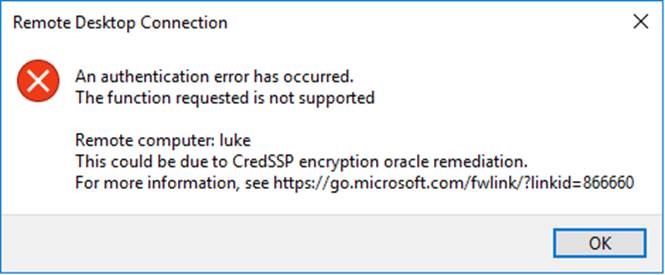
An authentication error has occured. The function requested is not supported This could be due to CredSSP encryption oracle remediation
Voici les scénarios possibles :
Ne fonctionne pas
Serveur non patché depuis Mars / client patché depuis Mai
Fonctionne
Serveur non patché depuis Mars / client non-patché
Serveur patché depuis Mars / client non-patché
Serveur patché depuis Mars / client patché depuis Mai
Workaround (fortement déconseillé)
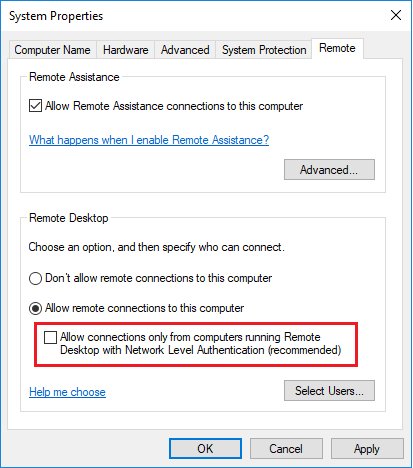
Si un client a été patché alors que le serveur n’est pas à jour, il est possible de désactiver le Network Level Authentication côté serveur de manière temporaire pour s’y connecter.
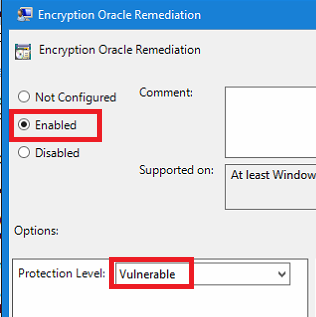
Il est aussi possible de désactiver la fonctionnalité “Encryption Oracle Remediation” par GPO sur les serveurs non-patchés :
Lets use Power Automate inside Power Virtual Agents to get all the users details who is interacting with the bot. We can customize our greetings, or simply use any information that Office365 returns
Azure Active Directory Certificate-Based Authentication (Azure AD CBA) allows you to authenticate to Azure Active Directory using a certificate from your internal Public Key Infrastructure (PKI). To know how to implement Azure Active Directory CBA, please refer to the Microsoft doc.
Certificate authentication will happen on the URL https://certauth.login.microsoftonline.com. By default, your web browser will prompt you to select a certificate installed on your Personal User Certificate store.
To avoid the user to manually select a user certificate for authentication, you can use the following parameters with Microsoft Edge :
Configuration
Registry
Create the following registry key either in CURRENT_USER or LOCAL_MACHINE :
Type : REG_SZ
Name : 1(or any following number if you already have parameters configured here)
Location :
User setting: HKEY_CURRENT_USER\SOFTWARE\Policies\Microsoft\Edge\AutoSelectCertificateForUrls OR
Le but de ce décalage de 2 mois était de patcher d’abord les serveurs (Mars), puis les clients (Mai) pour que ces derniers puissent s’y connecter 2 mois après.
Suite à ces modifications, la connexion RDP à des serveurs non-patchés depuis des clients patchés peut échouer (erreur CredSSP).
An authentication error has occured. The function requested is not supported This could be due to CredSSP encryption oracle remediation
Voici les scénarios possibles :
Ne fonctionne pas
Serveur non patché depuis Mars / client patché depuis Mai
Fonctionne
Serveur non patché depuis Mars / client non-patché
Serveur patché depuis Mars / client non-patché
Serveur patché depuis Mars / client patché depuis Mai
Workaround (fortement déconseillé)
Si un client a été patché alors que le serveur n’est pas à jour, il est possible de désactiver le Network Level Authentication côté serveur de manière temporaire pour s’y connecter.
Il est aussi possible de désactiver la fonctionnalité “Encryption Oracle Remediation” par GPO sur les serveurs non-patchés :
Federated search is when you aim to receive search result from separate SharePoint (on-premises) by performing a search query in a separate on-premise SharePoint farm.
If you have done such configuration probably you have seen the official documentation for setting it up. This procedure will work in most of the cases.
However, this will not work if you do not have outbound connectivity from the remote farm that will receive the search query (ReceivingFarm) to the farm that is sending the query (SendingFarm).
In that case the federated search will be possible as long as the SendingFarm can access the ReceivingFarm, vice versa is not required, but you should take a bit different approach when building the trust since the SendingFarm web app metadata end point will not be available.
The first thing that needs to be done is to export the root and the token signing certificates from the SendingFarm and also get the Issuer Name (NameIdentifier) of the SendingFarm STS .
## Export Root Certificate$rootCert=(Get-SPCertificateAuthority).RootCertificate$rootCert.Export("Cert")|Set-Content"C:\SendingFarmRoot.cer"-Encodingbyte## Export Signing Certificate$stsCert=(Get-SPSecurityTokenServiceConfig).LocalLoginProvider.SigningCertificate$stsCert.Export("Cert")|Set-Content"C:\SendingFarmSTS.cer"-Encodingbyte## Get the STS Issuer Name$issuerName=(Get-SPSecurityTokenServiceConfig).NameIdentifier
The difference from the official procedure will be how we are going to create the trusted token issuer and the trusted root authority in the ReceivingFarm, this is step 3 in the official procedure.
First copy the SendingFarm certificated to the ReceivingFarm.
Having above done you can create the trusted security token issuer and the trusted root authority in the ReceivingFarm.
## Read SendingFarm Signing certificate$stsCert=Get-PfxCertificate"C:\Install\Certs\SendingFarmSTS.cer"## Read SendingFarm root certificate$rootCert=Get-PfxCertificate"C:\Install\Certs\SendingFarmRoot.cer"# Create a trusted security token issuer$i=New-SPTrustedSecurityTokenIssuer-Name"SendingFarm"`
-Certificate$stsCert`
-IsTrustBroker:$false`
-RegisteredIssuerName"<SendingFarm IssuerName>"# Configure trust of the token-signing certificate'# by adding the trust used to sign oAuth tokens'# to the list of trusted root authorities'# in ReceivingFarmNew-SPTrustedRootAuthority-Name"SendingFarm"`
-Certificate$rootCert
Now, you can continue with the trust configuration as it is described in the documentation.

 Connexion