Vue normale

Il y a de nouveaux articles disponibles, cliquez pour rafraîchir la page.
À partir d’avant-hierFlux principal

Docker Scout for Vulnerability management of Containers and remediation

I have installed the latest Docker Desktop for Windows version 4.43.2

In today’s cloud-native world, container security is not a luxury—it’s a mission-critical requirement. With the release of Azure Linux 3.0, Microsoft has reinforced its dedication to performance, flexibility, and security. But no matter how polished the host OS is, containers themselves can still be riddled with vulnerabilities, bloated layers, or sneaky outdated dependencies. That’s where Docker Scout and Open Source tool Dive come into play.

Docker Scout: Intelligence at Your Fingertips

Docker Scout introduces vulnerability detection into your CI/CD pipeline. For Azure Linux 3.0 containers, this means:

  • Real-Time Vulnerability Scanning: Scout analyzes your container image (including base layers) against CVE databases and flags known vulnerabilities.
  • Remediation Guidance: It doesn’t just scream “VULNERABLE!”—Scout offers actionable suggestions like switching to a newer base image or updating specific packages.
  • Policy Integration: You can define security policies (e.g., block images with critical CVEs) and automate enforcement in Azure DevOps or GitHub Actions.

In the following steps we will get the Microsoft Azure Linux 3.0 container and scan for security issues before we run the container.

Open Docker terminal
docker pull mcr.microsoft.com/azure-cli:azurelinux3.0

when you have pulled the image, you can do a quick scan with Docker Scout.
docker scout quickview mcr.microsoft.com/azure-cli:azurelinux3.0

docker scout cves mcr.microsoft.com/azure-cli:azurelinux3.0

Here you can see more information about the CVE’s.

Here you see the vulnerable package file and the fix for remediation.

Now we want to remediate this image with the update fix version 2.32.4 of this package. To do this, I made a directory docker fix with a dockerfile (without any extension) with the following commands :

———

# ⚙ Start met Azure CLI base image op Azure Linux 3.0
FROM mcr.microsoft.com/azure-cli:azurelinux3.0

# 🧰 Install Python and pip via tdnf
RUN tdnf install -y python3 python3-pip

# 🛠 Upgrade pip and install
RUN python3 -m pip install –no-cache-dir –upgrade –ignore-installed pip \
&& python3 -m pip install –no-cache-dir requests==2.32.4

# Remove old files
RUN rm -f /usr/lib/az/lib/python3.12/site-packages/requests-2.32.3.dist-info/METADATA

# 🔍 Verify 
RUN python3 -c “import requests; print(f’Requests versie: {requests.__version__}’)”

————-

With Open Source tool Dive you can have a look into the Docker image. This supported me because first I did only the install and upgrade of the file requests version 2.32.3 to fixed version 2.32.4. But then Docker Scout still see the vulnerability file in the image.

dive [Image]
So that’s why we remove it via the Dockerfile.

We now building a new image with this dockerfile :

docker buildx build –provenance=true –sbom=true -t azure-cli-patched:latest .

After a Docker Scout scan, there are zero vulnerabilities in the image now
and in the Container fixed version 2.32.4 is running.

Conclusion

Docker Scout represents a major leap forward in managing container security, efficiency, and reliability. By integrating seamlessly into the Docker ecosystem, it empowers developers to ship production-ready containers with confidence.

💡 Key Benefits

  • Security Insights: Automatically detects vulnerabilities, recommends fixes, and integrates with CVE databases.
  • Dependency Intelligence: Tracks changes and upgrades across your software stack to ensure compatibility and stability.
  • Image Comparison: Visualizes differences between builds—helping you pinpoint unintended changes and regressions.
  • Team Collaboration: Enables shared visibility across development pipelines, so teams can align on image quality and release standards.

In short, Docker Scout turns container image analysis into a proactive, collaborative part of modern DevOps. Whether you’re optimizing performance or hardening against threats, Scout puts you ahead of the curve.


Celebrating 15 Remarkable Years in the Microsoft MVP Community

Dear Community Members, Friends, and Colleagues,

As I mark my 15th anniversary in the Microsoft MVP program, I’m filled with immense gratitude, humility, and pride. What began as a passion for sharing knowledge and building connections has blossomed into a deeply rewarding journey—one shaped by innovation, collaboration, and the extraordinary people who make this community thrive.

Over these 15 years, I’ve had the privilege to learn from brilliant minds, contribute to inspiring projects, and witness the transformative power of technology firsthand. Whether through speaking engagements, blog posts, mentoring, or hands-on technical work, being part of the MVP program has continually deepened my commitment to empowering others and fostering open, inclusive collaboration.

To the community: thank you for challenging, supporting, and celebrating with me. Your curiosity, creativity, and kindness are what keep this ecosystem alive and forward-looking.
To Microsoft: thank you for the honor and trust. The MVP program is a unique platform that amplifies voices, nurtures growth, and builds bridges—not just between developers and users, but between ideas and action.

While this milestone is a moment to reflect, it’s also a reminder that there’s always more to explore, create, and share. I look forward to continuing this journey together—with the same spark, but even greater purpose.

With heartfelt appreciation,
James

Here are some photos with Awesome people that I have met during these years:

Here you see Vijay Tewari in the middle who nominated me for the first time 🙂
Damian Flynn on the left and me on the right are Microsoft MVPs for Virtual Machine Manager (VMM)
at that time in 2011.

Here you see Tina Stenderup-Larsen in the middle, she is amazing! A Great Microsoft Community Program Manager
supporting all the MVPs in the Nordics & Benelux doing an Awesome Job!
On the right is Robert Smit a Great Dutch MVP and friend.

Mister OMS alias Scripting Guy Ed Wilson.

When there is a Microsoft Windows Server event, there is Jeff Woolsey 😉
“The three Musketeers”

Meeting Brad Anderson, he had great lunch breaks interviews in his car
with Awesome people.

The Azure Stack Guys on the 25th MVP Global Summit 😊

Mister PowerShell Jeffrey Snover at the MVP Summit having fun 😂

Scott Guthrie meeting him at the Red Shirt Tour in Amsterdam.

Great to meet Yuri Diogenes in 2018 with his book Azure Security Center.
I know him from the early days with Microsoft Security, like ISA Server 😉

Mister Azure, CTO Mark Russinovich meeting at the MVP Global Summit in Redmond.
a Great Technical Fellow with Awesome Azure Adaptive Cloud Solution Talks!

Mister DevOps himself Donovan Brown in Amsterdam for DevOps Days

My friend Rick Claus Mister MS Ignite.

Mister Azure Corey Sanders at the MVP Summit.

Mister Channel 9, MSIgnite, AI Specialist Seth Juarez
He is a funny guy.

Meeting Scott Hanselman in the Netherlands together with MVP Andre van den Berg.
Scott is Awesome in developer innovations and technologies.
Following Azure Friday from the beginning.

Windows Insider friends for ever meeting Scott Hanselman.
With on the left MVP Erik Moreau.

Windows Insiders for Ever 💙
Here together with Dona Sarkar here in the Netherlands

Windows Insider Friends having fun with Ugly Sweater meeting.
On the right my friend Maison da Silva and on the upper right Erik Moreau and Andre van den Berg.
Friends for Life 💙

Microsoft Global MVP 15 Years Award disc is in the House 🫶
on Monday the 14th of July 2025.

Thank you All 💗

Happy Anniversary Day 50 years of Microsoft Innovation

50 years of Microsoft

A Legacy of Innovation and Transformation

Half a century ago, on April 4th, 1975, two young visionaries, Bill Gates and Paul Allen, co-founded Microsoft with a bold ambition: to make computing accessible and essential for everyone. What began as a small software company has grown into a global technology leader, continuously transforming industries and empowering billions of lives. As we celebrate Microsoft’s 50-year journey, let’s explore its milestones, innovations, and impact, including its contributions to datacenters, Windows Server, Hyper-V, Azure, and the leadership of its CEOs.

The Early Years: Coding the Future

Microsoft’s first big breakthrough came with the creation of an operating system for the fledgling personal computer market. In 1980, the company introduced MS-DOS, laying the groundwork for the revolutionary Windows operating system, launched in 1985. This graphical interface transformed computing, making it accessible to both businesses and individuals.

Guiding Microsoft Through Its Evolution: The CEOs Who Shaped the Company

Microsoft’s trajectory has been shaped by its visionary leadership. From the founders to the present, each CEO has left an indelible mark:

  1. Bill Gates (1975–2000): As co-founder and first CEO, Gates spearheaded the company’s initial growth, launching pivotal products like MS-DOS, Windows, and Office. His focus on innovation and accessibility built the foundation of Microsoft’s success.
  2. Steve Ballmer (2000–2014): During his tenure, Ballmer led Microsoft through massive expansion, particularly in enterprise solutions and cloud computing. He introduced Windows Server and laid the groundwork for services like Azure. Ballmer’s energy and passion defined his leadership style and kept Microsoft competitive in a rapidly changing market.
  3. Satya Nadella (2014–Present): Nadella ushered in a cloud-first, AI-driven era, transforming Microsoft’s culture and business model. His emphasis on inclusivity, empathy, and sustainability revitalized the company. Under his leadership, Azure became one of the world’s leading cloud platforms, and Microsoft made transformative acquisitions like LinkedIn, GitHub, and Activision Blizzard.

Lake Bill on Redmond Campus

Redefining Enterprise Technology: Datacenters, Windows Server, and Virtualization

As businesses increasingly relied on technology, Microsoft expanded its offerings to support enterprise needs. Windows Server, introduced in 1993, became a cornerstone for server management and networking. It evolved over the decades, incorporating features such as Active Directory, high availability, and security enhancements.

Microsoft played a pivotal role in virtualization with Hyper-V, launched in 2008. Hyper-V allowed organizations to maximize resource efficiency and reduce costs by running multiple virtual machines on a single physical server. Modern datacenters powered by Microsoft’s hardware and software solutions now form the backbone of its cloud services.

Embracing the Cloud: The Azure Revolution

Microsoft’s Azure cloud platform, launched in 2010, redefined computing. It enabled organizations to access scalable infrastructure, deploy applications globally, and harness artificial intelligence with ease. Azure spans over 60 regions worldwide, making it one of the most comprehensive cloud platforms. Its ecosystem includes hybrid cloud solutions, advanced analytics, and IoT technologies.

Gaming, Devices, and Consumer Innovation

Microsoft entered the gaming industry with the Xbox in 2001, creating a thriving gaming ecosystem. Beyond gaming, the company innovated with devices like the Surface lineup, combining sleek design with productivity. Its integration of hardware and software demonstrated Microsoft’s versatility.

Shaping the Future: AI, Sustainability, and Datacenters

Microsoft continues to lead in artificial intelligence with tools like Microsoft Copilot. Its pledge to be carbon-negative by 2030 highlights environmental responsibility, with sustainable datacenter operations playing a central role.

Conclusion: A Legacy Built to Inspire

Microsoft’s 50-year journey is a testament to the power of innovation and visionary leadership. From Bill Gates to Steve Ballmer to Satya Nadella, each CEO has steered the company to new heights. With contributions ranging from datacenters and Windows Server to Hyper-V and Azure, Microsoft’s impact has been profound. As the company looks ahead, it remains dedicated to empowering people and organizations to achieve more, ensuring the next 50 years are as groundbreaking as the last.

Here’s to Microsoft—a company built to inspire and shape the future.

at Building 92 of the Microsoft Campus in Redmond.


Install Microsoft Windows Server 2025 Insider Preview Build 26360

Try Now!

Windows Server 2025 Insider Preview Build 26360

Exploring the Latest Features in Microsoft Windows Server Insider Preview Builds

Microsoft’s Windows Server Insider Preview Builds are a treasure trove of innovation and advanced features designed to enhance performance, security, and flexibility for IT professionals. Today, we’re diving into the latest updates and new features introduced in the Windows Server 2025 Insider Preview Build.
Here you find more on What’s New in Microsoft Windows Server 2025 🚀

Here are some Highlights of new Windows Server 2025 Insider Preview features:

  1. Enhanced Security with Delegated Managed Service Accounts (dMSA)

One of the standout features in this build is the introduction of Delegated Managed Service Accounts (dMSA). This new account type allows for migration from traditional service accounts to machine accounts with managed and fully randomized keys. By linking authentication to the device identity, dMSA helps prevent credential harvesting through compromised accounts, a common issue with traditional service accounts.

  1. Windows Admin Center (WAC) Integration

Starting with this build, users can now download and install the Windows Admin Center (WAC) directly from the Windows Server Desktop. This in-OS app simplifies the installation process and provides a seamless experience for managing your server infrastructure.

  1. Bluetooth Connectivity

Windows Server 2025 now supports Bluetooth connectivity, allowing users to connect mice, keyboards, headsets, and other peripherals directly to the server. This feature enhances flexibility and convenience for server management.

  1. DTrace for Real-Time Performance Monitoring

The new build includes DTrace, a powerful command-line utility that enables real-time performance monitoring and troubleshooting. DTrace allows users to dynamically instrument both kernel and user-space code without modifying the code itself, supporting a range of data collection and analysis techniques.

  1. Improved Upgrade Experience

Upgrading to Windows Server 2025 has never been easier. The build supports in-place upgrades from Windows Server 2012 R2 and later versions, allowing you to upgrade up to four versions at a time. This streamlined upgrade process ensures a smooth transition to the latest server version.

  1. Feedback Hub for User Input

The new Feedback Hub app is now available for Server Desktop users. This app allows users to submit feedback or report issues directly to Microsoft, helping the development team understand user experiences and improve future builds.

  1. SMB over QUIC and Alternative Ports

The build introduces SMB over QUIC with support for alternative ports. This feature enhances security and performance by allowing SMB traffic to use custom-defined ports instead of the default UDP/443 port.

  1. Enhanced Desktop Experience

When you sign in for the first time, the desktop shell experience now conforms to the style and appearance of Windows 11. This visual update provides a familiar and modern interface for server administrators.

These new features and enhancements in the Windows Server 2025 Insider Preview Build demonstrate Microsoft’s commitment to providing cutting-edge solutions for IT professionals. Whether you’re looking to improve security, streamline management, or enhance performance, the latest Windows Server Insider Preview Build has something to offer.

Stay tuned for more updates and features as Microsoft continues to innovate and improve its server offerings.

Conclusion:

Become a Microsoft Windows Server Insider and get all the newest features first to play with it in your test environment.


Get started here and register for free

A little Christmas Story

Once upon a time, in a world where technology and holiday cheer intertwined, there was a bustling community of developers eagerly awaiting the latest updates from the Microsoft Windows 11 and Windows Server Insider programs. As the festive season approached, the air was filled with excitement and anticipation.

In the heart of this community were the Microsoft MVPs (Most Valuable Professionals) and Docker Captains, who were known for their expertise and passion for technology. They decided to come together to create something truly magical for developers around the world.

One snowy evening, as the MVPs and Docker Captains gathered around a virtual fireplace, they began to brainstorm ideas. “What if we could combine the power of Windows 11, Windows Server, and Docker Containers to create a seamless development experience?” suggested one MVP, their eyes twinkling with excitement.

The idea quickly gained momentum, and soon, the group was hard at work. They envisioned a world where developers could effortlessly build, test, and deploy applications using the latest features of Windows 11 and Windows Server, all within the flexible and scalable environment of Docker Containers.

With the help of the Insider programs, they gained early access to cutting-edge features and updates. The MVPs and Docker Captains worked tirelessly, sharing their knowledge and expertise to create a series of tutorials, guides, and sample projects. These resources were designed to help developers harness the full potential of Windows 11, Windows Server, and Docker Containers.

As the holiday season progressed, the community began to see the fruits of their labor. Developers from all corners of the globe started to adopt the new tools and techniques, marveling at the ease and efficiency they brought to their workflows. The combination of Windows 11’s sleek interface, Windows Server’s robust capabilities, and Docker Containers’ flexibility created a harmonious symphony of technology.

To celebrate their success, the MVPs and Docker Captains organized a virtual holiday party. Developers joined from far and wide, sharing stories of their experiences and the innovative projects they had created. The virtual room was filled with laughter, camaraderie, and a shared sense of accomplishment.

As the night drew to a close, one of the Docker Captains raised a toast. “Here’s to the power of collaboration, the spirit of innovation, and the joy of the holiday season. May we continue to push the boundaries of technology and inspire developers everywhere.”

And so, the story of the Microsoft Windows 11 and Windows Server Insider Christmas, made possible by the dedication and expertise of the MVPs and Docker Captains, became a cherished tale in the developer community. It was a reminder that, with passion and teamwork, even the most ambitious dreams could come true.

Happy holidays, and may your coding adventures be merry and bright! 🎄💻🐳

Running CBL-Mariner 2.0 Azure Linux on Hyper-V for Docker Container Host and Azure CLI

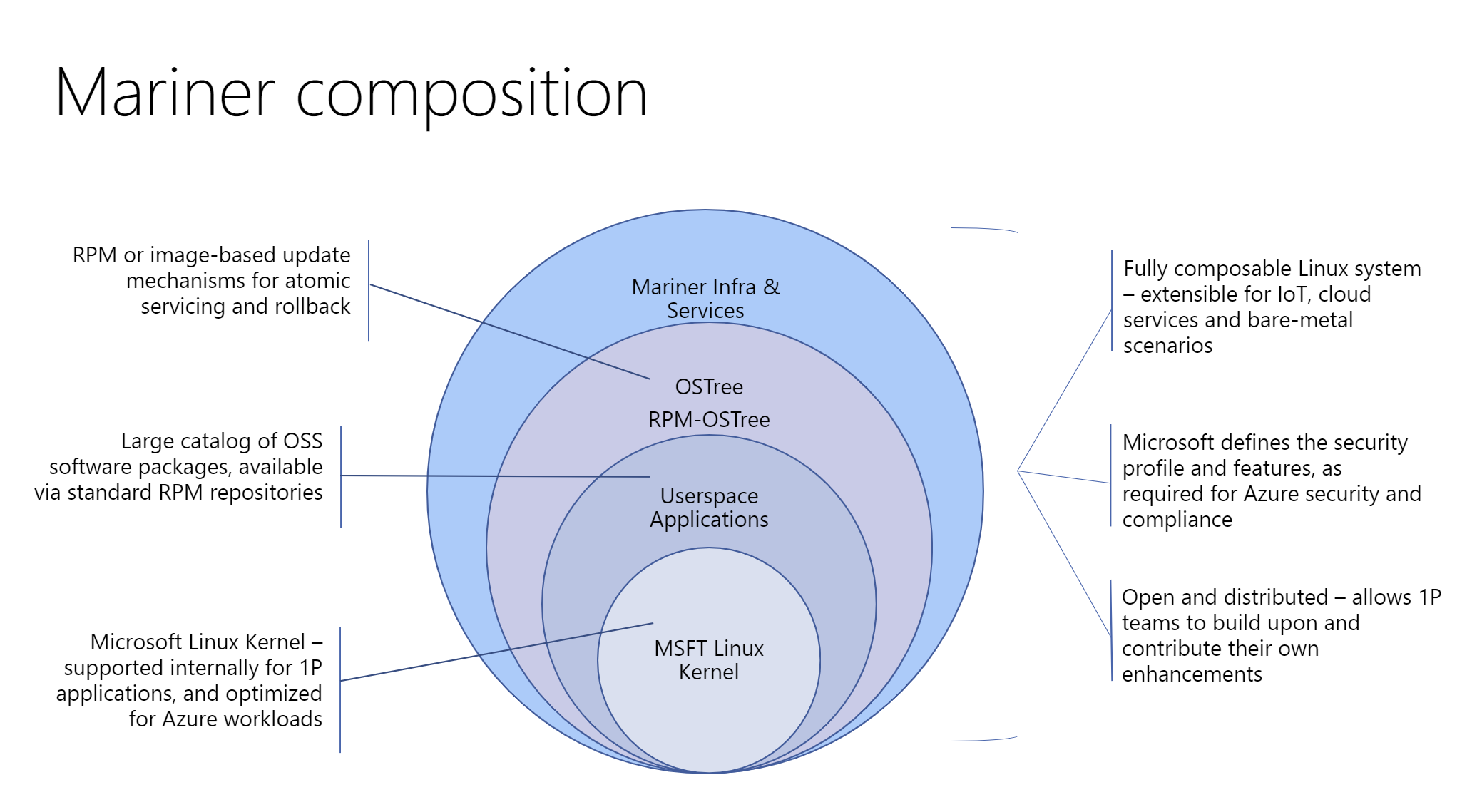
CBL-Mariner Linux is a lightweight operating system, containing only the packages needed for a cloud environment. CBL-Mariner can be customized through custom packages and tools, to fit the requirements of your application. CBL-Mariner undergoes Azure validation tests, is compatible with Azure agents, and is built and tested by the Azure Edge & Platform to power various use cases, ranging from Azure services to powering IoT infrastructure. CBL-Mariner is the internally recommended Linux distribution for use with Microsoft cloud services and related products.

In the following steps we are going to install CBL-Mariner 2.0 on Hyper-V as a virtual Docker Container Host.
First you have to download CBL-Mariner 2.0 (Azure Linux) ISO here

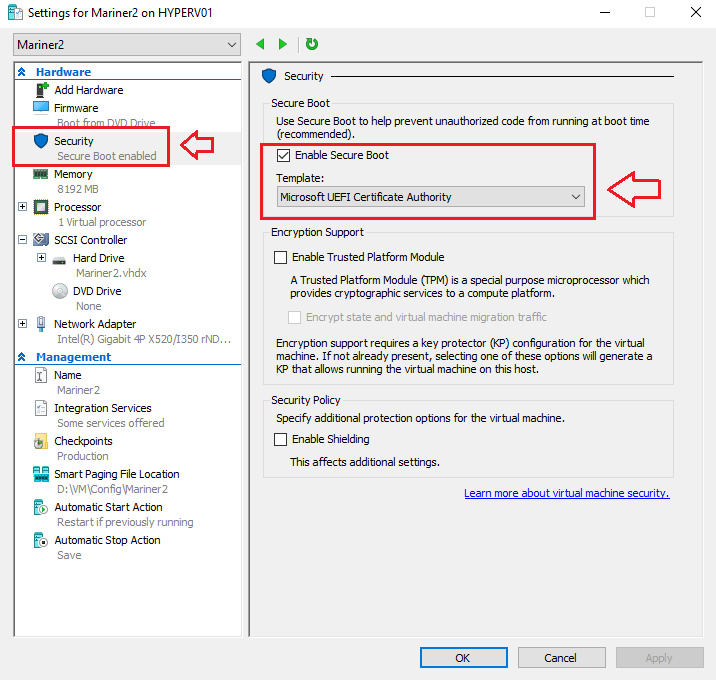
Enable Secure Boot Template: Microsoft UEFI Certificate Authority

When you have made your Virtual Machine on Microsoft Hyper-V, you have to change the Security Boot Template from Microsoft Windows to Microsoft UEFI Certificate Authority and then you can boot from the ISO.

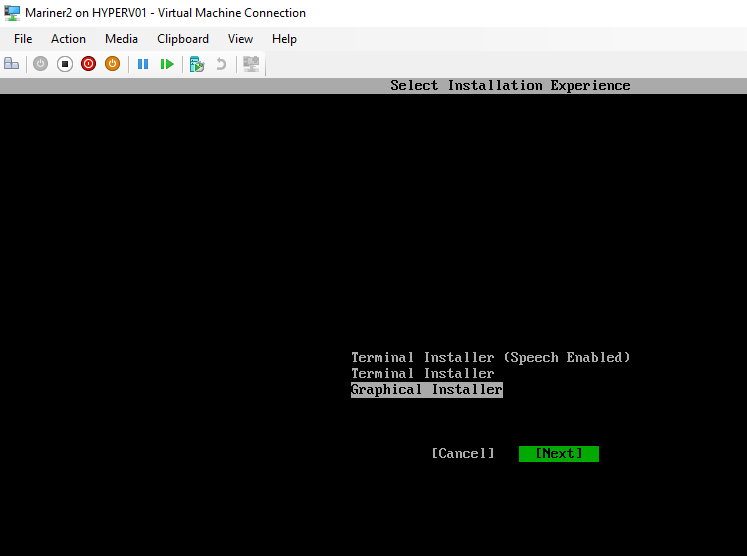
Select the Installation Experience
I used the Graphical Installer,
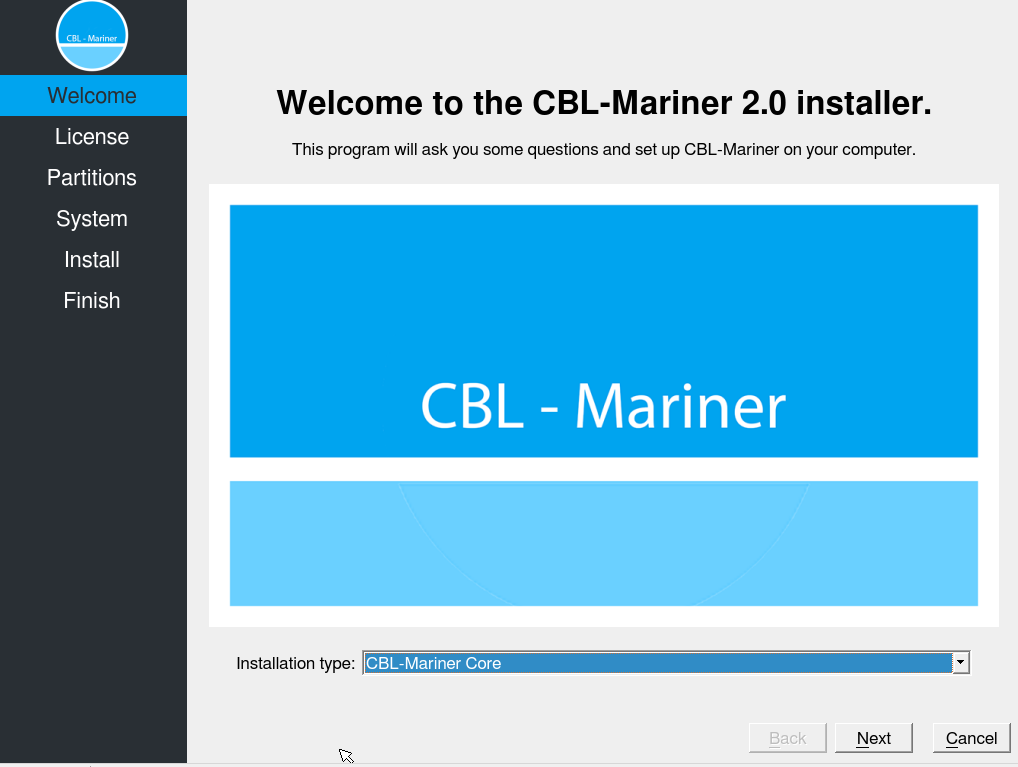
Select Next.

Default is the installation type: CBL-Mariner Core

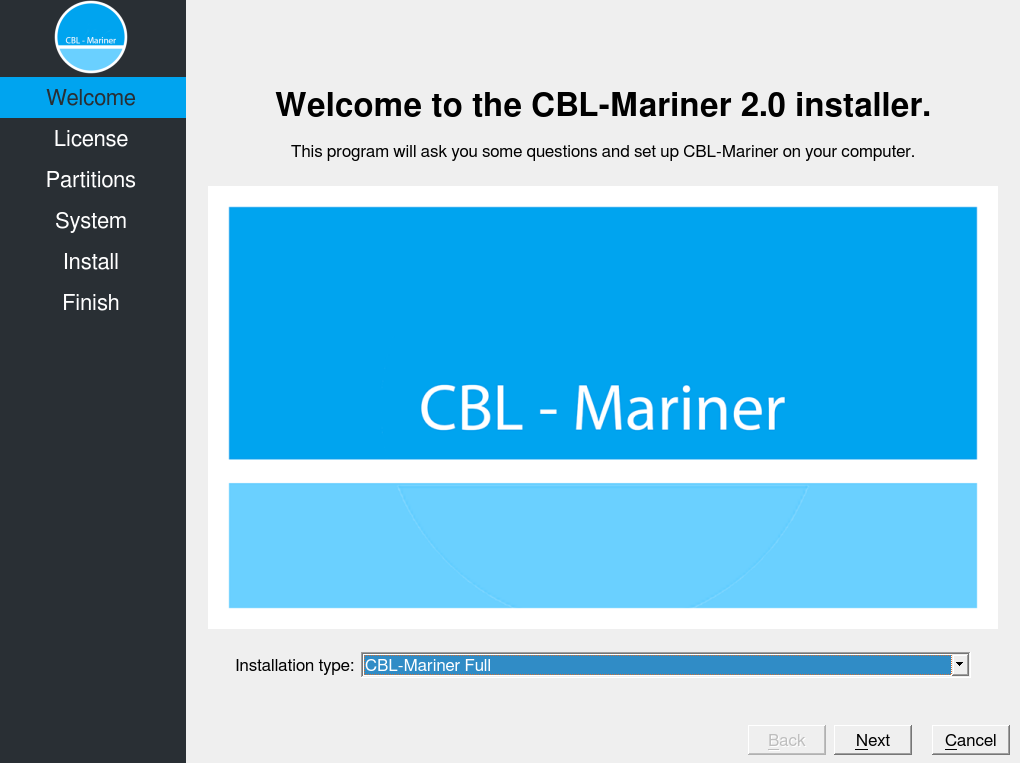
I selected Installation type: CBL-Mariner Full

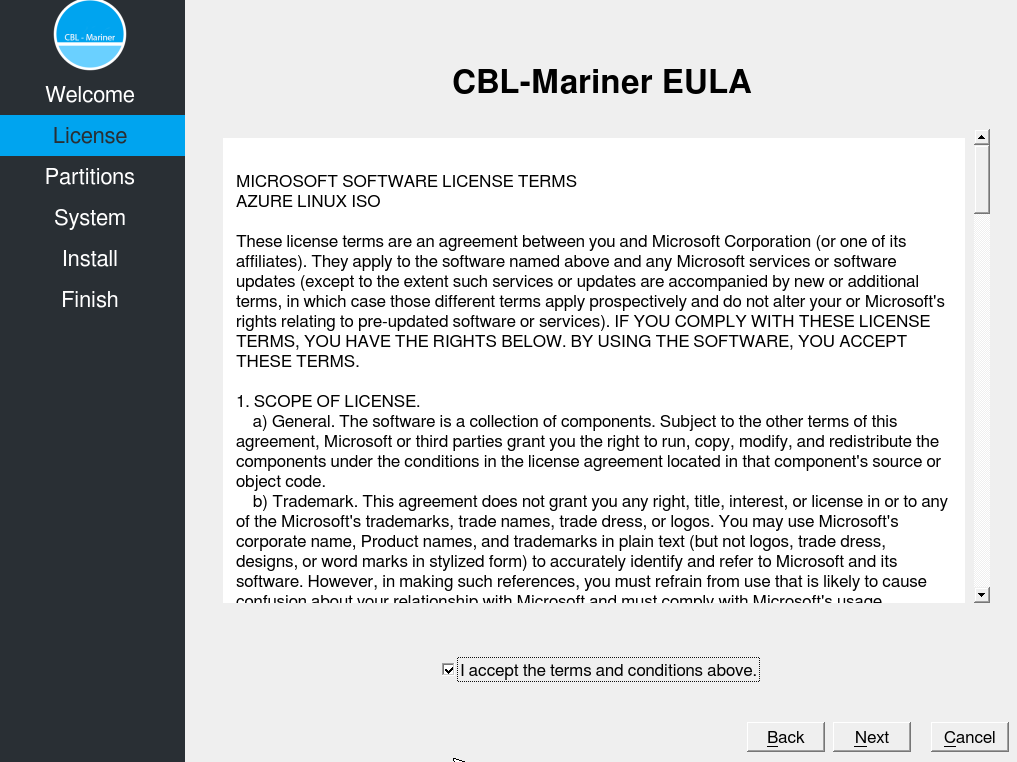
Read and Accept the CBL-Mariner Eula.

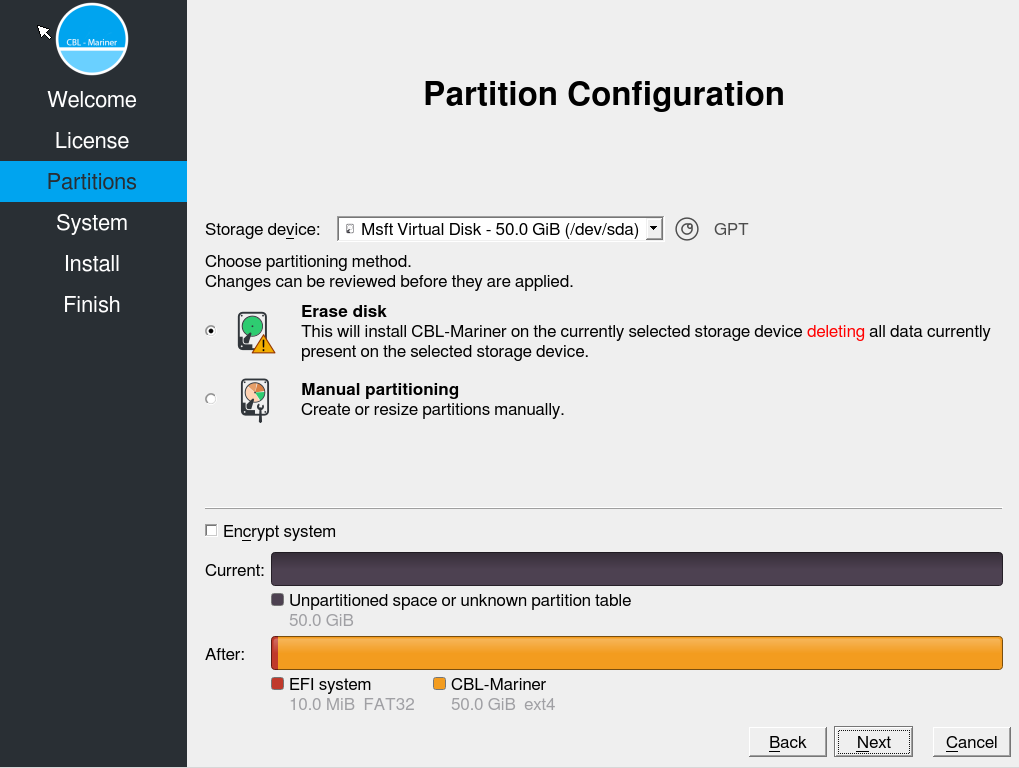
Here you can Partition your Storage.


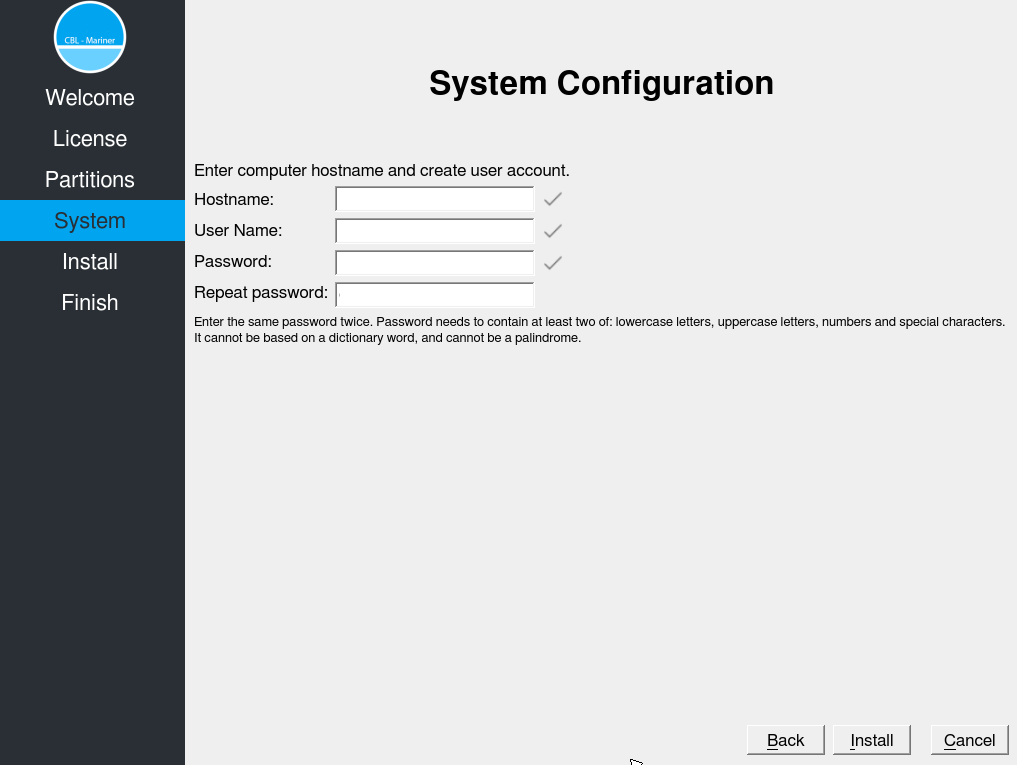
Enter the Computer hostname and Create a User account.

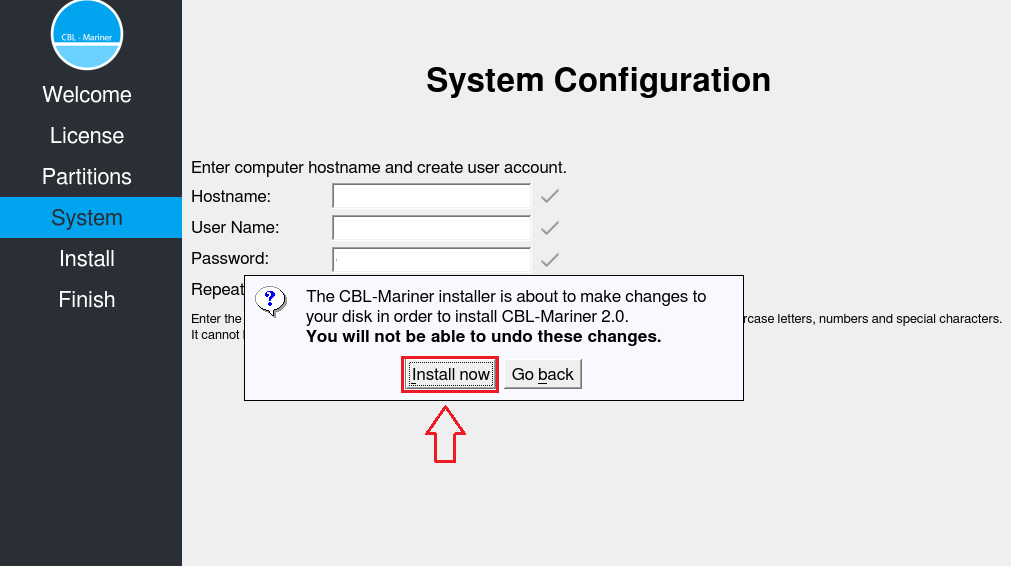
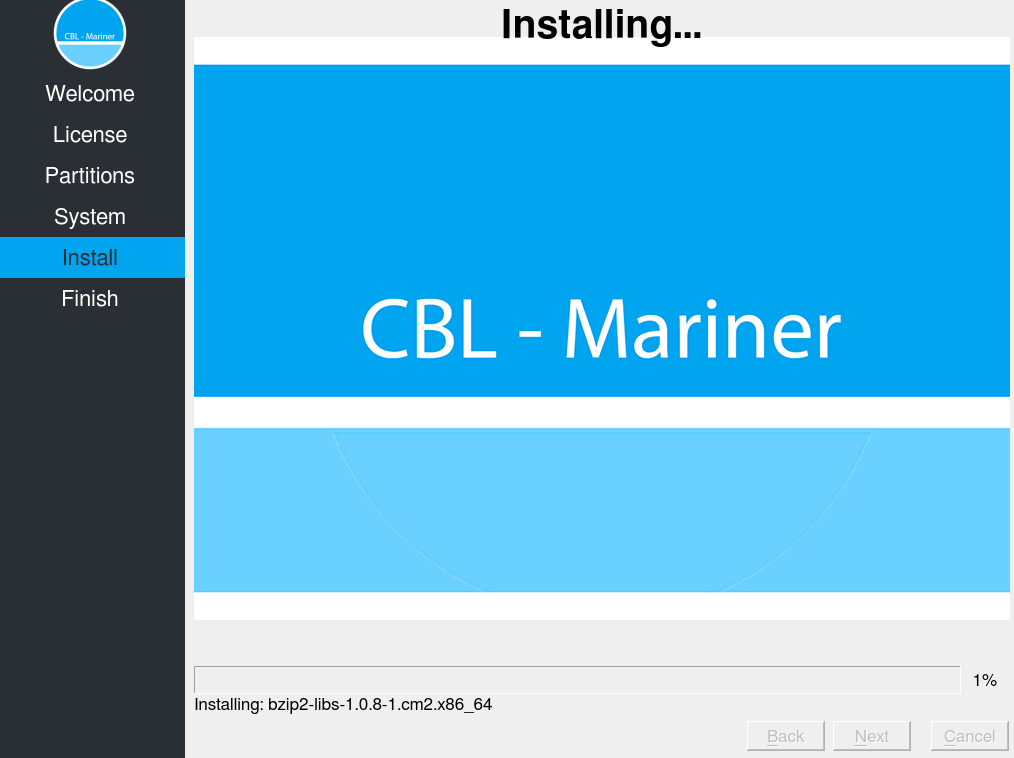
Install Now.

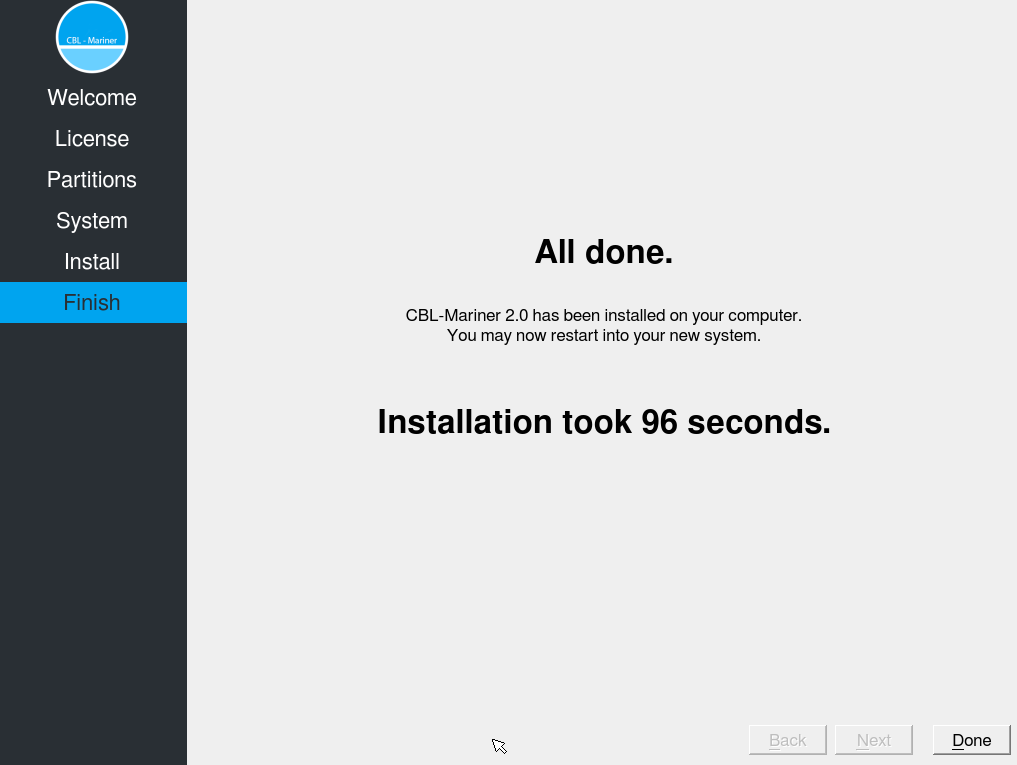
Installing CBL-Mariner 2.0 on the VM.

And yes It’s fast 😉

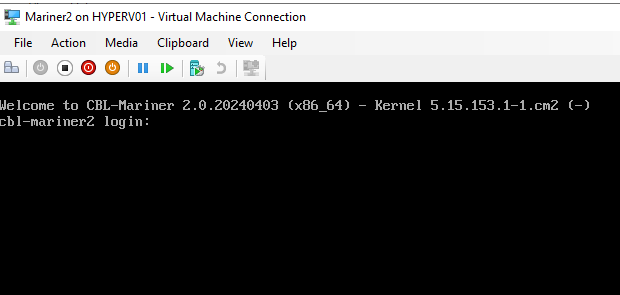
Login with your new created user account.

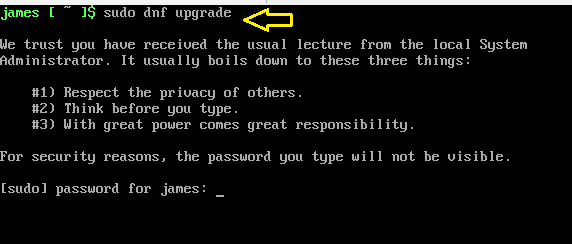
It’s a habbit of my to update always the OS before doing other installations, so in the next steps we are going to upgrade to the latest updates since the ISO is released. Then we are going to install Azure-CLI and Docker Host for Containers.

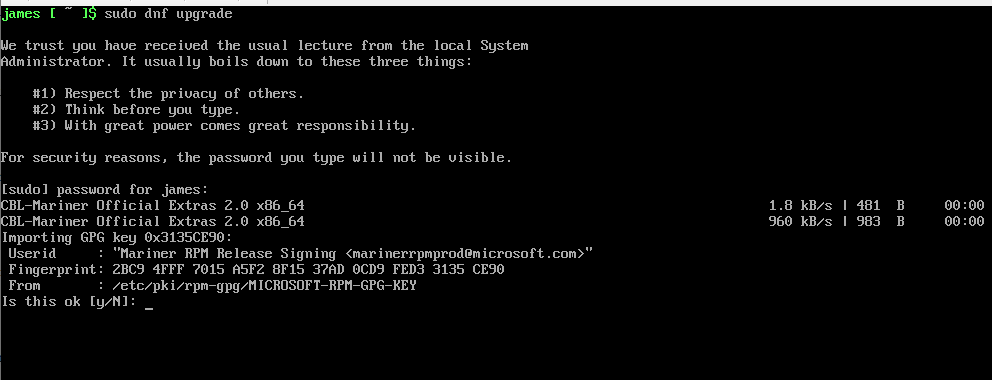
Type the Command: Sudo dnf upgrade

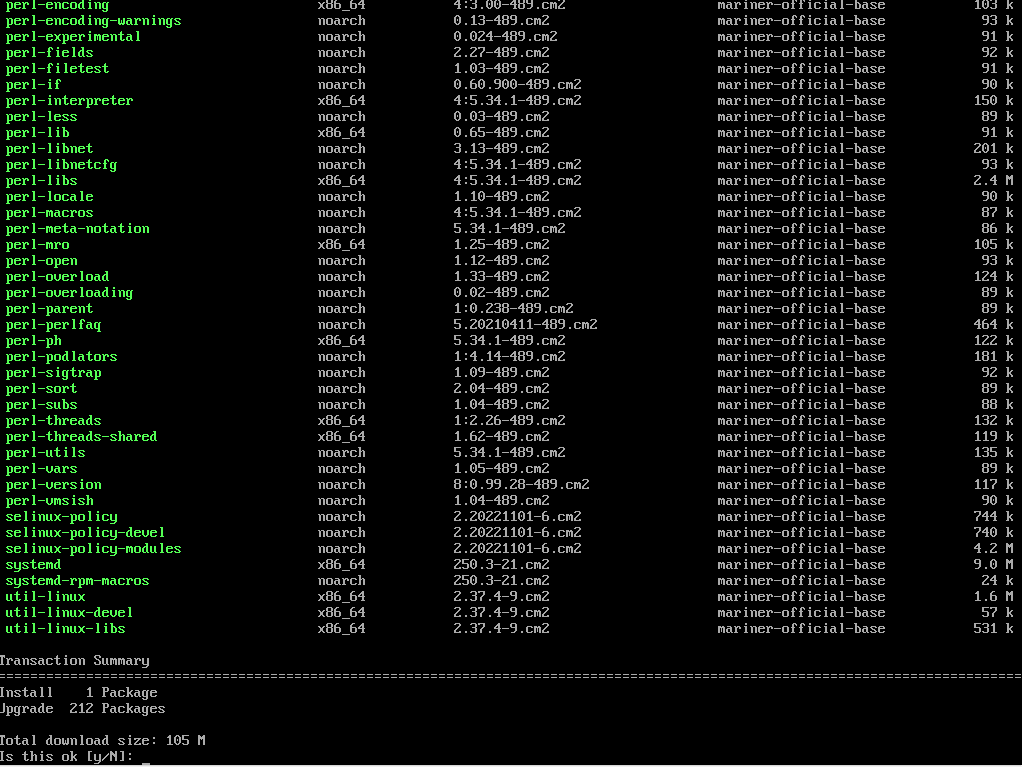
The OS is now asking a couple of times if it’s OK to install.

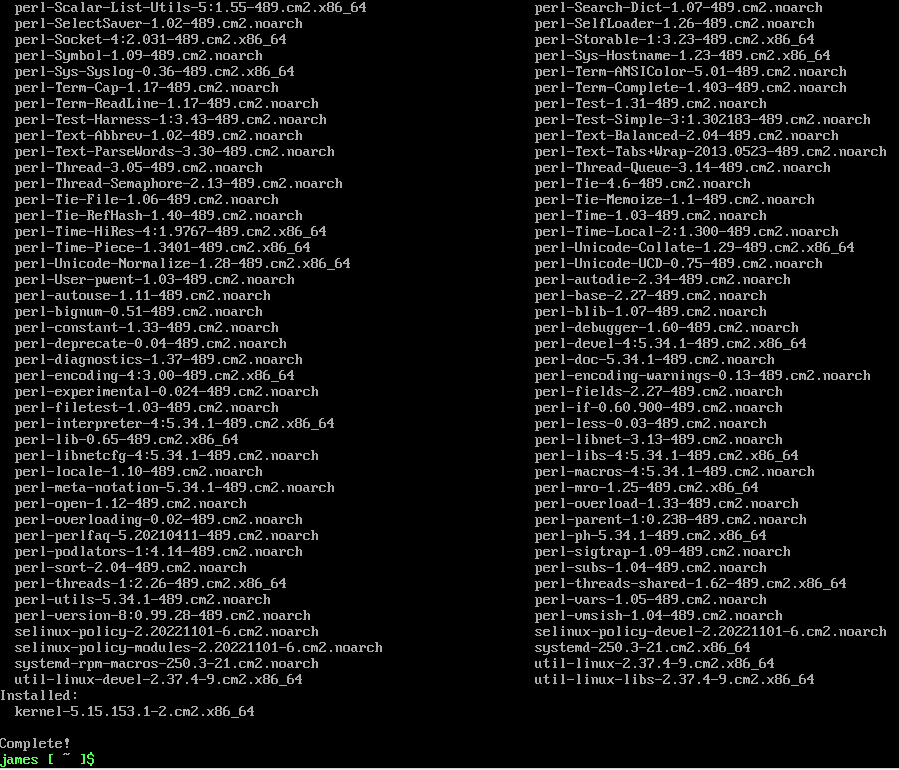
Installing of Packages to update the System.

Upgrade of CBL-Mariner 2.0 is Completed.

Installing Microsoft Azure-CLI on CBL-Mariner 2.0

The Azure Command-Line Interface (CLI) is a cross-platform command-line tool to connect to Azure and execute administrative commands on Azure resources. It allows the execution of commands through a terminal using interactive command-line prompts or a script. Here you can find more about Microsoft Azure-CLI


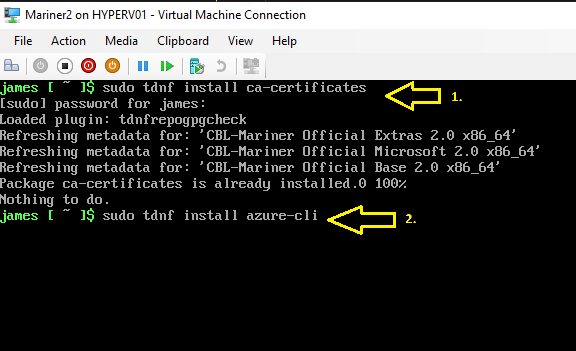
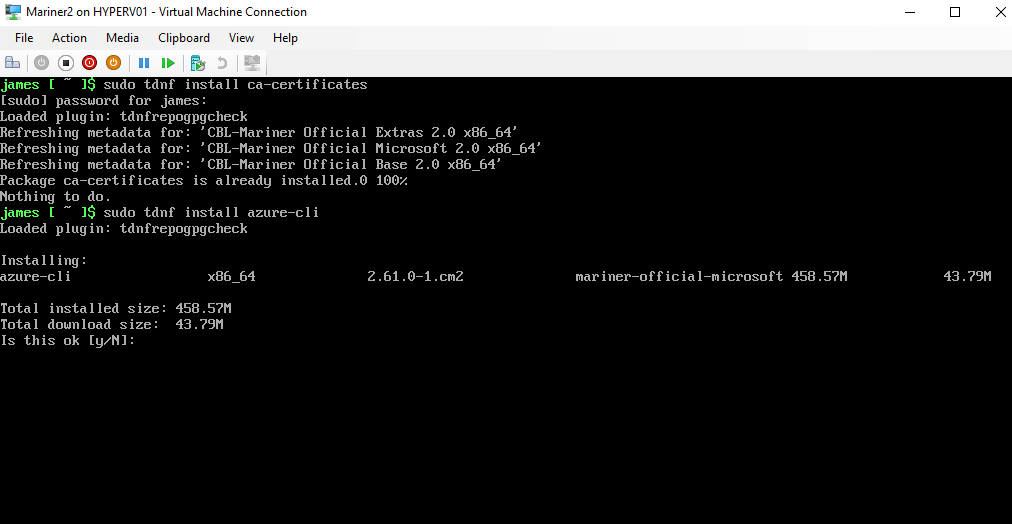
First, we install the ca-certificates
then
we install Microsoft Azure-CLI 

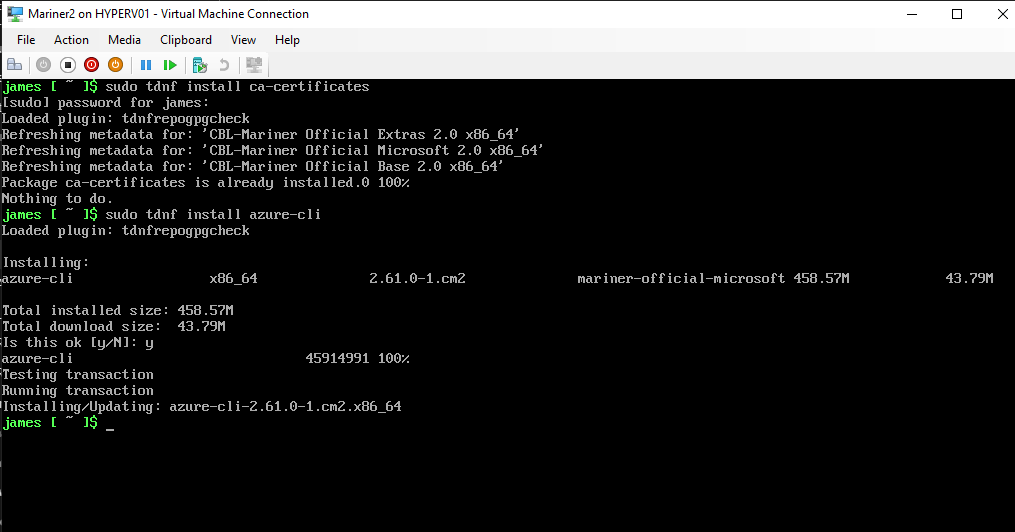
       type Y if this is OK.

Azure-CLI is installed.

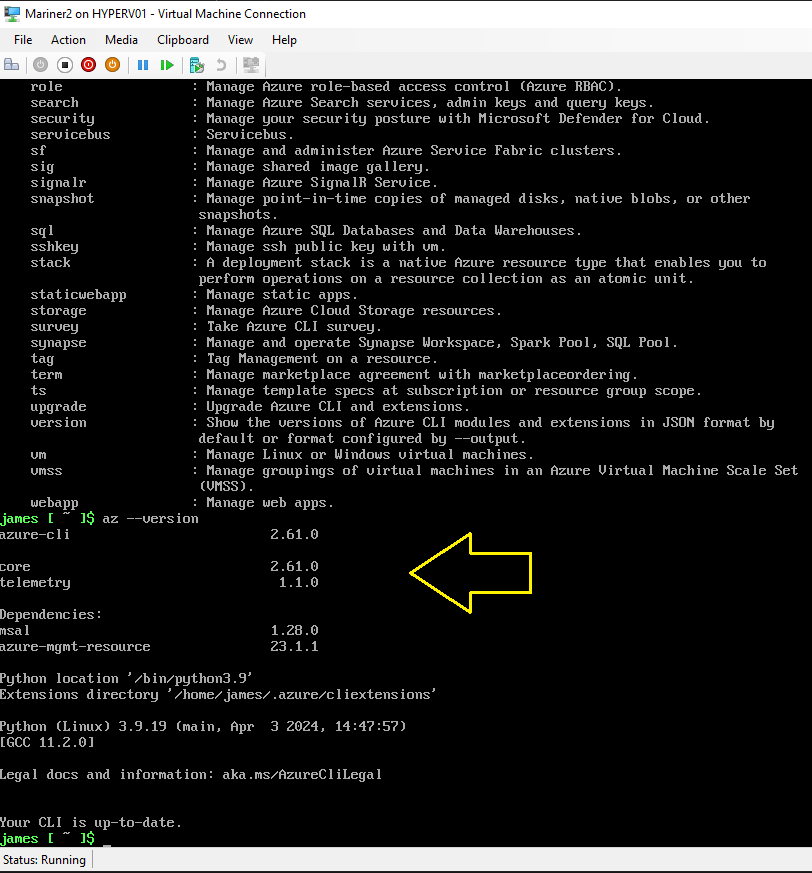
The Latest Microsoft Azure-CLI is running on your up-to-date CBL-Mariner VM.

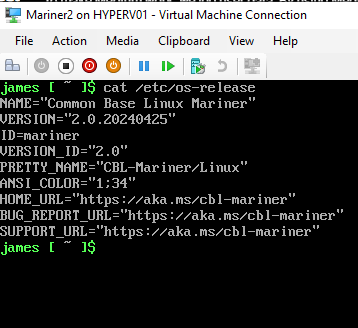
Type command: cat /etc/os-release
and you can see the exact version of CBL-Mariner 2.0

Installing Docker Container host on CBL-Mariner 2.0

Docker provides the ability to package and run an application in a loosely isolated environment called a container. The isolation and security lets you run many containers simultaneously on a given host. Containers are lightweight and contain everything needed to run the application, so you don’t need to rely on what’s installed on the host. You can share containers while you work, and be sure that everyone you share with gets the same container that works in the same way.

Docker provides tooling and a platform to manage the lifecycle of your containers:

  • Develop your application and its supporting components using containers.
  • The container becomes the unit for distributing and testing your application.
  • When you’re ready, deploy your application into your production environment, as a container or an orchestrated service. This works the same whether your production environment is a local data center, a cloud provider, or a hybrid of the two.

Now we are going to install the Docker Container host software on Microsoft CBL-Mariner 2.0 (Azure Linux):

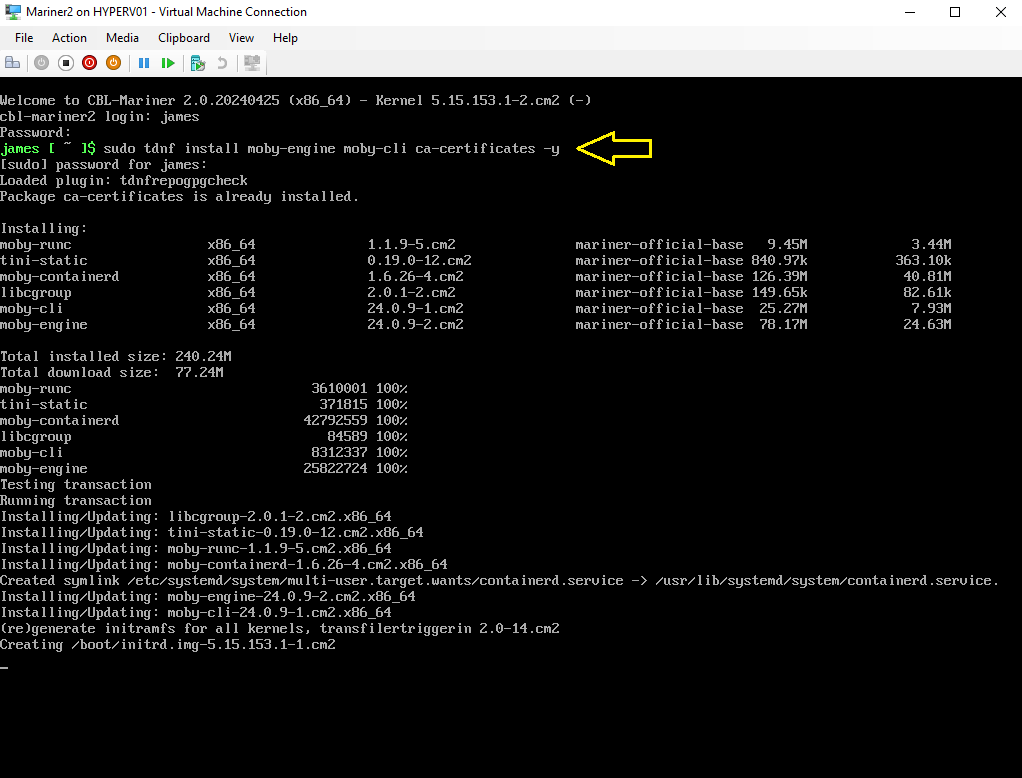
Type Command: sudo tdnf install moby-engine moby-cli ca-certificates -y

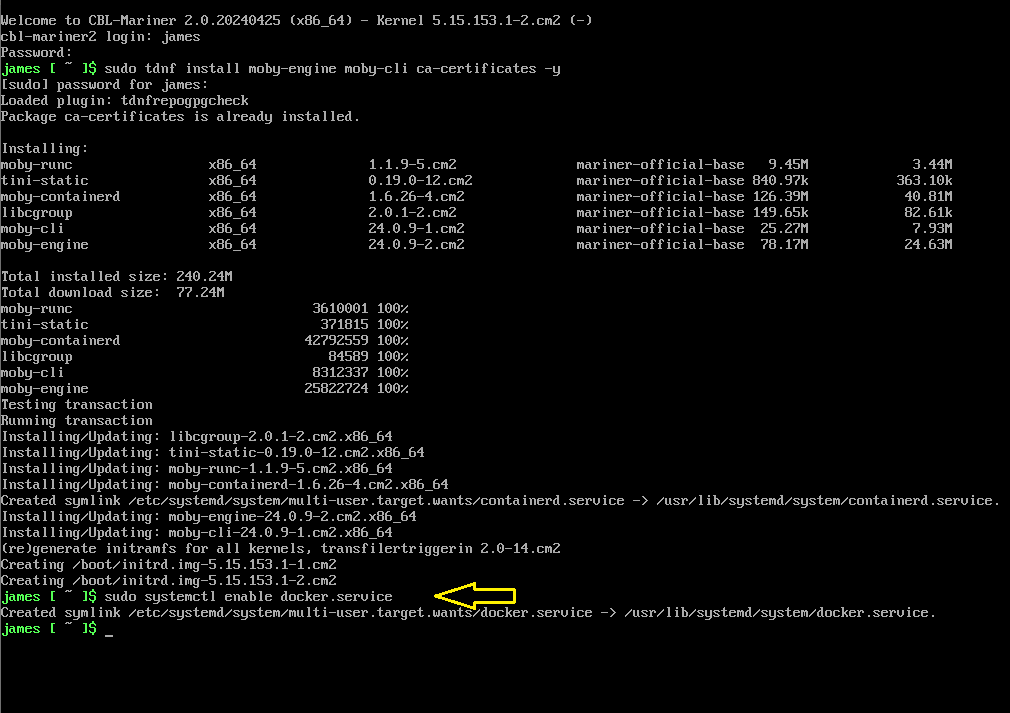
Type command: sudo systemctl enable docker.service

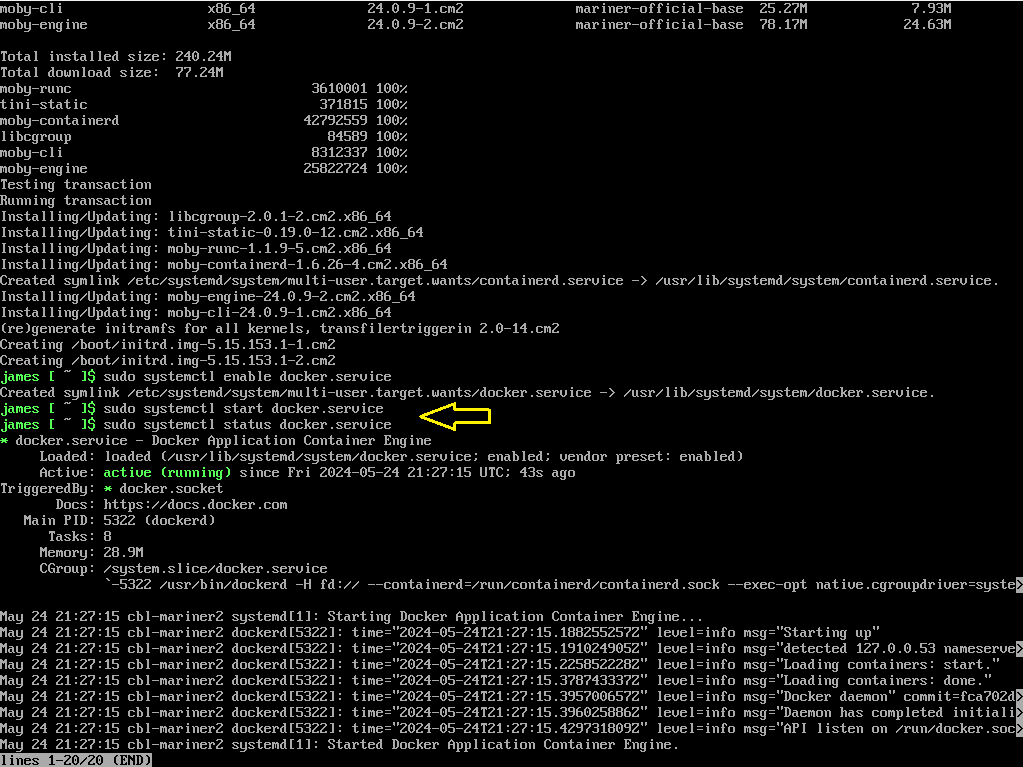
Type command: sudo systemctl start docker.service
and then
type command: sudo systemctl status docker.service

Now you can pull or create your containers from here for example:
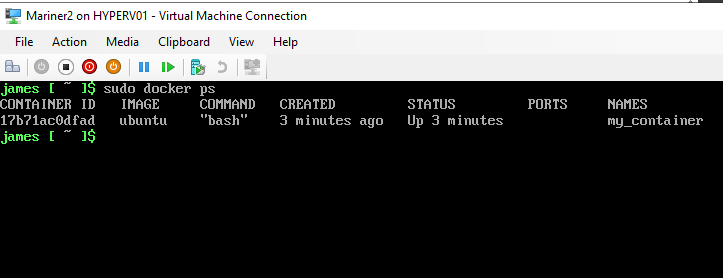
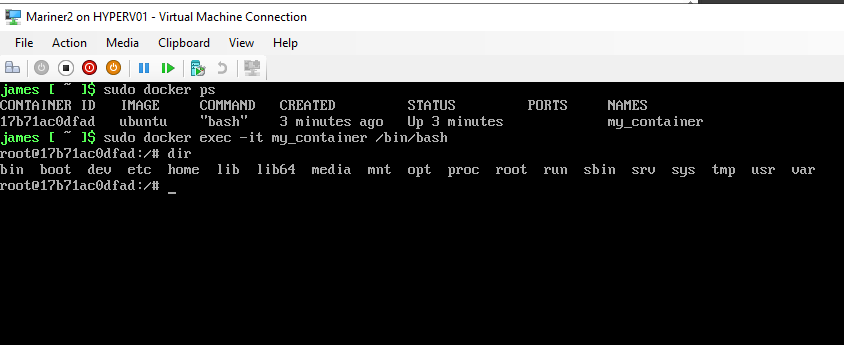
Type Command: docker run -it -d –name my_container ubuntu bash

Here I’m inside the Ubuntu Linux Container running on CBL-Mariner 2.0 with Docker Container Host.

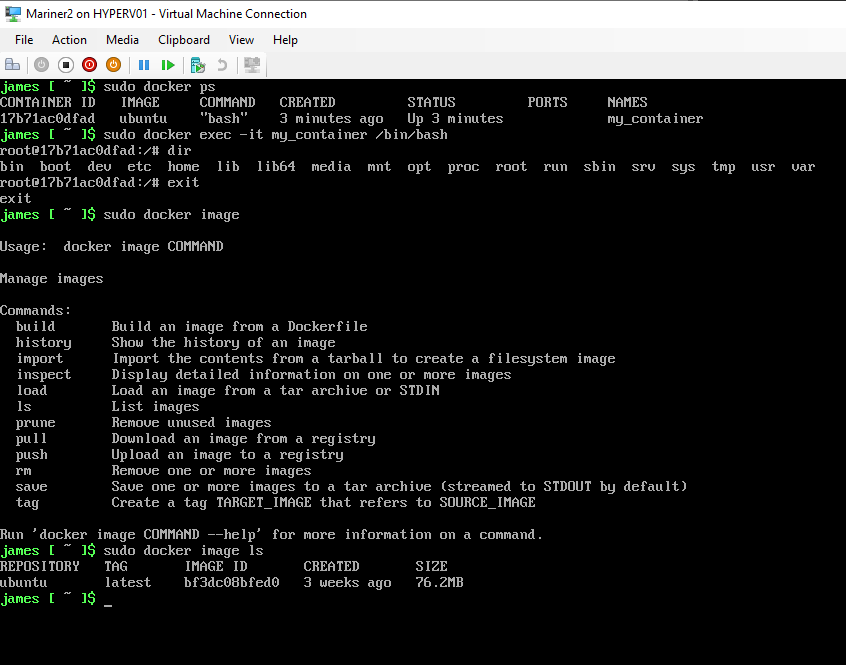
Docker Container Ubuntu image.

More information about Microsoft CBL-Mariner 2.0 you can find here:

Microsoft CBL-Mariner 2.0 (Azure Linux) on Github

Microsoft CBL-Mariner 2.0 (Azure Linux) Security

Microsoft CBL-Mariner 2.0 (Azure Linux) Toolkit docs

Conclusion

Running Microsoft CBL-Mariner 2.0 (Azure Linux) on Azure Stack HCI Hyper-V Cluster or in Microsoft Azure Cloud can be very powerfull as a lightweight Linux operating system at the Edge. Now we did running Docker Container Host on CBL-Mariner 2.0 (AzureLinux) but you can also install Microsoft Azure Arc agent to use this Operating System in a Adaptive Cloud way for Azure Hybrid Management and security. Try it yourself first in your test lab and when you have build a great security by design solution, use it in production for your business.

Join Containers in the Cloud LinkedIn Community Group for Free

New Alert for Microsoft 365 Defender Password Spray Detection

Microsoft 365 Defender is introducing a new “Password spray attacks originating from single ISP” alert to detect password spray attacks originating from authentic cloud service providers. E5 P2 licensed customers will be impacted with this roll out.

When this will happen:

Rollout will begin in mid-April and will be complete by late April.

How this will affect your organization:

 If your team is impacted, please follow these steps:

  • Validate the sign in attempts from the ISP.
  • Validate user’s typical logon patterns.
  • Identify if any users are compromised.
  • Decommission compromised accounts or reset passwords. 
  • Contact your incident response team or contact Microsoft support for investigation and remediation services.

What you need to do to prepare:

 This alert will be enabled automatically. For additional information, please visit this documentation.

Message ID: MC543877

The post New Alert for Microsoft 365 Defender Password Spray Detection appeared first on M365 Admin.

Microsoft Defender for Office 365: DMARC Handling

In order to better protect our customers from exact domain spoofing attacks and improve deliverability of email, we are making changes to how we handle DMARC p=reject and p=quarantine.

For the enterprise customers, we are also making updates to how DMARC policy-based reject can be handled. This change will help Security Administrators be able to choose how DMARC policy-based reject and quarantine can be applied within their organization. 

For the consumer service, this means that if an email fails DMARC validation, it will be dropped and will not be delivered to the recipient’s inbox. This change will help to ensure that only emails from verified senders are delivered to our customers’ inboxes.

This message is associated with Microsoft 365 Roadmap ID 117533

When this will happen:

Standard: Rollout will begin in late April 2023 and is expected to be complete by mid-May 2023.

Gov Cloud: Rollout will begin in mid-April 2023 and is expected to be complete by mid-June 2023.

How this will affect your organization:

For enterprise customers, within the actions section of the Anti-Phishing policy, the new setting to honor DMARC policy will be disabled by default. In this case, currently if DMARC p=reject, the action specified when spoof intelligence detects a message is applied. (Note: it is set to go to junk by default). 

Moving forward, using the updated actions for spoof intelligence settings within the Anti-Phishing policy, the recipient tenant admin will be able to choose how they want to honor DMARC policy settings. 

What you need to do to prepare:

If the tenant admin chooses to enable this new setting to honor DMARC policy, by default, the action applied will be “quarantine” in case of DMARC p=reject or p=quarantine. The tenant admin can change it as desired to either “reject” or “junk” the message instead (respectively).

If you wish to honor DMARC, before turning on the feature, you may choose to review spoof intelligence insight to identify legitimate senders who are sending DMARC reject or quarantine emails. Based on your organization’s email sending business, you may override the sender domain pairs to the Tenant allow block lists – Spoofed Senders. You may want to notify your users about this change and update your training and documentation as appropriate.

Message ID: MC543870

The post Microsoft Defender for Office 365: DMARC Handling appeared first on M365 Admin.

Viva Goals: Changes to Members’ Listing in Organization and Team Administration pages

As part of our continued efforts to improve customer experience in Viva Goals, we are bringing in a few changes to how members of organizations and teams are listed in the admin pages in Viva Goals. 

In March 2023, we rolled out a feature that allowed Viva Goals team admins to add an AAD group as members to a team. As part of this feature, org admins can also add multiple groups as members to an organization. As groups can now be added as members of an organization/team, we will soon be launching an updated members listing page that will list both individuals and groups as members of an organization or team.

This message is associated with Microsoft 365 Roadmap ID 117470

When this will happen:

Standard Release: We will begin rolling out in mid-May 2023 and expect to complete rollout by late May 2023.

How this will affect your organization:

  • With the launch of the improved members listing pages, organization admins will be able to view and manage all individual members and groups that are added to their Viva Goals organization in a single list in the Admin > Members page.
  • Team admins will also be able to view and manage the individual members and groups added to their teams in a single list in the Team Members page.
  • Admins will be able to expand the groups by clicking on them to see all members in a group. Alternately, they can also search for a member (even those who are part of a group) from the search bars in the respective members pages.
  • Searching for a member will return all search results directly from AAD (Similar to the search function in MS Teams). Upon clicking on more options, admins will be able to know whether a particular member is already part of the organization or team or not. 

At the team level, if a user in the search result is already part of the team, the more options button will let team admins make the user a team admin or remove the team member from the team. If the user is not part of the team, the team admin can then add the user to the team.

What you need to do to prepare:

At the organization level, if a user in the search results is already part of the organization, the more options button will also let admins perform actions such as assigning admin role, changing user type from observer to regular and vice versa, removing a user and deleting a user. If a user is not part of the organization, the more options button will let admins add the user to the organization. 

Please reach out to your Viva account representative if you have any questions. If you do not have a Viva account representative assigned to you, you can reach us by creating a support ticket in Microsoft Admin Center.

Message ID: MC543873

The post Viva Goals: Changes to Members’ Listing in Organization and Team Administration pages appeared first on M365 Admin.

Introducing Microsoft Whiteboard App in Teams

The new Microsoft Whiteboard app in Teams allows you to create, collaborate and share right within Teams, outside of Teams meetings.

You can now easily access all your whiteboards in one single place inside Teams, pre-prep a board for your next meeting or add a whiteboard tab to your favorite chat/channels to collaborate with your team asynchronously. 

When this will happen:

Rollout begins in mid-April and will be completed by the end of April.  

How this will affect your organization:

There are no changes required, the Whiteboard app comes pre-installed in Teams to supercharge your visual collaboration with a seamless experience. 

What you need to do to prepare:

There is no action required. You have an option to pre-pin the Whiteboard app for users in your tenant. To pre-pin Whiteboard, a setup policy can be created and assigned to the users in Teams Admin Center. 

Please click Additional Information to learn more.

Message ID: MC543868

The post Introducing Microsoft Whiteboard App in Teams appeared first on M365 Admin.

SIP / H323 dialing from MTR-W to a VTC

Starting early June, you can configure your Teams Rooms on Windows with a Pro license (MTR-W Pro) to place and receive one-to-one calls from the room to a SIP/ H323 endpoint and vice versa. If you want to enable this calling feature, you must work with a CVI provider to enable the service.

This message is associated with Microsoft 365 Roadmap ID 95263

When this will happen:

Standard Release: We will begin rolling out in early June and expect to complete by mid-June.

How this will affect your organization:

There is no increased risk for you; the feature will be released disabled by default.

Only if you configure your MTR-W Pro by running the right PowerShell commands that enable the feature and if you have contacted a CVI provider that offers this service, your MTR-W Pro will be able to place and/or receive calls to and from SIP/H323 endpoints. These endpoints can be internal (within your organization) or external (outside your organization)

What you need to do to prepare:

If you do nothing, no change is needed and no impact for you. Your MTR-W Pro will continue working as today.

If you want to enable the feature, you must run the PowerShell commands to set up the MTR-W Pro and explicitly configure and enable if you want to allow the room to receive internal (from within your organization) or external (from outside your organization) calls from SIP / H323 endpoints.

How to disable the MTR-W Pro rooms you enabled:

If you want to disable an MTR-W Pro that you have enabled, you just need to run the same PowerShell command that you ran before and explicitly disable the feature.

Message ID: MC543860

The post SIP / H323 dialing from MTR-W to a VTC appeared first on M365 Admin.

Join BJN meeting from MTR-W via Direct Guest Join

As part of a Preview release, around mid-May you will be able to configure your Teams Rooms on Windows to join BlueJeans meetings.

This message is associated with Microsoft 365 Roadmap ID 121769

When this will happen:

Preview:  We will begin rolling out end of April and expect to complete by early May.

Standard Release: We will begin rolling out late June and expect to complete by early July.

How will this impact you:

There is no increased risks for you. If you do not make any changes, your MTR-W will not be affected and will continue working as today.

What you need to do to prepare:

During the preview, you can configure your MTR-W to be able to join BlueJeans meetings by modifying your room XML settings file.

After the standard release, you can configure your MTR-W to be able to join BlueJeans meetings via the console.

If you configure your MTR-W to join BlueJeans meetings you might want to prepare communications for your users on how to join these meetings. BlueJeans is the latest Direct Guest Join partner onboarded to MTR-W. 

Message ID: MC543859

The post Join BJN meeting from MTR-W via Direct Guest Join appeared first on M365 Admin.

Removal of Microsoft Store for Business tab from Microsoft Store app on Windows 10 and 11 PCs

We will be removing the Microsoft Store for Business tab from the Microsoft Store app on Windows 10 and 11 PCs. The Microsoft Store for Business tab will continue to be available on HoloLens devices. 

Note: The retirement of Microsoft Store for Business and Education on Windows 11 was announced in 2021

When this will happen:

We’ll be gradually rolling this out to all customers on or after mid-May.

How this will affect your organization:

Users will no longer be able to see Line of Business products listed in the Microsoft Store for Business tab in Microsoft Store when this change is implemented.

We recommend adding your apps through the new Microsoft Store app experience in Intune. If an app is not available in the Microsoft Store, you will need to retrieve an app package from the vendor and install it as a line-of-business (LOB) app or Win32 app. For instructions read the following articles:

Stay tuned to the Intune Customer Success blog as we will be publishing more information about this soon.

Message ID: MC543773

The post Removal of Microsoft Store for Business tab from Microsoft Store app on Windows 10 and 11 PCs appeared first on M365 Admin.

Intelligent Meeting Recap in Microsoft 365 Feed

We are announcing Intelligent Meeting Recap functionality in Microsoft 365 Feed for both Teams Premium users and users without Teams Premium.

This message is associated with Microsoft 365 Roadmap ID 122529

When this will happen:

Targeted Release: We will begin rolling out mid-April 2023.

Standard Release: We will begin rolling out late April 2023.

How this will affect your organization:

For Teams Premium users

Focus on what matters with AI-powered meeting recap recommendations in the Microsoft 365 Feed. Get personalized recommendations to catch-up or revisit important meetings, including key insights from these meetings.

What’s in the card?

  • Indication of which part of the meeting you missed
  • Automatically generated AI tasks
  • When your name was mentioned
  • List of top speakers
  • Quick links to the full meeting recap and recording

What’s next?

  • Starting gradual rollout to GA by the end of April
  • GPT-based AI meeting notes
  • Recommending key meetings you attended
  • Rolling out to the Outlook Mobile feed
  • Showing Files related to the meeting

For users without Teams Premium

Focus on what matters with meeting recap recommendations in the M365 Feed. Get recommendations to catch-up or revisit important meetings.

What’s in the card?

  • List of speakers
  • Quick link to the full meeting recap and recording

What’s next?

  • Starting gradual rollout to GA during May
  • Rolling out to the Outlook Mobile feed
  • Showing Files related to the meeting

What you need to do to prepare:

There is no action needed to prepare for this change. You may want to notify your users about this change and update any relevant documentation as appropriate.

Message ID: MC543390

The post Intelligent Meeting Recap in Microsoft 365 Feed appeared first on M365 Admin.

Activity policy – filter by file name

We will be retiring the ability to filter by ‘select file name’ from Microsoft Defender for Cloud Apps. 

When this will happen:

We will begin rolling out this change in mid-May.

What you need to do to prepare:

You are receiving this message because our reporting indicates you may have activity policy using the filter ‘select file name’. You can continue using the ‘select folder name’.

Users will no longer be able to use ‘select file name’ in activity policy, when this change is implemented.

What you can do to prepare:

You may consider updating your training and documentation as appropriate.

Message ID: MC543389

The post Activity policy – filter by file name appeared first on M365 Admin.

File policy/filter ‘policy’ retirement

We will be retiring the File policy/filter ‘policy’ from the MDA file policy page. Instead, we recommend the utilization of the new Malware policy governance actions, which is where we will continue to invest our development resources.

When this will happen:

We will be rolling out this change beginning in mid-May.

How this affects your organization:

You are receiving this message because our reporting indicates your organization may be using this File policy – policy filter (allows to use Policy as part of a new file policy condition. this feature was used for Malware governance actions, and now we created the solution within ‘malware policy’ conditions.

Users will no longer be able to configure or use file policies that contain the ‘policy’ filter, when this change is implemented.

What you can do to prepare:

Instead of using the current file policy, please create a new Malware policy, with the new Governance action. 

Please click Additional Information to learn more – Activity governance actions

Message ID: MC543387

The post File policy/filter ‘policy’ retirement appeared first on M365 Admin.

Whats new in the Microsoft 365 Roadmap today? 2023-04-20 00:00:48Z

Additions : 5
Updates : 11

More Details At: www.roadmapwatch.com


New FeaturesCurrent Status
Microsoft Viva: Auto-categorization coming to meeting category insights in Viva InsightsIn Development
Microsoft Teams: Allow meeting apps to show an indicator on their icon to signal new activityIn Development
Outlook: Loop Components Read Support in Mail on MobileIn Development
Microsoft Purview compliance portal: Information Protection – Contextual summary support in service-side auto-labeling (U.S. Government clouds)In Development
Outlook: for Android – Folder suggestion when moving emailsIn Development
 
Updated FeaturesCurrent StatusUpdate Type
Microsoft Teams: Receive all group chat messages with resource-specific consentLaunchedStatus
Microsoft Intune: Update Readiness ReportsCancelledStatus, Description
Microsoft Intune: Microsoft Tunnel Mobile Application Management(Android)Rolling OutStatus
Microsoft Intune: Windows 11 update readiness reportsRolling OutStatus
Microsoft Intune: Microsoft Tunnel Mobile Application Management (iOS)Rolling OutStatus
Yammer: Improvements to @mentioning behaviorLaunchedStatus
Microsoft Intune: Endpoint Privilege ManagementRolling OutStatus
Minecraft Education: License Management Moving to the Microsoft 365 Admin CenterRolling OutStatus
Microsoft Viva: Adding Viva Goals team members through AAD GroupsLaunchedStatus
Microsoft Teams: Upload files to your approval request via Power Automate portalLaunchedStatus
Microsoft Defender for Office 365: Within 4 hours option for notificationsRolling OutStatus

Regards
The Author – Blogabout.Cloud

Whats new in the Microsoft 365 Roadmap today? 2023-04-19 00:00:30Z

Additions : 9
Updates : 12

More Details At: www.roadmapwatch.com


New FeaturesCurrent Status
OneDrive: PDF Annotation and Fillable Form FieldsIn Development
Microsoft Syntex: Prebuilt model for contractsIn Development
Microsoft Defender for Office 365: Enabling malware filter bypass for SecOps MailboxesIn Development
Forms: Allow respondents edit their responsesIn Development
Microsoft Defender for Office 365: Auto allow of third-party phish simulation URLs in email message bodyIn Development
Microsoft Purview compliance portal: Endpoint DLP – Authorized printer groups (U.S. Government clouds)In Development
Microsoft Purview compliance portal: Endpoint DLP – Network location as a condition in DLP policy (U.S. Government clouds)In Development
Microsoft Purview compliance portal: Endpoint DLP – Sanctioned and unsanctioned site groups for different sensitive files (U.S. Government clouds)In Development
Outlook: New Outlook for Windows and web – Message List Selection updatesIn Development
 
Updated FeaturesCurrent StatusUpdate Type
Microsoft Defender for Office 365: Easier to sort and filter messages reported by usersRolling OutStatus
Microsoft Teams: Geo filtering for Teams appsRolling OutStatus
Microsoft Purview | eDiscovery (Premium): New case creation wizard (U.S. government clouds)LaunchedStatus
Microsoft 365 Defender: Secure Score for Government CloudsLaunchedStatus
Microsoft Teams: Profanity filtering on/off control for Live CaptionsRolling OutStatus
OneDrive: Favorite/Unfavorite filesRolling OutStatus
Microsoft Teams: Activity feed improvements for centrally published urgent tasksLaunchedStatus
Microsoft Teams: Support Breakout Rooms on VDIRolling OutStatus
OneDrive: Sharing experience – Manage Access settingsIn DevelopmentDescription
Microsoft Defender for Office 365: Within 4 hours option for notificationsLaunchedStatus
Microsoft Teams: Simplified app update experienceRolling OutStatus
Outlook on the web: Update to the location of message compose optionsLaunchedStatus

Regards
The Author – Blogabout.Cloud

❌
❌